

An email address can route a payment, but it does not carry the money itself. With an email based money transfer service, the sender’s account is debited electronically, and the recipient follows a notification and verification process to access the funds. The email identifies where the payment should go.
This can make sending money feel straightforward, especially when you don’t have the recipient’s bank details. However, the process, fees, limits, and timing depend on the bank or payment platform and the countries involved.
Learn how email money transfers work, when they’re useful for everyday payments, and what to consider before sending one. This guide also explains how costs are determined, how to reduce security risks, and how email payments fit alongside other digital transfer options. You’ll come away with a clearer sense of which details matter before you send and what to expect after the payment is initiated.
Key Takeaways
- Understand how an email notification helps direct a payment while funds move electronically between accounts.
- See what can affect transfer costs, including the payment method, provider, and currency conversion.
- Use recipient verification and careful handling of payment details to help protect email-based transactions.
- Explore when email payments or peer-to-peer transfers can suit everyday payments and sending money across borders.
How much does it cost to send money to email address?
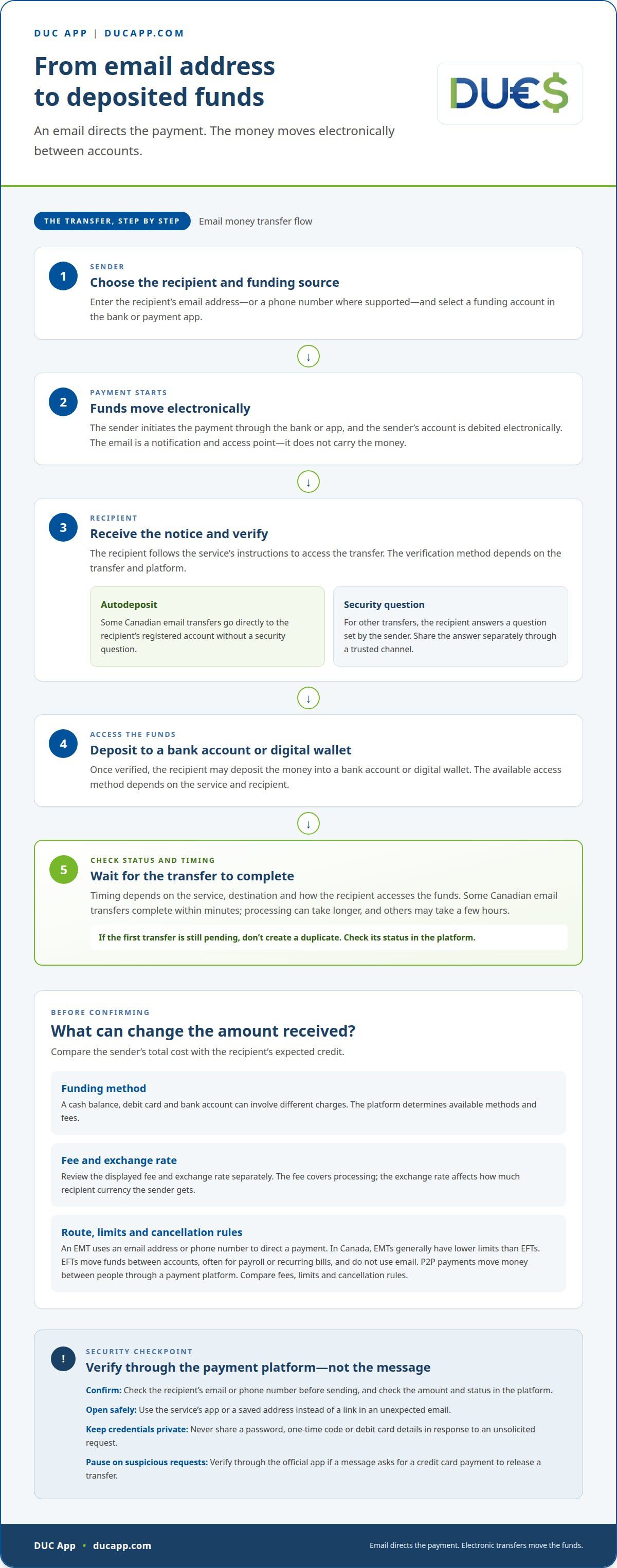
The final cost depends on the payment route, funding source, and currency conversion. Compare the total paid by the sender with the amount the recipient is expected to receive.
Comparing Transfer Costs
Funding from a cash balance, debit card, or bank account can involve different charges. Before sending, review the displayed fee and exchange rate, then check the recipient’s expected credit. Those figures describe wires, not email payments.
Payment Type Differences
An EMT, or email money transfer, uses an email address or phone number to direct a payment. In Canada, EMTs generally have lower limits than EFTs. An EFT moves funds electronically between accounts, often for payroll or recurring bills, and does not use email. P2P payments move money between people through a payment platform. Compare each route’s fee, limits, and cancellation rules before choosing.
The funding method affects the amount available to send. A cash balance uses funds already in the account; a debit card draws from its linked account, while a bank transfer uses the connected bank. The platform determines which methods are available and what charges apply. Compare the total for debit-funded and bank-funded payments, including any currency conversion.
A short payment note can make transactions easier to identify later. Add a concise description, such as “shared dinner,” if the payment screen offers a note field. Use the transaction history to review the recipient, status, and credits. Don’t include sensitive information, and check the recipient’s email address or phone number before completing the payment.
Security practices for email-based payments
Email-based transfers can be safe when you use the platform’s security features and confirm the recipient. Watch for phishing, impersonation, and fake payment confirmations that pressure you to send money or share banking details.
Open the payment service through its app or a saved address, not a link in an unexpected email. Confirm the recipient’s email address or phone number before sending. Check the amount and payment status in the platform, rather than trusting a screenshot or message claiming the money arrived. Never share your password, one-time code, or debit card details in response to an unsolicited request.
In Canada, some email money transfers use autodeposit, sending funds to a recipient’s registered account without a security question. Other transfers require the recipient to answer a question set by the sender. Choose an answer the recipient can provide but others can’t easily guess. Share it through a separate trusted channel, not in the transfer notification email.
Protect the device you use for mobile banking with a screen lock and current security updates. Sign out after using a shared device, and avoid payment activity on public Wi-Fi. If a message asks for a credit card payment to release a transfer, pause and verify the request through the platform’s official app. Keep transaction confirmations, but don’t store passwords or security answers with them.
According to the Internal Revenue Service, third-party payment platforms must report transactions exceeding $20,000 USD and involving more than 200 transactions in a calendar year. This reporting threshold is separate from security steps. Keep your own payment records and use accurate account details when managing transactions.
If a transfer looks unfamiliar, report it promptly through the platform’s in-app process or support channel. Save the transaction reference and related messages, then secure the account by changing its password. A quick response helps document the issue and limit further access.
How do email money transfers work?
In the United States, a few banks may integrate with Canada’s Interac system, while most residents use peer-to-peer apps for electronic payments. The available option depends on the sender’s bank or app and the recipient’s ability to receive the transfer.
The sender enters the recipient’s email address, chooses a funding account, and starts the payment through a bank or app. The email is a notification and access point; the funds move electronically, not through the message. After verification, the recipient may deposit the money into a bank account or digital wallet. Transfer timing and costs depend on the service and destination.
Before sending money across currencies, compare the transfer fee and exchange rate separately. The fee covers processing; the exchange rate determines how much recipient currency the sender gets. Treat that as an example, not a universal rate. The conversion shown for the payment affects the final amount received.
Bank account and debit card funding can involve different fees, depending on the bank or app. Review the transaction screen for charges before confirming. For an international transfer, also compare the converted amount with the recipient’s expected deposit. A low visible fee can still result in a different payout if the exchange rate differs.
Timing and charges depend on how the recipient accesses the funds. A bank deposit and a digital-wallet deposit may follow different processing steps. Some Canadian email transfers complete within minutes, though processing can take longer; others may take a few hours. Check the delivery method and any withdrawal charge before sending, especially if considering a repeat payment after a delay. Don’t create a duplicate while the first transfer is pending.
Common uses for email money transfers
Email money transfers suit personal payments when the recipient can receive funds through a participating bank or payment platform. Examples include repaying a friend for groceries, contributing to a family expense, or settling your share of a group bill. The sender uses an email address or, in some systems, a phone number to direct the payment. The account and service determine how the recipient accesses the funds.
Shared expenses are a practical example. After a group meal, one person can send each contributor their share instead of collecting cash. A clear note, such as “dinner share,” helps both people recognize the transaction in their activity history. Friends or relatives can also reimburse the person who paid a household bill. Confirm the amount and recipient before sending.
Family support is another use. Someone may send a relative money for a specific expense, such as groceries or school supplies. For international transfers, availability depends on the sending and receiving banks. An email address alone doesn’t guarantee the payment can be completed, so check that the route supports both sides before relying on it for a time-sensitive need.
Email transfers can also help with one-off payments between people who don’t want to share bank details directly. They aren’t the same as scheduled bank transfers for recurring costs, such as payroll or regular household bills. Choose a method that fits the purpose, destination, and amount. Keep the payment confirmation, and don’t send again until the first transaction’s status is clear.
Use email payments for straightforward person-to-person costs, not as a substitute for every payment method. For example, a shared-cost reimbursement may fit, while a scheduled bill may call for a different arrangement. Protect your payment by confirming the recipient’s address and reviewing the final amount before you send. Explore options for sending personal payments when you’re ready to move money digitally.
DUC App: Transfers between peers (p2p)
DUC App offers peer-to-peer transfers and email payments for people sending digital payments to others. Turn to these options when you want to move beyond a bank-based email transfer and use a platform built for person-to-person transactions. Choose the option that matches how you intend to send the payment, then review the transaction details before proceeding.
DUC App also offers international recharges and gift cards, for topping up a mobile service or sending a digital gift rather than transferring funds directly. Choose the service that fits the recipient and purpose. For a payment between people, peer-to-peer transfers are the relevant option.
Contact DUC App to learn more about its peer-to-peer transfers and email payments.
Make your next payment choice with confidence
Make each transfer intentional rather than automatic. Start with the payment’s purpose, then choose a route that fits. This helps keep a convenient option from becoming the default for every situation.
An email based money transfer service can be part of a flexible payment routine, but the right choice depends on the recipient and the task. Consider what kind of digital payment you need and which option suits that purpose. DUC App offers several digital services, including peer-to-peer transfers and email payments, so you can choose a relevant option for your next step.
Keep the decision simple: define what you need the payment to do, select the relevant service, and proceed once the details are clear. Choosing with purpose can make digital payments easier to manage.
Contact DUC App about email transfers and explore the available options for your next payment. Take the next step at your own pace.
Frequently Asked Questions
Do P2P payments have tax implications?
They can, depending on why the payment was made and how the platform reports transactions. A reimbursement between friends differs in purpose from a payment for goods or services, so keep a clear record of the transaction. According to the Internal Revenue Service, third-party payment platforms must report transactions exceeding $20,000 USD and involving more than 200 transactions in a calendar year. A reporting threshold alone doesn’t explain an individual payment’s tax treatment.
What is an email-based money transfer service?
An email-based money transfer service lets someone initiate a digital payment using the recipient’s email address as a routing detail. The provider processes the payment electronically and sends notifications to help both people follow its progress. This lets the sender direct a transfer without sharing bank details. The steps, destinations, and account options vary by service.
How do you send money to someone by email?
Open a payment service that supports email transfers in your location, then select the send-money option. Enter the recipient’s email address, choose the amount and funding method, and review the details before submitting. Check for typing errors, especially in similar-looking addresses. Keep the confirmation or transaction reference in case you need help later.
How does the recipient claim an email money transfer?
The recipient should open the notification and follow the payment service or financial institution’s instructions. Depending on the transfer, they may need to sign in, answer the sender’s security question, or select an account for the deposit. If they weren’t expecting the payment, they should verify it through their bank or app rather than relying only on the email.
How long do email-based money transfers take to arrive?
Timing depends on the service, participating financial institutions, and any action required from the recipient. Canadian email transfers often arrive within minutes, though processing may take longer; some take a few hours. The recipient can check the provider’s transaction status to see whether another step is needed. Don’t send a second payment just because the first notification hasn’t appeared.
What happens if you send money to the wrong email address?
Act promptly and open the transaction details in the service you used. For a Canadian email money transfer, you can cancel it if the recipient hasn’t claimed the funds. Once claimed, it can’t be reversed. If the payment is complete or there’s no cancel option, contact the service through its official support channel and provide the transaction reference.


