

An email isn’t the checkout. An email payment gateway for individuals lets you pay a request through a secure online checkout opened from a link or button in an email. The payment takes place on that page, not in the email itself.
It’s easy to confuse an email payment with an email money transfer. With an email payment, a business sends you a request to pay. With an email money transfer, the person sending money usually starts the transaction. This distinction helps you understand who initiates the payment and what to expect when you open a request.
Here’s how the process works, what a gateway does with your payment details, and how a payment link fits in. You’ll also learn how email payments differ from transfers between people, so you can choose the right option for the transaction.
Key Takeaways
- Understand how a gateway helps process a card payment and supports transaction authorization.
- See how payment links connect an email request to checkout, including when a business can use one without a website.
- Learn which details make a payment request clear and how to approach an example template.
- Know what to look for when opening a payment page, so you can follow the request with confidence.
What is a payment gateway?
A payment gateway routes online payment details for authorization. An email payment gateway for individuals connects a payment request to an online checkout, where the recipient can complete the transaction.
Gateway Purpose and Authorization
A gateway collects payment details and helps validate that the cardholder and card issuer authorized the transaction. This is useful when a freelancer, casual seller, or fundraiser needs to accept a card payment without asking someone to send card details by email.
Email payments usually begin when a business sends a payment request. An email money transfer usually begins with the person sending money. For recurring charges, the customer’s authorization and the seller’s payment setup determine how scheduled payments are handled.
Online Payment Processing Flow
Online processing sends payment details from checkout through the gateway for authorization, then returns an approval or decline. A payment link in an email leads to the checkout page, where the payment is completed, not inside the email.
Authorization and deposit are separate steps. T+2 is an example of an agreed merchant settlement timeframe, not a universal schedule. Deposit timing and payout limits depend on provider terms, payment method, account setup, and verification status.
Payment Methods and Provider Support
Available payment methods depend on the provider and checkout setup. Some providers support credit cards, debit cards, Apple Pay, and Google Pay. An email payment gateway for individuals should suit the payment methods customers can use and the seller’s needs.
There is no single best option for every freelancer, casual seller, or donation. Consider whether you need one-time payments, recurring charges, or a donation checkout. Verification and tax information requirements vary by provider and account setup. Deposit timing and payout limits also depend on the applicable terms and verification status. Review these factors when choosing a checkout flow.
Payment processing and gateway integration
An online payment process connects the checkout, gateway, payment processor, and merchant account. The customer chooses a payment method and enters details on the checkout page. The gateway routes the payment request for authorization, then returns an approval or decline. This lets a merchant collect payment without putting card details in an email. Each stage has a distinct role: checkout gathers payment information, the gateway routes it, and authorization reports the decision.
An email request can include a hosted payment link that works as a standalone checkout, even if the merchant has no website. The seller sends the link; the customer opens it, chooses an available payment method, and completes the transaction on the secure page. An email button can lead to the same page. The link can set a fixed amount due, helping prevent mistyped totals or partial payments. The email is a prompt, not the payment screen.
Integration describes how checkout connects with a website or sales workflow. A hosted link keeps checkout on a separate page, while an API integration can connect a payment flow with an e-commerce site. The merchant chooses based on where customers begin paying and how the process should fit the storefront. On mobile, a clear button and usable checkout help customers move from email to payment page without needing a desktop. The payment methods available depend on the checkout setup.
Some payment flows use 3D Secure 2 to help identify and block suspicious activity. After an approval, authorization and deposit are separate events. An agreed merchant settlement timeframe can be T+2, an example rather than a universal schedule. The payment status shows the transaction decision, while the settlement schedule indicates when funds move. For an individual seller, account configuration and the agreed settlement timeframe shape what happens after checkout. Keeping those stages distinct makes the payment process easier to follow.
Payment request email structure and template
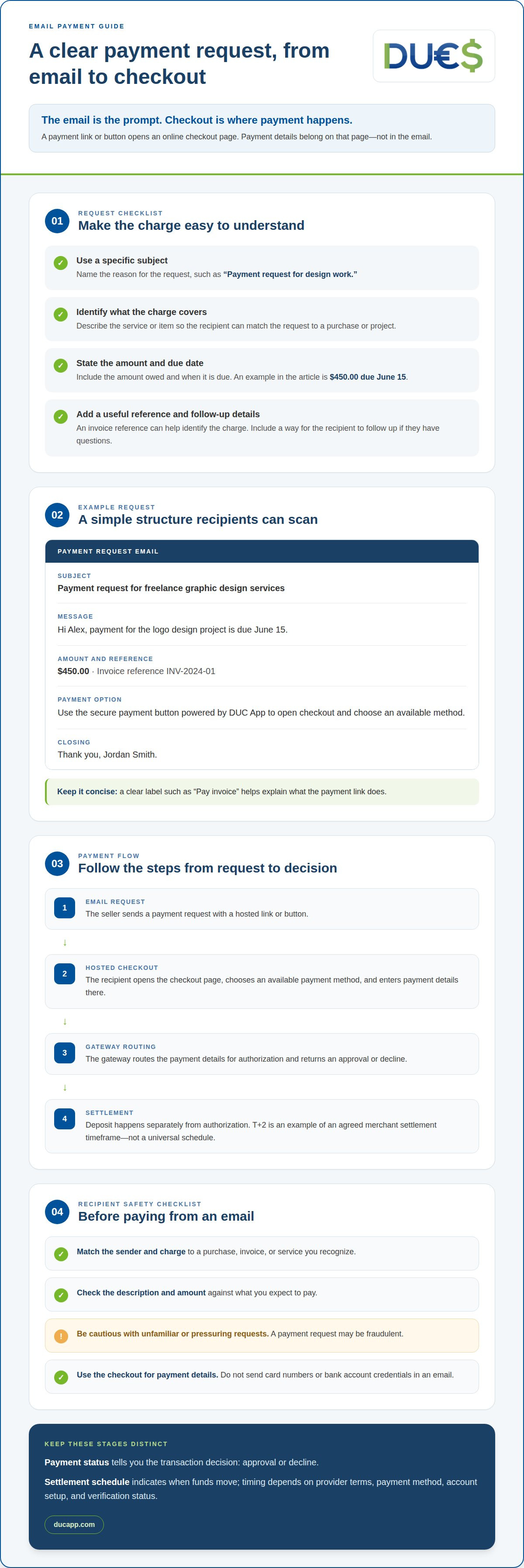
A clear payment request tells the recipient what the charge covers, how much is due, and how to pay. Start with a subject such as “Payment request for design work,” then identify the service or item and the due date. Keep the message specific. For example, an invoice might state that an outstanding balance of $1,245 is due May 30. Include a payment link or button that opens the checkout, rather than asking someone to send credit card or bank account details by email.
Use a simple structure: greeting, reason for the charge, amount and due date, payment option, and a way to follow up. Choose a clear button label, such as “Pay invoice,” so the recipient knows what happens next. If customers can choose among payment methods, explain this on the checkout page. A concise request helps them understand what to do without searching through a long message.
- Subject: Payment request for freelance graphic design services
- Message: Hi Alex, payment for the logo design project is due June 15.
- Amount: $450.00, with invoice reference INV-2024-01.
- Payment: Use the secure payment button powered by DUC App to open checkout and choose an available method.
- Closing: Thank you, Jordan Smith.
Fees for payment links and email invoices vary by provider, payment method, and account terms. Review the applicable provider terms before setting a price or estimating what you’ll receive.
Accepting payments through an email link can involve fraud, refund, and chargeback risks. A recipient may dispute a transaction or request a refund, and a payment request may be fraudulent. Clear descriptions and transaction records help explain what was purchased. Use the checkout link for payment details, and never ask customers to send card numbers or bank account credentials in a message.
Opening the payment gateway
Before opening a payment link, match the sender and charge to a purchase, invoice, or service you recognize. For example, a request for a design project should describe the work and show the expected amount. Be cautious with unfamiliar requests, especially if the message pressures you to pay immediately.
Open the payment link and review the checkout page before entering details. Confirm that it shows the expected merchant, charge, and payment methods. If the amount differs from the request, pause rather than submitting the wrong total. Complete payment on the checkout page, not by sending card details in an email reply.
On mobile, read the full page before choosing a payment method. A small screen can hide details lower down, so scroll to review the total, any displayed terms, and the final payment button. Enter information only in the checkout fields. Don’t send a password, card number, or bank account details through the message itself.
After submitting, wait for the checkout to show a result. An approval message or receipt confirms the payment response, but doesn’t necessarily mean funds have reached the seller’s account. If the page stalls, don’t press the payment button repeatedly. Check for confirmation first, since another submission could create a duplicate charge. A merchant may also show transaction status in a dashboard, while the customer’s receipt provides a record for their files.
If the amount, recipient, or result looks wrong, keep the request and confirmation details together before following up. That makes it easier to describe what happened and identify the transaction. Use email-based payments when a clear request and checkout match the purchase. Explore email payment options for a streamlined way to accept payments.
DUC App: Email payments
DUC App offers email payments for people who want to manage payments digitally through email. Choose this option when it fits the transaction. Peer-to-peer transfers serve a different purpose, letting one person send money directly to another. DUC App also offers international recharges and gift cards, giving you other digital payment options in the same platform.
The right choice depends on what you need to do: pay or request payment by email, send money to another person, recharge internationally, or get a gift card. Be clear about the purpose so you can choose the service that fits, rather than treating every payment method as interchangeable.
For more information about email payments, contact DUC App.
Choose the next step that fits your payment
Choose your next payment method based on what you need to do, not just the channel used to request payment. An email payment gateway for individuals can work when you need to respond to a payment request through an online checkout. For other needs, DUC App also offers international recharges, peer-to-peer transfers, and gift cards.
Be clear about the purpose of the transaction before moving forward. A payment request, a transfer to another person, and a recharge serve different needs. Choose the option that fits, then follow the relevant process with the payment details and recipient in mind.
If you’re ready to explore whether DUC App fits your payment needs, contact DUC App to discuss your payment needs. Take the next step at your pace, with a clear idea of the transaction you want to make.
Frequently Asked Questions
What are email payments?
Email payments let someone pay a request sent in an email. The message directs the recipient to an online checkout, where they complete payment. For example, a tutor could email an invoice for a lesson with a payment option. The email carries the request; the checkout handles payment details. This differs from an email money transfer, which is generally started by the person sending money.
How can I create and send payment links to my customers?
Use a payment provider’s link-creation tools to prepare checkout for the amount and purpose of the payment. Add a clear description, then copy the generated link into a message to your customer. For example, label it “March design deposit” instead of sending an unexplained link. Keep the amount and description consistent so the recipient recognizes the request before paying.
How do email payment links and invoices work?
An invoice records what a customer owes, while a payment link gives them a way to reach checkout. They can appear together: an email may summarize the work, due date, and invoice reference, then include a payment link. For example, a repair invoice can describe the service and direct the customer to pay online. The link handles checkout; the invoice provides context for the charge.
How can an individual create and send a payment link or invoice?
An individual seller can use a payment provider’s tools to create a link or make an invoice that includes one. Enter the transaction description and amount, review the details, then email the request to the customer. A standalone hosted checkout can work without a personal website. For a one-off sale, describe the item clearly. For ongoing work, identify the invoice period or project.
How quickly do providers deposit funds, and are there payout limits?
Deposit timing and payout limits depend on provider terms, payment method, account setup, and verification status. T+2 is one example of an agreed settlement timeframe, not a universal schedule.


