

An email address can identify the recipient, but a payment service processes the transfer. To transfer funds via a recipient’s email in the United States, use a peer-to-peer app and link a bank account, debit card, or digital wallet. Enter the recipient’s email address, confirm their identity and address, then review the payment before sending.
The final step matters: once sent, an email money transfer generally can’t be reversed unless the recipient declines it. If the recipient doesn’t claim the money, what happens next depends on the service’s pending-transfer and cancellation process. This guide explains how to send a transfer, what to check first, and what to do if the recipient doesn’t claim it, so you know what to expect.
Key Takeaways
- Choose a payment method that supports email-based transfers, and understand how the service routes the funds.
- Before sending, review the transfer’s limits, possible fees, and the steps available if it remains unclaimed.
- Use the service’s security checks and confirm the payment details before you authorize a transfer.
- Follow a clear send-and-review process to reduce mistakes and know what to expect after payment.
How can I send money to an email address?
To transfer funds via recipient email, use a peer-to-peer (P2P) app or online banking service that supports email transfers. Which services allow it depends on the provider and, for international payments, whether the sending and receiving banks support them.
-
Check the requirements for email transfers
Start by checking what the payment service requires to fund a transfer. In the United States, a P2P app requires a linked bank account, debit card, or digital wallet to send money to an email address. You’ll also need the recipient’s correct email address. Review the app’s instructions for additional details before starting, and don’t assume every service handles international transfers.
-
Choose a payment service
Select an online banking service or P2P app that supports email-based payments. These services let you transfer funds via recipient email, though their available features may differ. Check which recipient details the service accepts, since certain apps may support a U.S. mobile number as well as an email address. For an international transfer, support depends on the sending and receiving banks.
-
Send money using the recipient’s email
Open the service’s sending feature and enter the recipient’s email address exactly as provided. Select the intended recipient if the service displays a match, then enter the amount and review the payment details. The email identifies the recipient, but the payment service moves the funds. Follow its steps to authorize payment, and carefully check the final details before sending.
-
Send through an app using email or mobile
Choose email or a U.S. mobile number if the app offers both options. Enter one recipient detail, then confirm the person’s identity before sending. If the contact provided an email address but the app suggests a different person, pause and resolve the mismatch. Resend only when the transfer status calls for it, and review the recipient details again before authorizing another payment.
What if my recipient doesn’t claim the money?
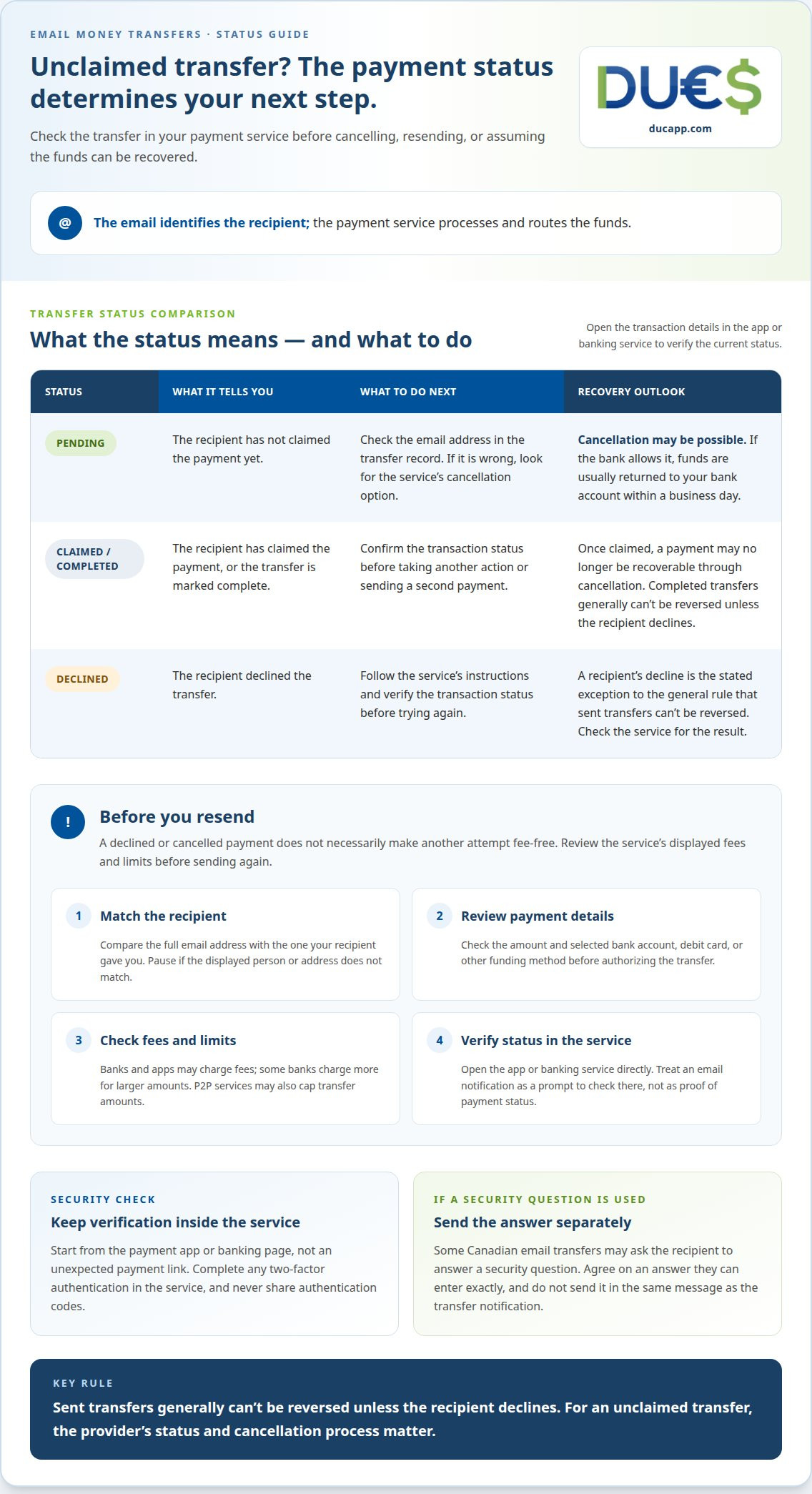
If the recipient doesn’t claim an email money transfer, check its status and the service’s cancellation options. Sent transfers generally can’t be reversed unless the recipient declines them. If the transfer is still pending, cancellation may be possible, including when you entered the wrong email address.
- Open the transfer details. Check whether the payment is pending, claimed, or declined. If your friend hasn’t claimed it, follow the service’s steps for a pending transfer. The status matters: a pending payment may have a cancellation option, while a completed transfer generally can’t be reversed unless the recipient declines it.
- Act quickly if the email is wrong. Compare the recipient address in the transfer record with the address your intended recipient gave you. If the payment is pending, look for the service’s cancel option. A bank that allows cancellation of a pending email money transfer usually returns the funds to your bank account within a business day. Once claimed, the payment may no longer be recoverable through cancellation.
- Review fees and transfer limits before sending again. Banks and apps may charge fees for email transfers, and some banks charge more for larger amounts. P2P transfers also often have limits, so a payment above the service’s cap may not go through as one transfer. Check the displayed terms before resending; don’t assume a declined or cancelled payment makes the next attempt fee-free.
- Choose a method that fits the recipient. Sending money by email can be convenient because you may not need the recipient’s bank account details. A regular bank-sent check, by contrast, can take several days to arrive. A cashier’s check is another paper option, but it won’t fix an incorrect email address or change an app’s cancellation terms. Review the recipient’s preferred method before sending.
Information and security checks required to send a transfer
Before authorizing an email money transfer, review the recipient details, funding method, and any security prompt. These checks can help you catch mismatches before the money leaves your account.
Review required transfer information
Check the recipient’s email address, transfer amount, and selected bank account or other funding method on the payment screen. Make sure the displayed recipient is the person you intend to pay, not just a contact with a similar name. Some Canadian email money transfers may ask the recipient to answer a security question before accessing funds. Agree on the answer with them in a separate message.
Follow email payment security practices
Use the payment service’s own app or banking page to start the transfer, rather than relying on a payment link in an unexpected message. P2P payment services may use two-factor authentication to help secure an account. Complete that check within the service, and don’t share authentication codes or a security-question answer in the same message that contains the transfer notification.
- Match the recipient. Compare the full email address with the one your recipient gave you. If the name or address differs, pause before sending the payment.
- Review the deposit details. Confirm the amount and funding account shown on the banking or payment screen. Correct any typo or unexpected detail before authorizing the transfer.
- Set a security answer carefully. For a Canadian transfer that uses a question, choose an answer the recipient can enter exactly. Send it separately from the transfer message, and avoid an answer others could easily guess.
- Verify notifications in the service. Treat an email notification as a prompt to open the app or banking service directly. Check the transaction status there before taking another action or sending a second payment.
Steps to send an email money transfer
Use the payment service’s sending process, then follow its instructions for receiving or claiming the funds. The recipient doesn’t necessarily need an account with the sender’s bank, but they must complete the steps the service requires to access the money.
- Choose the transfer method. Open an online banking service or P2P app that supports email money transfers. Check whether it sends funds to a bank account or requires the recipient to claim them through the service. Don’t treat email transfers and wire transfers as identical: wire transfers are listed as taking 1 to 5 business days.
- Enter the transfer details. Select the email payment option, add the recipient’s address, and enter the amount. Review the service’s transfer limit before continuing. Email money transfers often have limits, and the permitted amount depends on the bank or app. If your transfer exceeds the limit, follow the service’s instructions rather than splitting it without checking its terms.
- Review and send. Confirm the recipient, amount, and funding method on the final screen. If the service asks you to set a security question, choose an answer the recipient can enter correctly. Send the answer separately from the transfer notification. Then authorize the payment through the banking service or app.
- Accept or receive the money. Ask the recipient to follow the service’s notification and claim instructions. For some Canadian EMTs, they may need to answer the sender’s security question before accessing the funds. An email address identifies the recipient, but it doesn’t store money. The service’s process determines how the recipient accepts or deposits the funds.
For a digital way to send peer-to-peer payments, explore email payment options.
DUC App: Transfers between peers (p2p)
DUC App offers peer-to-peer transfers and email payments for sending money digitally to another person. If you want an alternative to arranging a bank-to-bank transfer, explore these options.
Choose an email payment when you want to use the recipient’s email as part of the payment process. DUC App also offers international recharges and gift cards for other digital needs. Each option serves a different purpose, so choose the one that fits what you want to send.
Consider whether you need a peer-to-peer payment or another digital service. Explore DUC App’s peer-to-peer transfers and email payments to find the option that fits your needs.
Make your next payment with confidence
Make every digital payment part of a clear routine. Before you transfer funds via a recipient’s email, decide how you’ll confirm the recipient and keep a record of the transaction. This simple habit can help you stay organized with personal payments, shared expenses, and future transfers.
Consider what you need from your next money movement, then choose the option that fits. If you’re exploring a digital payment or peer-to-peer transfer, explore DUC App’s services. Choose the next step that suits your situation and gives you clarity before you proceed.
Contact DUC App for help with your next step. Move forward at your own pace, with a clear plan for the payment you want to make.
Frequently Asked Questions
Are there any limits?
Yes, email money transfers often have limits, and the payment service sets the applicable cap. Limits can differ between banks and apps, so don’t assume one service’s limit applies to another. Before preparing a larger payment, review the limit shown by your selected service and make sure the transfer amount meets its terms.
Can someone take back an e-transfer?
A sender generally can’t reverse an email money transfer after it’s sent unless the recipient declines it. A pending transfer may have a separate cancellation option if the bank allows cancellation. Don’t assume an unopened notification means the payment can be taken back. Check the transaction status and cancellation controls in the service you used.
How does the recipient claim or accept money sent to an email address?
The recipient follows the payment service’s instructions, which may ask them to open a notification, sign in, or complete a claim process. The exact steps depend on how the sender initiated the payment. For some Canadian transfers, the recipient must answer a security question before accessing the funds. They should follow the service’s own instructions.
What are the transfer limits for sending money by email in the United States?
There isn’t one universal transfer limit stated for every U.S. email payment. P2P apps and banks set their own limits, so the amount available depends on the service you use. Check the limit shown in your selected app or online banking before preparing the payment. Don’t rely on a cap from another provider or payment method.
Can I cancel or reverse a transfer sent by email?
A completed email money transfer generally can’t be reversed unless the recipient declines it. If the payment is still pending, cancellation may be available through the bank or app, depending on its rules. Open the transaction record and use its cancellation option if shown. If the recipient has accepted the funds, pending-transfer cancellation no longer applies.
How can I avoid scams when sending money to an email address?
Confirm the recipient and email address through a trusted channel before authorizing payment. If an unexpected email or message asks you to send money, open your payment app directly rather than following its link. Don’t share sign-in codes or security-question answers in the same message as a transfer notification. Pause if the recipient details or payment request don’t match what you expected.


