

Keeping loved ones connected across Cuba shouldn't require battling outdated portals or guessing whether your payment will actually clear. If you've ever tried to complete a nauta internet account recharge online, you already know the frustration. Between recurring payment processing friction, surprise service fees tacked on at checkout, and the risk of accidentally crediting a Cubacel phone line instead of a dedicated Nauta inbox, an everyday task quickly becomes stressful.
Reliable communication shouldn't depend on guesswork or clunky telecom systems. Discover how to recharge any Nauta internet account online instantly using modern, secure payment methods without hidden platform fees. In this 2026 guide, we break down the practical distinctions between permanent Wi-Fi logins and Nauta Hogar residential connections, showcase direct digital checkout rails like Apple Pay and Google Pay, and walk you through the exact steps to deliver uninterrupted connectivity straight to Cuba in seconds.
Key Takeaways
- Understand the critical difference between public Wi-Fi logins and Nauta Hogar residential connections to ensure funds route to the correct user account.
- Follow an intuitive four-step workflow to execute a secure nauta internet account recharge online in seconds.
- Unlock flexible payment rails including Apple Pay, Google Pay, and major card networks to bypass regional transaction barriers.
- Troubleshoot common transmission delays, verify recipient email syntax, and protect your balance against costly typo errors.
- Leverage automated direct routing pipelines to deliver immediate, uninterrupted connectivity to family across Cuba with zero surprise fees.
Understanding Nauta Internet Accounts: Types and Identification Rules
Sending balance to Cuba requires digital precision. ETECSA, the national telecommunications provider, manages all public connectivity through its central Nauta infrastructure. Because the development of the Internet in Cuba relies heavily on centralized access portals, user accounts function as secure access keys rather than standard phone balances. Before you initiate a nauta internet account recharge online, you must verify the exact account type and identifier your recipient holds.
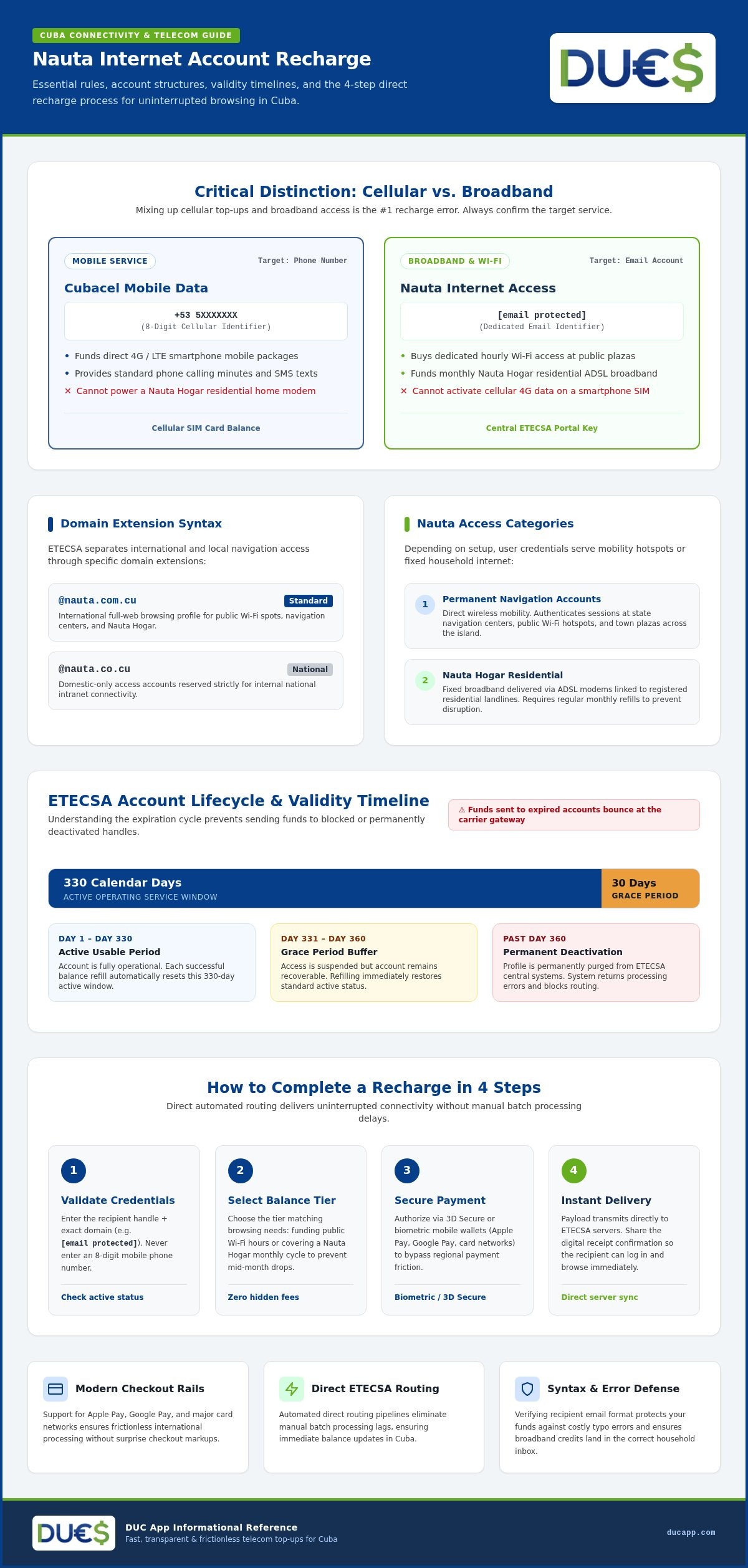
Permanent Nauta accounts use a dedicated email format. International browsing profiles end in @nauta.com.cu, while domestic-only access accounts end in @nauta.co.cu. ETECSA keeps these accounts active for 330 calendar days following a successful balance refill, backed by an additional 30-day grace period. If an account passes that final window without a fresh deposit, the system deactivates the profile permanently. Transmitting funds to an expired username results in processing errors and blocked routing, making status confirmation an essential first step.
Permanent Navigation Accounts vs. Nauta Hogar
Permanent accounts give users direct wireless mobility. Account holders use these credentials to authenticate sessions at public Wi-Fi hotspots, public plazas, and state navigation centers across the island. Nauta Hogar functions differently by delivering fixed broadband access directly to residential ADSL modems linked to registered landlines. Both services draw from the Nauta framework, but Nauta Hogar accounts require active monthly refills to maintain residential internet access. Entering an incorrect domain extension routes funds to an unintended mailbox instead of the household router, disrupting your family's home connection.
Why Separate Nauta Balance from Cubacel Mobile Data?
Mixing up cellular top-ups and home broadband remains the single most common recharge error. Keep the two payment paths strictly separate:
- Cubacel Mobile: Targets an eight-digit cellular phone number (+53 5XXXXXXX) to fund direct LTE mobile data packages, phone calls, and SMS texts.
- Nauta Internet: Targets an email address to buy dedicated hourly Wi-Fi access or monthly home broadband quotas.
Mobile cellular credit cannot power a Nauta Hogar home modem, and a dedicated Nauta recharge cannot activate 4G data on a smartphone. Always confirm whether your recipient needs cellular line credit or broadband browsing hours before completing your nauta internet account recharge online.
How to Recharge a Nauta Internet Account Online in 4 Steps
Modern telecom platforms remove the historic hurdles of sending connectivity abroad. Completing a nauta internet account recharge online no longer requires dealing with slow portals, arbitrary checkout markups, or delayed server posts. By following four straightforward steps, you can fund a recipient balance in seconds and keep your family connected.
Step 1: Input and Validate the Recipient Credentials
Start by entering the recipient username. Precision is vital here. Type the exact handle followed by the required domain extension, typically @nauta.com.cu. Never enter an eight-digit mobile phone number; doing so halts the automated gateway. Check with your recipient beforehand to confirm their profile remains within its active operating window so the transfer doesn't bounce at the carrier gateway.
Step 2: Select Recharge Amount and Payment Rail
Select the balance tier that aligns with your recipient's browsing demands. Whether funding regular public Wi-Fi hours or covering a Nauta Hogar residential cycle, picking the right tier prevents mid-month service drops. While international policy debates around Cuba's internet expansion often highlight infrastructure limits, modern funding channels make the billing side instantaneous. Choose your preferred checkout rail, whether that means using traditional card networks or swift mobile wallet options, and always verify that the checkout summary shows zero hidden platform fees.
Step 3: Complete Secure Payment and Instant Delivery
Authorize the transfer with your chosen authentication method, such as 3D Secure verification or biometric approval via mobile wallets. Top-tier platforms instantly transmit transaction payloads directly to ETECSA servers, eliminating the lag associated with manual batch processing. Once the gateway processes your request, send the digital receipt to your contact in Cuba so they can log in and browse right away. If you want a direct, transparent workflow with zero extra checkout markups, you can use DUC App to send international recharges in just a few taps.
Completing your nauta internet account recharge online takes less than two minutes from start to finish. Once you confirm the transaction details and submit the order, the automated delivery pipeline updates the account balance immediately, delivering uninterrupted broadband access across the island.
Payment Options: Best Ways to Fund a Nauta Recharge from Abroad
Cross-border payments to Cuba historically suffered from legacy banking friction and unexpected processing blocks. Many users discover their domestic debit cards declined simply because an outdated recharge portal triggered a generic fraud alert. Modern fintech architecture solves this problem entirely. Today, completing a nauta internet account recharge online involves flexible, tokenized payment networks that protect your financial details while ensuring instant transaction clearance.
Independent research into the state of internet freedom in Cuba underlines how vital reliable off-island balance refills are for regular families. Having robust, diversified checkout rails guarantees that your financial support arrives uninterrupted, no matter which corner of the globe you call home.
Digital Wallets: Apple Pay and Google Pay
Mobile wallets represent the cleanest leap forward in international top-up technology. Instead of repeatedly inputting sixteen-digit card numbers into unfamiliar forms, biometric verification lets you approve transfers with Face ID or fingerprint recognition. These platforms use secure encrypted tokens, meaning your real account numbers never touch external telecom databases. If you handle multiple connectivity tasks simultaneously, pair this method with how to recharge Cubacel from USA to keep both mobile lines and Wi-Fi profiles active in parallel.
Major Card Networks: Visa and Mastercard
Global card networks remain an indispensable baseline for cross-border funding. Leading checkout portals integrate mandatory 3D Secure protocols, shielding transactions against unauthorized attempts via one-time SMS verification or bank app confirmation. For step-by-step guidance on safely leveraging these networks, review how to send money to Cuba with a credit card without triggering bank security flags.
Regional Bank Transfers: SEPA and Interac
Geographic flexibility matters just as much as digital speed. Diaspora members outside the United States benefit from regional direct payment standards:
- SEPA Rails: Provide Eurozone senders with direct, frictionless bank settlements free from punitive foreign currency markups.
- Interac Processing: Enables Canadian account holders to fund top-ups directly from their local financial accounts using native Canadian dollar rails.
Modern routing rails deliver predictable value straight to Cuba. Choosing a service with transparent checkout standards ensures your nauta internet account recharge online processes smoothly, keeping your friends and family connected without unnecessary payment barriers.
Troubleshooting Common Nauta Top-Up Issues and ETECSA Delays
Payment cleared, but the recipient still can't connect? Don't panic. Cross-border telecom delivery occasionally encounters backend friction on the island. When completing a nauta internet account recharge online, understanding the technical handoff between foreign gateways and domestic telecom servers helps you resolve bottlenecks quickly.
Most post-payment issues stem from local session states rather than lost funds. Applying structured diagnostic steps saves time, avoids double charges, and restores access without unnecessary worry.
What to Do if Balance Does Not Appear Immediately
Give the transaction a five-to-ten-minute buffer. High-traffic hours, scheduled maintenance, and regional power fluctuations can cause temporary queue delays on central ETECSA servers. Follow these quick troubleshooting steps to refresh the connection:
- Terminate active browser sessions: The captive portal in Cuba locks balance reads during active logins. Ask the user to log out completely, disconnect from the Wi-Fi or ADSL signal, and reconnect fresh.
- Verify the transaction receipt: Look for the unique carrier confirmation code on your payment summary. This code proves your funds cleared the international pipeline.
- Clear captive portal cache: Stored browser cookies often display outdated balance figures until cleared on the user device.
Handling Incorrect Username Entries and Inactive Accounts
Typographical errors remain the leading trigger for failed refills. A single misplaced character before the domain suffix sends funds to another existing mailbox or causes a gateway rejection. If you suspect an input mistake, contact platform customer support right away with your receipt code. When a username does not exist, gateways bounce the transaction back, enabling an orderly correction.
Accounts left dormant beyond the 360-day threshold (330 active days plus the 30-day grace period) enter full deletion. In that scenario, automated top-ups cannot post, and the owner must visit a commercial telecommunications office in Cuba with valid identification to register a new permanent account. To avoid recurring errors, store verified recipient handles in your digital address book. If you want a smooth top-up flow backed by real-time delivery tracking, download DUC App to recharge instantly without dealing with clunky third-party interfaces.
Resolving delivery snags requires methodical checks. Ensuring accurate user credentials and confirming clean portal logouts keep your nauta internet account recharge online dependable, secure, and stress-free.
Why Choose DUC App for Fast, Frictionless Nauta Recharges
Legacy recharge websites often treat cross-border connectivity like a cumbersome chore. Between unexpected checkout markups and clunky interfaces that stall mid-transaction, completing an essential balance top-up shouldn't feel like a gamble. DUC App strips away the friction. Built with modern fintech infrastructure, the platform turns every nauta internet account recharge online into a fluid, two-tap experience designed for immediate delivery.
Seamless International Recharges in Seconds
Speed matters when family members depend on active browsing hours to talk, study, or handle remote work. DUC App routes every transaction payload directly to ETECSA servers through an automated pipeline, cutting out unnecessary intermediaries. This architecture ensures your payment registers on the recipient account within seconds rather than hours.
Transparency sits at the center of the checkout flow. You see the final total upfront, backed by broad global payment compatibility including Apple Pay, Google Pay, Visa, Mastercard, and SEPA transfers. What you approve is exactly what gets billed, with zero surprise platform charges added at the final screen.
Comprehensive Ecosystem Beyond Internet Top-Ups
Managing cross-border support shouldn't mean toggling between half a dozen disconnected web portals. Beyond simple Wi-Fi top-ups, DUC App functions as a unified digital hub. Users can execute direct peer-to-peer transfers, coordinate email payments, and send reliable international recharges within a single clean dashboard.
The built-in digital address book safely stores verified usernames and domain extensions, eliminating the risk of costly typos on future orders. Real-time transaction records keep both sender and recipient synchronized from the moment authorization clears. Choose efficiency, bypass telecom roadblocks, and recharge Nauta account online with total confidence today.
Power Seamless Connectivity Across Cuba Today
Reliable communication bridges borders. Executing a successful nauta internet account recharge online comes down to accurate account credentials and modern payment infrastructure. By verifying whether your family needs public Wi-Fi access or Nauta Hogar residential quotas, you prevent common misallocations before they start.
You don't have to navigate outdated portals or worry about surprise fees. DUC App streamlines the entire experience through transparent pricing and flexible global payment rails, letting you pay with Apple Pay, Google Pay, Visa, Mastercard, or SEPA transfers. Every balance refill routes through an automated delivery pipeline direct to ETECSA servers, guaranteeing fast execution and peace of mind. Ready to restore broadband access without the usual friction? Recharge a Nauta account instantly with DUC App and keep your loved ones effortlessly connected.
Frequently Asked Questions
How long does it take for a Nauta internet recharge to arrive?
A Nauta internet recharge typically arrives within seconds when processed through an automated direct-to-carrier gateway. Modern digital pipelines eliminate batch processing delays by connecting straight to ETECSA infrastructure. In rare instances involving local network congestion or scheduled maintenance on the island, delivery might require five to ten minutes. Once the gateway transmits the payload, the updated balance reflects immediately on the recipient's central profile.
Can I recharge a Nauta Hogar home internet account online from abroad?
Yes, you can fund a Nauta Hogar residential connection from anywhere in the world. Nauta Hogar uses the same core billing system as public Wi-Fi profiles. When you complete a nauta internet account recharge online for home broadband, simply enter the specific account handle linked to the household ADSL contract. Refilling this balance ensures your family's monthly residential internet subscription remains active and uninterrupted.
What is the exact difference between a Cubacel top-up and a Nauta recharge?
Cubacel top-ups fund mobile phone lines, while Nauta recharges add browsing hours to dedicated broadband accounts. A Cubacel transfer credits an eight-digit cellular number for mobile LTE packages, phone calls, and SMS texts. A Nauta top-up specifically credits an email username ending in @nauta.com.cu or @nauta.co.cu, powering fixed ADSL home modems and public Wi-Fi hotspot sessions across the island.
What happens if I type the recipient Nauta username incorrectly?
If the entered username does not exist, the carrier gateway automatically rejects the transfer and cancels the transaction. However, if the typo matches another active Cuban user, ETECSA routes the funds to that account irreversibly. Always verify every character before confirming payment. Platforms like DUC App allow you to save verified recipient handles in an address book to prevent recurring input mistakes.
Can I pay for a Nauta account recharge using Apple Pay or Google Pay?
Yes, modern platforms support direct checkout through Apple Pay and Google Pay alongside Visa, Mastercard, and SEPA transfers. Using digital wallets speeds up checkout by replacing manual card entry with biometric authorization. Mobile wallets also use encrypted security tokens, preventing cross-border fraud triggers and ensuring your nauta internet account recharge online clears instantly without unexpected bank blocks.
Is there an expiration date on recharged Nauta internet account balances?
Recharged balances remain active for 330 calendar days from the moment funds post. ETECSA also provides an additional 30-day grace period once that window expires. During this grace period, the user cannot browse until a fresh top-up arrives. If 360 consecutive days pass without a recharge, the carrier permanently deactivates the account handle and deletes all associated records.
Why does my family member in Cuba still see their old balance after payment?
The user's device is almost certainly caching an active captive portal session. ETECSA access gates lock balance counters while a session remains open. To display the new balance, have the user log out of the navigation portal, disconnect from the Wi-Fi hotspot or home ADSL modem for one minute, and sign in again. The refreshed balance will show immediately on their session timer.


