

A quick recharge only helps if it reaches the right phone. Before sending an instant phone recharge for cuba, confirm that Cuba and the recipient’s mobile operator are available in the service, then check every digit of the number. DUC App offers international mobile top-ups, but check the current app flow for Cuba availability and review the displayed terms before you pay.
A mobile recharge adds credit to an eligible phone line; it is not the same as sending money. Use the country code +53 and follow the form’s instructions for entering the recipient’s number, including any mobile identifier. If anything is unclear, confirm the details with the recipient before continuing.
This guide explains how to check destination and operator eligibility, enter the recipient’s details, compare available options, and follow a transaction’s status. It also covers what to check if a recharge is pending or appears incorrect.
Key Takeaways
- Before choosing an instant phone recharge for cuba, confirm whether the available option adds mobile credit or tops up an eligible plan. It is not a money transfer.
- Follow the checkout flow in order, and verify the destination and operator before entering payment details.
- Compare the information shown at checkout, including the top-up, total, payment options, and transaction status details.
- If a recharge is pending or appears incorrect, check its status and avoid paying again until the first transaction is resolved.
- DUC App offers international mobile top-ups. Check the app to see whether Cuba and the recipient’s operator are currently available.
Instant phone recharge for Cuba: what to check before you send
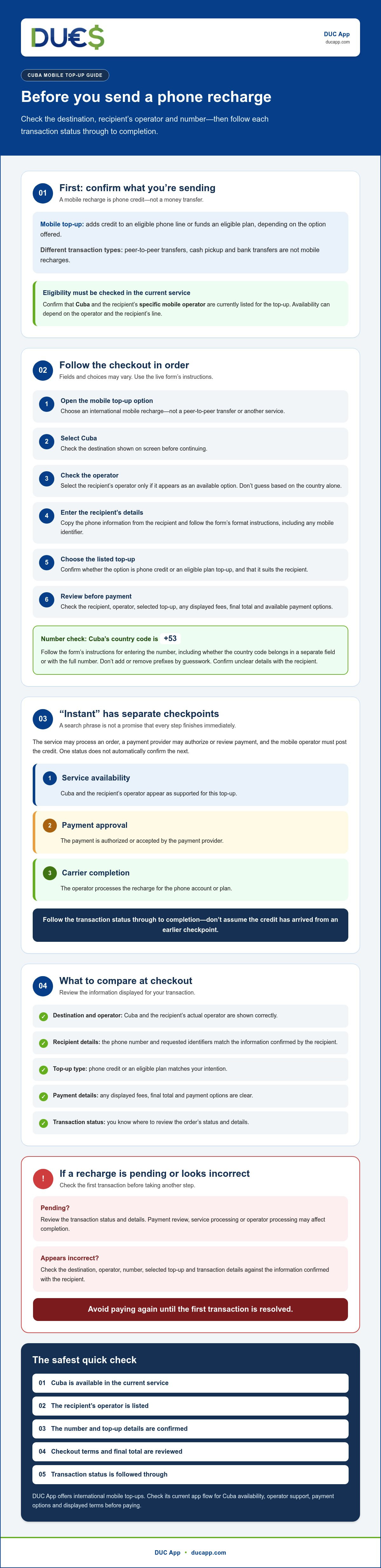
First, make sure you’re choosing a phone top-up, not a way to send someone spendable money. A mobile recharge adds phone credit or funds an eligible plan, depending on the option offered. Before entering payment details, check that both Cuba and the recipient’s specific mobile operator are supported.
Cuba’s telecommunications infrastructure and mobile services have their own local context. For background on the sector and the role of ETECSA, see Telecommunications infrastructure in Cuba. Use that context to understand the destination, but rely on the recharge service’s current checkout to confirm eligibility. Options can depend on the operator and the recipient’s line.
Is a Cuba phone recharge the same as sending money?
No. A supported mobile top-up credits a phone account or eligible plan. It is not cash the recipient can withdraw or spend freely. Peer-to-peer transfers are a separate transaction type, as are cash pickup and bank transfers. Choose a recharge when your goal is to add eligible phone credit, and check what the service actually provides before paying.
What does “instant” mean for an international top-up?
“Instant phone recharge for cuba” is a common search phrase, not a promise that every step finishes immediately. The app may process an order, the payment provider may authorize or review the payment, and the mobile operator must post the credit. These are separate steps. Operator availability, maintenance, or payment review can affect completion, so check the service’s stated terms and transaction status rather than assuming the credit has arrived.
Keep these three status checks separate:
- Service availability: Cuba and the recipient’s operator appear as supported for this top-up.
- Payment approval: The payment is authorized or accepted by the payment provider.
- Carrier completion: The operator has processed the recharge for the phone account or plan.
One status does not automatically confirm the next. Before submitting, verify the destination, operator, top-up type, and phone number shown in the service. After payment, follow the transaction status through to completion. If it is unclear, check the transaction details before trying again.
How to complete an instant phone recharge for Cuba step by step
Confirm the destination and operator first, then enter the recipient’s details and review the checkout before paying. An instant phone recharge for cuba is only available if the service currently lists Cuba and supports the recipient’s operator. Fields and choices can vary, so follow the live checkout rather than expecting every service to use the same process.
- Open the recharge service. Choose its international mobile top-up option, not a peer-to-peer transfer or another service.
- Select Cuba as the destination. Check the country shown on screen before moving forward.
- Check the operator. Select the recipient’s operator only if it appears as an available option. Don’t guess based on the country alone.
- Enter the recipient’s details. Provide the requested phone information in the format shown by the form. Required fields may differ between services.
- Choose the listed top-up. Confirm whether the option is phone credit or an eligible plan top-up, and check that it suits the recipient.
- Review and pay. Verify the recipient, operator, selected top-up, any displayed fees, and the final total before choosing a payment method.
How to enter the recipient’s Cuban phone details
Copy the number directly from the recipient and ask them to confirm the country code. Follow the form’s instructions for entering it, including whether the country code goes in a separate field or as part of the full number. Don’t add or remove prefixes by guesswork. For broader context about phone use and connectivity, the FCC’s guide to U.S. mobile phone use in Cuba may help distinguish a recharge from roaming service.
Before you pay, verify the destination, operator, and number. Check all three against the recipient’s information, not just the country displayed at the start. If any detail is missing, unsupported, or unclear, pause and confirm it before continuing.
How to review payment and confirm the top-up
At checkout, make sure the recipient and operator are correct, the selected amount or plan matches your intention, and the final total is displayed. Use only a payment method shown as available for your transaction. DUC App offers international mobile top-ups, but check the current flow for Cuba and operator availability, payment options, and transaction details.
After submitting payment, save the transaction reference and any confirmation displayed. Check the transaction status before taking further action. You can review DUC App’s mobile top-up options to see whether a Cuba recharge is currently available.
Compare availability, payment, and delivery before choosing a Cuba top-up
Don’t compare services by broad claims alone. For an instant phone recharge for cuba, focus on the details shown for your destination, recipient, and transaction in the live checkout. A suitable service should confirm destination and operator support before payment. Then check what kind of top-up is offered and how you can follow progress after submitting the order.
| What to compare | What to check in the live checkout |
|---|---|
| Destination support | Is Cuba selectable for this transaction? |
| Operator | Does the recipient’s specific mobile operator appear as supported? |
| Top-up type | Does the option provide phone credit or an eligible plan top-up? |
| Total shown | Review the final total and any disclosed charges before authorizing payment. |
| Payment | Is your preferred method displayed as available for your location and transaction? |
| Status tracking | Can you see a transaction status, confirmation, or reference number, and find a route to support? |
Which details should you compare across recharge options?
Start with eligibility, not an advertised speed. A service may handle international recharges without supporting every destination or operator. Confirm Cuba and the recipient’s operator first, then compare the available credit or plan type. Review the checkout total and disclosed charges before approving payment. Look for a transaction confirmation and reference number, as well as a clear way to get help if the status is unclear.
A recharge adds eligible credit or a plan to a phone account. A peer-to-peer transfer is a different service for sending money, so choose according to what the recipient needs. For wider context on digital access and connectivity conditions, see Freedom House’s report on Internet freedom in Cuba.
Which payment method should you use?
Choose a method you recognize that appears in your checkout, and verify the final total before authorizing payment. DUC App supports Visa, Mastercard, Apple Pay, and Google Pay as payment methods generally, but availability can vary by market. Don’t assume a method will appear for a Cuba top-up or for your location. If you’re comparing card use for a money transfer, treat that as a separate transaction type and check the relevant service’s terms.
What to do if a Cuba phone recharge is pending or incorrect
A delayed status does not necessarily mean the payment failed. Check what the service and payment method show before acting. A payment authorization means the payment may be approved or held for processing; it does not confirm that a mobile operator has posted the top-up. “Pending” means the transaction has not been marked complete. “Completed” means the provider reports the transaction finished. If the recipient cannot see the credit, contact the provider with the transaction reference.
Don’t submit a second payment while the first transaction is unresolved. A duplicate could create another charge without fixing the original issue. Status labels and handling steps vary, so follow the instructions shown for your transaction and the provider’s current terms.
Why might a phone recharge remain pending?
Possible causes include a payment review, processing by the mobile operator, a temporary service interruption, or recipient details that don’t match the selected destination or operator. These are general possibilities, not a confirmed explanation for any specific DUC App transaction. Check the in-app status and any current service notices. If the status remains unclear, contact the provider through its available support channel rather than resubmitting.
What should you do after entering the wrong number?
Act promptly. Gather the transaction reference, the number entered, the correct recipient number, the transaction time, and any payment confirmation. Share those details through the provider’s support channel and ask what options are available. Whether a correction or cancellation is possible depends on the transaction’s status and the provider’s terms. Don’t assume a completed top-up can be reversed or moved to another number.
Keep these details together before contacting support:
- Transaction reference: Use the identifier shown in the confirmation or transaction record.
- Recipient details: Note the number entered and the correct number, including the country code as displayed in the form.
- Payment record: Keep the confirmation and time of payment for reference.
- Status: Record the current wording shown in the service, such as pending or completed.
If you used DUC App, follow the status and instructions available for that transaction, and consult the applicable provider terms for next steps. Refunds or reversals aren’t guaranteed. For a future instant phone recharge for cuba, recheck the recipient details before payment and save the confirmation afterward. Check DUC App’s available mobile top-ups and confirm current destination support before starting another transaction.
Use DUC App to check available Cuba mobile top-ups
DUC App offers international mobile top-ups, so you can check whether a recharge route is available online. That offering does not confirm support for Cuba or any specific Cuban operator. Check the current destination and operator options in the app before starting a transaction. Availability can vary by route, so don’t rely on a general claim about international coverage.
How to check whether DUC App supports your recipient
Open the current mobile top-up flow and look for Cuba in the destination list. If it appears, check whether the recipient’s operator is offered too. Confirm both before entering payment information. If Cuba or the operator is absent, don’t try to force the transaction through or choose a different operator as a substitute. Check the current coverage and terms again if needed, since availability may vary.
How to proceed with confidence
Once the route is listed, verify the recipient’s phone number and operator. Review the top-up option, any charges, final total, and payment methods displayed for your location. Continue only if the details match what the recipient needs and the checkout makes the terms clear.
After payment, keep the transaction reference and confirmation. Check the status shown in the app, and use the available support route if it is unclear or doesn’t update. Payment confirmation and mobile recharge completion are separate checkpoints, so look for a status that confirms the transaction itself is complete. Don’t submit another payment while the first one remains unresolved.
If you’re looking for an instant phone recharge for cuba, let eligibility lead the decision: confirm the destination and operator, review the checkout details, then pay only if everything matches. For a Cubacel line being recharged from the USA, consult the dedicated guide for that route alongside these checks. The live DUC App flow still determines whether the destination and operator are currently available.
Ready to check the route? Check DUC App’s available mobile top-ups, confirm Cuba and the recipient’s operator are listed, and review the transaction details before paying.
Make your next top-up a confident one
A successful instant phone recharge for cuba starts with eligibility, not speed claims. Confirm that Cuba and the recipient’s operator appear in the current service, then check the number and top-up details before paying. After checkout, use the displayed transaction status and reference to follow what happens next.
DUC App offers international mobile top-ups, with payment options that include major cards and digital wallets. Available methods can vary by location and transaction, as can destination and operator support. Review the live checkout details before you decide, and don’t treat a payment confirmation as proof that the mobile recharge is complete.
Ready to check whether your route is available? Check DUC App’s available mobile top-ups, confirm the recipient’s eligibility, and proceed only when the details match.
Frequently Asked Questions
Can I send an instant phone recharge to Cuba online?
Yes, if an online service lists Cuba and the recipient’s mobile operator for top-ups. “Instant” describes what people search for, not a guarantee that payment approval and carrier processing will finish immediately. Before paying for an instant phone recharge for cuba, check destination eligibility, the top-up option, and how the service displays transaction status.
Is Cuba or Cubacel currently supported for mobile top-ups?
Check the current service flow to confirm whether Cuba and the recipient’s operator are supported. DUC App offers international mobile top-ups, but current support for Cuba or Cubacel isn’t confirmed here. Don’t assume that a general international recharge service covers every destination. If Cuba or the operator doesn’t appear as an available option, don’t proceed with that transaction.
How long does a phone recharge to Cuba take to arrive?
There’s no confirmed delivery time for a Cuba top-up through DUC App. Processing can involve separate steps: payment authorization, order processing by the service, and the mobile operator posting the credit. Check the delivery terms and status displayed for your transaction. If it remains pending, follow the provider’s instructions rather than submitting another payment or assuming the recharge is complete.
What details do I need to recharge a phone in Cuba?
You’ll generally need the destination, the recipient’s mobile operator, and their phone number in the format requested by the service. Some checkout forms may ask for additional details or present top-up options, so follow the live instructions rather than guessing number prefixes. Before paying, compare the entered number with the one provided by the recipient and confirm the selected country and operator.
Can I pay for a Cuba phone recharge with a credit or debit card?
Possibly, if the payment method appears in checkout for your location and transaction. DUC App supports Visa and Mastercard, along with Apple Pay and Google Pay, but availability can vary by market. Check the final total and any charges shown before authorizing payment. Don’t assume a card or digital wallet is available for a Cuba top-up until it appears as an option.
What happens if my Cuba mobile recharge is still pending?
A pending status means the transaction hasn’t been marked complete; it doesn’t confirm whether the phone’s operator has posted the credit. Check the in-app status and any service notices, then follow the provider’s stated next steps. Keep the transaction reference and payment confirmation handy if you contact support. Avoid paying again while the original transaction remains unresolved.
Can I cancel or correct a phone recharge sent to the wrong number?
Possibly, but correction or cancellation depends on the transaction status and the provider’s terms. Contact the service promptly with the transaction reference, the number entered, the correct recipient details, and the payment confirmation. Don’t assume a completed top-up can be reversed or transferred to another number. Check the provider’s support instructions and terms for the options that apply to your transaction.


