
What if the "US-only" restriction on your iPhone was actually the key to sending MLC to Havana in seconds? Most people think Apple Cash is useless for international support, but that's a common misconception. You've likely felt the sting of trying to send help home only to be blocked by regional limitations or the fear of complex bank wires. It's time to stop letting legacy systems dictate how you support your loved ones.
This guide reveals how to master an apple pay money transfer cuba strategy using the DUC App as your primary funding engine. By leveraging your digital wallet, you can achieve instant delivery to Cuban cards and handle recharges without the typical wait times. We'll explore how the latest 2026 updates to General License 1 interact with version 2.4.8 of the DUC App to simplify the entire process. You're about to discover a secure, regulated method to bridge the distance with just one click.
Key Takeaways
- Understand the technical workaround for Apple Pay's regional restrictions by using it as a secure funding source for your transfers.
- Master the process of an apple pay money transfer cuba to send MLC and recharges instantly through the DUC App ecosystem.
- Reduce transaction friction by using FaceID or TouchID for one-tap authentication instead of manual card entry.
- Follow a simple, verified setup guide to connect your digital wallet and start supporting your family in Cuba within minutes.
- Protect your sensitive financial data by leveraging Apple's encryption layers to avoid sharing card details with third-party servers.
Can You Use Apple Pay for Cuba Money Transfers in 2026?
The short answer is no, you can't send a direct Apple Cash message to a phone number in Havana. Apple's native peer-to-peer service remains locked to the United States. However, that doesn't mean your iPhone is useless for helping family. In 2026, the strategy has shifted from direct transfers to using Apple Pay as a high-speed funding engine. By treating your digital wallet as a secure container for your cards, you can bypass the friction of traditional banking.
Third-party platforms like DUC App have bridged this gap. They allow you to select Apple Pay at checkout, instantly authorizing a transfer to Cuban MLC cards or providing recharges. This method has become the gold standard for the diaspora because it removes the need to share sensitive card numbers with multiple vendors. It's fast. It's secure. It's the most efficient way to execute an apple pay money transfer cuba strategy without the headaches of manual data entry. 2026 is truly the year of frictionless funding, where your biometric ID replaces the clunky wire transfer forms of the past.
Apple Pay vs. Apple Cash: Knowing the Difference
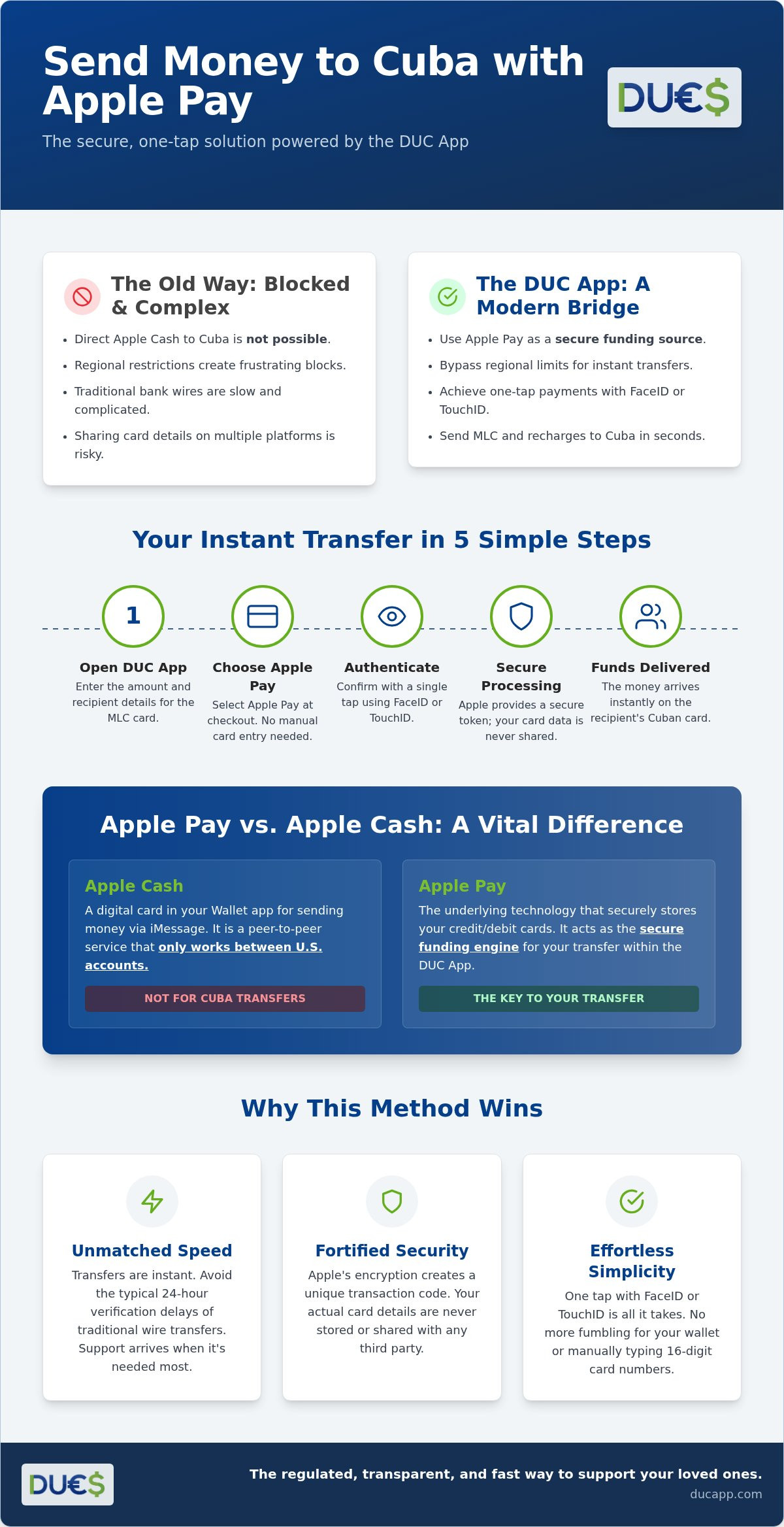
Confusion between these two services often leads to frustration. Apple Cash is the digital card in your Wallet app used for sending money via iMessage; it only works between U.S. accounts. Apple Pay is the underlying technology that stores your physical debit and credit cards. When you want to send funds to Cuba, you aren't "texting" the money. Instead, you're using Apple Pay to fund a transaction within a specialized app like DUC App. This distinction is vital for a successful apple pay money transfer cuba experience. One is a domestic social tool, while the other is a global payment powerhouse.
The Legal Landscape of Remittances to Cuba
Sending money involves more than just tech; it requires navigating the complex U.S. embargo against Cuba. As of July 2026, regulatory scrutiny has increased with new executive orders targeting specific entities. However, General License 1, issued in May 2026, continues to authorize remittances that don't involve restricted entities on the Cuba Restricted List. Using a regulated app is significantly safer than informal street exchanges. These digital platforms ensure your funds reach MLC cards through authorized channels, providing peace of mind that "under-the-table" deals simply can't offer. Modern transfers prioritize transparency and speed, ensuring your support arrives exactly where it's needed most without legal risks.
How Apple Pay Works with DUC App for Cuba Transfers
The logic is simple. DUC App acts as the sophisticated interface between your iPhone's hardware and the Cuban banking system. When you initiate an apple pay money transfer cuba, the app triggers the standard iOS payment sheet you use at your local coffee shop. This integration means you never have to type in a 16-digit card number or expiration date. Your biometric data, whether through FaceID or TouchID, serves as the ultimate key. It's a one-tap process that authorizes the funding source instantly, allowing the transfer to begin without the typical 24-hour verification delays seen in traditional wires.
Security is the cornerstone of this method. When you pay, Apple creates a device-specific number and a unique transaction code. Your actual card details are never stored on DUC App servers or shared with the recipient in Cuba. This layer of abstraction is vital for maintaining privacy in international remittances. By using this "digital container" approach, you ensure your financial footprint remains minimal while your support reaches its destination with maximum speed. You can get started with the DUC App to experience this seamless integration firsthand.
The Tech Behind the Bridge
DUC App functions as a real-time conversion engine. Once Apple Pay authorizes the funds, the app's backend processes the transaction through regulated channels that comply with the Cuban Assets Control Regulations. This technical bridge converts your USD funding into MLC or CUP credit for the recipient's card. Everything is encrypted using modern standards, and you receive a tracking number the moment the tap is confirmed. You aren't just sending money; you're launching a secure, tracked digital asset across borders.
Supported Cards Within Your Apple Wallet
To ensure the lowest friction, use a Visa or Mastercard debit card already saved in your Apple Wallet. Debit cards typically offer the fastest processing times and the fewest hurdles. While credit cards are compatible, be aware that some banks may classify international remittance funding as a "cash advance," which can trigger additional interest or fees. Prepaid cards also work within the ecosystem, provided they are authorized for international transactions. The goal is a hassle-free experience. Stick to your primary debit card for the most reliable apple pay money transfer cuba results, ensuring your family receives the full benefit of your transfer without unexpected bank deductions.
Step-by-Step: Sending Money to Cuba Using Apple Pay
Transitioning from understanding the tech to actually sending funds takes less than five minutes. Your journey begins with downloading the DUC App from the App Store and completing a quick profile setup. This initial step includes basic identity verification to ensure every apple pay money transfer cuba stays fully compliant with U.S. regulations on digital remittances to Cuba. Once your account is active, you're ready to bridge the gap between your digital wallet and your family's needs without leaving your couch.
The interface is designed for speed. After logging in, follow these direct steps to complete your first transaction:
- Choose your service: Select "Send Money" for card deposits or "Recharge" for mobile credit.
- Set the destination: Pick Cuba from the global list of supported countries.
- Input recipient data: Enter the 16-digit MLC card number or the specific Cubacel phone number.
- Authorize with a tap: Select Apple Pay at the checkout screen and confirm via FaceID or TouchID.
The beauty of this system lies in its immediacy. You don't need to wait for manual bank approvals or fill out physical forms. The moment your biometric scan completes, the transaction enters the high-speed processing queue. It's a modern solution for a modern diaspora.
Funding MLC Cards via Apple Pay
When sending to MLC accounts, accuracy is your best friend. You'll need the 16-digit card number associated with BANMET, BANDEC, or BPA. Before you finalize the tap, the app allows you to verify the recipient's name. This extra check ensures your money reaches the correct individual. While delivery times can vary based on Cuban bank processing cycles, most MLC deposits funded through Apple Pay arrive within 24 to 48 hours. It's a reliable, documented way to provide support without the risks of informal street exchanges.
Instant Cubacel Recharges
If you're looking to keep your family connected, "Recargas" are the most efficient option. Using Apple Pay for an apple pay money transfer cuba specifically for mobile recharges is incredibly popular during special promotion windows. Simply select the phone number from your contacts, choose the recharge amount, and authorize the payment. You'll receive a push notification the moment the credit is successfully applied to the Cuban line. It's instant, efficient, and ensures your loved ones never run out of data or minutes during critical moments.
Apple Pay vs. Other Methods: Why One-Tap Wins
Choosing the right tool for an apple pay money transfer cuba isn't just about preference; it's about performance. While traditional methods rely on manual data entry or slow bank wires, digital wallets offer a significant upgrade in speed and reliability. Industry data suggests that using Apple Pay is approximately 3x faster than typing out card details manually. In a world where families need support instantly, those seconds saved translate into faster relief. Beyond speed, digital wallets often see higher authorization rates for international apps because banks trust the biometric verification built into your iPhone.
The liberation from physical wallets is a major advantage for the modern expat. You can send funds while waiting for a train or during a lunch break without reaching for a credit card. This mobile-first approach simplifies global processes and removes the friction that often makes remittances feel like a chore. You can download the DUC App today to experience the efficiency of one-tap transfers yourself.
Apple Pay vs. Manual Credit Card Entry
Manual entry is the enemy of efficiency. It's prone to "fat-finger" errors where a single mistyped digit can lead to a declined transaction or, worse, a locked account. Apple Pay eliminates this risk entirely. By leveraging tokenization, Apple Pay ensures that your actual card number never travels across the digital ether; it replaces it with a unique, one-time-use code for every transaction. This makes it the more secure choice compared to storing your physical card details on multiple third-party servers. There's also a psychological benefit to using FaceID. It provides a sense of high-stakes security for high-value transfers that manual typing simply cannot match.
Apple Pay vs. Cryptocurrency Transfers
While cryptocurrency has gained traction as a way to bypass financial blockades, it remains too technical for the average user. Managing private keys and navigating exchanges can be intimidating. Apple Pay offers the speed of digital assets without the steep learning curve. It also protects you from the extreme volatility of the crypto market. By using a fiat-to-fiat bridge, you ensure the amount you send is the amount that arrives, minus transparent fees. DUC App provides the flexibility of multiple funding sources, but prioritizing the Apple Pay experience ensures a hassle-free journey for those who value simplicity and stability over technical complexity. It's the bold, innovative way to stay connected without the digital asset headache.
Why DUC App is the Safest Way to Use Apple Pay for Cuba
DUC App stands out because it was designed specifically for the unique hurdles of the Cuban corridor. While generic payment apps often struggle with regional compliance, this platform prioritizes the modern expat experience by being fast, secure, and mobile-first. When you execute an apple pay money transfer cuba through DUC, you aren't just sending a digital asset. You're using a system that respects your privacy and your time. Transparency is the default here. You won't find hidden "conversion surprises" or opaque fee structures that drain the value of your support before it reaches its destination.
Support matters when dealing with international finance. DUC App provides expert assistance tailored to the specific challenges of the Cuban market. Whether it's a question about card types or delivery status, you have access to a team that understands the landscape. This creates a borderless financial experience where the focus remains on your family, not the technical barriers. It is about empowering you to act the moment a need arises, regardless of where you are in the world.
Reliable Global Connection
The platform carries a strong legacy, serving as a modern successor to established platforms like Duales. This history provides a foundation of trust that new, unverified apps simply can't match. High uptime is a non-negotiable standard because family support doesn't wait for business hours. By choosing DUC, you join a global community of users who move money without borders. It's a reliable link that has been optimized to ensure every authorization leads to a successful delivery. Consistency is what separates a professional service from a temporary workaround.
Getting Started Today
Ready to simplify your routine? Your first step is to download the app from the App Store and link your existing Apple Wallet. There's no need to verify new cards if they're already in your iPhone. Once you're set up, you can make your first apple pay money transfer cuba in under 60 seconds. The process is intuitive; choose your recipient, select the amount, and double-click to pay. It is that simple. Experience the fastest way to send money to Cuba with DUC App and stop letting outdated banking systems slow you down. Your family deserves the speed and security of the 2026 digital standard.
Empower Your Family with One Tap
You now have the blueprint to navigate the complex world of international remittances with total confidence. By leveraging Apple Pay as a high-speed funding source, you eliminate the frustration of manual card entry and the uncertainty of traditional banking delays. The DUC App provides the essential bridge, ensuring that your apple pay money transfer cuba is processed through secure, regulated channels that prioritize speed and reliability. No more waiting days for confirmation; your family can receive the support they need in record time.
It is time to move beyond legacy systems and embrace a borderless financial experience. Send Money to Cuba with Apple Pay on DUC App to benefit from instant MLC delivery and the peace of mind that comes with FaceID secure authentication. Your support is vital, and now it is easier than ever to deliver. Take the first step today and experience how simple global connection can be.
Frequently Asked Questions
Is it possible to send money to Cuba directly through Apple Cash?
No, you cannot send funds directly through Apple Cash because it is a US-only peer-to-peer service. To support family on the island, you must use a third-party platform like DUC App that accepts Apple Pay as a funding source. This workaround allows you to use your stored cards to pay for MLC transfers or recharges while bypassing the regional restrictions of the native iMessage payment system.
How long does an Apple Pay transfer to Cuba take via DUC App?
Funding your transaction is instant, while delivery to Cuban MLC cards typically takes 24 to 48 hours. Mobile recharges for Cubacel lines are processed immediately upon authorization. Using an apple pay money transfer cuba strategy ensures your request enters the processing queue the moment your biometric scan completes. This makes it one of the most efficient methods available for the diaspora in 2026.
Are there limits on how much I can send to Cuba using Apple Pay?
Yes, limits are determined by your bank's daily transaction caps and your DUC App verification level. Most new users start with standard thresholds that increase as they complete additional profile security steps. It is a good idea to check your specific limits within the app's settings before initiating a large transfer. This ensures your family's support arrives without being stalled by individual transaction ceilings.
Will my bank charge me extra for using Apple Pay for international transfers?
Your bank doesn't charge for the Apple Pay technology itself, but they may apply fees based on the card type you use. Debit cards are usually processed as standard purchases with no extra cost. If you use a credit card, some financial institutions classify remittance funding as a cash advance. This can trigger high interest rates and immediate fees, so stick to debit cards for the best results.
Can I send MLC to a BANMET card using Apple Pay?
Yes, you can send MLC directly to BANMET, BANDEC, and BPA cards using Apple Pay to fund the transaction. Simply enter the recipient's 16-digit card number in the DUC App and choose the Apple Pay button at checkout. The system handles the conversion and routing to the Cuban bank automatically. It is a secure way to ensure your family receives credit on their cards without dealing with bank wires.
Is DUC App legal to use for Cuba remittances from the USA?
DUC App is legal for users in the United States because it complies with General License 1 and the Cuban Assets Control Regulations. These federal rules permit remittances as long as they don't involve entities on the Cuba Restricted List. The platform manages the regulatory compliance for every apple pay money transfer cuba, allowing you to send help home without navigating complex legal paperwork yourself.
What happens if the money transfer to Cuba is declined?
If a transfer is declined, the funds are released back to your original card, usually appearing in your balance within a few business days. Declines often happen due to incorrect recipient names or bank-side security blocks on international transactions. If you face an issue, contact the expert support team through the app. They can help identify the block and ensure your next attempt at supporting your loved ones is successful.
Can I use Google Pay for Cuba transfers if I don’t have an iPhone?
Yes, Android users have access to the same high-speed experience using Google Pay within the DUC App. The process mirrors the iPhone experience, allowing for one-tap authorization via fingerprint or face scan. This ensures that the entire community can access a borderless financial experience regardless of their device. You get the same security, speed, and transparent fee structure as Apple users do when sending recharges or MLC.


