

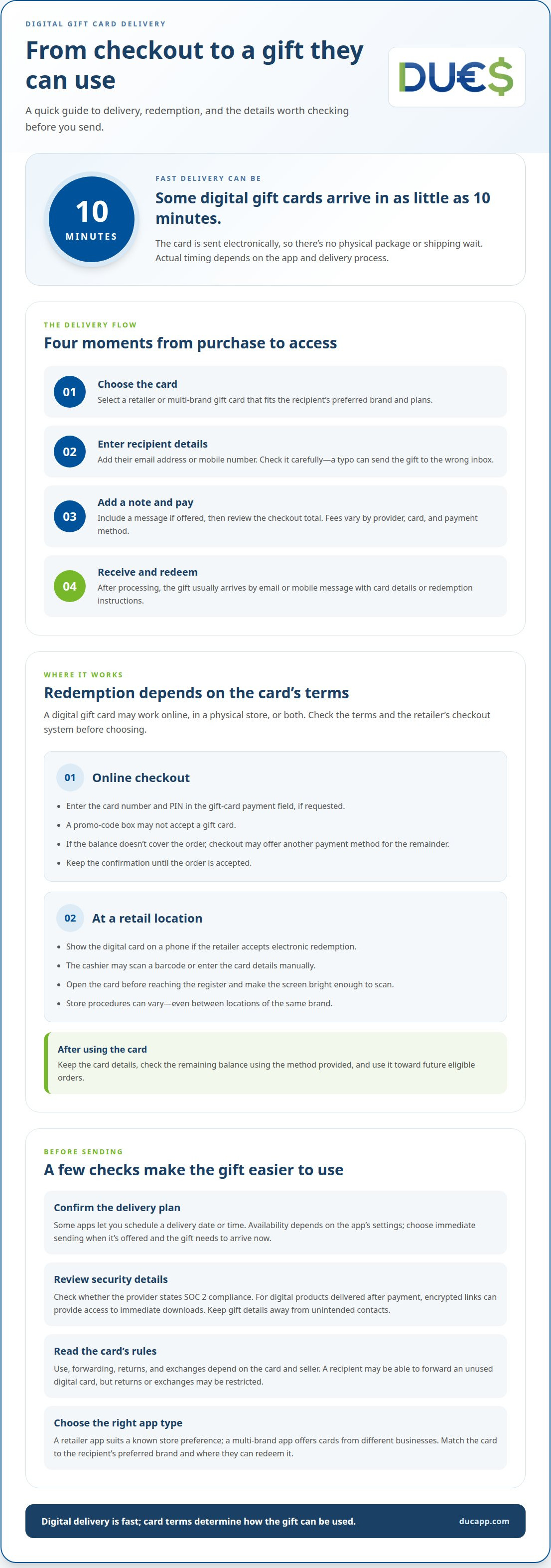
A digital gift card can reach its recipient in minutes, making an instant digital present delivery app useful when you need a gift right away. Some digital gift card deliveries can arrive within 10 minutes. The card is sent electronically, so there’s no physical package to wait for.
Speed is only part of the decision. It’s natural to wonder whether a digital gift is secure and where the recipient can use it. The answer depends on the card’s terms and the provider’s delivery process, so it helps to know what happens after purchase.
This guide explains how digital gift card delivery works, how recipients typically redeem their cards, and what security features to look for. You’ll also learn how digital gift cards can make sending a thoughtful present simpler, whether you’re planning ahead or sending one at the last minute.
Key Takeaways
- Understand the steps between purchase and delivery, including how the recipient gets access to the gift card.
- Learn why redemption options depend on the card’s terms and whether it’s accepted online, in-store, or both.
- See how digital delivery can make gifting more convenient, and which security details matter when sending a card.
- Explore how an app can bring gift cards together with other digital payment options.
How instant gift card delivery works
Digital delivery moves a gift card from checkout to the recipient electronically. Some options arrive in as little as 10 minutes, making them useful for last-minute birthdays.
The Instant Delivery Process
An instant digital gift is a gift card sent electronically after purchase, so the recipient can access it without waiting for a physical package. The sender selects a card, enters the recipient’s details, adds a message if offered, and completes payment.
After processing, the delivery usually arrives through the channel selected at checkout, such as email or a mobile message. The recipient uses the card details or redemption instructions provided. Delivery tracking, when available, can help the sender see whether the message was sent or delivered. For businesses, faster digital delivery can simplify fulfillment and support revenue by reducing reliance on physical shipping.
For a last-minute birthday, a retailer’s app or a multi-brand gift-card app can be a good fit. Choose based on the recipient’s preferred brand, the delivery method, and where they can redeem the card.
There’s no standard fee across all apps. Charges vary by provider, card, and payment method, so review the checkout total before purchasing.
Some apps let you schedule delivery for a specific date or time. This depends on the app’s settings. If the gift needs to arrive now, select immediate sending when it’s available.
Recipient Options and App Availability
A card’s recipient options depend on its terms, including how someone can use or pass along its value. Check these details because a gift card may be less flexible than cash.
Exchange, return, and regifting rules depend on the card and seller. A recipient may be able to forward an unused digital card, but returns or exchanges may be restricted. Read the card’s redemption terms before promising a particular option.
In the United States, digital gift cards are available through retailer apps and multi-brand gift-card apps. The right choice depends on the recipient’s preferred brand and whether the card works online, in-store, or both. Confirm the recipient’s email address or mobile number before sending. A typo can send the gift to the wrong inbox.
Online and in-store use
A digital gift card may be used online, in a physical store, or both. Redemption depends on the card’s terms and the retailer’s checkout system. Before choosing, consider whether the recipient shops online, visits stores, or does both. This helps you match the card to their plans.
Redeeming a Card Online
For an online order, the recipient enters the gift card details during checkout. The payment page may ask for a card number and PIN in a gift-card field. A separate promo-code box may not accept payment cards. For example, someone buying a book online should select the gift-card payment option before submitting the order.
If the balance doesn’t cover the full order, checkout may offer another payment method for the remainder. The process varies by retailer. Save the confirmation until the order is accepted. If the code is rejected, check for typing errors, an incorrect field, or terms that limit how the card can be used.
Using a Card at a Retail Location
At a store, the recipient can show the digital card on a mobile screen if the retailer accepts electronic redemption. The cashier may scan a barcode or enter the card details manually. For example, a coffee shop’s point-of-sale system might scan the screen, while another retailer may require the number and PIN.
Set the screen brightness high enough for scanning, and open the card before reaching the register. If the store can’t scan it, ask the cashier to enter the details if the card’s instructions allow that. Don’t assume every location of the same brand follows identical procedures. Franchise systems, payment terminals, and card terms can affect acceptance.
For either channel, the recipient should retain the card details after use. Check the remaining balance through the method provided with the card, then apply it to future eligible orders. This makes partial use easier to manage without treating the original digital message as a one-time receipt.
Benefits of instant delivery apps
A digital gift app removes the wait for packaging and physical shipping. Imagine a birthday dinner starting tonight: you can send a card electronically instead of arriving empty-handed. The recipient can open the message on a phone or computer, and you don’t need to arrange a delivery address or track a parcel.
A straightforward purchase flow can make last-minute gifting easier. Choose a suitable card, enter the recipient’s contact details, add a personal note if the app allows it, and complete checkout. This keeps the process in one place, without a store visit, gift wrapping, or a trip to the post office.
A well-chosen card can make the gift feel more personal. For example, pick one for a bookstore fan, a restaurant regular, or someone who prefers a particular retail brand. Consider how the recipient shops and whether the redemption terms suit their plans. Treat discounts as a checkout condition, not an assumed benefit, and review the offer’s terms before relying on one.
Security deserves attention alongside speed. A useful factor when assessing a digital gift provider is whether it states SOC 2 compliance. For digital products delivered after payment, encrypted links can provide access to immediate downloads. Keep the recipient’s email or mobile details accurate, and avoid forwarding gift information to unintended contacts.
Apps can also simplify repeat gifting. Keep track of the steps that work for a family birthday, thank-you, or holiday exchange, then choose a new card for the next occasion. A digital receipt can help you find purchase details later. Convenience doesn’t change redemption rules, so the recipient’s preferred brand and the card’s terms still matter.
What apps let you send digital gifts instantly in the US?
In the United States, retailer apps and multi-brand gift-card apps let you purchase digital gifts. A retailer app suits you when you know the recipient’s preferred store. A multi-brand app lets you browse cards from different businesses in one place. An instant digital present delivery app can make choosing and sending convenient, but delivery timing depends on the card and checkout process.
Start with a retailer’s app when you know the recipient’s favorite brand. For example, a bookstore card may suit someone who regularly shops for books. The retailer sets the redemption terms, so check whether the card works online, in-store, or through both channels before choosing.
A multi-brand gift-card app can help when you’re choosing between categories such as dining, entertainment, or retail. It brings different options together in one browsing experience. Selection and delivery options vary, so review the card details before checkout. An instant digital present delivery app is most useful when its available brands and delivery method suit the recipient.
Use these steps to choose an app for a US recipient:
- Choose a retailer app for a known favorite, or a multi-brand app when you want broader choice.
- Read the card’s terms and confirm the recipient can redeem it in their preferred way.
- Enter the recipient’s details carefully. A mistyped email address can send the gift message to the wrong inbox.
- Review checkout details, including the total and any delivery timing information. Don’t assume every card arrives immediately.
Security matters, too. Choose a provider that explains how it protects transactions, and keep the gift code private after delivery. Send the card to the recipient’s email address or mobile number rather than posting its details publicly. This helps direct the gift to the intended recipient and keeps the purchase process straightforward.
For a last-minute birthday, choose a retailer app if you know the recipient’s favorite brand, or a multi-brand gift-card app if you want more options. Check the card’s delivery timing and redemption terms before checkout, since not every card arrives immediately.
DUC App
DUC App offers gift cards for people who want to send a digital present, alongside other digital payment options. If you’re looking for an instant digital gift app, explore DUC App’s gift cards and decide whether they suit your recipient. The platform also offers international recharges and peer-to-peer transfers, bringing several digital transactions together.
For e-commerce businesses, DUC App offers API integration to connect gift-card options with an online shopping experience. The right choice still depends on the recipient’s preferences and the card’s redemption terms. Review those details when choosing a digital gift.
Contact DUC App to discuss your digital gift-card needs.
Make your next digital gift feel personal
Fast delivery handles the timing, but a thoughtful choice makes the gift feel personal. Match the card to the recipient’s habits, add a message that sounds like you, and choose a delivery moment that suits the occasion. An instant digital present delivery app can simplify sending, while your attention to the person makes the gift meaningful.
For your next gift, start with a practical question: what would the recipient enjoy using? The answer can guide your choice and help you avoid sending something convenient but impersonal. Consider how the recipient prefers to receive messages, too. A few deliberate choices can turn a quick digital transaction into a thoughtful gesture.
If you’d like to explore DUC App’s digital options, contact DUC App to learn more. Take the next step with clarity, and make your next gift easy to send and enjoyable to receive.
Frequently Asked Questions
Is it safe and secure to send gift cards digitally?
Digital gift cards are safer to send when you protect the recipient’s details and redemption code. Use the intended recipient’s contact information, keep the code private, and don’t share it in a public post or group chat. Before paying, confirm you’re using the genuine app or retailer service. Treat any message asking you to send the code back with caution.
What payment methods are accepted?
DUC accepts Visa, Mastercard, Apple Pay, Google Pay, Direct debit SEPA, Interac, Discover, American Express, bank transfers in USD, iDEAL, Affirm, Afterpay/Clearpay, Diners Club, PayNow, OXXO, Klarna, Cash App Pay, and Link. Email Money Transfer is available in Canada only. The payment methods shown at checkout help you choose an option supported for your transaction.
What if the recipient doesn’t receive it?
First, confirm the recipient’s email address or mobile number and check the message’s spam or promotions folder. Then review the purchase confirmation and order record for delivery status. If the details are correct but the message is missing, use the app’s support channel and provide the order reference. Don’t forward or repost the gift code while investigating.
How can I set up a workflow to automatically trigger gift card delivery?
An automated workflow connects an e-commerce order event with gift-card fulfillment through a configured integration. DUC App offers API integration for e-commerce, which merchants can use when designing that connection. Define which paid orders qualify, how recipient details enter the workflow, and what record confirms fulfillment. Test the process with sample orders before using it for live purchases.
Which retailers or brands are available?
Available retailers and brands vary by gift-card app and its current selection. Open the card options in the service you’re using and look for a brand that matches the recipient’s interests, such as dining or entertainment. Check the redemption terms before choosing. DUC App offers gift cards, and the options presented for purchase can guide your selection.
Can I send an instant gift card directly to someone else?
Yes. Choose a digital gift card, enter the recipient’s delivery details, and add a personal message if checkout offers one. Before completing the purchase, carefully review the recipient information and make sure the gift is addressed to them rather than your own inbox. This sends the digital gift directly to the recipient through the selected delivery channel.


