

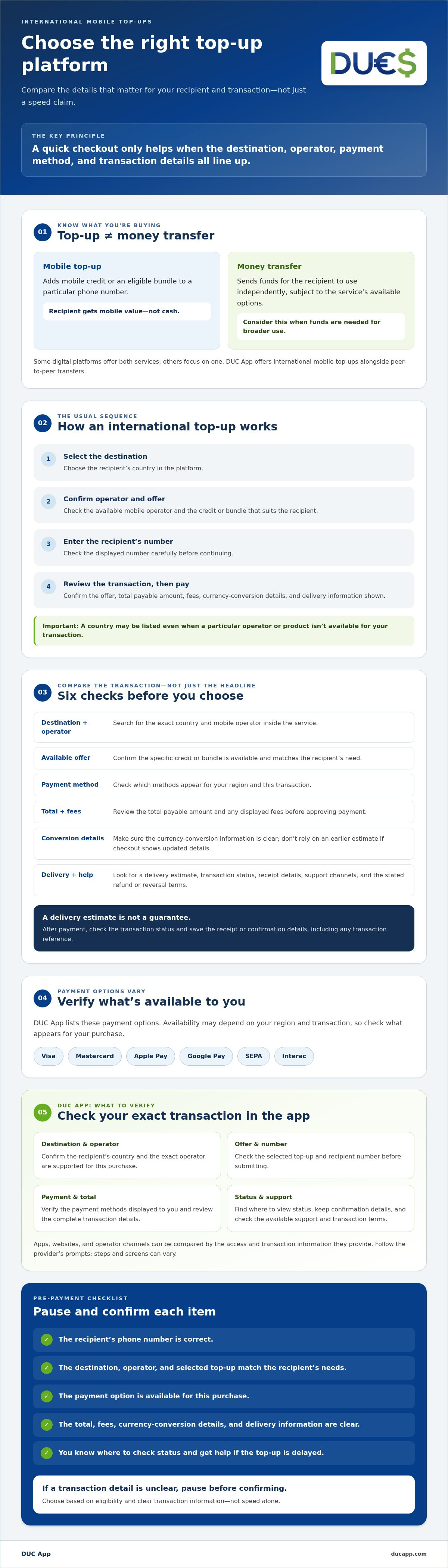
The fastest option isn’t always the right one. An international cell phone top up platform needs to support the recipient’s country and mobile operator, accept a payment method available to you, and explain the transaction details before you pay. If those don’t line up, a quick checkout won’t help.
Coverage, payment options, delivery estimates, and fees can vary by destination and transaction. This guide shows you how to compare those details, check a recipient’s number before submitting a top-up, and find out where to get help if a transaction doesn’t go through. You’ll also learn what to verify in DUC App. Payment options such as Visa, Mastercard, Apple Pay, Google Pay, SEPA, and Interac may depend on your region and transaction, so check what appears for your purchase. Use the comparison to confirm eligibility, understand the transaction details, and choose a platform that fits your needs rather than relying on a speed claim.
Key Takeaways
- Understand the top-up process, from selecting a destination and offer to entering the recipient’s number.
- Choose an international cell phone top up platform by checking the specific destination and operator, not just broad coverage claims.
- Compare apps, websites, and operator channels to find the access and transaction information you need.
- Use a pre-payment checklist to catch errors in the recipient’s number, selected top-up, or payment details.
- See how DUC App’s international top-ups and other digital services may fit your needs, and what to verify in the app.
What Is an International Top-Up Platform and Who Is It For?
An international top-up platform is a digital service for purchasing mobile credit or an eligible bundle for a phone number in another country. Unlike a person-to-person money transfer, a top-up adds mobile value to a recipient’s account rather than sending funds they can use independently. An international cell phone top up platform can suit someone supporting family or friends abroad, or anyone who needs to add credit to another person’s mobile service.
The basic process is simple, but destinations, operators, products, payment methods, and delivery information vary by platform and transaction. Some services focus on recharges; others offer additional digital services. For a neutral overview of the history and mechanics, see International mobile remittance.
How an international mobile top-up works
Usually, you select the recipient’s destination, choose an available mobile operator and top-up offer, enter the recipient’s number, and review the transaction before paying. Screens and steps vary, so follow the provider’s prompts rather than assuming every service works the same way. The recipient generally receives mobile credit or an eligible bundle, not cash.
Before paying, check that the displayed number is correct and that the selected offer matches what the recipient needs. A country may be listed even when a particular operator or product isn’t available. Confirm the exact combination shown for your transaction.
When a top-up platform differs from a money-transfer app
A top-up buys mobile value for a particular number. A money transfer sends funds for the recipient to use independently, subject to the service’s available options. Choose a recharge when the goal is mobile credit or a bundle. Consider a transfer when the recipient needs funds for other purposes. Some digital platforms offer both services, while others focus on one.
For example, DUC App offers international mobile top-ups alongside peer-to-peer transfers. If you’re researching a transfer rather than a recharge, read the 2026 guide to sending money to Cuba with a credit card for that distinct use case.
Be clear about what the recipient needs before comparing services. For mobile service, check destination and operator eligibility, the available top-up product, and the number you enter. If the recipient needs money for broader use, a recharge may not meet that need. Knowing the difference helps you choose a suitable service and review the transaction before paying.
Which Features Matter Most When Comparing International Top-Up Platforms?
Compare what a service can complete for your specific transaction, not just how many countries it says it reaches. Search for the recipient’s destination and mobile operator inside the platform, then check whether the required credit or bundle is available. A country may appear in a coverage list even when a particular operator or offer isn’t available for your transaction.
Check payment options just as carefully. A platform may list cards or digital wallets, but available methods can depend on your location and transaction. DUC App lists Visa, Mastercard, Apple Pay, Google Pay, SEPA, and Interac as payment options. Check the app to see which are available to you before proceeding.
Coverage, payment methods, and transaction details
Before approving payment, review the selected mobile product and the total payable amount. Check any displayed fees and currency-conversion information, and make sure you understand what the recipient is set to receive. Don’t rely on a headline rate or an earlier estimate if checkout shows updated details. If the total or conversion information isn’t clear, pause and look for an explanation before confirming.
Quick check: verify coverage, payment, total, and delivery before you confirm. This keeps your comparison focused on whether the platform can serve the recipient and whether you understand the transaction.
Delivery status, receipts, and help options
Check whether the service displays a delivery estimate and lets you view the transaction status after payment. An estimate isn’t a guarantee, so note the status and follow the platform’s instructions if the top-up is delayed. Save the receipt or confirmation details, including any transaction reference, so you can identify the purchase if you need help.
Before buying, find the available support channels and read the service’s stated refund or reversal terms. Know where to report a problem and what information you may need. The U.S. Consumer Financial Protection Bureau provides guidance on consumer protections for international money transfers. That resource concerns money transfers, so check the terms that apply specifically to a mobile top-up as well.
Use these criteria to compare any international cell phone top up platform, then check the details for your destination and payment method. You can review available top-up options in DUC App and confirm the transaction information shown before paying.
App, Website, or Operator Service: Which Top-Up Option Fits Your Needs?
There’s no universal winner. An app, a website, or the mobile operator’s own channel may suit you, depending on the destination, available payment method, and information you need before paying. Compare the steps and transaction details for your specific purchase rather than choosing by headline speed or convenience alone.
Digital channels are also part of broader conversations about digital remittances. For a mobile top-up, the practical questions are simpler: can this channel provide the right offer for the recipient, accept your payment, and clearly show the transaction details?
| Service type | Potential advantage | Limitation | What to verify |
|---|---|---|---|
| Top-up app | May bring destination selection, payment, and transaction information into one interface. | Could require an account or a supported device; payment options may vary by region. | Device and account requirements, destination and operator coverage, available payment methods, and transaction status details. |
| Top-up website | Can provide access through a browser without installing an app. | The available destinations, payment choices, or transaction visibility may differ from an app. | Whether your destination, operator, offer, and preferred payment method are supported on the site. |
| Mobile operator channel | May provide direct information about that operator’s products or recipient account. | May be limited to the operator’s own services and available payment options. | That the channel is official and supports the recipient’s number, selected product, and your location. |
When a dedicated top-up app may be convenient
An app can be practical if it lets you select a destination, choose an available offer, pay, and view transaction information in one place. Check device compatibility, account requirements, and which payment methods are available to you. Convenience doesn’t prove that a top-up costs less or arrives faster. Review the displayed terms for your specific transaction.
When a website or mobile operator’s own channel may suit better
A website may suit you if you prefer a browser-based process or don’t want to install another app. Check that it offers the destination and payment option you need. If you want direct information about a particular mobile product or account, look for the operator’s official channel and confirm it supports the recipient’s service. For destination-specific steps, see the guide to recharging Cubacel from the USA.
Choose the channel that fits your transaction, then confirm its current features and terms with the provider. If you’re considering an international cell phone top up platform, you can explore international top-up options with DUC App and check what’s available for your destination and payment method.
How to Check a Platform Before You Submit an International Top-Up
A short review before payment can help catch a wrong number, unavailable offer, or unexpected transaction detail. Use this checklist with any provider. Screens vary, so rely on the information shown for your specific top-up.
Confirm recipient and offer details
- Choose the destination. Select the recipient’s country from the platform’s available options, then confirm that the mobile operator is listed for that destination.
- Check the recipient’s number. Compare the full number with the one the recipient gave you. Follow any country or area code instructions shown by the provider, and make sure the displayed number is correct before continuing.
- Verify the top-up product. Confirm whether you’re selecting mobile credit, data, or another listed offer. Check that it’s the type of top-up the recipient needs and that the selected amount or bundle is clear.
Review payment, confirmation, and issue handling
- Review the payment method and final total. Confirm that your preferred payment method is available for your location and this transaction. Check the amount payable and any displayed fees or currency-conversion information before approving.
- Save the confirmation. After payment, keep the receipt or order reference. Check the provider’s process for viewing transaction status and note any delivery estimate shown for the top-up.
- Follow the provider’s instructions if there’s a delay. Check the transaction status and use the listed support channel for guidance. Avoid submitting a second top-up until you’ve checked what happened to the first one, since it may still be processing.
For a destination-specific example, the guide to recharging Cubacel from the USA covers steps relevant to that service and route. It doesn’t replace checking current options and transaction details with your chosen provider.
Use this checklist before submitting a top-up through an international cell phone top up platform. To review DUC App’s international recharge options, check available top-ups in DUC App and confirm the destination, operator, payment method, and final details shown for your transaction.
Is DUC App the Right International Cell Phone Top-Up Platform for You?
DUC App offers international mobile top-ups alongside peer-to-peer transfers and digital gift cards. It may be worth assessing if you need to recharge a mobile number abroad and want access to other digital services on the same platform. Whether it fits your top-up depends on your destination and transaction details, not on broad coverage claims alone.
Where DUC App may fit a top-up shopper’s checklist
DUC App lists Visa, Mastercard, Apple Pay, Google Pay, SEPA, and Interac among its payment methods. These are options to check, not a promise that every method will appear for every user or transaction. Availability may depend on your region and the specific top-up.
First check whether the recipient’s country and mobile operator are available in the app. Then confirm that the displayed offer matches the recipient’s needs. If the destination or operator isn’t supported, or the offer doesn’t suit the recipient, DUC App may not fit that particular recharge. Compare it with another service that supports the required combination.
A practical next step before choosing
Review the transaction information shown in the app before deciding. Check whether your payment method is available, then read the displayed total, any conversion details, delivery estimate, and support information before approving the purchase. These details help you assess the transaction on its own terms rather than relying on a speed claim or assuming listed features apply everywhere.
Use the same criteria you’d apply to any international cell phone top up platform: does it support the recipient’s destination and operator, offer a payment method you can use, and present terms you understand? If one of those checks doesn’t line up, pause and compare alternatives. A platform can fit one destination and transaction without being right for every top-up.
To assess DUC App against your needs, explore DUC App and check the destination, operator, payment options, and transaction details available for your top-up before paying.
Choose a Top-Up That Fits the Recipient
The right international cell phone top up platform supports the recipient’s destination, mobile operator, and specific top-up, while clearly showing payment and transaction details before you confirm. Check the number carefully, review the total, and save the confirmation so you can identify the purchase if it needs attention.
DUC App offers international mobile top-ups alongside other digital services. Its listed payment methods include Visa, Mastercard, Apple Pay, Google Pay, SEPA, and Interac, though availability can depend on your region and transaction. Check what’s available for your top-up instead of assuming every option applies.
Compare the details for your destination with DUC App. Explore DUC App and review the available operator, payment method, and transaction terms before paying. A careful check helps you choose based on the actual details of your purchase.
Frequently Asked Questions
What is an international cell phone top-up platform?
An international cell phone top-up platform is a digital service for purchasing mobile credit or an eligible bundle for a phone number in another country. Users typically select a destination, an available mobile operator or offer, and a payment method. Coverage and transaction steps vary by provider. Before paying, check that the recipient’s country and operator are supported, and confirm the selected product and number at checkout.
How do I choose an international mobile top-up platform?
Start by confirming that the platform supports the recipient’s country and mobile operator. Then compare payment methods available in your region, the displayed total, delivery information, transaction tracking, and support options. Check the recipient’s number and selected mobile product before approving payment. Don’t choose based on speed claims alone. Review the details for your specific transaction so you understand what you’re purchasing and where to check its status.
Can I top up a phone in another country with a credit card?
Some international top-up platforms accept card payments, but availability depends on the service, your location, and the transaction. Check the payment methods displayed during checkout and confirm the final amount before approving. DUC App lists Visa and Mastercard among its supported methods, but availability can vary by region and transaction. Verify that your card appears as an option for the specific purchase.
How long does an international phone top-up take?
Delivery timing depends on the platform, destination, mobile operator, and selected product. Use the estimate displayed for your transaction rather than relying on a general promise or another customer’s experience. After paying, keep the confirmation reference and check the transaction status through the provider’s process. If the top-up appears delayed, follow the provider’s support instructions before trying again. A second payment could create a duplicate if the first transaction is still processing.
What should I do if an international mobile top-up does not arrive?
First, check the transaction status and confirm the recipient’s number, country, operator, and selected product. Find the receipt or order reference, then contact the platform through its stated support channel if the issue remains unresolved. Don’t immediately submit the same top-up again, since the first transaction may still be processing. Refunds, reversals, and resolution times depend on the provider’s terms and your transaction status.
Are international top-up platforms safe to use?
Assess the specific platform rather than assuming every service offers the same protections. Look for clear payment and privacy information, accessible support, transaction confirmations, and understandable terms for failed or delayed top-ups. Use a payment method you recognize, and check the recipient and final transaction details before approval. These steps help you make an informed choice, but they can’t guarantee a particular outcome. Contact the provider if its terms or processes aren’t clear.
Can I use Apple Pay or Google Pay for an international phone top-up?
Some platforms list mobile wallet payments, but availability may depend on your country, device, destination, and transaction. Check the options presented during checkout before relying on a wallet. DUC App lists Apple Pay and Google Pay among its payment methods, but neither option is necessarily available for every user or top-up. Confirm that your preferred method appears for your account and purchase, then review the transaction details.


