

You enter a Cubacel number and choose a recharge, then pause before paying: is the number format right, and will the credit reach the intended line? When you top up Cubacel lines from Canada, checking the recipient details and transaction terms before confirming can help you avoid a costly mistake.
That hesitation makes sense. Fees, exchange details, offer conditions, and delivery estimates can vary, so review what checkout shows before you pay. DUC App offers international mobile top-ups. Confirm whether Cuba and Cubacel are available for your transaction, along with your preferred payment method.
This guide walks you through the process, from confirming the recipient’s number to reviewing the top-up amount, payment details, and promotion terms. You’ll also learn what to check if a recharge is delayed or the balance doesn’t appear. A few practical checks can make sending mobile credit from Canada more straightforward.
Key Takeaways
- Before you top up Cubacel lines from Canada, confirm the service offers Cuba and Cubacel for your transaction.
- Check the recipient’s number carefully. A mobile top-up adds phone credit, it isn’t a cash transfer.
- Review the amount, fees, exchange details, payment method, delivery estimate, and any promotion conditions shown before confirming.
- If the balance doesn’t appear, check the transaction status and compare the recipient number, payment confirmation, and transaction reference before trying again.
- DUC App offers international mobile top-ups. Check the current checkout to confirm route availability and the payment methods that apply.
Can You Top Up Cubacel Lines from Canada? Start with These Checks
Yes, an online recharge service may let you send a Cubacel top-up from Canada if it supports Canadian payments and the intended Cuban operator. Availability can differ by service and transaction, so check the live checkout before entering payment details. DUC App offers international mobile top-ups, but confirm that Cuba and Cubacel are available for your specific transaction.
A top-up adds mobile credit to the recipient’s phone line. It isn’t a cash transfer, and the credit may be subject to the offer or usage terms shown by the service. For background on Cuba’s telecommunications system, see this overview of the telecommunications infrastructure in Cuba.
Before you start, confirm the recipient’s country and Cubacel number. Then check the available amounts, currency, fees, total charge, payment options, delivery estimate, and any promotion conditions. These details can vary, so rely on what checkout shows for your transaction rather than assuming a previous offer or payment method still applies.
What to confirm about the recipient’s Cubacel line
Ask the recipient to confirm the number and that it’s the line they want topped up. If the service requests the full international format, Cuba’s country code is +53. Follow the field instructions, since some forms collect the country separately, and don’t enter the country code twice. If the line is new, inactive, or recently changed, check with the recipient before paying that it can receive a recharge.
What Canadian senders should check before choosing a service
Confirm that the service accepts a sender in Canada and lists Cuba and Cubacel in its current options. A service offering international recharges doesn’t necessarily support every route in every checkout. Payment choices can also depend on the transaction. DUC App supports multiple methods across its platform, including Interac and major cards, but check which options appear for your Cubacel top-up.
Pause at the final review screen. Check the recipient number, selected operator, top-up amount, currency, total charge, listed fees, and delivery estimate. If a promotion appears, read its eligibility and bonus terms, including any disclosed limits or expiry details. If something is unclear or the final total differs from what you expected, don’t confirm until you’ve reviewed the transaction details.
How to Top Up a Cubacel Line from Canada Step by Step
A mobile top-up adds credit to the recipient’s phone line. Use the service’s current checkout as your guide, since screens and available options can change. Select Cuba and Cubacel only if both appear for your transaction.
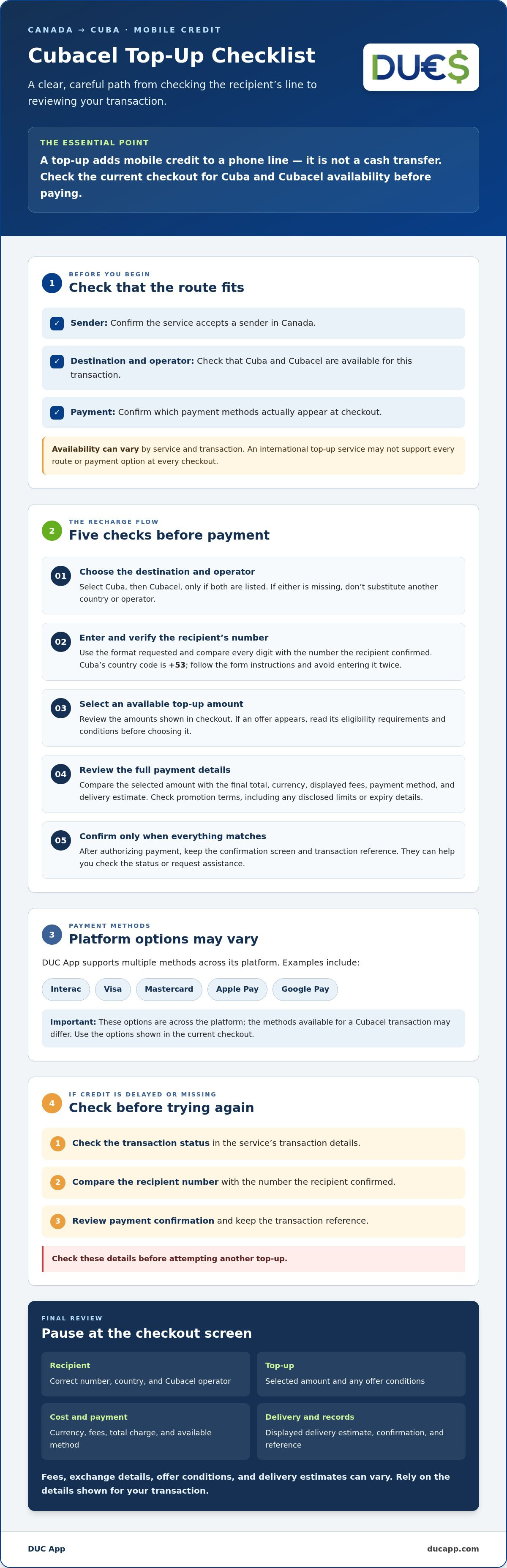
- Choose the destination and operator. Select Cuba, then choose Cubacel if it’s listed. If either option is missing, don’t substitute another country or operator. Check the current route availability before continuing.
- Enter the recipient’s details. Type the Cubacel number in the format requested. Compare every digit with the number the recipient confirmed, including the country code if the form asks for it. Pause if the screen shows a different country, operator, or number.
- Select a top-up amount. Review the amounts available in checkout. If an offer is displayed, read its eligibility requirements and conditions before choosing it. Don’t assume a promotion applies just because the recipient uses Cubacel.
- Review the payment details. Compare the selected amount with the final total, currency, and any displayed fees. Confirm which payment methods are available for this transaction. DUC App supports options such as Interac, Visa, Mastercard, Apple Pay, and Google Pay across its platform, but the methods shown at checkout may vary.
- Authorize and save the confirmation. Once the recipient details and total look right, submit the payment. Keep the confirmation screen and transaction reference. These details can help you check the status or request assistance if the credit doesn’t appear.
Canadian senders may also want official background on Canada-Cuba relations. For the recharge itself, rely on the destination, operator, and transaction information shown in the service flow, not general country information.
To review a digital option, visit DUC App international mobile top-ups and check whether Cuba and Cubacel are available before proceeding. The final review is essential: confirm the line, compare the amount with the displayed total, and authorize payment only when the details match.
Compare Top-Up Options, Payment Methods, and Offer Terms Before Paying
Before you top up Cubacel lines from Canada, distinguish the amount you pay from what the recipient may receive. The checkout total is the amount charged for the transaction. The recipient’s main balance or promotional benefit is separate and depends on the offer terms. Don’t assume the amounts are equal or that a bonus applies to every line.
The Government of Canada travel advisory notes potential limitations with telecommunications in Cuba, including that Canadian cell phones may not work. A recharge adds credit to a line, but it doesn’t guarantee network access or resolve local connectivity issues. Confirm what the recipient needs and check the offer details shown for your transaction.
How to assess a Cubacel promotion without assumptions
Compare options only if checkout currently offers both a standard top-up and a promotion. If it shows one option, don’t infer that another is available. Check the details the service actually discloses:
| Option | What to check |
|---|---|
| Standard top-up | Amount paid, recipient credit, eligible line, and any stated validity terms. |
| Promotional top-up, if shown | Eligible dates and numbers, qualifying amount, bonus conditions, expiry or validity terms, and any action the recipient must take. |
Read the live offer terms before selecting a promotion. Check whether it applies to the recipient’s line and chosen amount, and whether the recipient must activate or claim a benefit. If dates, eligibility, or expiry aren’t disclosed, don’t assume them. Promotions change, so older examples aren’t a reliable guide to the current offer.
How to review payment and total-charge details from Canada
DUC App lists Interac, Visa, Mastercard, Apple Pay, and Google Pay among the payment methods supported across its platform. That doesn’t mean every method will appear for each Cubacel transaction. Use the options shown in your checkout and confirm they’re available for your sender location and selected top-up.
Before authorizing, review the total charge, currency, and any displayed fee or conversion information. Compare these with the selected top-up amount, then check the recipient credit or bonus separately. If the exchange information or promotion terms are unclear, pause rather than relying on a rate, fee, or payment method from a previous transaction. Clear terms make it easier to compare the available options.
What to Do If a Cubacel Top-Up Is Delayed or Does Not Appear
If the credit hasn’t appeared, pause before trying again. A second payment could create another top-up rather than resolve the first one. Start by checking the transaction status in the service’s history or confirmation message, if available. A payment authorization alone doesn’t necessarily mean the recharge has completed, so look for a status such as pending, failed, or completed. Don’t assume a delivery time unless the service provides one for that transaction.
Check the transaction status before trying again
Compare the transaction status with the payment confirmation from your card, wallet, or other payment method. Ask the recipient to check the relevant line’s balance and confirm which number they’re checking. If the transaction shows as completed but the credit is missing, compare the number in the confirmation with the number the recipient verified before you paid. Keep the details private while checking.
If the payment is pending, don’t resubmit until the service’s instructions clarify what to do. If it failed, check whether the service provides a next step before starting over. When the status is unclear, contact the service through its official support channel rather than making a second transaction based on a guess.
Prepare useful details for a support request
Keep the reference number, transaction date and time, amount, payment confirmation, and current status together so the transaction is easier to trace. Recheck the recipient number privately, and share it with support only as requested through the service’s official channel. Follow the channel’s current instructions, and don’t send full payment credentials or unnecessary personal details.
For a support request, keep the transaction reference, timestamp, amount, payment status, and recipient number available, and share them only through the service’s official support channel.
If you want to top up Cubacel lines from Canada, a saved confirmation makes it easier to check what happened. It helps distinguish a payment that was authorized from a recharge marked as complete, and gives support useful details to investigate if the recipient still can’t see the credit.
If you’re using DUC App, review the transaction details and current support instructions before taking another step. Review your DUC App top-up information and keep the reference handy while you follow the available guidance.
Complete Your Cubacel Top-Up from Canada with DUC App
A digital top-up flow lets you initiate an international mobile recharge remotely. DUC App offers international mobile top-ups, making it an option to consider when you want to top up Cubacel lines from Canada. Route availability can change, so confirm that Cuba and Cubacel appear in the current app flow before you begin. A mobile recharge adds credit to a phone line. It isn’t a cash transfer or physical cash pickup.
Why use a digital top-up flow
An online service lets you review the destination, recipient details, available recharge options, and payment information in one transaction flow. Check each detail before authorizing payment. Don’t assume a particular delivery speed or that every payment method will be available. Use the options and estimate shown for your transaction.
Finish the transaction with confidence
Follow this sequence before confirming:
- Check availability: Make sure Cuba and Cubacel are offered for the transaction in the app.
- Verify the number: Compare the recipient’s confirmed number with the one entered, following the format the app requests.
- Compare the terms: Review the selected top-up, any promotion conditions, the currency, fees, and displayed total.
- Confirm payment: Proceed only if the destination, operator, number, and charge match your expectations.
DUC App lists payment options across its platform, including Interac, Visa, Mastercard, Apple Pay, and Google Pay. Available methods can depend on the transaction, so rely on the choices shown in checkout rather than assuming a preferred option will appear. Review the final details before authorizing.
After submitting, save the confirmation screen and transaction reference. If the balance doesn’t appear, these records can help you check the status and follow the service’s current support instructions. If the route or payment option isn’t available, don’t substitute another operator or proceed on an assumption. Recheck the service flow later or consider another supported option.
To see whether this route is currently available, open DUC App and review the Cubacel options, payment methods, and transaction details before deciding whether to complete the top-up.
Make Your Cubacel Top-Up with a Clear Final Check
To top up Cubacel lines from Canada with confidence, confirm the route is available, verify the recipient’s number, and review the displayed amount and terms before paying. These checks help you avoid sending credit to the wrong line or overlooking a promotion’s conditions.
DUC App offers international mobile top-ups. Its platform lists Interac, Visa, Mastercard, Apple Pay, and Google Pay among supported payment methods, but the options for a Canadian Cubacel transaction may vary. Check the current checkout for route availability, payment choices, fees, currency details, and the final total. Save your transaction confirmation and reference in case you need to check its status later.
Ready to review the current options? Check current Cubacel top-up availability in DUC App, then proceed only when the recipient details and transaction terms look right.
Frequently Asked Questions
Can I top up a Cubacel line from Canada?
Yes, it may be possible through an international recharge service that supports Canada as the sender location and Cubacel as the destination operator. Confirm both options in the live checkout before paying, since availability can change. A top-up adds mobile credit to a phone line, it isn’t a money transfer. Verify the recipient number, selected amount, and transaction details before confirming.
How do I top up a Cubacel phone from Canada?
Select Cuba and Cubacel if they’re available in the service’s current flow. Enter the recipient’s number in the requested format, choose an offered top-up, and review the amount, total charge, currency, fees, and offer terms. Authorize payment only after checking the details, then save the confirmation and transaction reference. Screens and payment choices differ by service, so follow the instructions and delivery estimate shown for your transaction.
What payment methods can I use to recharge Cubacel from Canada?
Available payment methods depend on the service and checkout. DUC App lists Interac, Visa, Mastercard, Apple Pay, and Google Pay among its supported methods, but that doesn’t confirm each option will appear for every Canadian Cubacel top-up. Check the methods offered for your transaction before paying. Review the displayed total and currency or conversion information so you know what you’re authorizing.
How long does a Cubacel top-up from Canada take?
There isn’t one delivery estimate that applies to every Cubacel top-up. Processing and balance updates can depend on the service, payment status, operator, and current conditions. Check the estimate shown before confirming, then monitor the transaction status. If the balance doesn’t appear, verify the recipient number and transaction reference first. Don’t place another top-up while the original transaction’s status is unclear.
What should I do if my Cubacel recharge does not arrive?
Check the transaction status and whether the payment was only authorized or the top-up is marked completed. Compare the entered number with the one the recipient confirmed, then ask them to check the correct line’s balance. Keep the transaction reference, timestamp, and payment confirmation. Contact the service through its official support channel, and avoid submitting a duplicate payment while the first transaction remains unresolved.
Can I use a Cubacel promotion when topping up from Canada?
Possibly, if a current offer is available and the recipient’s line and selected recharge meet its conditions. Check the live terms for eligible dates, numbers, amounts, and any action the recipient must take before paying. Don’t rely on an old campaign page or assume a bonus applies automatically. If eligibility or the benefit is unclear in checkout, pause and confirm the offer details with the service.


