

The transfer with the smallest advertised fee can still leave your recipient with less. An international transfer fee calculator helps explain why: the upfront charge is only one part of the cost. The exchange rate and possible intermediary or receiving-bank fees can also affect the final amount. Compare these factors to understand both what you’ll pay and what the recipient is expected to receive.
It’s easy to focus on the fee shown at checkout, but an exchange-rate markup may be less obvious. Payment method and delivery choice can also change an estimate. A useful comparison looks at both sides of the transfer: your total debit and the recipient’s expected payout.
This guide explains which details to enter, how to compare estimates, and what can make the figures change. It also shows how service fees and currency conversion are separate factors when assessing transfer options, including DUC App for international and peer-to-peer transfers.
Key Takeaways
- Use an international transfer fee calculator as an estimate, not a guarantee. Distinguish the amount sent from your total debit and the recipient’s expected payout.
- Compare explicit transfer charges, currency-conversion effects, and possible third-party fees for a fuller cost picture.
- Use the same amount, currencies, destination, payment method, and delivery option when comparing estimates.
- Check what each calculator measures and may omit, then review the transaction-specific quote before sending.
- Include DUC App in your comparison of international remittance and peer-to-peer transfer options. Assess service fees separately from currency conversion.
What an international transfer fee calculator should include
An international transfer fee calculator estimates a transaction using details such as the amount you plan to send, the sending and receiving currencies, the destination, and the payment method. It isn’t a guarantee of the final cost or payout. Use it to compare options, then review the transaction-specific quote before sending.
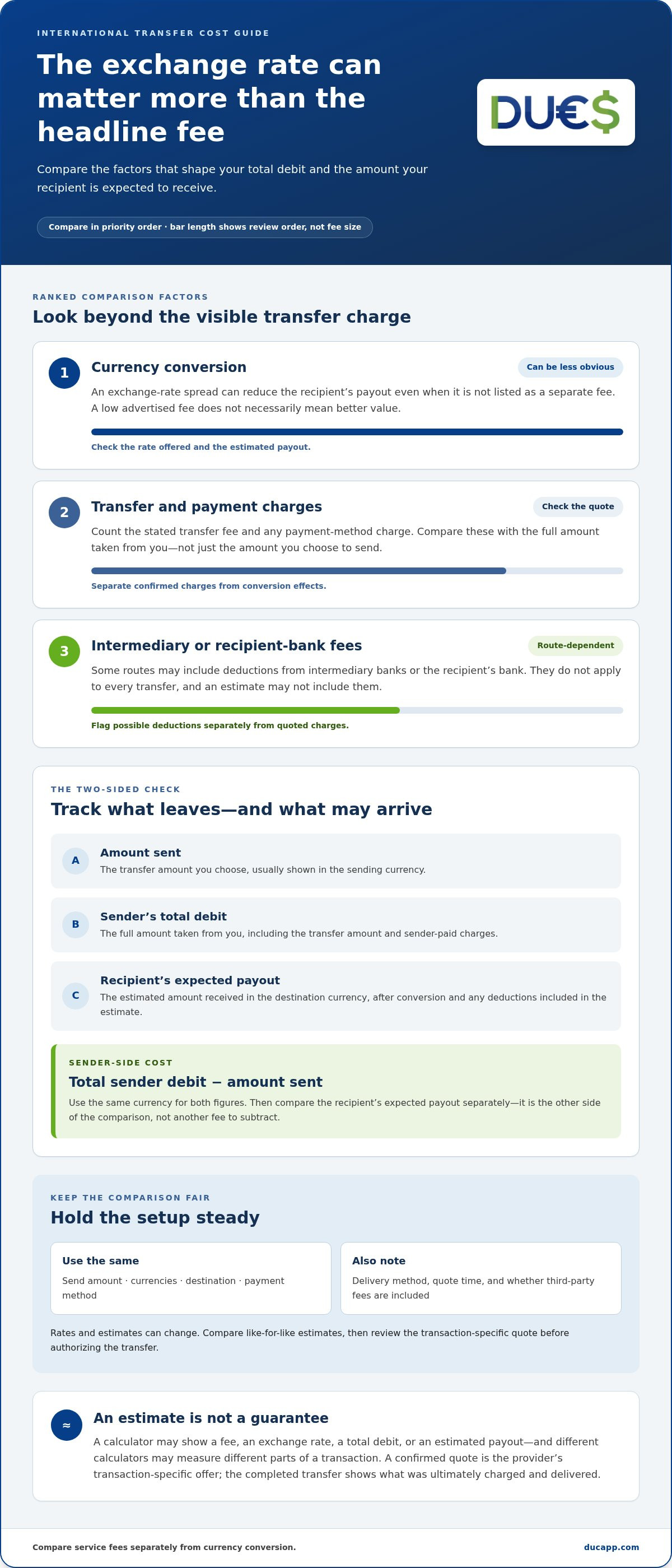
Keep these three figures separate:
- Amount sent: The amount you choose to transfer, usually shown in the sending currency.
- Sender’s total debit: The full amount taken from you, including the transfer amount and any charges paid by the sender.
- Recipient’s expected payout: The estimated amount the recipient will receive in the destination currency, after conversion and any deductions included in the estimate.
These figures answer different questions. Your total debit shows what leaves your side; the payout shows what may arrive. Compare both, not just the headline fee. Charges and exchange rates can vary by provider, route, and payment method, so an estimate for one setup may not match another.
What does an international transfer fee calculator estimate?
Calculators don’t all measure the same parts of a transaction. One may show an upfront service fee and an exchange rate. Another may focus on the rate for a card purchase without estimating transfer charges or the recipient’s payout. A wire-transfer estimate may show sending costs but not every deduction along the route. For context on how wire transfers work, including international transfers and SWIFT, see Understanding Wire Transfers.
Check whether the result represents a fee, an exchange rate, your total debit, or the recipient’s estimated amount. A calculator uses the inputs and information available at that moment. A confirmed quote is the provider’s transaction-specific offer before you authorize the transfer. The completed transfer shows what was ultimately charged and delivered. These figures aren’t interchangeable.
Why the lowest transfer fee may not mean the lowest cost
A low upfront fee can be offset by a less favorable exchange rate. Imagine two options for the same amount and destination. Option A advertises a smaller transfer fee, but its exchange rate gives the recipient fewer units of the destination currency. Option B charges a higher fee but produces a larger estimated payout. The headline fee alone can’t tell you which option offers better value. Compare the total debit and expected payout side by side.
There may also be deductions outside a calculator’s view. On some routes, intermediary banks or the recipient’s bank may charge fees that reduce the amount received. These charges don’t apply to every transfer, and an estimate may not include them. For a fair comparison, use the same amount, currencies, destination, and payment method. Then note whether each estimate includes conversion and possible third-party fees.
How to calculate the full cost of an international money transfer
Use two checks. First, work out what the transfer costs you beyond the amount sent. Then compare what the recipient is expected to receive. This keeps visible charges separate from conversion effects and possible deductions along the route.
Sender-side cost = total sender debit − amount sent. Use the same currency for both figures. Then compare the estimated recipient payout in the destination currency. The payout isn’t another fee to subtract from your debit; it’s the other side of the comparison.
Plain-language definition: Total transfer cost is the extra amount you pay to send money, considered alongside how much the recipient is expected to receive.
Which costs belong in the comparison?
Start with the charges shown in the estimate. Include the stated transfer fee and any payment-method charge. Next, examine currency conversion. An exchange-rate spread is the difference between a reference rate, such as the mid-market rate, and the rate offered for your transfer. It can affect the payout even when it isn’t shown as a separate fee.
Some routes may also involve intermediary or recipient-bank charges. These depend on the route, and an estimate may not include them. Keep possible third-party deductions separate from confirmed charges: record what the quote shows, then note what could affect the final amount.
How to compare sender debit with recipient payout
Hold the inputs steady: use the same send amount, destination, currency pair, and payment method. Keep the delivery method consistent where possible, too. Otherwise, differences between estimates may come from the setup rather than the transfer’s underlying cost.
For each option, record the total amount paid and the expected amount received. Note when you viewed the quote and the delivery method. Exchange rates and estimates can change, so comparisons made at different times may not be directly equivalent. Before authorizing a transfer, review the transaction-specific quote and check that the debit and payout still match your expectations.
Hypothetical example: compare both sides
Illustration only. These are not provider prices or exchange rates. Imagine comparing two options for the same transfer. Option A displays a lower transfer fee, but its exchange rate produces a smaller estimated payout. Option B displays a higher fee, but the recipient’s estimated payout is larger. Compare each option’s total debit with the amount sent to understand your direct cost, then compare the payout estimates. If a possible bank deduction is excluded from one quote, flag it separately rather than treating the estimates as complete.
An international transfer fee calculator is most useful when it supports a like-for-like comparison, not when it simply highlights one fee. Apply the same checks to international remittance and peer-to-peer transfer options, including DUC App transfers, and weigh service charges separately from currency conversion.
Compare international transfer calculators by what they actually measure
Calculator results can look similar while answering different questions. One may estimate charges for a bank wire, another may show a remittance provider’s transaction quote, and a card tool may focus on currency conversion. An international transfer fee calculator is useful for comparison only when you know what its result includes.
| Calculator type | What it measures | What it may omit | Best use |
|---|---|---|---|
| Wire-transfer calculator | Potential bank-transfer charges and, depending on the tool, route details. | Some intermediary or recipient-bank deductions, or the final amount delivered. | Reviewing a bank wire’s estimated charges and transfer route. |
| Remittance-provider calculator | A specific provider’s estimate for the entered amount, currency pair, destination, and transaction choices. | Costs outside that provider’s estimate, including route-dependent third-party charges. | Checking the provider’s expected debit and recipient payout for a particular transfer. |
| Card exchange-rate calculator | An indicative currency-conversion rate for card use. | Transfer fees, other transaction charges, and the complete remittance payout. | Understanding a card-related conversion estimate, not pricing a full money transfer. |
Use the table to understand each tool’s scope, not to rank providers. A calculator with a detailed rate may still leave out charges that another tool includes. Before comparing results, identify what amount each one represents and whether it shows the recipient’s payout or only a fee or rate.
Wire-transfer and remittance calculators: different transaction contexts
A wire calculator can help you examine bank-transfer charges and route information. A remittance calculator gives an estimate for a particular provider and may respond to the destination, payment choice, or delivery method you enter. Neither automatically captures every possible deduction. If an intermediary or recipient bank could be involved, treat its charge as route-dependent unless it appears in the estimate.
A currency-conversion calculator estimates a rate; a full transfer-cost calculator estimates the transaction around that rate. This distinction helps prevent a rate-only result from being mistaken for the amount a recipient will receive.
Currency-conversion calculators: useful, but not the whole picture
A conversion tool can show how one currency translates into another at an indicated rate. For example, Visa’s exchange-rate calculator is card-focused. It can help estimate conversion for Visa card use, but it doesn’t price a complete remittance or bank wire by itself. Don’t treat it as a quote for every type of transfer.
To use a rate estimate in a broader comparison, pair it with the relevant transfer and payment charges, then look for the expected recipient payout. Keep the amount, currency pair, and transaction context aligned. If the rate tool and transfer estimate use different assumptions, their outputs won’t make a reliable like-for-like comparison. First check what each tool measures, then identify any missing information.
Use this checklist to compare transfer estimates with confidence
A useful comparison requires each estimate to use the same setup and measure the same things. Use this checklist to align the details, spot gaps, and compare the figures that matter before deciding.
- Match the inputs. Enter the same send amount, destination country, sending currency, and receiving currency for each estimate. Use the same payment method and delivery option wherever available. Changing any of these can change the result, so estimates with different settings aren’t directly comparable.
- Review the full cost. Identify what the displayed fee covers and whether the estimate includes a payment-method charge or exchange-rate information. Record the total debit if it’s shown. A missing line item doesn’t prove the cost is zero; it may fall outside the calculator’s scope.
- Check the payout. Find the amount the recipient is expected to receive and the currency it’s displayed in. If the estimate shows only a fee or conversion rate, mark the payout as unavailable rather than assuming a figure.
- Check the quote details. Note when you generated each estimate and whether the result is indicative or a transaction quote. Record any stated quote-validity information. Rates and estimates can change, so refresh the figures before sending.
Which details should stay the same across estimates?
Keep the send amount, destination country, and currency pair consistent. Match the payment method and delivery option, too, since a different way to pay or deliver can produce a different estimate. If one calculator doesn’t include an option, note the difference instead of treating the results as an exact comparison. Record when you viewed each estimate and any stated validity period.
How to spot an estimate that leaves questions unanswered
First identify what the displayed figure means. Is it a transfer fee, an exchange rate, or the total amount paid? Does it show the expected payout, and is that payout in the destination currency? If a key detail is missing, label it as unknown. Don’t fill the gap with an assumption or interpret it as a free service.
Use this template to capture the results side by side. Fill in the details each estimate provides and mark missing information clearly.
| Option | Debit | Fees | Rate | Payout | Timing |
|---|---|---|---|---|---|
| Estimate A | |||||
| Estimate B |
Use the debit and payout columns to compare what leaves your account with what’s expected to arrive. Fees and rate help explain the difference; timing ties each estimate to when it was generated. An international transfer fee calculator can support the process, while your notes make the calculator’s scope visible. To review an international transfer option, explore transfers with DUC App.
How DUC App fits into an international transfer cost comparison
Apply the same comparison method to DUC App and other options. DUC App supports international remittances and peer-to-peer transfers. Focus on the details of the transfer you’re considering rather than assuming one option is always the cheapest.
Keep the two main cost factors distinct. A service fee is a charge for the transfer; currency conversion affects how much the recipient receives in their currency for the amount sent. Look at both, then compare your total debit with the expected payout. An international transfer fee calculator can help organize an estimate, but use the transaction details shown for the specific transfer rather than assuming a result applies to every route or payment choice.
What to consider when assessing a DUC App transfer
Use the same comparison method you’d use for any transfer. Record the sender debit, service fees shown, the conversion rate or amount after conversion, and the expected payout. If a figure isn’t displayed, don’t assume it’s zero or fill it in with a guess. Review the transaction details before deciding.
DUC App supports payment methods including Visa, Mastercard, Apple Pay, Google Pay, SEPA, and Interac. These options belong in your comparison, but they don’t necessarily have identical charges or conversion terms. Keep the selected method consistent when comparing estimates, and use the quote for that specific setup. Compare figures that match the transaction you plan to make.
Choose your next step based on the transfer you need
For a peer-to-peer transfer, focus on your total debit and the amount the other person is expected to receive. If the transfer involves currency conversion, account for its effect on the payout rather than looking at a service fee alone. That gives you a clearer basis for assessing the transaction.
For a Cuba-related sending need, compare the destination, currencies, payment method, displayed charges, and expected amount received. Destination-specific details matter, so base your decision on the transaction information for that route rather than assuming another corridor’s estimate applies.
DUC App supports both international remittances and peer-to-peer transfers. Review the details that matter for your payment, then explore DUC App transfer options.
Make your next transfer decision with confidence
Before you send, decide what matters most for this payment: keeping your total debit within a budget, meeting a specific recipient payout goal, or choosing a payment method that suits you. That priority gives your comparison a clear purpose and helps you avoid focusing on a low headline fee that doesn’t fit the transfer you need.
Keep your notes for future transfers, but treat each new estimate as a fresh decision. Amounts, destinations, and payment choices can change, so an international transfer fee calculator is most useful when you revisit the details for the transaction in front of you. Make your final choice with the recipient’s needs in mind, not just the first number you see.
Ready to explore an option for your next transfer? Explore DUC App’s international transfer options.
Frequently Asked Questions
How do I calculate the total cost of an international money transfer?
Subtract the amount you intend to send from the total debit shown for the transaction to find the extra sender-side cost. Then check the expected payout separately. If your goal is for someone to receive a specific amount, compare quotes set up to deliver that amount, not just quotes based on sending the same amount. This helps you plan around the recipient’s actual need.
Does an international transfer fee calculator include the exchange-rate markup?
It depends on the calculator. Some show an offered exchange rate without explaining how it compares with a reference rate, while others provide more detail. If both rates are available, compare them using the same currency pair and quote time. If only one rate appears, don’t assume there’s no markup. Treat it as the rate used for that estimate, then compare the expected payout with other quotes.
Why does the recipient receive less than the amount I sent?
The amount you enter may be in your sending currency, while the payout is shown in the recipient’s currency. Conversion changes the numerical amount, and some transfers may also have charges deducted along the route or by the receiving bank. Check whether the quote says the recipient gets a fixed payout or whether the payout is calculated from your send amount. That can explain why the figures don’t match.
Can international transfer fees change by payment method?
Yes. A provider may show different charges or conversion terms depending on how you fund the transfer. For instance, a quote using a card may not match one using a bank-based payment method. If you switch methods after comparing estimates, review the updated quote rather than relying on the earlier figure. The method may also affect the delivery choices or the amount shown for the recipient.
Is an exchange-rate calculator the same as an international transfer fee calculator?
No. An exchange-rate calculator estimates how one currency converts into another; it may not account for the charges or transaction details of sending money. A transfer calculator may provide a broader estimate, but its coverage still varies. Use a rate-only tool to understand conversion, not as a complete transfer quote. To assess a transaction, look for an estimate tied to the specific amount, route, and payment setup.
Are international transfer fee calculator results guaranteed?
No. An international transfer fee calculator provides an estimate based on the details and rates available when you use it. The figure can change if you adjust the amount, payment method, destination, or delivery choice, or if the quote is refreshed later. Before proceeding, review the transaction-specific details presented for approval. Confirm that the debit and expected recipient payout still fit your plans.
What information do I need to compare international transfer fees?
Have the exact amount, sending currency, receiving currency, destination country, payment method, and delivery choice ready. Note whether you want to send a fixed amount or have the recipient receive a set amount, since those are different quote scenarios. Save the time you checked each estimate and any stated validity information. For a peer-to-peer transfer, make sure you’re comparing the same recipient payout goal across options.


