

Can you pay anyone using just an email address, without knowing their bank details? An email payment service uses the address to identify the recipient, while the platform processes the transaction. Money doesn’t travel through email itself. A typo can direct a payment to the wrong recipient, and the recipient’s next steps depend on the service’s payment flow.
Before sending, check the recipient’s details, your funding method, any fees or currency conversion, and the transaction summary. These checks help you understand exactly what you’re authorizing.
This guide explains how email payments work, what to review before sending, and how recipient setup or acceptance can vary by service. It also explains how DUC App’s email payments fit alongside peer-to-peer transfers and international services.
Key Takeaways
- Learn how you can pay anyone using just an email, and why the address identifies the recipient rather than carrying the payment.
- See how DUC App email payments fit alongside its peer-to-peer transfer options.
- Compare email-based payments with other digital payment methods by looking at recipient details, funding, fees, currency, and recipient actions.
- Use a pre-send checklist to review the transaction details before you authorize a payment.
- Weigh the convenience of email-based recipient details against the payment requirements and costs that matter to you.
What does it mean to pay anyone using just an email?
Paying someone using an email address means entering it in a payment service to identify the intended recipient. The email is an identifier, not the payment method: you still choose how to fund the transaction and authorize it.
This can save you from exchanging some account details, but an email address alone doesn’t deliver money. The service processes the transaction, and its payment flow determines what happens next. Check the recipient and transaction information before approving the payment.
How an email address can identify a payment recipient
A payment service uses the email address to match your payment with a recipient profile or a way to receive funds. That’s separate from how you pay. Depending on the service, you might fund the transaction with a card or another supported method. The recipient may need an account or have to take another step to receive the payment.
- Recipient identification: The email tells the service who you intend to pay.
- Funding: You select an available payment method for your side of the transaction.
- Receiving: The service’s rules determine whether the recipient needs to enroll, accept, or claim the funds.
The exact sequence depends on the service. An email address isn’t automatically a destination for money, so read the payment flow to understand what you and the recipient need to do.
When email payments may be useful
Email payments can be useful for everyday peer-to-peer transactions, such as splitting a shared expense, paying someone back, or sending money to a person whose account details you don’t have. If both people can use the same service, an email may be simpler to exchange than a longer set of account or routing details. The service still needs to support the payment and match the recipient correctly.
This approach is familiar in some markets. For example, Interac e-Transfer is a Canadian email money transfer service. Email can help identify or notify the recipient, while a payment system handles the transfer.
Before choosing this method, consider whether the recipient can use the service, which funding options are available, and what transaction details the service displays. DUC App offers email payments alongside peer-to-peer transfers. Its P2P money transfer app guide explores how app-based transfers fit into a broader set of payment options.
You can pay anyone using just an email only when the payment service supports the recipient and transaction. Treat the address as a convenient identifier, then review the payment flow to understand what you and the recipient need to do.
How to make an email payment with DUC App
DUC App offers email payments alongside peer-to-peer transfers. Follow the current in-app prompts, since screen labels and recipient steps can differ by payment flow. In general, select the email-payment option, enter the requested details, review the transaction, and authorize it only when everything is correct.
Prepare the recipient and payment details
Get the recipient’s email directly from them, then check the spelling, punctuation, and domain. A small typo can point to a different address. Decide how much you intend to send and in which currency. Enter the recipient information requested in the app, and follow the prompts to complete the payment.
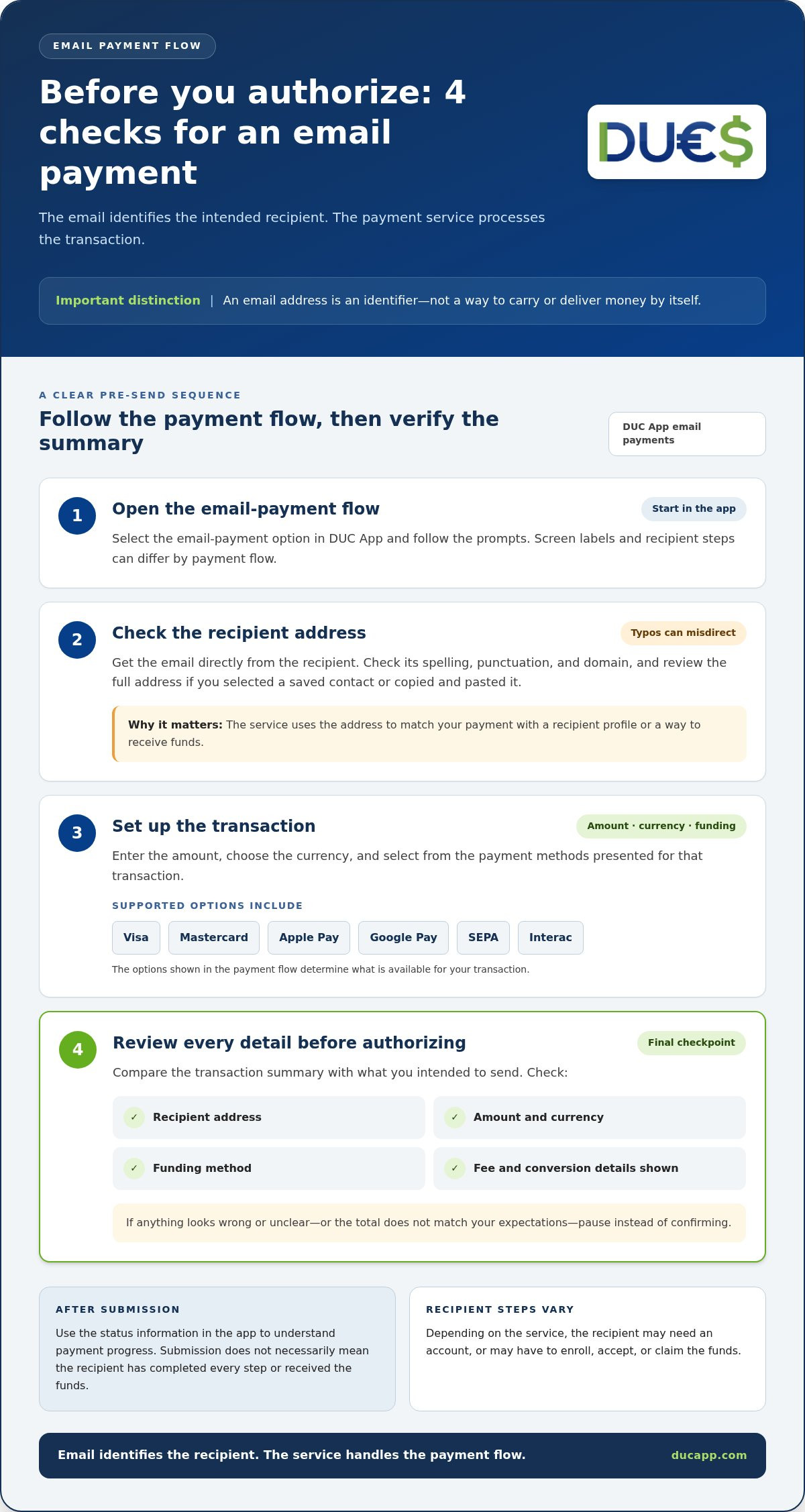
- Open the payment flow. In DUC App, select the email-payment option and follow the prompts in the app.
- Enter the recipient details. Type the email address carefully. Review the full address before continuing, especially if you selected a saved contact or copied and pasted it.
- Set up the transaction. Enter the amount and choose from the payment methods presented for the transaction. DUC App supports options including Visa, Mastercard, Apple Pay, Google Pay, SEPA, and Interac. Review the options shown in the payment flow.
- Review before authorizing. Check the recipient, amount, currency, funding method, fee, and any currency-conversion information displayed. Compare the summary with what you intended to send. If anything looks wrong or unclear, pause instead of confirming.
Review and authorize the payment
The review step is your final chance to catch a mismatched address, unexpected currency, or unintended funding choice. Read any displayed fee and conversion information alongside the amount. If the total or payment details don’t match your expectations, pause until you understand the figures shown in the app.
Once you’ve checked the details, follow the app’s authorization prompt to submit the transaction. Use the status information the app provides to understand its progress. Don’t assume that submission means the recipient has completed every step or received the funds. Recipient actions and payment progress depend on the service’s flow.
To explore DUC App’s email payments and peer-to-peer options, visit DUC App. Before authorizing, use the address and transaction summary as your final checkpoint.
How to compare email payments with other ways to send money
Email payments are one way to identify a recipient, not a guarantee that a transfer suits every situation. Compare the full payment flow, from the details you need to enter to the amount and currency the recipient can receive. Availability, timing, fees, and recipient actions vary by service and transaction.
Use this framework to compare email identification, account-based details, and other app-based peer-to-peer options:
| Factor | Email identification | Account-based details | Other app-based P2P |
|---|---|---|---|
| Recipient information | An email address, if the service supports it | Account details requested by the sending method | A detail or contact method supported by the app |
| Funding method | Options offered by the payment service | Options supported for the account or transfer | Options available within the app |
| Fees | Check charges shown for the transaction | Review applicable transfer or service charges | Review the app’s displayed charges |
| Currency handling | Check whether conversion applies and what is displayed | Confirm the sending and receiving currencies | Review supported currencies and conversion details |
| Recipient actions | May depend on the service’s payment flow | May depend on the receiving account and transfer method | May depend on the app and recipient setup |
This is a comparison framework, not a promise that every method supports every recipient or route. A domestic payment and a cross-border transfer can involve different availability, currency handling, and requirements. Review the details shown for the specific payment you plan to make.
Which details matter most when choosing a payment method?
Start with compatibility: can you fund the payment using an available method, and can the recipient receive it through the selected service? Then compare the displayed service fee and any currency-conversion information before authorizing. For an international payment, check that the route and currencies are supported in the payment flow rather than assuming a familiar option works across borders.
Compare recipient details, funding options, displayed fees, currency handling, and any recipient steps before choosing a method.
Where DUC App fits among digital payment options
DUC App offers email payments alongside peer-to-peer transfers, giving you more than one digital payment option. Payment methods include Visa, Mastercard, Apple Pay, Google Pay, SEPA, and Interac. Review the options and transaction information presented for your payment. For a wider look at mobile payment tools and their features, the secure digital wallet app guide covers how digital wallets fit into everyday finance.
If your goal is to pay anyone using just an email, weigh the convenience of email-based identification against recipient requirements and the complete transaction details. Choose the method that matches your recipient, funding method, and payment needs.
What to check before sending money to an email address
A quick pause before authorization can catch errors that are easy to miss while entering payment details. Check the recipient address first, then confirm exactly what you’re sending and how it will be funded. Follow the service’s on-screen instructions and transaction terms. Don’t assume a payment can be canceled or recovered after submission.
How to reduce mistakes when entering an email
Use the address the intended recipient gave you. If you copy and paste it, compare the pasted version with the original before continuing. Check every character, including dots, hyphens, numbers, and the part after the @ symbol. A typo could identify another recipient or prevent the service from matching the person you intended to pay.
If the request is unexpected or the payment is unusual, confirm the address through a separate, trusted communication channel, such as a phone number you already have for the person. Don’t rely only on a new message repeating the payment details. This extra check can help catch mistakes or a request that doesn’t match what you expected.
What to review before confirming
Before authorizing, compare the payment screen with your original intention. Check the recipient details, amount, currency, and selected funding method. Then read the fee and any currency-conversion information displayed for that transaction. Don’t infer the final cost from another payment, since details may differ by service or transaction.
- Recipient: Does the full email address match the one you intended to use?
- Amount and currency: Is the amount right, and is it in the currency you meant to send?
- Funding method: Is the selected card or other payment option the one you intended?
- Fees and conversion: Have you reviewed the charges and exchange information shown for this payment?
- Terms and instructions: Do you understand the information the service presents before authorization?
Read the complete transaction summary, not just the prominent amount. If a detail is unfamiliar, inconsistent, or unclear, pause and review the service’s instructions and terms. A familiar recipient name may help orient you, but it shouldn’t replace checking the actual address and payment details.
After submitting, review any transaction confirmation or record available in the app and keep it with your payment records. Use the status or instructions the service provides. Don’t assume a particular notification, delivery time, or cancellation option. If you spot an error, follow the service’s displayed guidance rather than assuming the transaction can be reversed.
These checks help you pay anyone using just an email with a clearer understanding of the payment you’re authorizing. To explore DUC App’s email payment option, visit DUC App and review the transaction details presented for your payment.
Is DUC App the right way to pay someone using just an email?
DUC App suits people who want an email-payment option within a broader digital payment platform. It also offers peer-to-peer transfers, so you can consider which payment flow matches the transaction. The right fit depends on the recipient, the payment purpose, and the details presented before you authorize. An email address can simplify recipient identification, but you still need to review requirements, funding options, fees, and currency information.
Consider the type of payment you’re making. Sending money to another person is different from paying for a purchase or major recurring commitment—such as handling tenancy obligations through Rentify to pay via card or flexible installments. Choose the flow that matches the transaction, then read its instructions and terms. If the recipient needs to take a step or a particular payment method is required, account for that before proceeding.
A quick checklist for deciding whether it fits
Use this checklist to assess whether DUC App’s email payment option aligns with your needs. Review the transaction itself, not just the convenience of entering an email address:
- Recipient and payment: Does the email-payment flow fit the intended recipient and purpose of the payment?
- Funding: Is a payment method shown in the app suitable for funding this transaction?
- Charges and currency: Have you reviewed the fees and any conversion information displayed for this payment?
- Transaction type: Is this a peer-to-peer transfer, or a different kind of payment with its own requirements?
- Recipient steps: Do the service’s displayed instructions explain what the recipient may need to do?
If any detail doesn’t match your expectations, pause and review it before authorizing. A payment method is useful only if it works for both sides of the transaction and the terms are clear to you.
What to expect from DUC App’s broader payment platform
Email payments are one part of DUC App’s digital financial technology platform. Its offerings also include peer-to-peer transfers, international top-ups, and gift cards. This range lets you consider different digital services in one platform, while keeping in mind that each transaction has its own details and requirements.
DUC App is a financial technology platform, not a traditional bank. Its available payment methods include Visa, Mastercard, Apple Pay, Google Pay, SEPA, and Interac. Review the options shown for your particular transaction rather than assuming every method applies to every payment. Email payments are distinct from other ways a recipient might receive money, so follow the flow and terms presented for the service you’re using.
If email-based recipient details and peer-to-peer payment options match what you need, get started with DUC App. Review the recipient information, funding choice, charges, and transaction details in the app before authorizing a payment.
Make your next payment choice with confidence
An email address can make a payment feel simpler, but choose a method that suits both you and the recipient. Check who the payment is for, understand the details on screen, and authorize only when they match your intention. Convenience shouldn’t replace informed decision-making.
DUC App brings email payments together with peer-to-peer transfers. Payment methods include Visa, Mastercard, Apple Pay, Google Pay, SEPA, and Interac. Review the available choices and transaction details to see how they fit your needs.
Ready to explore whether you can pay anyone using just an email through a payment flow that works for you? Get started with DUC App and review the transaction details before you authorize.
Frequently Asked Questions
Can I pay someone using only their email address?
Some services let you pay anyone using just an email address as the recipient identifier, but only through a supported payment flow. You still need to authorize the transaction through the service. Typically, you enter the recipient’s email, choose a funding option, and review the payment before approval. The recipient may also need to complete steps on the platform, so read the instructions before sending.
Does the person receiving an email payment need an account?
Whether a recipient needs an account depends on the payment service and the transaction flow. A valid email address doesn’t automatically mean funds can be received at that address. For a DUC App email payment, follow the instructions shown in the payment flow and make sure the recipient details match the person you intend to pay. Account for any recipient steps before authorizing.
Can I send money internationally using someone’s email address?
An email address alone doesn’t establish that an international payment is available. The service, destination, currency, and payment route can all affect how the payment works. DUC App offers international services. Before authorizing, review the destination and currency details on the transaction screen, along with any fee and conversion information displayed for that payment.
How much does it cost to pay someone by email?
There’s no universal fee for paying by email. Charges depend on the service and transaction. DUC App applies service fees, and currency-conversion spreads may matter when a payment involves conversion. Review the charges and conversion information displayed for your specific payment, then decide whether the amount and terms work for you before authorizing.
Is paying someone by email the same as sending money through a bank?
No. An email-payment flow may use an email address to identify the recipient, while a bank transfer typically uses banking details or a bank-specific process. Email payments don’t necessarily bypass banks or other payment networks behind the scenes. Compare the service’s instructions, available funding method, displayed fees, and recipient requirements to choose a method that fits the payment.
What should I do if I entered the wrong email address?
If you’ve submitted the payment, check its status in the app and follow the service’s instructions promptly. What happens next depends on whether the payment was submitted and on the service’s transaction rules. Don’t assume cancellation, reversal, or recovery is available. If you haven’t authorized it yet, correct the address before proceeding. For future payments, compare the full email with a trusted source before confirming.
Can I use a credit card to make an email payment?
DUC App supports Visa and Mastercard among its payment methods. Check which funding options appear for your transaction, then review any displayed fee before confirming. If your preferred card isn’t shown, use an option presented for that payment.


