

When you send money to Cuba using a debit card, your card is the way you pay for the transfer. It does not determine how the recipient receives the value. Keep those two choices separate: first review the payment method, then check the recipient option shown for the transfer.
Before authorizing a payment, look at the amount charged to your card, any displayed fee, and the recipient outcome. DUC supports Visa and Mastercard among its payment methods. Your card issuer may also require authorization or authentication before approving a transaction.
This guide explains how debit-card-funded transfers work and what to review before sending. Use the practical checks below to verify recipient details, compare the transaction summary with your intention, and distinguish a money transfer from a mobile top-up.
Key Takeaways
- When you send money to cuba using debit card, treat the card as the funding method and review the recipient delivery option separately.
- Follow the transfer flow: select the destination, enter the requested recipient details, and choose a payment method shown in the flow.
- Before authorizing payment, compare the sender and recipient information in the form with the details you intend to use.
- DUC supports international transfers and peer-to-peer payments, with Visa and Mastercard among its payment methods.
What Does It Mean to Send Money to Cuba Using a Debit Card?
To send money to Cuba using a debit card means using the card to pay for a transfer. It does not tell you how the recipient will receive the money. The payment method is on the sender’s side of the transaction; the delivery option is selected separately.
In plain language: your debit card pays for the transfer, while the selected delivery option determines how value reaches the recipient. Review both before authorizing. Check the charge to your card and the recipient outcome shown in the transfer summary so you know what you are paying and what the recipient is meant to receive.
How debit-card funding differs from recipient delivery
A debit card authorizes payment from your account. The transfer service processes that payment as funding for the transaction. The recipient option is a separate part of the transfer flow. Paying by card does not mean the recipient receives money on a debit card, and it does not mean the transfer is for cash pickup.
For example, you might select Visa or Mastercard as the payment method, then review the recipient option presented in the transfer flow. These choices have different roles. Check the destination details and the stated recipient outcome rather than assuming the card brand determines delivery.
Cuba also has a distinct regulatory and historical context. The United States embargo against Cuba helps explain why financial dealings with Cuba can involve particular restrictions and complexities. Rules and route availability can change. Review the details for your transfer and make sure the intended recipient and purpose fit the applicable requirements.
Who may find this payment method useful?
A debit-card transfer can suit someone who prefers to pay digitally by card. To assess whether it fits your needs, compare the total charge shown for the transfer with the recipient outcome. Review any fee and conversion information displayed, then make sure the payment method and delivery option match your plan.
This check can help when you are sending support to family or friends in Cuba. A payment that looks straightforward from the sender’s side can still cause confusion if the recipient outcome is not what you expected. Before confirming, verify the destination, recipient information, payment amount, and delivery option shown on screen.
A money transfer is different from a mobile top-up. A transfer provides value through the recipient option shown in the transfer flow. A phone recharge adds mobile credit or service to a number. If your goal is to add credit to a Cuban mobile phone, use the Cubacel recharge guide to understand that separate process.
How a Debit-Card-Funded Transfer to Cuba Works
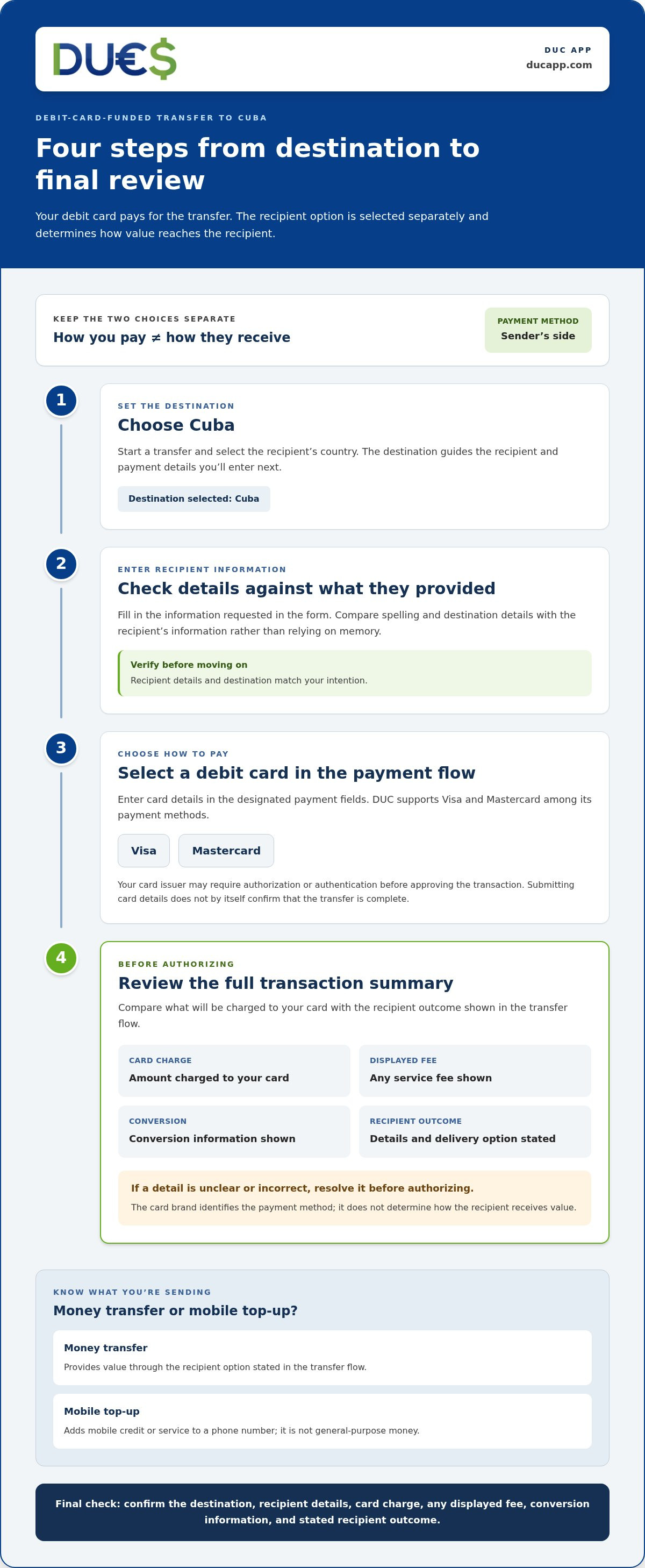
A digital transfer generally follows a clear sequence: set the destination, enter recipient information, choose a payment method, and review the transaction before paying. Use the steps below as a practical guide, and follow the instructions shown in the transfer flow. For wider context on available approaches, see this Cuba transfer guide.
- Choose Cuba as the destination. Start a transfer and select the recipient’s country. The destination guides the recipient and payment details you will enter.
- Enter recipient details. Fill in the information requested in the form. Compare spelling and destination details with what the recipient provided, rather than relying on memory.
- Select a payment method. Choose a debit card in the payment flow and enter its details in the designated fields. DUC supports Visa and Mastercard among its payment methods.
- Review and authorize. Check the amount charged, any displayed fee, conversion information, recipient details, and stated delivery option before confirming.
What to expect when entering debit-card details
Your card issuer may request authorization or authentication before approving a payment. The process depends on the issuer and transaction. Enter card information only in the service’s intended payment flow. Before proceeding, check that the amount and recipient details match your expectations. Submitting card details does not by itself confirm that the transfer is complete.
What to review before authorizing the transfer
Review the transaction summary as a whole. Confirm the amount charged to your card and any displayed service fee. Then check the conversion information and the recipient outcome shown for the transfer. Make sure the recipient details are correct before proceeding.
The final summary is your last chance to compare what leaves your account with what the recipient is meant to receive. If a detail is unclear or incorrect, stop and resolve it before authorizing the payment. U.S.-related transfers to Cuba can involve specific restrictions; the U.S. Treasury’s OFAC Cuba Sanctions page provides official information about the applicable sanctions framework.
Debit card versus bank transfer or credit card
A debit-card payment draws on available account funds, subject to your card and issuer terms. It can be convenient if you prefer paying by card and want to review the transfer details in one flow. A bank transfer uses a different funding path and may involve different steps. A credit card is another possible funding method, but its terms and potential charges depend on the card issuer. There is no universal best choice. Compare the options available to you and consider your own circumstances. For a closer card-funding comparison, review the credit-card transfer guide.
Money transfer versus Cuban mobile top-up
A money transfer provides value through the recipient option stated in the transfer flow. A mobile top-up adds phone credit to a mobile account; it is not general-purpose money. Choose based on what the recipient needs. If a digital transfer fits your plans, explore the available options in DUC’s transfer platform and review the transaction summary before you authorize.
Before You Send: A Debit Card Transfer Checklist
A short review can catch mistakes before a Cuba-bound payment is authorized. Check the sender information, recipient and destination, amount, payment details, and final transaction summary. Each check answers a practical question: Is the information accurate, and does the transfer still match what you intend the recipient to receive?
- Sender: Check that your account and personal details are entered correctly. If the payment flow requires a card in the sender’s name, make sure the card matches.
- Recipient: Compare the recipient’s name and destination details with the transfer form and the information they provided. Check every character, especially in account, card, or other receiving details requested for the selected method.
- Amount: Confirm the amount you are sending and the amount or outcome displayed for the recipient. If conversion applies, do not assume the two figures will be identical.
- Payment: Review the selected card and its details, and make sure sufficient funds are available. Read the fee and conversion information displayed for this transaction.
- Final confirmation: Review the destination, recipient, payment amount, charges, and stated delivery option together before authorizing.
Check your card and payment information
Enter card details only in the payment flow for the transfer. Never share full card numbers, security codes, or other sensitive payment information in messages or public content. If a payment is declined, follow the guidance shown in the app and any instructions from your card issuer. Avoid repeated attempts until you understand what needs attention.
Card issuer terms can affect payment authorization. Check that the card details are current and that the available funds cover the displayed charge. If the payment flow asks you to match cardholder and sender details, compare the fields before submitting to avoid a preventable mismatch.
Check recipient details and transfer summary
Match the recipient’s information to the receiving method selected in the transfer. The form may request different details for different methods, so use the fields shown for your selected option. Then review the summary, including the amount charged, any displayed fee, conversion information, and stated recipient outcome. Do not proceed if the summary conflicts with what you agreed with the recipient.
Before authorizing, confirm the sender, recipient, destination, amount, displayed charges, conversion details, and delivery option. If the service provides a transaction reference or status, save it or make a note after submitting so you can identify the transfer later. Keep that information private and follow the service’s guidance if you need to review the payment.
Ready to put the checklist into practice? Review transfer options in DUC and check the transaction details before you authorize.
Send Money to Cuba with DUC App
DUC is a digital platform for international transfers and peer-to-peer payments. It supports Visa and Mastercard among its payment methods, giving senders a way to fund a transfer digitally. Review the payment and recipient details in the transaction flow so you understand both how you are paying and what the recipient is meant to receive.
A digital route from payment selection to transfer review
Start by following the transfer flow. Select the destination, enter the requested recipient information, and review the transaction details presented. Choose a debit card as the payment method and provide the required details in the payment flow. Follow the instructions shown in the app as you complete each step.
Before authorizing, pause at the transaction summary. Check the amount charged, any displayed fee, conversion details, recipient information, and the stated outcome for the recipient. Make sure the summary matches what you intend to send. Do not infer the timing, exchange rate, or delivery method from the fact that you are paying by debit card. Review the transaction details presented for your transfer.
This final check keeps payment and delivery clear. A debit card funds the transaction; it does not determine how the recipient receives value. Confirm the recipient details and receiving option in the transfer flow before proceeding. If something does not match your instructions or expectations, pause rather than authorizing a transfer with incorrect information.
Choose the right DUC service for your goal
Use DUC’s international transfer or peer-to-peer payment service when your goal is to send money. DUC also offers international mobile top-ups, which serve a different purpose: a top-up adds mobile credit to a phone account. It is not a general-purpose money transfer, so choose the service that matches what the recipient needs.
For a Cuba-bound transfer, use the transaction summary to guide your final review. Check it carefully before confirming, and keep the distinction between card payment and recipient delivery in view. DUC supports Visa and Mastercard alongside other payment methods on the platform.
Ready to review the transfer flow for yourself? Explore DUC App, select the relevant transfer path, and check the payment and recipient details shown before you authorize.
Make Your Next Transfer With Confidence
A clear plan starts before you open a payment screen. Agree with your recipient on what they need, then choose a transaction that matches that purpose. This can help prevent a mismatch between what you intend to send and what the recipient expects.
If you are ready to send money to cuba using debit card, review the transfer details and decide whether a money transfer or a separate mobile top-up fits your goal. DUC offers international transfers and peer-to-peer payments alongside other digital payment services.
Use the transfer flow to check the details for your transaction before authorizing it. Review what you are sending and how the recipient is meant to receive it. Explore DUC App and start your Cuba transfer.
Frequently Asked Questions
Can I send money to Cuba using a debit card?
Yes. You can use a debit card to fund a Cuba transfer through DUC. DUC supports Visa and Mastercard among its payment methods. Select Cuba in the transfer flow, enter the requested details, and review the payment summary and recipient information before authorizing.
Can I use a debit card issued outside the United States to send money to Cuba?
A card issued outside the United States is not automatically accepted for every Cuba transfer. Acceptance can depend on the payment flow and your card issuer. Review the payment options presented after selecting the destination, and consider whether your issuer permits the transaction. Your location and applicable rules may also affect whether a transfer can proceed, so do not rely on card brand alone.
How much does it cost to send money to Cuba with a debit card?
The total cost depends on the specific transaction. A transfer may include a service fee and a currency conversion spread, with the amounts depending on the route and transaction details. Review the displayed charge and conversion information before confirming. Compare the amount charged to your card with the amount or outcome shown for the recipient, and do not estimate the total from another transfer.
What happens if my debit-card payment for a Cuba transfer is declined?
A declined payment means the transaction has not been approved, but the reason may depend on your card issuer or the payment flow. Check for an incorrect or expired card detail, then read any message in the app. If the information looks right, follow your issuer’s instructions about available funds or transaction permissions. Avoid sharing card details in messages, and do not keep retrying without addressing the decline.
Is paying with a debit card the same as sending money directly to a recipient’s card?
No. Paying with your debit card means using it to fund the transaction; it does not establish that the recipient will receive money on a card. Your card might be charged while the transfer flow specifies a different receiving option. Check the recipient outcome shown for the transaction rather than inferring it from the card you use to pay.
Can I use a debit card to send a Cubacel mobile top-up instead of money?
A mobile top-up and a money transfer are different services. A top-up adds phone credit to a mobile account, while a transfer provides value through the recipient option shown in the transfer flow. DUC offers international mobile top-ups as a separate service. If you want to recharge a Cubacel number, choose the recharge process and review the number and top-up details before proceeding.
What details should I check before confirming a debit-card transfer to Cuba?
Check the recipient’s name and destination information against the details they provided, along with the amount, displayed charges, conversion information, and stated receiving option. Make sure the selected card and sender details are correct. If the summary shows a recipient amount or currency, verify that it matches your intention. After submission, keep any transaction reference or status information the service provides for your records.


