

A sent gift card may appear in your purchase history or confirmation email, but access to it later depends on the service you used. To send digital gift cards via email, enter the recipient’s address carefully and save the purchase confirmation.
Email delivery makes gifting quick and convenient, but a mistyped address can send the card to someone else. Expiration terms also vary, so check the card’s details before you buy.
Learn what digital gift cards include, how to verify an email address, and what to check in the card’s expiration policy and available amounts. You’ll also find out how delivery timing works and which purchase details to keep for your records.
Key Takeaways
- Understand how email delivery works, including immediate or scheduled sending and the details a recipient may receive.
- Review the recipient’s email address carefully before sending to reduce the chance of misdelivery.
- Learn what expiration terms to look for and why a gift card’s conditions matter.
- Choose from the amount options shown for the gift card, and consider what to keep for your records after purchase.
What is a Digital Gift Card?
A digital gift card is an electronic gift with value the recipient can redeem. Instead of handing over a physical card, you choose an amount and enter delivery details during purchase. To send digital gift cards via email, enter the recipient’s address and follow the checkout steps. Depending on the card, it may be redeemable online, in a store, or both.
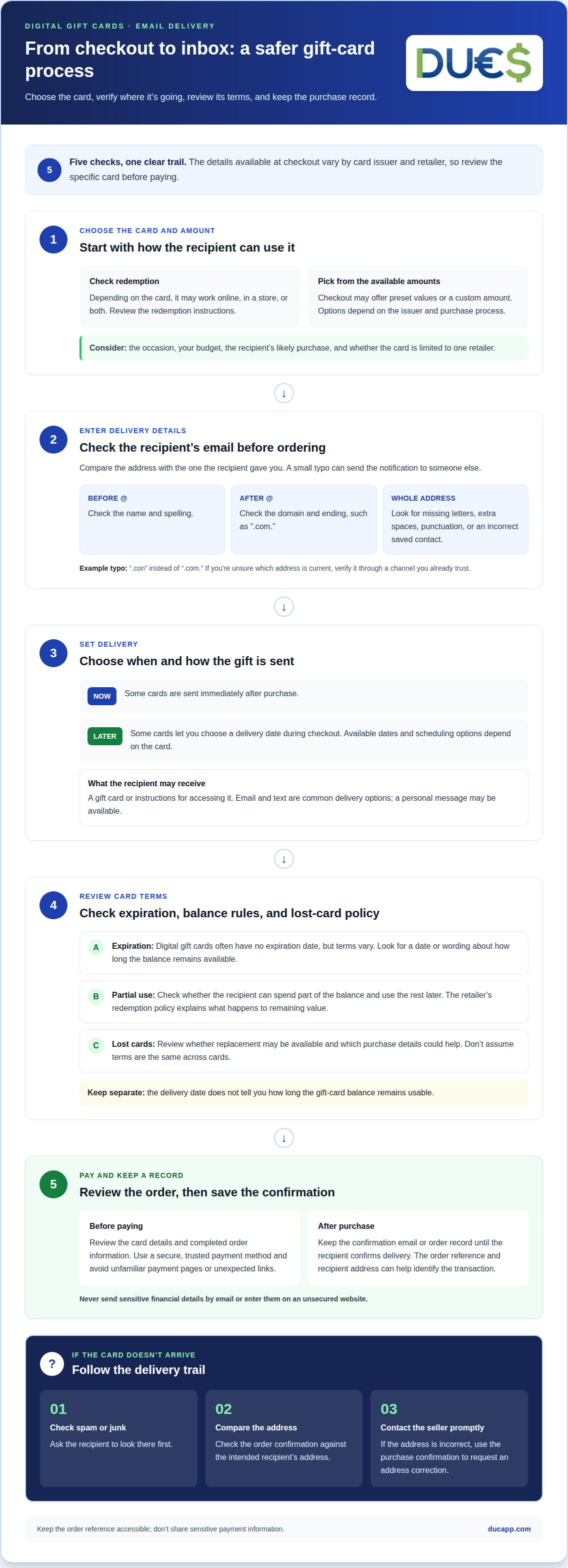
Email and text are common delivery options. At checkout, choose an amount, enter the recipient’s email address, and add a personal message if available. The recipient receives the gift card or instructions for accessing it. If it doesn’t appear, ask them to check their spam or junk folder. Review the email address carefully before placing the order to avoid sending the notification to someone else.
Some digital cards let you schedule delivery in advance. Choose a date during purchase and make sure it suits the occasion and the recipient’s plans. Scheduling can help you prepare a birthday or holiday gift without sending it straight away. Available dates and scheduling options depend on the card’s checkout process.
Email isn’t the only way to present a digital gift. If the card can be printed, the recipient may be able to print it for in-store use. You can also print it yourself and give it in person. Check the redemption instructions first: a printable card may not work at a physical checkout.
Protect your purchase by using a secure, trusted payment method. Don’t send sensitive financial details by email or enter them on an unsecured website. Treat unsolicited requests for personal or financial information as possible phishing attempts. Buy through a trusted channel, review the card details before paying, and avoid unexpected links to unfamiliar payment pages.
Checking the recipient’s email address
A mistyped email address can send the gift card notification to the wrong person. Before placing the order, compare the address with the one the recipient gave you. Check the name before the @ symbol, the domain after it, and the ending, such as “.com.” Even a small typo can change where the message goes.
Watch for errors that autocomplete can hide. If a saved address appears, make sure it belongs to the intended recipient, not someone with a similar name. Check the spelling, missing letters, extra spaces, and punctuation. For example, an address ending in “.con” instead of “.com” may look familiar but is still incorrect. If you’re unsure which address is current, verify it through a channel you already trust.
If an emailed gift card goes to the wrong address or doesn’t arrive, first check the recipient’s spam or junk folder. Then compare the address in your order confirmation with the intended one. If it’s incorrect, contact the seller promptly using your purchase confirmation and request an address correction.
Keep the order confirmation until the recipient confirms delivery. It helps you find the transaction and share relevant details if there’s a delivery issue. Avoid emailing sensitive payment information. The order reference and recipient address are usually the useful details for identifying a purchase.
For future email transactions, enter the recipient’s address directly instead of relying on an old contact entry. Then review the completed order details before closing the checkout page. These simple checks reduce the chance of a delivery error and help recipients get their gift card at the right inbox. If you’re exploring other ways to send funds by email, see email payment options.
Expiration policies
Digital gift cards often have no expiration date, but check the specific card’s terms before purchasing. Look for an expiration date or wording that explains how long the balance remains available. If the terms give a date, save it with the purchase confirmation and share it with the recipient.
Check the card’s conditions, not just the delivery email. The email may explain how to access the gift, while the card terms explain how it can be used. Check whether the recipient can spend part of the balance and use the rest later. If they make a partial purchase, the retailer’s redemption policy explains what happens to the remaining value.
Keep the confirmation email or order record so you can quickly find the purchase details. If the recipient asks about an expiration date, refer to the card’s terms rather than relying on memory or the delivery date. These are separate details: an email arriving today doesn’t tell you how long the card remains usable.
Review the retailer’s policy for lost cards and replacements, too. If the recipient deletes the email or can’t find the card, the terms explain whether a replacement may be available and which purchase details could help. Keep the order reference accessible, but don’t share payment details or other sensitive financial information.
Before buying, check for an expiration date, review the rules for partial use, and note the lost-card policy. Don’t assume the terms are the same across gift cards, even if no expiration date is shown. Read the terms for the specific card and pass along any relevant instructions so the recipient knows how to use it.
Gift amount range
Available amounts depend on the gift card issuer. Some checkout pages offer preset values, while others let you enter a custom amount. Review the options before choosing. If the card is for a specific retailer, consider what the recipient is likely to buy. A card for one planned purchase may call for a different amount than a flexible gift.
Start with the occasion and your budget. For a thank-you, choose an amount that feels thoughtful without stretching your spending. For a major celebration, you could contribute more or coordinate with others. There’s no amount that suits everyone: the right choice depends on your relationship, the occasion, and how the recipient can use the card.
Consider how the recipient can redeem the balance. A card limited to one retailer may suit someone who shops there regularly. A card accepted more broadly may offer greater flexibility, depending on its terms. Check the available amounts alongside the redemption rules: the amount alone doesn’t tell you whether the balance can be used in one purchase or several.
If checkout allows a custom amount, enter it carefully and review the total before paying. If only preset amounts are available, choose the closest one that fits your plan. Options vary by issuer, retailer, currency, and purchase process. Confirm the selected amount in the order summary before completing the transaction.
Keep the amount consistent with the message you send. For example, a note saying “enjoy a meal” feels clearer when the card’s intended use supports that plan. Check the recipient, selected amount, and order summary together before completing the purchase. To choose a digital gift card, explore gift card options and review the available amounts during checkout.
DUC App: Gift cards
DUC App offers gift cards for people who want to choose a digital gift rather than send money directly. After considering delivery details, recipient address, expiration terms, and available amounts, turn to DUC App when a gift card fits your plans. Review the options and select what suits your recipient and occasion. This gives you a practical next step after deciding what kind of gift to send, without treating every gift as the same choice. A gift card may suit a recipient who values choosing how to use it, while a peer-to-peer transfer serves a different purpose. Contact DUC App to discuss gift cards and find the right next step for your needs.
Choose a Thoughtful Next Step
A digital gift can help you connect across distance. Choose the kind of support that suits the person and the occasion: a gift card gives the recipient a choice, a peer-to-peer transfer sends money directly, and an international recharge can help with mobile connectivity.
If you plan to send digital gift cards via email, consider what would make the gift feel personal to the recipient. Then choose the option that fits your intention. DUC App offers gift cards, peer-to-peer transfers, and international recharges, giving you different ways to send value.
Ready to explore the available options? Contact DUC App for help and take the next step with confidence.
Frequently Asked Questions
Can I See What Gift Cards I Have Sent?
Search your email for purchase confirmations and gift card messages, then check the account used to make the purchase. Some sellers keep an order history; others rely on email receipts. Save confirmation messages in a dedicated folder so you can find the details later. If you purchased as a guest, your inbox may be the clearest record.
What Is the Cost of the Service?
The cost of a digital gift card depends on the card and the seller’s checkout terms. Before paying, review the order summary for the card value and any charges shown. Compare the total with your budget, and save the receipt so you can refer to the transaction details later.
How do you send a digital gift card by email?
Choose a digital gift card, select an available amount, and enter the recipient’s email address in the delivery field. Add a personal note if offered, then review the recipient and order details before paying. Keep the confirmation message so you can identify the purchase if you need to look up the transaction.
Which retailers offer digital gift cards delivered by email?
Retailers that sell gift cards online may offer email delivery, but options vary by retailer. Look for digital or e-gift cards in the retailer’s gift card section. Check the redemption terms before buying, especially if the recipient plans to use the card in person. The retailer’s checkout page shows which delivery methods are available.
How much can you load onto an emailed gift card?
The gift card issuer determines the available amounts. Some cards offer preset values, while others allow a custom amount. There’s no universal maximum for every card. Use the amount selector for the specific card, then confirm the value in the order summary before completing your purchase.
How long does email delivery of a digital gift card take?
Email delivery may be immediate, or you may be able to schedule it in advance. Timing depends on the option selected during purchase. For a scheduled gift, note the delivery date so you know when to look for the message. If it doesn’t arrive, check the inbox along with the spam and junk folders.


