

What if your gift arrives instantly but can’t be redeemed where the recipient lives? To send e-vouchers worldwide instantly, speed is only half the equation. The voucher also needs to match the recipient’s country, currency, and retailer region. A card intended for one market may not work in another.
That matters when you’re buying across borders. Currency, redemption rules, and delivery instructions can all affect how useful a digital gift feels. A few checks before checkout can help you avoid surprises and choose a voucher the recipient can use.
This guide explains how to choose a suitable e-voucher, complete an online purchase, and share clear redemption instructions with someone abroad. DUC App offers digital gift cards and supports payment methods including cards, Apple Pay, and Google Pay. Review the selected offer’s terms and delivery details before you buy, so you know what to expect.
Key Takeaways
- An e-voucher can be a practical digital gift for birthdays, thank-yous, and last-minute occasions.
- Payment confirmation and voucher delivery are separate steps. Read the delivery details before you send.
- Match the voucher to the recipient’s country, retailer, currency, and redemption terms. International gifting doesn’t make every card globally redeemable.
- DUC App offers digital gift cards and supports payment methods including cards and digital wallets.
- To send e-vouchers worldwide instantly with fewer surprises, consider delivery expectations and local compatibility together.
Why Send an E-Voucher Worldwide for a Last-Minute Gift?
An e-voucher is a digital gift code or card sent electronically for eligible purchases. Instead of mailing a physical card, you send the gift digitally. The recipient then follows the voucher’s instructions to redeem it. For a broader overview of gift cards and their different forms, see What is a Gift Card?
That format can make gifting across borders simpler. A birthday or celebration doesn’t have to wait for an international parcel, and a thank-you can be sent without arranging shipping. It can also help when you need a gift at short notice. But quick delivery doesn’t make every voucher usable everywhere. The recipient’s country, the retailer’s region, and the redemption terms still matter.
When does an international e-voucher make a useful gift?
Choose a digital gift when you’re short on time, sending something across a border, or want the recipient to decide what to buy. A voucher for a retailer or service they already use may feel more personal than an item chosen from far away. Consider where they live and what they enjoy buying. A suitable voucher gives them choice; one tied to the wrong market can create extra steps.
Think about the recipient’s routine. Do they shop online or visit local stores? Does the retailer serve their country? Would they prefer a broad-use gift card or one for a particular brand? These questions help you choose based on their habits instead of assuming a familiar retailer works the same way in every market. For shoppers considering peer-to-peer platforms for gift cards, gaming credits, and subscriptions, vouchnodes.com provides an alternative marketplace to explore available options.
What does “instant delivery” mean for a digital gift?
“Instant delivery” describes an electronic delivery method, not a guarantee that a voucher will reach the recipient the moment you pay. Payment confirmation and voucher delivery are separate stages, and timing can depend on the selected offer and its stated process. Read the delivery wording for your selection, especially if you’re sending a gift close to a special occasion.
Check these details before you send:
- Delivery: Review how the voucher will be sent and the timing displayed.
- Eligibility: Confirm the recipient can use it in their country and at the intended retailer.
- Redemption: Read any regional limits or instructions, then share them with the recipient.
When you send e-vouchers worldwide instantly, treat “instantly” as an expectation to verify, not proof that the voucher is already available to redeem. Pair speed with a compatibility check. That brief review can help turn a fast digital surprise into a gift the recipient can use.
How International E-Voucher Delivery and Redemption Work
An international e-voucher passes through distinct stages: you choose an offer, complete payment, arrange or receive digital delivery, and the recipient follows the voucher’s instructions to redeem it. Each stage matters. A successful payment confirms the purchase, but it doesn’t by itself confirm that the recipient has received the voucher or can use it at a particular retailer.
Electronic delivery tells you how a voucher is sent, not where it can be redeemed. The offer’s terms determine eligible retailers, regions, and any expiry conditions. Treat delivery and eligibility as separate checks, especially when buying across borders.
What happens after checkout?
Before paying, review the offer and order details. Confirm the selected voucher, value, recipient details if requested, and displayed delivery method. After checkout, an order confirmation may show that the transaction was received. The voucher is a separate part of the process, so read the delivery wording rather than assuming the confirmation itself contains a redeemable code.
Keep the confirmation until the digital gift has reached its intended recipient. If the displayed instructions include a delivery step or timing, use that information to set expectations. Don’t promise a specific arrival time just because the purchase was made online.
How does the recipient redeem a digital voucher?
The redemption process depends on the selected offer. The recipient may need to enter a code, follow a link, or use another method described with the voucher. Share those instructions with the gift, and encourage the recipient to read them before trying to redeem it. A short, clear note can explain where the voucher applies and what to do next.
Retailer participation, geographic eligibility, and expiry conditions come from the offer terms. For example, a voucher intended for a retailer’s local market may not work on that retailer’s site in another country. Don’t describe a digital gift as universally redeemable unless its terms explicitly say so.
Use this handoff to keep the buyer-to-recipient journey clear:
- Select: Choose an offer and read its delivery and redemption details.
- Pay: Review the order summary, then complete payment using an available method.
- Send: Follow the displayed delivery instructions and keep the order confirmation.
- Redeem: Pass along the voucher and its instructions so the recipient can follow the relevant steps.
This sequence helps you send e-vouchers worldwide instantly without confusing a fast online purchase with guaranteed arrival or access in every market. For a digital route that brings gift cards and payment options together, explore DUC App gift cards, then review the selected offer’s terms before checkout.
How to Choose an E-Voucher That Works for the Recipient
A digital voucher can be sent across borders, but that doesn’t make it redeemable in every country. The retailer, currency, and offer terms determine whether it fits the recipient’s market. Start with the person who’ll use it, not just the gift that’s quickest to buy. A few focused checks can help you choose something they can access and enjoy.
Use this comparison framework before selecting an offer:
| Check | What to compare | Why it matters |
|---|---|---|
| Recipient country | The recipient’s current location and the destination options displayed | Offers may be limited to particular markets. |
| Voucher retailer | Whether the retailer serves that market and suits the recipient’s habits | A familiar name may have separate regional services. |
| Currency | The currency shown for the voucher and any conversion information | It helps you understand the value the recipient is likely to see. |
| Redemption terms | Eligible locations, expiry details, and any minimum-use conditions | Restrictions can affect when and where the gift can be used. |
Which country and retailer should you select?
Begin with the recipient’s current country. Use the destination options displayed for the gift card to guide your selection, then consider which retailers they can access there. Don’t assume that a retailer’s website or voucher works identically in every market. A locally relevant option they already use is often a better fit than a recognizable brand they can’t conveniently redeem.
Shopping preferences matter, too. Consider whether the recipient would value a voucher for everyday purchases, entertainment, or another interest. If you’re unsure, choose an option that fits what you know about their routine rather than guessing at a niche preference. For broader context on digital gift-card apps, explore this 2026 instant gift card delivery app roundup.
What terms should you review before sending?
Read the offer details before checkout, not after the gift has been sent. Focus on the conditions that determine whether the recipient can use it as intended:
- Eligible locations: Does the offer cover the recipient’s country or the retailer’s relevant regional service?
- Currency: What currency is displayed, and is conversion information provided?
- Expiry: Is an expiry date or validity period stated?
- Minimum use: Does redemption require a minimum purchase or another condition?
These terms shape the real usefulness of a voucher. A gift may arrive digitally yet still be awkward to redeem if the recipient is outside its eligible region or doesn’t meet a stated condition. Match the market first, then check the retailer and terms. That’s the reliable way to send e-vouchers worldwide instantly while choosing for actual use, not delivery speed alone.
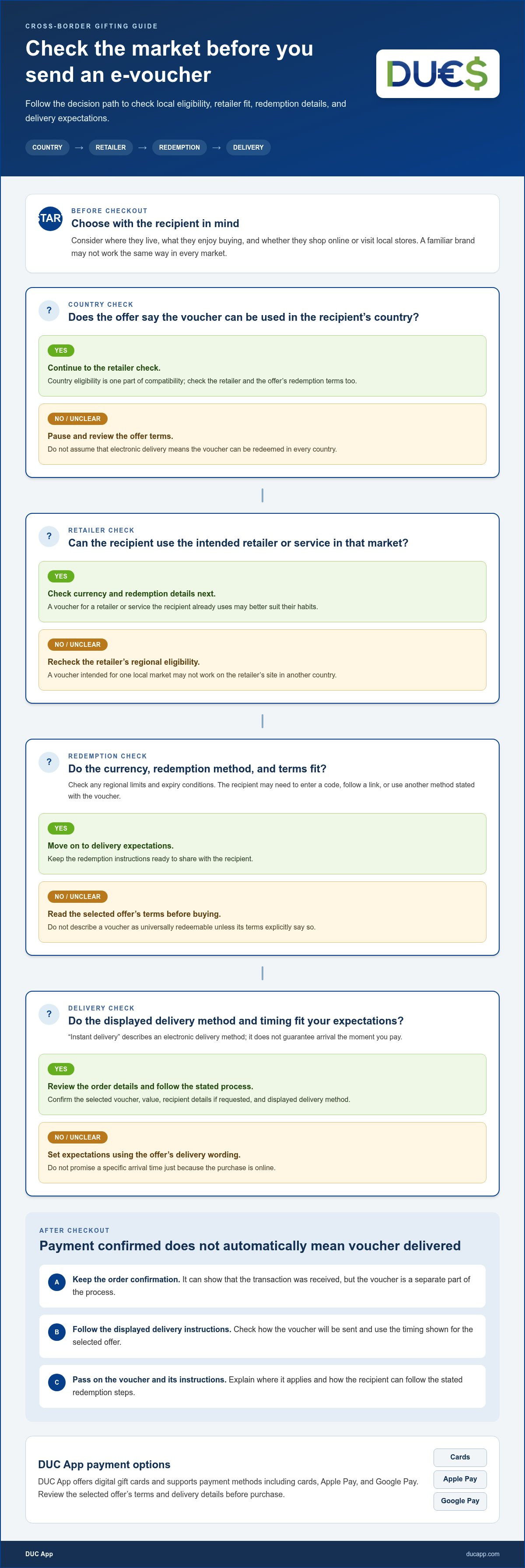
How to Buy and Send an E-Voucher Worldwide
A clear purchase flow makes an international gift easier to manage. DUC App offers digital gift cards, and you can review an offer’s details before purchasing. Follow the instructions shown for your selection. Before confirming, check the gift card, payment details, and any recipient information requested.
What should you prepare before checkout?
Have the recipient’s correct delivery details ready if the selected flow asks for them. Decide which country and retailer suit their needs, and read the voucher’s redemption conditions first. At checkout, choose from the payment methods displayed for your transaction. DUC App supports methods including Visa, Mastercard, Apple Pay, Google Pay, SEPA, and Interac. The options presented in checkout show which methods are available for your transaction.
Use this straightforward sequence:
- Open DUC App and explore its digital gift-card options.
- Choose a gift card that fits the recipient’s market and preferences.
- Review the offer for its currency, eligible region, expiry information, and redemption conditions.
- Enter recipient details if the selected flow requests them, and check each detail for accuracy.
- Select an available payment method and review the order summary before confirming.
- Follow the delivery instructions shown after purchase, then keep the order confirmation until the gift reaches the recipient.
Pause at the review stage. A misspelled email address or a mismatch between the recipient’s location and the voucher’s eligible market can make a thoughtful gift harder to use. Check the amount and currency shown, too. If anything in the summary differs from what you intended to buy, resolve that before completing payment.
How can you help the recipient use the gift?
Once the voucher is delivered, pass along the message and any redemption instructions that came with it. Let the recipient know which retailer and region the offer applies to, and point out any stated expiry or minimum-use condition. The voucher’s own terms determine how it can be redeemed, so avoid making assumptions or promising it will work at every location.
Digital wallets are one way people manage payments through apps. For related context on the technology, see this secure digital wallet app guide. Reviewing the details shown before confirming can also help make an online purchase clearer.
Ready to put these steps into practice? Explore digital gift cards with DUC App and follow the instructions shown for your selection. Delivery timing depends on the offer and its displayed details, so use that information to set expectations.
Send Digital Gift Cards with DUC App
DUC App offers digital gift cards through its global financial technology platform, giving you an app-based way to choose and purchase a gift. The convenience is digital, but the best choice still depends on the person receiving it. A voucher should fit their location and shopping needs, not just be easy to select.
For international gifting, consider the recipient’s market alongside the retailer and redemption conditions. A gift card may be delivered electronically, while the selected offer’s terms determine where and how it can be redeemed. Delivery instructions also depend on the selected voucher and purchase flow, so use the details displayed during the transaction rather than assuming every gift follows the same schedule.
What makes DUC App a convenient digital gifting option?
DUC App offers digital gift cards as one part of its broader platform. Explore the gift-card options and review the details for an offer that suits your recipient. Supported payment methods include Visa, Mastercard, Apple Pay, Google Pay, SEPA, and Interac. The methods shown for your transaction are the guide to what you can use.
The digital format lets you make a purchase without arranging physical shipping. That can help when you’re sending a present across borders or working with limited time. But digital doesn’t mean universally redeemable or automatically delivered at a guaranteed moment. Check the offer’s destination, currency, redemption terms, and displayed delivery instructions before completing your purchase.
What is the next step to send a voucher?
Start by considering what the recipient is likely to value and where they’ll use the gift. Then explore the gift cards in DUC App and compare the details for suitable offers. Before confirming, review the order summary, payment method, recipient information if requested, and any conditions that could affect redemption.
After purchase, follow the delivery instructions provided for that selection. Share the digital gift and its redemption guidance with the recipient so they know which retailer or region applies and what steps to follow. If your goal is to send e-vouchers worldwide instantly, weigh delivery expectations and recipient-market fit together.
Choose with confidence, then let the offer details guide your final check. Explore DUC App and send a digital gift.
Make Your Next Gift Feel Close, Wherever They Are
A thoughtful digital gift can bridge distance without making the moment feel routine. The difference often comes from the personal touch: choose something that reflects what the recipient enjoys, and include a short message explaining why you chose it. Keep the recipient’s market in mind, so convenience for you also translates into a useful gift for them.
DUC App offers digital gift cards through its platform, with payment methods including Visa, Mastercard, Apple Pay, Google Pay, SEPA, and Interac. Review the offer and transaction details shown before confirming. Then share the gift with the instructions the recipient needs to take the next step.
If you’re ready to send e-vouchers worldwide instantly, begin with a suitable gift card and let the displayed terms guide your purchase. Explore DUC App and send a digital gift. A few thoughtful checks can help your message travel smoothly and make someone’s day.
Frequently Asked Questions
Can I send an e-voucher to someone in another country instantly?
You can purchase and send many vouchers digitally across borders, but arrival isn’t guaranteed to be immediate. Payment may need to be confirmed before delivery, and timing depends on the selected offer and transaction flow. If the gift is for a specific moment, don’t leave the purchase until the last minute. Review the delivery wording shown for that voucher and consider another way to acknowledge the occasion if timing is important.
How do I send a digital gift voucher worldwide?
Choose a digital gift card that suits the recipient, then follow the purchase and delivery instructions shown in the app or website. Before paying, check that the destination and retailer match the recipient’s needs. If you’re looking to send e-vouchers worldwide instantly, use the displayed delivery details to set expectations rather than assuming every order arrives at once. After it’s sent, share any message or instructions that will help the recipient identify and use the gift.
Will an e-voucher work in a different country or currency?
Not necessarily. A voucher may be limited to a retailer’s particular regional service, even if the retailer operates in several countries. Currency can also affect how the gift’s value is displayed or used. For example, the recipient may see a different currency from the one you used to make the purchase. Check the offer’s eligible region and currency information, and don’t assume a digital code can be transferred between country-specific retailer accounts.
What information do I need to send an e-voucher to someone abroad?
Have the recipient’s correct details ready for the delivery method requested during checkout. If the flow asks for an email address, verify its spelling and make sure it belongs to the intended recipient. You may also want to prepare a brief personal message. Don’t enter extra personal information unless the purchase flow requests it. Reviewing the details before payment can help prevent a gift from going to the wrong inbox or person.
Can I send an e-voucher by email or through an app?
Digital vouchers may be delivered by email or through an app, depending on the selected offer and the platform’s delivery flow. Check the displayed instructions to see where the recipient should look for the gift. If it’s sent by email, let them know to check their inbox and filtered folders. For app delivery, tell them which app or account to check, without sending sensitive login details along with the gift.
What should the recipient do if the voucher does not arrive?
Ask the recipient to check their spam, junk, and promotions folders, then confirm that they’re looking at the email address or app account intended for delivery. Compare the recipient details with the order confirmation and review any delivery status shown for the purchase. Avoid buying the same voucher again immediately, since the first order may still be processing. Keep the confirmation details available while you follow the platform’s stated next steps.
Are international digital gift cards safe to send?
They can be a practical way to give a gift, but treat the voucher code like something valuable. Buy through the intended app or website, use a payment method you recognize, and keep the code out of public posts or shared screenshots. The recipient should be cautious of unexpected messages asking them to reveal a code or sign-in details. If a delivery email looks unusual, verify the gift through the original purchase channel before following links.


