

What if the best digital gift isn’t the one that’s quickest to buy, but the one your recipient can actually use? If you want to purchase digital presents with credit card, choosing the gift is only part of the decision. Payment acceptance, currency conversion, and redemption rules can all affect checkout.
It’s reasonable to want a simple process: find something useful, pay with a familiar card, and know what you’re approving before you confirm. DUC App offers digital gift cards and supports Visa and Mastercard as payment methods. Your card still needs to be authorized for the transaction, so review the checkout details rather than assuming every card will work.
This guide explains how to match a digital gift to the recipient, check where and how it can be redeemed, and review the amount and payment details before placing an order. You’ll also learn what to do if a card authorization doesn’t go through, so you can avoid common checkout surprises.
Key Takeaways
- Match the gift to the recipient’s interests, then check where and how they can redeem it.
- To purchase digital presents with credit card, review the checkout options and total before confirming.
- Credit cards, digital wallets, and bank-based methods suit different checkout preferences and transactions.
- Use a pre-checkout checklist to catch recipient-detail errors and mismatches with gift terms.
- Browse digital gift cards through DUC App and review the purchase details before paying.
Why purchase digital presents with a credit card?
A thoughtful gift doesn’t have to involve a trip to a store or a parcel to wrap. A digital present can be practical when you’re short on time, sending a gift across distance, or looking for something that fits neatly into online shopping. Choosing to purchase digital presents with credit card offers a familiar way to pay, with a chance to review the checkout before you commit.
A digital gift card is a prepaid digital gift the recipient can use toward eligible purchases, subject to the card’s terms. For a broader overview of digital gift cards and how they work, see Wikipedia’s general guide.
When a digital present makes sense
Digital gifts suit occasions where convenience matters: a birthday you remembered at the last minute, a thank-you for someone who lives far away, or a small celebration that calls for a useful gesture rather than a physical item. They can also work well when you know what the recipient enjoys but aren’t sure which specific item they’d choose.
Start with the person, not the checkout. Think about their interests and routines, then choose a relevant gift category. A gift is more likely to be useful when it connects to something the recipient already likes or plans to use. Before paying, check the redemption terms, including where the card can be used and any destination restrictions. These details can differ between gift cards, so don’t assume a digital format means universal redemption.
Digital doesn’t automatically mean instant, either. Buying the gift and the recipient redeeming it are separate parts of the experience. Review the information presented during checkout and the gift terms, especially if you’re buying for someone in another region or for a specific occasion.
What credit card payment can simplify
Paying by credit card follows a familiar checkout pattern: select the gift, enter or choose payment details, review the order, and authorize the transaction. Your card issuer may apply its own approval checks or terms, so a familiar process doesn’t guarantee that every card will be approved.
Keep the gift value separate from the total amount shown for payment. The gift value is what the recipient can use under its terms; the checkout total is what you’re being asked to pay. Review the currency and any charges displayed before confirming. If the total differs from the gift value, check the breakdown rather than assuming the difference is part of the gift.
DUC App offers digital gift cards and supports Visa and Mastercard. You can use those familiar card options alongside other digital payments in the app. Your card still needs to be authorized for the transaction, so review the payment options shown at checkout. A final check can catch a mismatched amount or payment detail before you confirm.
How to choose a digital gift before paying by card
Choose the gift before you choose how to pay. This keeps the decision focused on the recipient first, then checks whether the gift fits their location and needs. Once those details make sense, move on to payment.
- Start with the recipient. Think about their interests, routines, and the things they already use. A practical gift tied to a real preference is more likely to feel thoughtful than a category chosen only because it’s easy to buy.
- Choose a gift category. Pick something the recipient can realistically use. If you’re unsure about a specific item, a gift card connected to a relevant category can give them room to choose within its terms.
- Check the redemption location. Consider the recipient’s country or region, and look for limits on where the card can be redeemed.
- Read the gift terms. Review the selected gift’s usage rules and any expiry information shown before checkout.
- Move to payment. Once the gift fits the recipient and its terms are clear, review the checkout details before paying by card.
Match the gift to the recipient
If you don’t know the recipient’s exact preferences, prioritize flexibility within the card’s stated terms. Don’t rely on assumptions about a brand, catalog, or regional availability; gift options and redemption rules differ. For a wider look at app-based gifting, the instant gift card delivery app guide offers broader context for comparing how these apps approach digital gifts.
Review redemption rules before checkout
A digital format doesn’t remove the need to check the fine print. A gift card may have location, expiry, or usage terms that affect how the recipient can use it. Read the details for the specific gift, and pay attention to the eligible destination or service region rather than assuming the recipient can redeem it anywhere.
A gift card is only useful if the recipient can redeem it where they live and shop. Destination matters as much as category: a well-matched gift can still be inconvenient if its redemption rules don’t fit the recipient’s location.
Once you’ve chosen a suitable category and checked its terms, browse digital gift cards on DUC App and use those details to guide your selection before checkout.
Credit card, digital wallet, or another payment method?
The best payment method is the one that fits the checkout and gives you a clear view of what you’re authorizing. A credit card may feel familiar, while a digital wallet can be convenient if you already use one. Bank-based options may suit you if they’re available and fit how you prefer to pay. The options shown can depend on the transaction.
Use this comparison as a quick guide, not a universal ranking. Payment options depend on the checkout and transaction context.
| Payment method | May suit you if | Review before paying |
|---|---|---|
| Credit card | You prefer a familiar card checkout. | Final amount, currency, and issuer terms. |
| Digital wallet | You like using a wallet already set up for online payments. | That wallet appears as an option for this transaction. |
| Bank-based option | You prefer a supported method connected to bank-based payments. | Its availability and displayed payment details. |
When a credit card is the practical choice
A credit card can be a straightforward choice if it’s already part of your online checkout routine. Select the card option, review the transaction details, and authorize payment through the steps presented. If you’re buying across currencies, the amount charged may be affected by currency conversion or your issuer’s foreign-transaction terms. Those terms vary, so check the final amount and your card terms before confirming.
DUC App supports Visa and Mastercard as payment methods. That doesn’t mean every card will be approved for every transaction. Card rewards, protections, and issuer terms differ, so focus on the payment details shown for your purchase. For consumers evaluating personal financing and card terms, comparison portals like FinWybor.pl illustrate how different borrowing and credit options compare.
When another supported payment method may suit you
DUC App also supports Apple Pay, Google Pay, SEPA, and Interac. A digital wallet may feel convenient if you already use it, while a bank-based option may better match your usual payment routine. Choose from the methods presented for your transaction, then check the amount and currency before authorizing payment. For a simple explanation of wallet basics, see this secure digital wallet app guide.
If you want to purchase digital presents with credit card, pause at the checkout summary. Confirm that the selected gift, payment method, currency, and total match your expectations. If the displayed amount isn’t clear, don’t rush to authorize it. You can also explore digital gift cards through DUC App and review the payment options available for your transaction.
A practical checklist for a smooth credit card purchase
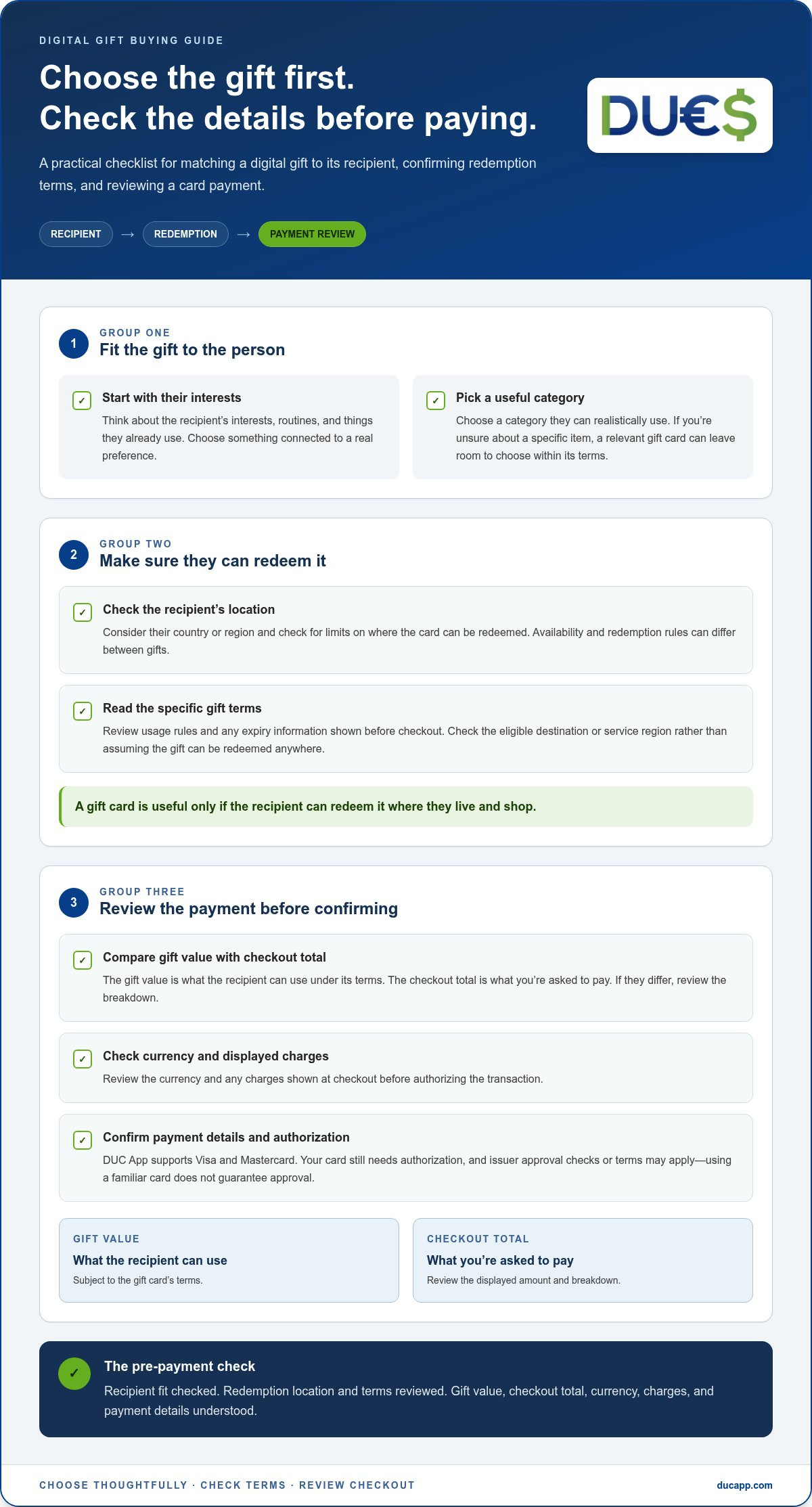
A quick pause before payment can catch small errors that create checkout frustrations. Confirm the gift and recipient details, understand the terms, and check the amount you’re about to authorize. A careful review won’t guarantee card approval, but it can help you avoid preventable mistakes and understand the transaction.
Before entering card details
Use this pre-checkout list to review the order before submitting payment:
- Confirm the selected gift. Check that it’s the intended gift card and that its stated value or option matches your choice.
- Review recipient details. If you’re entering an email address or other recipient information, check it carefully for typos. An error could make it harder for the intended person to receive or use the gift.
- Revisit redemption terms. Check the selected gift’s location, expiry, and usage details. Make sure they fit the recipient’s likely needs.
- Check the payment total. Compare the amount shown at checkout with your expectations. If the currency or any displayed charges aren’t clear, pause before proceeding.
- Choose a secure setup. Use a device and payment method you can access securely, and avoid entering card details on a shared or unfamiliar device.
Review every displayed charge before authorizing payment. Read the checkout summary from top to bottom. Confirm the gift selection, recipient information, currency, and final amount. If something looks different from what you expected, don’t confirm until you understand the details shown.
If a card payment does not go through
A declined payment can have several possible causes. Start with what you can verify: check the card number, expiry date, security code, and billing information for typing errors. Make sure the billing details match the information associated with the card, and correct any mistakes before trying again.
If the details appear accurate, the card issuer may have declined the transaction or may require additional authorization. Follow any instruction shown during checkout, and use your issuer’s official channel if you need to understand a decline or authorization request. Issuer checks vary, so a decline doesn’t necessarily mean there’s a problem with the gift selection.
If the issuer has blocked the transaction, don’t keep repeating the same payment attempt. Pause and follow the issuer’s guidance instead. Repeated attempts may not resolve an authorization issue and can make it harder to identify what needs attention.
Once the details are clear, choose a digital gift on DUC App and review the checkout summary before authorizing your card payment.
Buy digital gifts through DUC App
DUC App brings digital gift cards and multiple payment methods together in one platform. Once you’ve chosen a gift that suits the recipient, browse the gifts in the app, select one, review its details, and proceed to checkout. You can then choose from the payment methods shown for your transaction.
This gives you a clear path from gift selection to payment while leaving room to review the details that matter. DUC App supports Visa and Mastercard, but card approval depends on the transaction and issuer. Review the checkout information before authorizing payment, and use the details for your selected gift rather than assuming every gift has the same terms.
What to expect when choosing a gift in DUC App
Browse the digital gifts in the app and choose an option that fits the recipient’s interests. Open its details and read the terms, including the redemption location and any usage or expiry information. Consider whether the recipient can realistically use the gift. A little review now can help you avoid choosing an option that doesn’t match their needs.
Keep the recipient in mind as you compare. For example, consider whether the relevant service or merchant is usable in the recipient’s region before you select a gift. Use the information shown for the specific gift to understand its terms. Digital gifting can be convenient, but don’t assume that purchase means immediate delivery or that redemption works everywhere.
Complete the purchase with confidence
Once you’ve selected a suitable gift, move to checkout and choose an available payment method. If you’re paying by card, Visa and Mastercard are supported in DUC App, though a particular card may not be approved for every transaction. Check that the selected gift and payment details are correct, then review the checkout summary, including the displayed amount and currency, before confirming.
After completing the transaction, keep the confirmation or other transaction details for your records. They can help you identify the purchase later if you need to review what you selected or the amount shown. Take a final pause before authorization to make sure the recipient, gift terms, and payment all match your expectations.
If you want to purchase digital presents with credit card, DUC App brings gift selection and payment options together, with gift details available to review during checkout. Choose carefully, confirm the summary, and save your transaction information.
Explore digital gifts in DUC App
Make your next digital gift an easy choice
A smoother gift purchase starts before checkout. Keep a simple note of the recipient’s interests, preferred country or region, and the kinds of gifts they’re likely to use. When an occasion comes around, you’ll have a useful starting point instead of making a rushed guess. The thoughtful part is still yours; a clear plan just makes it easier to act on.
If you want to purchase digital presents with credit card, let the recipient’s needs guide your selection and take a moment to review the order before you confirm. That small pause can help turn a quick online purchase into a gift that feels considered.
DUC App brings digital gift shopping and payment options together, so you can explore available gifts and choose what fits your plans. Explore digital gifts in DUC App and take the next step toward a thoughtful present.
Frequently Asked Questions
Can I purchase digital presents with a credit card online?
Yes, you can purchase digital presents with a credit card online when the checkout offers card payment and your issuer authorizes the transaction. DUC App supports Visa and Mastercard, though approval can vary by card and transaction. Before paying, make sure you’re using the intended card and can complete any issuer verification, such as an approval prompt in your card issuer’s app.
Is it safe to buy digital gift cards with a credit card?
You can reduce payment risks by protecting your details and checking where you’re shopping. Open the official app or website, check the address before entering card information, and avoid making purchases on shared or unsecured devices. Never share your card PIN or one-time verification code with someone who contacts you unexpectedly. Keep your transaction confirmation so you can recognize the purchase later.
How much does it cost to purchase a digital present with a credit card?
The total depends on the selected gift and the charges displayed at checkout. There isn’t one fixed cost that applies to every digital present. If the purchase involves a different currency, your card issuer may also apply its own conversion method or foreign-transaction terms. Review the checkout total and currency, then check your card’s terms if you’re unsure how an international purchase will be handled.
What happens if my credit card is declined when buying a digital gift?
A decline means the payment wasn’t authorized, but it doesn’t necessarily mean the gift is unavailable. Check for typing errors in your card or billing details, then read any message asking you to verify the transaction. Your issuer may decline a payment or require additional authorization. If it appears blocked, stop retrying and follow your issuer’s guidance before attempting the purchase again.
Can I send a digital gift card to someone in another country?
The recipient’s country matters. A digital gift card may be limited to a particular country, currency, or service region, so a gift purchased from abroad might not be usable where the recipient lives. Check the selected card’s displayed redemption terms before paying. Choose a gift whose stated region and usage conditions fit the recipient.
Can I use Apple Pay or Google Pay to buy a digital gift?
Apple Pay and Google Pay are supported payment methods in DUC App. The options shown depend on the checkout and transaction, so review the payment methods presented for your purchase. If you choose a wallet, make sure the correct card or funding source is selected within it and review the amount before approving the payment on your device.
Are digital gift cards delivered immediately after payment?
Not necessarily. Digital describes the gift’s format, but it doesn’t guarantee a particular delivery time. Follow the timing and status information shown during checkout and in your transaction confirmation. If you’re buying for a specific occasion, leave room for possible processing or delivery delays rather than relying on an assumption of instant arrival. Keep the confirmation available so you can refer to the purchase details.


