

Google Pay can fund a Cuba transfer, but it can’t send money to Cuba directly. If you’re looking to send money to cuba with google pay, use a remittance service that supports transfers to Cuba rather than Google’s own transfer feature.
Slow delivery, high fees, and extra paperwork can make it harder to support family when they need help. A digital wallet can simplify the payment step by avoiding manual card entry, but it doesn’t remove the rules that apply to Cuba-bound transfers. DUC App supports Google Pay for transfers, along with peer-to-peer payments and MLC transfers for Cuban residents.
This guide explains how Google Pay fits into the process, why you need a separate remittance app, and how to send funds through DUC App. You’ll also find practical points to review before choosing an MLC transfer and ways to track its status. Start by understanding what Google Pay can, and can’t, do.
Key Takeaways
- Google Pay can’t send funds to Cuba directly, but a remittance app such as DUC App can use it as a payment method for a transfer.
- Learn how to send money to cuba with google pay through DUC App, from setting up your profile to reviewing and confirming a transfer.
- Understand key compliance considerations for Cuba remittances, including why a fixed quarterly limit may not apply to family remittances.
- Explore ways to support family beyond transfers, including mobile top-ups and digital gift cards.
- See how MLC transfers can send funds to family in Cuba and what to consider before choosing this option.
Can You Send Money to Cuba with Google Pay? (The 2026 Reality)
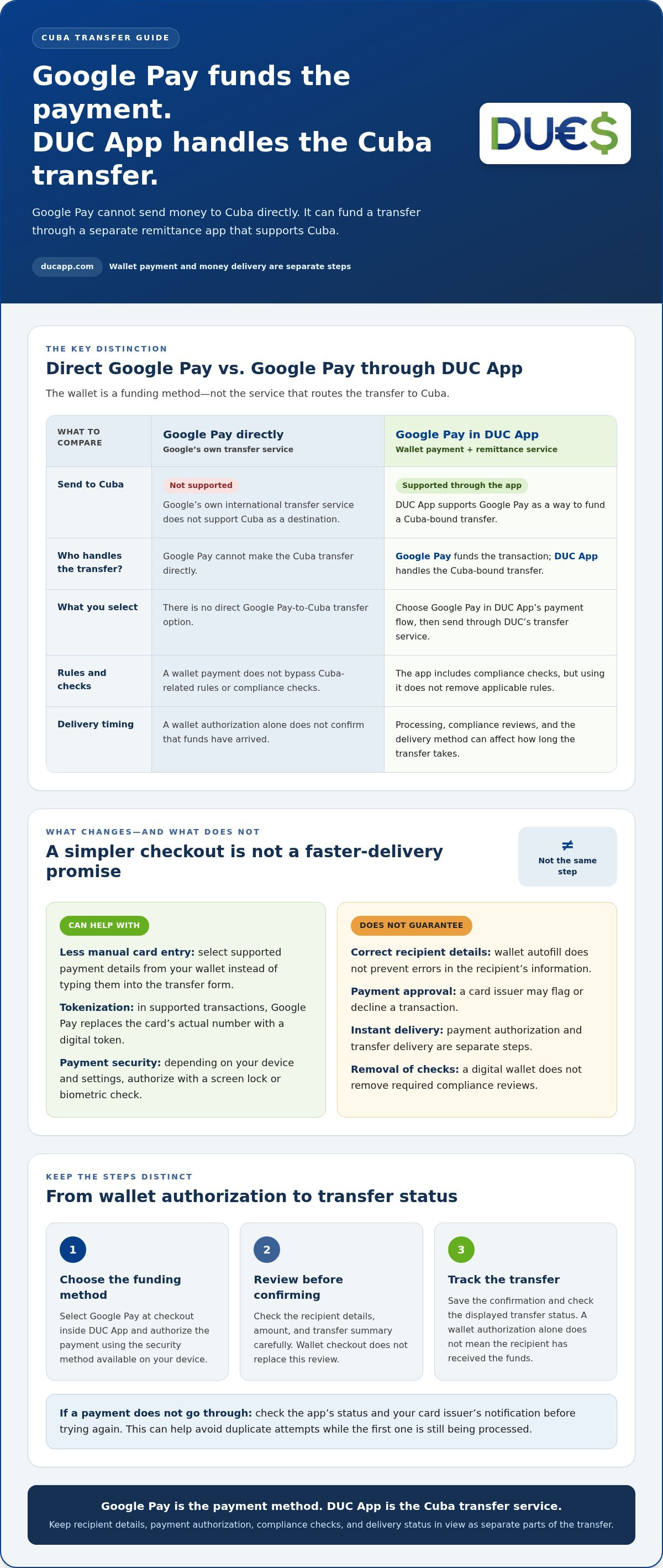
Not directly through Google Pay. Google’s own international transfer service doesn’t support Cuba as a destination. However, Google Pay can fund a transfer through a separate remittance platform that supports Cuba. DUC App supports Google Pay, so you can select it in the app’s payment flow and send funds through DUC’s transfer service. In this setup, Google Pay funds the transaction, while the remittance app handles the Cuba-bound transfer.
That distinction matters when you want to send money to cuba with google pay. You aren’t sending money directly from Google Pay to a recipient in Cuba. Instead, you’re choosing Google Pay as the payment method in a specialized app. For an overview of the wallet’s functions and availability, see this Google Pay overview.
The Role of Google Pay in International Remittances
Digital wallets can reduce friction at checkout. Google Pay uses tokenization in supported transactions, replacing a payment card’s actual number with a digital token. Your full card details aren’t shared with the merchant in the usual way. Depending on your device and settings, you may authorize a payment with a screen lock or biometric check. Using a wallet can also save you from entering card details each time, though payment processing and transfer times can vary.
DUC App connects that familiar wallet payment experience to peer-to-peer transfers and MLC transfers for Cuban residents. Learn more about features of a secure international money transfer app.
Why Traditional Banks Still Struggle with Cuba
Cuba-bound transactions sit within a complex sanctions and compliance environment. Banks and payment companies must assess where funds are going and who is involved. As a result, a conventional international wire may involve more steps than a domestic transfer. Specialized remittance platforms focus on supported corridors and include compliance checks in their workflows, but they don’t remove the rules.
Wire transfers can involve intermediary banks, additional processing steps, or fees that vary by institution. A peer-to-peer app offers a digital alternative, but speed, cost, and delivery depend on the transfer and payment method. With an app, you can start the process digitally, choose a supported funding option, and send to an eligible recipient without relying on paper forms or a branch visit. Learn how a P2P money transfer app works before starting your transfer.
Why Google Pay is the Smart Choice for Cuba Remittances
Google Pay’s main benefit is a smoother way to fund a transfer, not a promise that money will reach Cuba in seconds. You can approve an eligible payment without manually entering card details each time, while the remittance app handles the transfer. Payment authorization and delivery are separate steps. Processing, compliance reviews, and the delivery method can all affect how long the transfer takes.
A digital process can also reduce the need to visit a physical store or complete paper forms. It doesn’t remove required checks or guarantee that a transaction will be approved. Cuba-related transfers remain subject to applicable rules. The U.S. Treasury Cuba Sanctions page is an official reference for the sanctions framework.
Eliminating Manual Entry Errors
With Google Pay, you can select supported payment details from your wallet instead of typing them into a transfer form. This reduces the chance of mistyping a card number, but it won’t prevent errors in the recipient’s information. Before confirming, review the recipient details, amount, and transfer summary carefully.
A familiar wallet checkout can feel simpler when you’re sending support in a hurry. It may also be easier for people who find lengthy forms difficult, but you still need to review and authorize the payment. One tap can make checkout easier, not replace careful checks.
Comparing Google Pay to Traditional Credit Card Transfers
Google Pay can streamline how an eligible card payment is presented to the remittance service. It doesn’t guarantee approval or prevent a card issuer from flagging or declining a transaction. If a payment doesn’t go through, check the app’s status and your card issuer’s notification before trying again. This helps you avoid creating duplicate attempts while the first one is still being processed.
For a broader look at card-funded options, read this guide to sending money to Cuba with a credit card. Using one app to initiate and review a transfer can make payment and status information easier to find, but keep your own records too. Save the confirmation and check the displayed transfer status. A wallet authorization alone doesn’t mean the recipient has received the funds.
To see how wallet funding fits into a Cuba transfer, explore DUC App’s transfer options and review the details before confirming.
How to Send Money to Cuba via Google Pay: 3-Minute Guide
Ready to send money to Cuba with Google Pay? Choose Google Pay as the funding method within DUC App, not as a direct transfer service. These steps outline the basic process. Screens and available payment options can vary by location, device, and account status, so follow the instructions shown in the app.
- Get DUC App and set up your profile. Create an account and complete the identity or security checks requested in the app. Enter accurate information to help your profile move through review.
- Start a transfer. Open the “Send Money” section and select Cuba as the destination.
- Choose Google Pay. Select it as the payment method at checkout, then authorize the payment using the security method available on your device.
- Enter the recipient details. For an MLC transfer, use the account information your family provides and review it carefully. For a DUC-to-DUC peer transfer, enter the recipient’s associated email address.
- Review and confirm. Check the amount, recipient, payment method, and transfer details before submitting. Then use the app’s status information to follow the transfer. Wallet approval by itself doesn’t confirm that the recipient has received the funds.
Setting Up Your DUC Wallet for the First Time
Start with a current version of the app and complete any profile verification prompts before sending. Add a supported payment method to Google Pay in advance and make sure it’s available for online payments. Select Google Pay through the app’s checkout flow. Setup time can vary, so leave time to complete any prompts before you need to send. If Google Pay isn’t displayed, check that your wallet and payment method are ready for the transaction.
Recipient Information: What You Need from Your Family
Ask your recipient for the exact details required for the transfer type you’ve chosen. For MLC, copy the account information as provided and verify it with them before submitting. For a peer transfer between DUC users, confirm the email address associated with the recipient’s account. Don’t guess bank formats or rely on saved details that may be out of date.
Support can also take the form of a mobile recharge. DUC App supports international recharges, so you can learn more about how to recharge Cubacel from the USA alongside your transfer. Review each transaction separately before confirming.
Navigating 2026 Regulations: Security and Compliance
Digital payments can simplify the process, but they don’t bypass the rules. U.S. personal remittances to Cuban nationals are generally authorized and are no longer subject to a specific quarterly limit. That isn’t blanket permission to send to anyone: transfers to prohibited Cuban government officials or prohibited Communist Party members aren’t allowed. OFAC rules also changed on September 30, 2026, including restrictions on certain indirect transactions involving entities on the Cuba Restricted List. Review the official U.S. Treasury Cuba sanctions guidance for current requirements.
An Electronic Remittance Affidavit isn’t necessarily a universal form required for every digital transfer. A service may request information or declarations as part of its compliance process. Answer accurately, and don’t assume that a faster app flow removes your responsibility to follow applicable rules. If you want to send money to Cuba with Google Pay, remember that wallet funding is only the payment step. It doesn’t determine whether a recipient or transaction is permitted.
Digital Compliance: What to Expect
Know Your Customer checks help a financial service verify account identity and assess transactions. They support the integrity of the transfer process, but don’t guarantee approval or delivery. Digital verification may replace some paper-based steps with in-app prompts, though the exact checks depend on the service and transfer. No app should be treated as a way around sanctions. Informal “mula” networks can lack clear records and safeguards, so use a traceable transfer channel and keep its confirmation.
MLC vs. CUP: Match the Transfer to the Need
MLC is used for Cuban bank accounts denominated in freely convertible currency, while CUP is the Cuban peso. Before choosing a transfer type, ask your family which form of funds is useful for their immediate needs. MLC may suit a recipient who needs funds in an MLC account. It isn’t interchangeable with cash in CUP, and conversion can affect what the recipient ultimately gets.
Google Pay is a funding method, not the authority that sets the recipient’s payout currency or exchange rate. Before approving a payment, review the transfer summary for the amount funded, destination amount, currency, and any displayed conversion details. Avoid relying on informal exchange-rate promises. An in-app record helps you see what you authorized, but it doesn’t guarantee a particular market value after conversion.
Review DUC App’s Cuba transfer options and the details shown before confirming a payment: explore Cuba transfer options.
Beyond Transfers: Total Family Support with DUC App
Family support doesn’t always need to take the form of a money transfer. DUC App also supports international mobile recharges, gift cards, and peer-to-peer transfers, giving you more ways to help with everyday needs. A recharge can help a relative stay connected for calls and data. A digital gift card offers another way to send useful supplies without shipping a physical package.
For relatives who use DUC App, peer-to-peer transfers provide a digital way to send funds between users. Recipient and transfer details still matter, so review the information shown in the app before confirming. DUC also offers a developer API for e-commerce integrations. Businesses can explore how a global payment processing API can connect digital payment flows to an online store.
Make Mobile Recharges and Gift Cards Work for Your Family
Cubacel promotions can change, so don’t assume a particular “Gran Recarga” offer is active or that every recharge qualifies. Look for official promotion announcements and note any start and end dates. Before purchasing, review the offer terms and the recipient’s mobile details. Google Pay can make funding a supported purchase more convenient, but it doesn’t guarantee a promotion or a better rate.
You can also consider a recharge and a money transfer as separate forms of support. A top-up may address an immediate connectivity need, while an MLC transfer can help with a different expense. Review each transaction on its own and choose based on what your family says they need, rather than assuming a combined purchase will deliver extra value.
More Ways to Stay Connected Across Borders
Digital transfers, top-ups, and gift cards make DUC App useful for different kinds of family support. Each option serves a different purpose, so match the tool to the need: a recharge for mobile service, a gift card for eligible purchases, or a peer-to-peer transfer between DUC users.
If you want to send money to cuba with google pay, DUC App brings Google Pay funding together with Cuba-focused transfers and other digital support options. Treat it as a practical digital toolkit, not a promise of instant delivery, a specific promotion, or a guaranteed exchange rate. Review the transaction details and choose the option that fits your family’s needs.
Make Your Next Cuba Transfer More Direct
Google Pay doesn’t send money to Cuba on its own. It can fund a transfer through a remittance app that supports the Cuba corridor, such as DUC App. This distinction sets clear expectations: wallet authorization starts the payment, while transfer processing and delivery happen separately.
DUC App supports Google Pay and Apple Pay, peer-to-peer transfers, and MLC transfers for Cuban residents. It also offers mobile recharges and digital gift cards, giving you more ways to support family beyond a single transfer. Before sending, check the recipient details and review the transaction summary, including the currency and status.
If you’re ready to send money to cuba with google pay, use a clear digital process and keep the confirmation for your records. Start a Cuba transfer with DUC App and choose the option that fits your family’s needs.
Frequently Asked Questions
Is it legal to send money to Cuba using Google Pay through DUC App in 2026?
It can be lawful to send an authorized remittance, but Google Pay doesn’t determine whether a Cuba-bound transfer is permitted. U.S. family remittances to Cuban nationals are generally authorized, while transactions involving prohibited Cuban government officials or prohibited Communist Party members aren’t allowed. Applicable sanctions rules can change, so review current official guidance and provide accurate information when completing DUC App’s transfer and verification steps.
What are the fees for using Google Pay to fund a Cuba remittance?
Fees may apply to the remittance, and currency conversion can affect the final amount received. Google Pay is the funding method, not a guarantee of a fee-free transfer. Review the transaction summary in DUC App before confirming. Check the displayed fee, exchange rate or conversion details, and recipient amount to understand the total and what your family is expected to receive.
How long does it take for the money to arrive in a Cuban MLC account?
Delivery time can vary, so don’t assume that Google Pay authorization means funds arrive instantly. Payment processing, verification, and the selected transfer route can all affect timing. After confirming, use the transfer status in DUC App to follow its progress. Check that the MLC recipient details are accurate, and save the confirmation for your records.
Can I send money to someone in Cuba if they don't have a DUC account?
It depends on the transfer type. A peer-to-peer transfer between DUC users requires the recipient’s DUC account, commonly identified through their associated email. DUC App also supports MLC transfers for Cuban residents, which use the recipient’s relevant account details rather than a DUC-to-DUC email transfer. Choose the appropriate option in the app and confirm the recipient information before submitting.
Do I still need to fill out an affidavit to send money with Google Pay?
Google Pay doesn’t decide whether an affidavit is required. A digital transfer may ask for declarations or identity information within the app instead of a paper form, depending on the transaction and applicable requirements. Follow the prompts shown during setup and checkout, and answer accurately. Using a wallet doesn’t remove compliance checks or responsibilities that apply to your transfer.
What happens if my Google Pay transaction is declined?
A declined payment usually means the funding step wasn’t approved, but check the status in DUC App before trying again. Confirm that the payment method in Google Pay is valid for the transaction, then review any message from your card issuer or wallet. If the transfer status is unclear, avoid repeated attempts until you know whether a payment or transfer is pending.
Are there daily or monthly limits when sending money to Cuba via DUC?
Before sending, review any transaction limit displayed in DUC App. Separately, U.S. family remittances to Cuban nationals are generally no longer subject to a specific quarterly limit. That doesn’t permit transfers to prohibited recipients or override other applicable compliance requirements.
Can I use Google Pay to buy Cubacel credit for my family?
DUC App supports international mobile recharges and Google Pay. Select Google Pay at checkout to purchase a Cubacel top-up, then enter the recipient’s mobile number carefully and review the recharge details before confirming. A mobile top-up is separate from a money transfer, so check its confirmation independently.


