

The easiest app for you may be the wrong choice for the person receiving your money. A p2p money sharing service app can make sending feel quick, but the full experience depends on how the recipient can access the funds, what the transfer costs, and when the money becomes available.
Comparing app features alone isn’t enough. Weigh your preferred payment method against the recipient’s options, especially for cross-border transfers where currency conversion and receiving methods matter. The right fit works for both sides and makes the total cost and transfer details clear before you send.
This guide explains what to compare in 2026, including payment methods, fees, timing, recipient access, and safe transfer habits. It also covers how multi-use platforms such as DUC App bring P2P transfers together with related digital services, so you can choose based on the task you need to complete.
Key Takeaways
- Choose a p2p money sharing service app by looking at the whole transfer, including how the recipient can access the money.
- Compare destination support, payment methods, fees, timing, and transaction information before sending.
- Review the amount, any applicable fee, and currency conversion shown in the app before confirming.
- Match the app to your destination, recipient, funding method, and reason for sending.
- DUC App brings P2P transfers together with international top-ups, gift cards, and email payments.
What a P2P Money Sharing Service App Does, and When It Fits
A p2p money sharing service app lets one person send money digitally to another. It connects the sender’s chosen payment method with a recipient and a transfer instruction. Depending on the service, the recipient may be identified by an account or another supported detail. For a neutral overview of the concept, see Peer-to-peer transactions.
The basic process is to choose the recipient, select a payment method, enter an amount, review the transfer details, and send. The steps can differ between apps. The sender may pay by a supported card or another payment option, while the recipient may receive funds in an app or through another supported method. Check how the recipient can access the money before you proceed.
How a person-to-person app transfer works
Imagine paying a friend back for dinner. You select their recipient details, choose how to fund the payment, review the amount and destination, and submit the transfer. The app processes it using its available methods. Your friend’s next steps depend on the receiving method: they may receive funds in an account or need to use another supported option. Don’t assume all apps have the same processing time or withdrawal steps.
Domestic payments and cross-border transfers
When P2P is different from a bank transfer or mobile top-up
A bank transfer moves money between accounts. A P2P app provides a digital way to initiate a payment between people, using the app’s supported payment and receiving methods. A mobile top-up is different: it adds phone credit or mobile service to a number rather than sending general-purpose funds to a person. Choose the service based on what the recipient needs.
For a wider look at how these services are changing cross-border payments, read this P2P money transfer app guide. The practical first step is to identify who receives the money and how they need it, then choose the transfer type and app that fit.
How to Compare P2P Money Sharing Service App Features
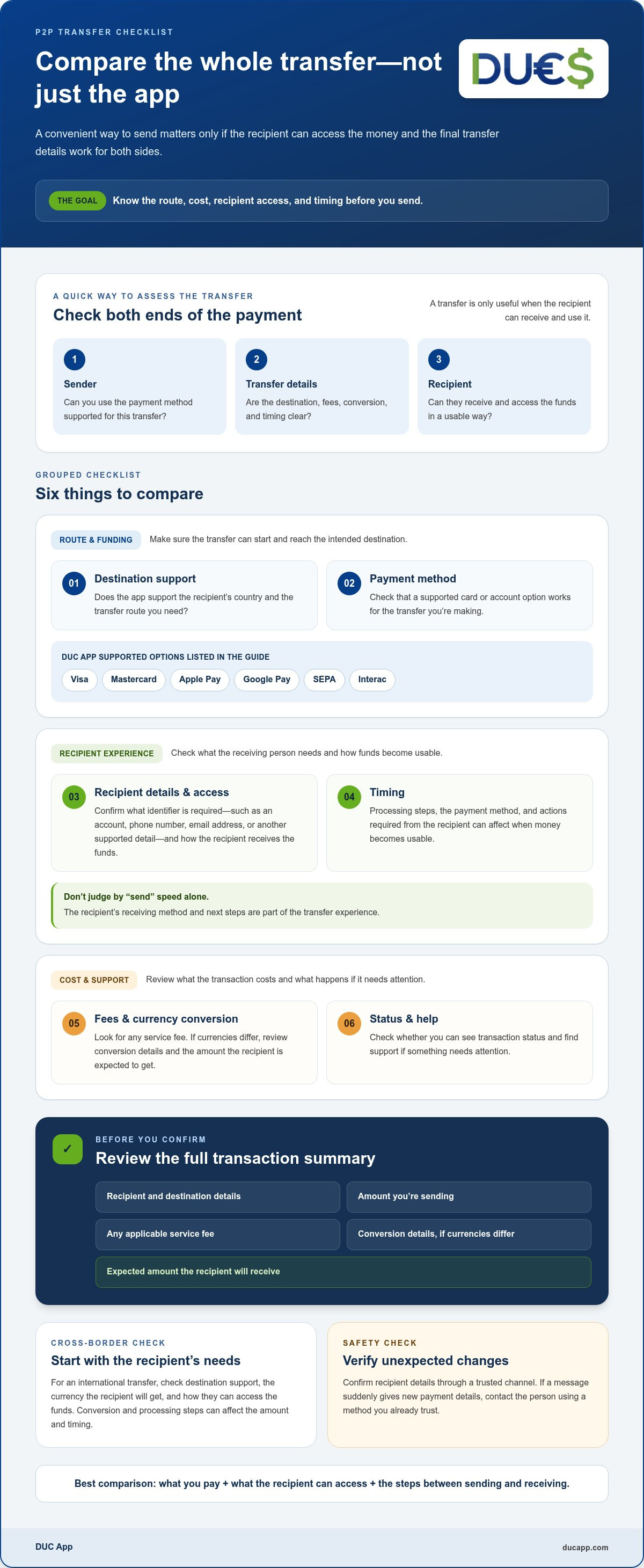
Compare the complete transfer, not just a headline feature. A convenient payment method won’t help if the recipient can’t access the funds in a usable way or the final amount differs from what you expected. Use this checklist to weigh the sender and recipient experience side by side.
| What to compare | What to look for |
|---|---|
| Destination support | Does the app support the recipient’s country and the transfer route you need? |
| Payment methods | Can you fund the transfer with a method you can use, such as a supported card or account option? |
| Recipient experience | What details does the recipient need, and how can they receive or access the funds? |
| Fees and conversion | Is a service fee shown? If currencies differ, can you review the conversion and recipient amount? |
| Timing | What processing or receiving steps could affect when the funds are usable? |
| Help and status | Can you see the transaction status and find support if something needs attention? |
Payment methods, fees, and currency conversion
Compare the complete transfer, not one advertised feature. Consider what you pay, what the recipient can access, and the steps between sending and receiving.
Recipient access, delivery, and support
Check what information is needed to identify the recipient. Depending on the service, this could be an account, phone number, email address, or another supported detail. Confirm that the recipient can use the receiving method instead of focusing only on how quickly you can tap “send.”
“Fast” doesn’t mean the same thing for every transfer. Processing steps, the payment method, and actions required from the recipient can affect when the money becomes usable. Look for transaction status information and a way to get help if a transfer is delayed or needs attention.
DUC App supports Visa, Mastercard, Apple Pay, Google Pay, SEPA, and Interac. Explore DUC App’s digital payment platform while comparing which funding options fit your transfer.
Is a P2P Money Sharing Service App Safe for Your Transfer?
A p2p money sharing service app can make sending convenient, but you still need to check each payment carefully. Mistakes and scams can happen if you select the wrong recipient, share account access, or respond to a suspicious request. Treat every transfer as a deliberate action, especially when a request is unexpected or urgent.
A careful transfer starts with verified recipient details and a final review. Confirm who will receive the money and what they’re expected to receive before authorizing payment.
What to check before sending money
Verify the recipient identifier and destination details through a trusted channel. If a message suddenly asks you to use new payment details, contact the person using a method you already trust instead of replying to the request. Then review the transfer screen:
- Recipient: Check the name or other identifier and the destination details.
- Amount and currency: Confirm the amount and review any conversion details.
- Fees and receiving method: Check any fee shown and how the recipient is expected to access the funds.
- Confirmation: Keep the transaction confirmation so you can refer to its details later.
Protect your account credentials as well. Don’t share your password or one-time verification codes with anyone who contacts you, even if they claim to represent a payment service. A familiar name or convincing-looking message doesn’t verify a request.
How to respond to a transfer issue
If a payment looks delayed or unclear, check its status in the app and follow the service’s guidance before sending again. A second payment could create a duplicate. Keep the confirmation and note the recipient details, amount, and transaction status so you have the relevant information if you need help.
For an unfamiliar or disputed transaction, use the service’s available support route promptly. Explain what happened and provide the transaction details through the appropriate channel. Don’t assume a completed transfer can be cancelled: options differ by service and payment status, and some transfers may be difficult to reverse. Acting quickly can help you understand the next steps, but it doesn’t guarantee that a payment can be stopped or recovered.
Which P2P App Fits Your Sending Situation? Use This Decision Guide
The right app depends on the transfer you need to make, not just the name you recognize. A nearby contact may need a simple payment they can receive through an account they already use. Supporting family across borders may involve destination support, currency, and a different receiving method. Use these steps to narrow your options.
- Identify the destination. Is the recipient in your country or another country? For an international transfer, consider the destination and currency before comparing app features.
- Start with recipient access. Find out how the person can receive the money and whether they need an account or another supported method.
- Choose a workable funding method. Compare the payment options available to you with the transfer terms and total shown before sending.
- Match the service to the purpose. Decide whether you’re paying a person, supporting someone abroad, or meeting a specific need such as adding mobile phone credit.
For everyday payments between people
For a payment to someone nearby, prioritize clear recipient identification, a readable confirmation screen, and a receiving process both of you can use. Compare funding and receiving steps, not just brand familiarity. An app-based payment can be more convenient than arranging cash or a check when both people can use the app’s supported methods. Review the details before sending so a quick payment doesn’t become a preventable mistake.
For cross-border support and connected services
For family support across borders, consider destination, currency, recipient access, and displayed transfer terms together. The right option depends on what the recipient needs. If they need money they can use for different purposes, consider a P2P transfer. If they need phone credit, an international mobile top-up may fit better because it recharges a phone instead of sending general-purpose funds.
For Cuba-related needs, distinguish between sending money to a person and recharging a mobile phone. DUC App offers both P2P transfers and international mobile top-ups, with a focus on money transfers and recharges connected to Cuba. For a destination-specific overview, see this online money transfer to Cuba guide. You can also read the secure digital wallet app guide for related account and transfer considerations.
For an overview of DUC App’s transfer and digital payment options, visit the platform.
How DUC App Brings P2P Transfers and Digital Services Together
Choosing a p2p money sharing service app is easier when its services match the task. DUC App brings peer-to-peer transfers together with international mobile top-ups, gift cards, and email payments. These are distinct digital services, so start by identifying what the recipient needs rather than assuming every option works like a money transfer.
DUC App supports Visa, Mastercard, Apple Pay, Google Pay, SEPA, and Interac. These payment options accommodate different sender preferences. Review the transaction details and terms shown in the app before confirming your payment.
Choose the DUC service that matches the task
- P2P transfers: Send money between peers through the platform.
- International mobile top-ups: Choose a recharge when the need is phone credit or mobile service, not general-purpose funds sent to another person.
- Gift cards: Use this as a separate digital gift option, rather than treating it as a transfer method.
- Email payments: Use this distinct payment service when an email-based payment fits the task.
For example, if you’re supporting a family member, first decide whether they need money or a phone recharge. DUC App also focuses on money transfers and recharges connected to Cuba, making the distinction useful for Cuba-related needs. A transfer and a top-up serve different purposes.
Start with a clear transfer decision
Before beginning, identify the recipient, destination, and purpose. Select the service that fits, then review the transaction details shown in the app, including recipient information, amount, payment method, and applicable terms. Pause before confirming to make sure the transaction matches what you intend to send.
Explore DUC App to choose the digital service that fits your payment or top-up need.
Choose the Transfer That Works for Both Sides
The right p2p money sharing service app fits the complete transfer, from your preferred funding method to the way the recipient can access the money. Compare destination support, displayed fees or currency conversion, and timing before sending. Then verify the recipient and review the transaction details before confirming.
DUC App brings P2P transfers together with international mobile top-ups, gift cards, and email payments. Supported payment methods include Visa, Mastercard, Apple Pay, Google Pay, SEPA, and Interac. Match the service to your purpose: sending money, recharging a phone, or using another digital payment option.
Ready to choose the right service for your needs? Explore DUC App’s digital payment options and review your transfer details before you confirm.
Frequently Asked Questions
What is a P2P money sharing service app?
A P2P money sharing service app lets people send or receive money digitally through a platform. The sender selects a recipient, chooses a supported payment method, reviews the transaction details, and submits the transfer. The recipient’s steps depend on the service and its available receiving methods. Some platforms also offer separate services, such as mobile top-ups or gift cards, which aren’t the same as sending money between people.
How do I choose the right P2P money sharing service app?
Choose a p2p money sharing service app based on the full sender-to-recipient journey. Start with the destination and how the recipient can access funds. Then compare your available payment methods, displayed fees or currency conversion, transfer timing, transaction status, and support options. Before confirming, check the recipient details and total shown. A familiar brand or a fast-sounding feature may not suit your specific transfer.
Are P2P payment apps safe to use?
P2P payment apps can be convenient, but safe use depends on careful account and transaction habits. Verify recipient details through a trusted channel, review the amount and destination before authorizing payment, and keep the confirmation. Don’t share your password or one-time verification codes. Treat unexpected requests with caution. If a transaction looks unfamiliar, check its status and follow the app’s support guidance rather than sending another payment immediately.
How much does it cost to send money with a P2P app?
The cost depends on the app, transfer type, payment method, destination, and any currency conversion. Some transactions may include service fees or conversion costs, so don’t assume every transfer is free or that one payment method is always cheaper. Review the transaction summary before confirming. For DUC App transfers and related services, review the terms and total displayed for your transaction before submitting it.
How long does a P2P money transfer take?
Transfer timing varies by service and transaction. Processing steps, the selected payment method, destination, and any action required from the recipient can affect when funds become usable. An app may describe a transfer as fast, but that doesn’t guarantee the recipient can access the money immediately. Review the timing and transaction status shown in the app, and avoid sending a duplicate payment if a transfer appears delayed.
Can I use a P2P app to send money internationally?
Yes, some P2P services support international transfers, but destination availability, currencies, fees, and receiving methods vary. Check that the recipient’s destination is supported and review the conversion details and expected receiving amount before sending. DUC App offers peer-to-peer transfers and focuses on transfers connected to Cuba. Don’t assume every app supports every country or transfer route.
Can I send a mobile top-up through a P2P money sharing app?
Some platforms offer mobile top-ups alongside P2P transfers, but a top-up is a separate service, not money sent to a person. It adds phone credit or mobile service to a recipient’s number, while a P2P transfer sends funds through a supported receiving method. DUC App offers international mobile top-ups as well as P2P transfers. Choose based on whether the recipient needs phone credit or money.


