

A checkout that accepts payment but fails to update an order can disrupt a sale. E-commerce checkout integration tools connect a storefront with payment services and business systems, allowing transaction and order information to move between them. The goal is not simply to add payment options, but to make each handoff work reliably.
That takes more than connecting apps and hoping for the best. Payment, inventory, and order systems handle different data, and a mismatch can cause failed transactions, inaccurate stock, or orders that need manual fixes.
This guide explains what e-commerce integrations do, how APIs help systems exchange information, and how payment gateways, processors, storefronts, and back-office tools fit together. You’ll also learn why phased rollouts and thorough testing matter, so you can plan integrations around your business processes and reduce avoidable failures.
Key Takeaways
- Map how checkout, payment, inventory, and order data should move before connecting systems.
- Understand how gateways and processors play different roles in completing an online payment.
- Choose integration tools based on your storefront, back-office needs, and the systems they must connect.
- Reduce avoidable checkout failures by rolling out payment methods in phases and testing each channel.
- See where DUC App’s e-commerce API integration can fit when your business needs to connect its online store with payment-related services.
What is an ecommerce integration?
An e-commerce integration connects a commerce platform with the tools that handle payments, products, inventory, and orders. APIs and connectors pass data between those systems, reducing manual entry and keeping business operations aligned.
Integration Platforms and Connectors
An integration platform links e-commerce applications through pre-built connectors or APIs, which give systems a shared language for exchanging information. This matters because the same product, order, or stock update may need to appear in several systems.
For example, a connector can send an order from a storefront to an ERP system, then return inventory changes to the store. An API integration can also share product data between business systems. Map each field first, such as product identifier, quantity, and order status, so every system interprets the information consistently.
Automation handles recurring exchanges, such as sending a new order to fulfillment or updating stock after a purchase. ERP connections can help retailers monitor stock and plan restocking. Inventory software can update available quantities when an order is placed, while marketplace integrations synchronize product data and stock across sales channels.
To connect a checkout tool with an e-commerce website, identify the storefront, choose a compatible connector or API, map the required data, and test key order and payment events. The setup depends on how the platform provides its integration options.
Storefront Platforms and Checkout Features
A storefront platform displays products and manages the customer-facing checkout, including payment selection and order submission. Its features matter because customers need a clear path from choosing a product to completing an order.
Which checkout integrations can improve conversion rates and reduce cart abandonment? Offer familiar payment choices, such as card processing, PayPal, and digital wallets, and make the total and required steps clear. A simpler checkout can reduce friction, but results depend on your audience and its preferred payment methods.
Payment is only one part of the flow. Subscription integrations can pass recurring order details to billing systems; shipping connections can share delivery choices and fulfillment updates; and order management integrations can move order records between the storefront and back office. These links help keep customer-facing status aligned with operational records.
For example, a retailer selling through its own storefront and marketplaces can connect inventory data so a sale updates available stock across channels. Analytics tools can then organize sales and checkout information for review. E-commerce checkout integration tools are most useful when every connection has a defined data flow and a clear role in the customer journey.
Payment gateway and payment processor integrations
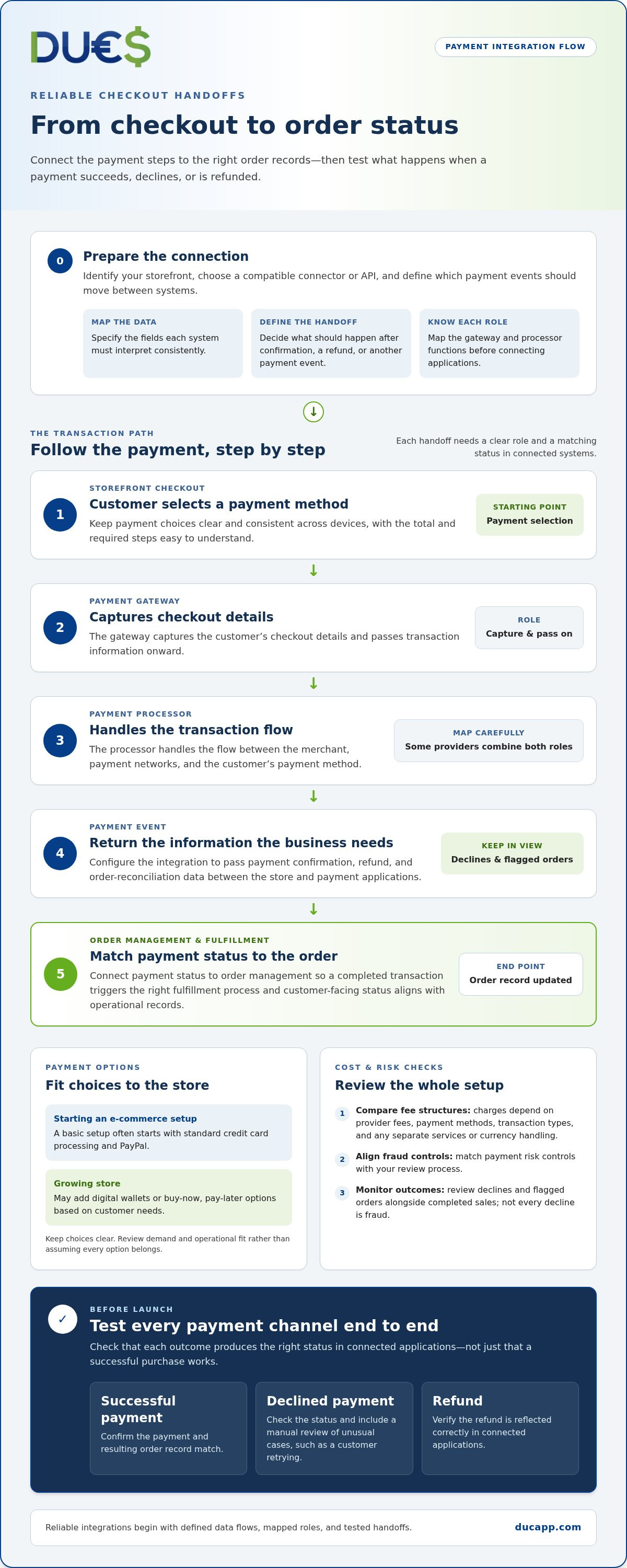
A payment gateway captures checkout details and passes transaction information onward. A payment processor handles the transaction flow between the merchant, payment networks, and the customer’s payment method. Some providers combine these roles, so map each function before connecting applications. This distinction helps you trace a payment from checkout to its final order status.
For a small business entering e-commerce, a basic setup often starts with standard credit card processing and PayPal integration. A growing store may add digital wallets or buy-now, pay-later options. Choose based on what customers need at checkout, then keep payment choices clear and consistent across devices.
PayPal can serve customers who prefer its payment flow, including shoppers making international purchases. If you offer it, explain which payment methods are available and make buyer-protection terms easy to find. Protection depends on PayPal’s rules for the transaction, so don’t imply that every purchase or dispute has the same outcome. Connect payment status to order management so a completed transaction triggers the right fulfillment process.
Stripe integrations use APIs to pass checkout and transaction data between a store and payment applications. Configure the connection to send the information needed for payment confirmation, refunds, and order reconciliation. For fraud prevention, align the risk controls in your payment setup with your review process. Monitor declined transactions and flagged orders alongside completed sales. These insights can help identify friction without treating every decline as fraud.
Payment gateway pricing and transaction fees affect the cost of processing payments. The total depends on the provider’s fee structure and the payment methods and transaction types your business accepts. Compare how charges are applied, including whether separate services or currency handling add costs. Review transaction costs regularly, then assess whether each payment option earns its place through customer demand and operational fit.
Before launch, test every payment channel from checkout through the resulting order record. Confirm that successful payments, declines, and refunds produce the right status in connected applications. Include a manual review of unusual cases, such as a customer retrying after a declined payment. This can catch mismatched records that an automated test of the successful purchase flow might miss.
For stores connecting checkout events to wider commerce workflows, an e-commerce API integration can link payment-related data with business processes. Define which events should move between systems, then test those handoffs before relying on automation.
E-commerce integration between storefronts and back-office systems
A storefront records what customers browse and buy; back-office systems coordinate what happens next. Connecting an e-commerce platform with an ERP, inventory system, and fulfillment software keeps key business data moving between those functions. For example, a confirmed order can enter the ERP while its product quantity changes in inventory records. This creates a more consistent view of sales and stock across retail channels.
ERP integration links checkout activity to operational records such as product details, inventory, and order status. Sharing product data between business systems typically requires API integration. A useful connection defines which system owns each field. The ERP might control stock quantities, while the storefront manages customer-facing product descriptions. This avoids conflicting edits and gives staff a clearer source for each update.
Inventory and marketplace connections matter when stores sell through several channels. A marketplace integration can synchronize product data and inventory between the online store and marketplaces. Automated stock updates can also help prevent overselling when separate channels receive orders close together. For example, a sale on one marketplace can update availability in the e-commerce platform, which then reflects the revised quantity elsewhere.
Shipping and third-party logistics integrations extend the flow beyond the warehouse. Connecting e-commerce platforms with logistics software can track products from the warehouse through last-mile delivery. Order details can move into fulfillment, while shipment updates return to the store for customer visibility. Each handoff should preserve the same order identifier so support teams can trace a purchase across systems.
Legacy system compatibility can slow these connections. Over 60% of IT decision-makers report that legacy systems’ inability to work seamlessly with newer applications has delayed digital transformation efforts. Older software may use different data formats, limited interfaces, or older exchange methods. Before integrating, identify the data each system can send and receive, then map fields and decide how exceptions will be handled.
For enterprise transactions, check whether the integration supports the EDI codes 850, 855, 856, and 810. These identifiers can help clarify which business documents need to pass between trading systems. Confirm the required document flow, field mapping, and status updates in the integration design. A mismatch can leave an order accepted in one system but missing from another.
Plan for maintenance as well as launch. With fully integrated e-commerce platforms, the platform provider is responsible for supporting and maintaining the e-commerce integrations. For other setups, define who monitors failures, resolves rejected data, and reviews changes to connected applications. A practical test follows an order from checkout through inventory, fulfillment, shipment, and final status, then checks that each system records the same outcome.
Planning e-commerce integrations to prevent failures
Start with the customer experience, then trace the software behind each checkout step. List how a shopper selects a payment method, submits an order, receives confirmation, and gets delivery updates. For example, a card payment should create a matching order record and reserve the correct inventory quantity. This map can reveal missing handoffs before they interrupt a sale.
Set the scope before connecting systems. Name each application, the data it sends, and the system responsible for that data. Your commerce platform might own product descriptions, while inventory software controls available quantities. Record what should happen when an update fails, such as placing an order in a review queue instead of silently dropping it.
Introduce core payment methods first, then expand in phases based on customer demand. A store might begin with card processing, then add a digital wallet after reviewing checkout requests. Each new option adds another transaction path, so define how payment status, refunds, and order records move through connected systems before launch.
Test every payment channel comprehensively, not just the successful purchase flow. Include a declined payment, a customer retry, a cancellation, and a refund. For each case, confirm that the checkout message, payment status, and order record agree. A test purchase can reveal whether an order remains marked as unpaid after payment succeeds.
- Payment: Check that approval, decline, and refund events reach the correct order.
- Inventory: Confirm that a completed purchase changes available stock as intended.
- Shipping: Verify that fulfillment receives the right address and order details.
- Customer updates: Match confirmation messages to the actual order status.
Run these checks in a test environment before switching to live traffic. Use sample products and distinct order records so test activity doesn’t affect real inventory. Then compare the storefront, payment application, and fulfillment system to confirm they show the same result. A mismatch identifies the handoff that needs attention.
Plan for routine changes, too. A new payment option, updated product field, or revised shipping process can affect connected software. Assign an owner to review integration errors and maintain a record of expected data flows. For example, if a stock update stops arriving, that record helps locate the connection and restore accurate availability.
Finally, roll out changes in manageable phases. Begin with core checkout and order data, monitor how each channel behaves, then add more automation. This keeps troubleshooting focused and helps teams streamline work without changing every system at once. Clear ownership, realistic tests, and staged expansion make a seamless checkout easier to maintain.
What are the best e-commerce checkout integration tools in 2026?
There isn’t one checkout integration tool that fits every store. The right choice depends on the systems you need to connect, the payment methods customers use, and how orders move after checkout. In 2026, compare tools by their role: payment processing, API connections, and links to inventory or fulfillment software. A useful setup is the one that supports your actual sales flow.
Payment integrations connect checkout to payment services and pass transaction results back to the store. Choose a solution that supports the methods your customers expect and sends clear payment statuses to order management. For example, a successful payment should create a paid order, while a declined transaction should leave the order unpaid. Test refunds and retries, too.
API integration platforms connect applications that don’t share a ready-made connector. They can help transfer order, product, or payment data between a storefront and business software. Before choosing one, map the fields each system needs. A product identifier or order status must retain the same meaning in both applications, or automation can create mismatched records.
Storefront connectors suit businesses whose commerce platform already supports integrations for their payment, inventory, or shipping systems. A pre-built connection can reduce custom development, but its suitability depends on the data and events it supports. Check whether it passes order updates, stock changes, and shipping status, then test those flows with representative transactions.
Use these criteria to compare options:
- Compatibility: Match the tool to your storefront and required business applications.
- Data flow: Identify what moves between systems, and which system controls each field.
- Failure handling: See how errors appear and how teams can trace affected orders.
- Testing: Validate payments, refunds, inventory changes, and order updates before launch.
- Ongoing ownership: Decide who monitors integration errors and maintains the connection.
For example, a retailer selling through a storefront and marketplaces needs accurate inventory updates across channels. A subscription business instead prioritizes recurring order data and billing status. A store adding a new payment method should test it separately, then confirm its transaction status reaches order management. These examples show why the right fit depends on the workflow, not a generic ranking.
Start with the integration that solves your most important handoff, then add connected tools in phases. Explore an ecommerce integration option as you assess how checkout systems can connect with your business processes.
DUC App: International recharges
DUC App offers international recharges for businesses looking to connect digital commerce with mobile top-ups. Its API integration for e-commerce can help connect an online store with DUC App services, while peer-to-peer transfers and gift cards offer other digital transaction options.
Consider this fit when your business wants to include international recharges in its e-commerce offering, rather than only connecting checkout to inventory or shipping software. Map the customer action, payment flow, and order record your store needs, then plan how the API connection fits those processes. Clear data handoffs help teams understand what happens after a customer selects a service.
Explore whether DUC App’s e-commerce integration fits your checkout plans. Visit DUC App online to learn more.
Build a Checkout That Can Grow With You
Your next integration decision can shape how easily your business adds services and reaches customers. Before expanding, define what you want checkout to make possible, then match the system connection to that goal. The best e-commerce checkout integration tools support your next business move without adding unnecessary complexity to the customer journey.
For businesses exploring digital services, DUC App offers international recharges, peer-to-peer transfers, and gift cards. Its e-commerce API integration can connect online stores with those offerings. Consider whether that fits your planned checkout experience, and outline the customer action and data flow you want the integration to support.
Ready to discuss how an integration could fit your ecommerce plans? Contact DUC App to discuss integrations.
Take the next step with a clear goal and a focused plan. A well-matched connection can help your checkout evolve alongside your business.
Frequently Asked Questions
What is an E-commerce Integration Platform?
An e-commerce integration platform coordinates data exchange between a store and connected applications. It can help manage mappings, transformation rules, and error handling in one place. For example, a platform can convert a store’s order status into the format an accounting application expects. This matters when separate tools use different field names or structures and teams need to trace how data moved.
What are the fees and pricing for popular checkout integration tools?
Pricing depends on the provider’s fee model and the services included. Some tools charge recurring subscription fees, transaction-based fees, or charges for optional capabilities. Compare how each cost applies to your payment mix, sales channels, and integration needs. For instance, a store processing several payment types should examine whether each method has a distinct charge. Review transaction costs regularly as your checkout setup changes.
Which payment gateways and payment methods do checkout integration tools support?
Support varies by gateway and integration, but common options include credit cards, PayPal, digital wallets, and buy-now, pay-later services. Some providers also support bank transfers or region-specific methods. Match payment choices to your customers’ locations and preferences. For example, a store serving international shoppers may need more than one option. Confirm that each method sends a clear transaction result to your order records.
What checkout integrations support one-click checkout, guest checkout, and digital wallets?
These features depend on the storefront, payment provider, and their integration. Digital wallets such as Apple Pay and Google Pay can appear as checkout options when the connected setup supports them. Guest checkout lets customers place orders without creating an account, while one-click flows use saved payment details or customer information. Review the customer journey on mobile and desktop to see which options are available and where extra steps remain.
How do checkout tools handle sales tax, PCI compliance, and fraud prevention in the United States?
Checkout tools can connect tax calculation, payment handling, and fraud screening, but each function has a different role. Tax settings use business and transaction details to calculate amounts for display or records. Payment integrations may support controls for handling card data, while fraud tools flag transactions for review. Keep configuration, records, and review processes aligned. For example, test how a tax adjustment appears in the final order and receipt.
What are the risks and security requirements of third-party checkout integrations?
Third-party integrations create dependencies on external software, data permissions, and API credentials. A misconfigured connection can expose more information than its workflow needs or send incomplete order data. Limit access to required functions, protect credentials, and review integration logs for unexpected activity. Also plan for provider changes or service interruptions so teams know how to pause affected transactions and reconcile orders after the connection resumes.


