

A Cuban mobile recharge helps someone stay connected for calls, texts, and mobile internet. To top up a mobile phone in Cuba, select a mobile recharge, enter the recipient’s Cuban number, and choose an available payment method. Check the number and transaction details carefully before paying to avoid preventable mistakes.
You want the recharge to reach the right person without adding stress to the process. This guide explains how mobile top-ups work, what to consider when comparing payment options, how promotions may apply and which details to review for a more informed transaction.
You’ll also learn how the recipient can check their balance and what to keep in mind before sending. The goal is simple: make your next Cuba recharge clearer, more confident and easier to manage.
Key Takeaways
- Match the payment option to your location and preferred way to pay, then review the transaction details before sending.
- Check the Cuban phone number carefully so the recharge is directed to the intended recipient.
- Learn how promotional presales work and what minimum recharge amount applies to the Cubacel promotion.
- After the recharge arrives, the recipient can use their phone balance for calls, texts or mobile internet and check balances with the relevant dial codes.
- Compare websites and apps by their payment flow and transaction information to choose an option that feels clear and convenient.
Credit card and Paysafecard payment options
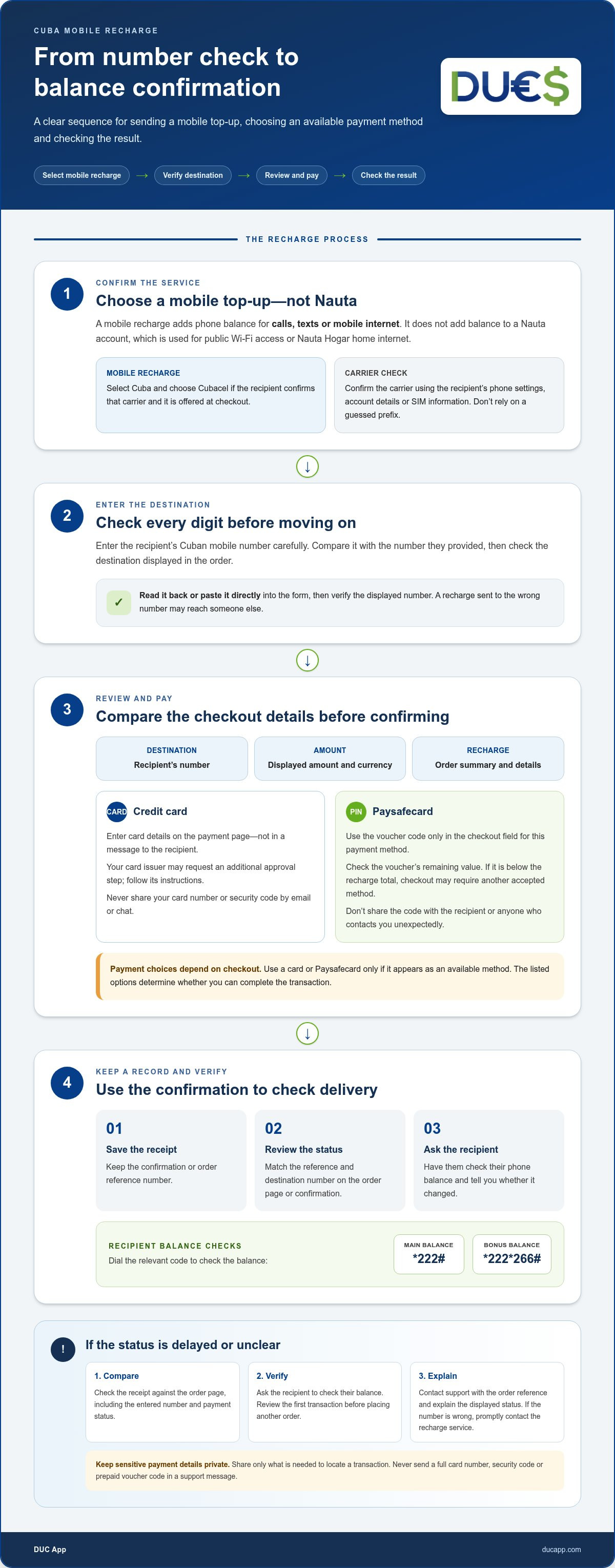
Credit cards and Paysafecard work differently at checkout. A credit card authorizes payment through the card issuer, while Paysafecard uses prepaid value and a voucher code. Available choices depend on the checkout. Select Cuba, enter the recipient’s mobile number, then choose a listed payment method. Reviewing the number before paying can help catch an error.
With a credit card, enter the card details on the payment page, not in a message to the recipient. Review the displayed amount and currency, recipient number, and recharge details before confirming. Your card issuer may request an additional approval step. Follow its instructions, then keep the transaction confirmation. Never share your card number or security code by email or chat.
With Paysafecard, enter the voucher’s payment code only in the checkout field provided for that method. Don’t share the code with the Cuban recipient or anyone who contacts you unexpectedly. A voucher is prepaid, so check its remaining value first. If the recharge total exceeds the balance, checkout may require another accepted method. The payment options displayed determine whether you can complete the transaction.
- Choose Cuba. Select the destination and enter the recipient’s Cuban mobile number carefully.
- Review the recharge. Check the number, amount, currency, and any order summary before proceeding.
- Select payment. Choose credit card or Paysafecard only if it appears at checkout.
- Keep the receipt. Save the confirmation or reference number to help identify the transaction later.
For a safer payment, use a private device and a trusted internet connection. Check that the payment page shows the recharge details before you submit. Avoid entering card information or voucher codes on public computers. If a page requests unrelated personal details or asks for payment information in a chat, stop and return to the checkout you opened yourself.
Customer support is most useful when you can describe the issue precisely. Keep the order reference, payment method, recipient number, and confirmation message together. If the recipient can’t use the recharge, ask them to check the main phone balance by dialing * 222 #. The bonus balance can be checked with * 222 * 266 #. These checks help distinguish a balance question from a payment or delivery issue.
Choose the payment route that fits your situation: card payment uses your card account, while Paysafecard uses prepaid value. Either way, compare the final checkout details with the recharge you intend to send before authorizing payment. Reviewing the number and keeping the confirmation gives you a clear record if you need support.
Sending a mobile recharge to a Cuban phone
A recharge adds phone balance for calls, texts, or mobile internet. Before sending one, identify the recipient’s carrier and carefully enter their Cuban number.
Online and App Recharge Steps
Online and app checkouts follow a similar sequence. Choose Cuba, select Cubacel if it matches the recipient’s service, and enter the mobile number. Review the displayed recharge details before paying. Keep the confirmation or order reference to track the transaction and explain any issue clearly.
A mobile recharge to Cuba adds balance to the recipient’s phone, not a Nauta account. Nauta is used for public Wi-Fi access or Nauta Hogar home internet. If the goal is mobile calls, texts, or internet, make sure the checkout specifies a mobile recharge.
Carrier and Number Checks
Cubacel is the Cuban mobile service identified for mobile recharge promotions. Select it when the recipient confirms their number uses Cubacel and the checkout offers that carrier. To confirm the carrier, ask the recipient to check their phone settings, account details, or SIM information. Don’t rely on a guessed prefix.
Before paying, compare every digit with the number the recipient provided. Read it back or paste it directly into the form, then check the displayed destination. This matters because a payment sent to the wrong number may reach someone else.
Recharge Delivery Status
Use the order page or confirmation message to review the recharge status. Match its reference number with the receipt and confirm the destination number shown. Then ask the recipient to check their phone balance and tell you whether it changed. A balance check helps distinguish a delivered recharge from one still being processed.
If the status is unclear, contact the service’s customer support with the order reference, payment confirmation, and recipient number. Share only the details needed to locate the transaction. Never send a full card number, security code, or prepaid voucher code in a support message.
Delayed or Misrouted Top-Ups
If a Cubacel recharge is delayed, compare the receipt with the order page first. Confirm the entered number and payment status, then ask the recipient to check their balance again. If the details still don’t match, send customer support the reference and explain the displayed status. Review the first transaction before placing another order.
If you spot a wrong number, promptly contact the recharge service with the receipt and correct destination. Explain clearly that the number was entered incorrectly. Keep the payment confirmation and any support response together. The recipient’s confirmation may help establish whether the recharge reached the intended phone or another number.
Promotional discounts for Cuba mobile top-ups
Yes. Cubacel promotions can add bonus balance to eligible recharges, and some operators advertise multiplied balance offers. Depending on the active campaign, mobile operators may offer double, triple, or sextuple balance promotions on Cuba top-ups. These are balance promotions, not a promise of extra data, so read the offer wording before choosing a recharge.
Timing matters. During a Cubacel promotion presale week, customers can reserve a recharge to be received in Cuba when the promotion becomes active. This lets you arrange the transaction during the presale instead of waiting for the active promotion period. Read the displayed dates and terms before paying, and make sure the selected recharge is intended for the promotion window.
The stated Cubacel promotion applies to recharges of 500 CUP or more. Treat that threshold as an eligibility condition: a smaller recharge does not meet it. Before submitting payment, compare the recharge amount and currency shown at checkout with the promotion requirements. The amount shown should be the amount intended for the recipient, not a value you have inferred from another currency.
- Check the offer period. Look for the presale week or active promotion dates shown with the offer.
- Check the minimum. Confirm the selected recharge meets the 500 CUP threshold for this Cubacel promotion.
- Read the bonus terms. Distinguish extra balance from data or other benefits.
- Review the recipient details. Confirm the Cuban mobile number before completing payment.
A promotion can help when the recipient needs mobile balance to stay connected. Still, compare what the offer actually adds with the recipient’s needs. A multiplied balance offer concerns balance; it doesn’t automatically mean more data, calls, or a longer validity period. Read the stated terms and don’t assume the conditions of one offer apply to another.
For a presale, keep the confirmation showing the selected recharge, destination number, and promotion details. When the offer becomes active, the recipient can check whether the expected balance arrived. If checkout doesn’t display the promotion or its eligibility conditions, don’t assume the bonus is included. Review the final order summary before authorizing payment, especially when selecting a qualifying recharge during a presale week when you top up mobile phone cuba.
Sending a Cubacel mobile top-up from Canada to Cuba
From Canada, select Cuba as the destination and Cubacel as the recipient’s mobile service. Choose a Saldo Principal recharge if the goal is to add main phone balance. Before sending, compare the entered number with the recipient’s message and review the recharge type displayed. These checks help connect the payment to the intended Cuban phone.
Use the checkout’s country and currency information to understand what you’re authorizing. You pay from Canada, while the recipient’s balance is credited in Cuba. Don’t assume the displayed amounts use the same currency. Read the order summary for the destination, selected balance type, and promotion details before approving payment.
For a Cubacel Saldo Principal top-up, select the main balance option rather than an unrelated service. Main balance is suitable when the recipient needs phone credit for calls, texts, or mobile internet. If the recipient requested a specific recharge type, match that request to the checkout wording. Different labels can mean a different service.
- Confirm the destination. Set Cuba as the receiving country and select Cubacel when shown.
- Enter the number. Compare every digit with the recipient’s Cuban mobile number.
- Choose the balance type. Select Saldo Principal when the intended credit is main balance.
- Review the order. Check the destination, amount, payment method, and any promotion terms.
- Save the confirmation. Keep the receipt or reference to track the transaction.
Promotion timing can affect a Canada-to-Cuba recharge. During a Cubacel promotion presale week, customers can reserve a recharge so it is received in Cuba when the promotion becomes active. The promotion applies to recharges of 500 CUP or more. Check the offer details in the checkout, since choosing a qualifying amount alone doesn’t explain every condition or benefit.
Some mobile-operator promotions multiply balance. BOSS Revolution says operators may offer double, triple, or sextuple balance promotions on Cuba top-ups. If an ETECSA or Cubacel label appears in an offer, read its terms and dates before paying. Don’t mistake a balance multiplier for extra data, a longer validity period, or a different recharge type.
“Instantly” may describe an advertised delivery experience, but it doesn’t replace checking the transaction status. After sending, keep the order reference and ask the recipient to check their phone balance. If it hasn’t appeared, compare the receipt’s number and recharge type with the recipient’s details. This gives you clear information to share with customer support.
Which websites and apps offer Cuba mobile phone top-ups?
International recharge websites and mobile apps are common online ways to send a top-up to Cuba. Look for Cuba as the destination and Cubacel as the mobile service in the selection menus. The country name alone isn’t enough: confirm that checkout identifies a mobile recharge, not a different service such as a Nauta account.
A website can be useful when you want to review an order on a larger screen. An app can make repeat transactions easier to manage from your phone. Either way, start with the recipient’s Cuban number and select the matching carrier. Before payment, compare the checkout summary with the intended destination and recharge type.
Don’t choose a service by its name alone. Assess the steps shown: a clear checkout lets you identify the destination, enter the recipient’s number, choose a recharge, and review payment details before submitting. Look for an order confirmation or reference after paying. These details help you follow up if the recipient can’t see the balance.
- Destination: Cuba appears as the country receiving the recharge.
- Carrier: Cubacel appears as the selected mobile service.
- Payment: The checkout shows the method and transaction summary before authorization.
- Confirmation: The completed order provides a receipt or reference to retain.
Payment options vary by website and app. One checkout may show a credit card option, while another presents different methods. Choose from the methods actually displayed, then check the final amount and destination before authorizing payment. Don’t assume an option is available just because you used it with another service.
Security starts with reviewing the transaction on screen. Enter card details only on the payment page, and don’t send card numbers or voucher codes through chat. Check the Cuban number before confirming. If the page shows an unexpected destination or asks for unrelated information, stop and return to the service’s checkout through the route you opened yourself.
For example, if the recipient requests a Cubacel main-balance recharge, check that the order summary reflects that request. Keep the confirmation and compare its reference with the status in your account or app. If the order is unclear, contact the platform’s customer support with the reference and recipient number. This makes the issue easier to identify without sharing sensitive payment credentials.
Websites and apps can both support a Cuba recharge. Choose one whose checkout clearly identifies Cuba, Cubacel, and the intended transaction. Review the details before paying, then keep the receipt so you can track the order.
DUC App: International recharges
DUC App offers international recharges, including mobile top-ups to Cuba. Choose the destination, enter the recipient’s mobile number, and review the recharge details before completing payment. It’s a practical way to top up a mobile phone in Cuba through a digital platform.
DUC App also offers peer-to-peer transfers and gift cards alongside international recharges. Choose the service that matches your purpose: a mobile recharge adds phone credit, while the other options serve different needs.
For a Cuba recharge, use the recipient’s carrier and number to guide your selection. Get started with an international mobile top-up through DUC App.
Make your next recharge feel straightforward
Choose your next step based on what the person in Cuba needs, not just the payment method you usually use. If you want to top up a mobile phone in Cuba, have the recipient’s details ready and approach the transaction with a clear purpose. Reviewing your choices carefully can make staying connected across borders easier.
DUC App offers international recharges, peer-to-peer transfers, and gift cards. These options serve different needs, whether you’re sending mobile credit or choosing another digital service. Start with the one that fits your situation, then review the details before proceeding.
Ready to explore a recharge option? Contact DUC App for recharge help and take the next step with clarity.
Frequently Asked Questions
Why send phone recharge to Cuba?
Sending phone credit helps someone in Cuba stay connected through calls, texts, and mobile internet. It can help with a family check-in, coordinating a visit, or maintaining phone access. A mobile recharge adds balance to the phone service, so it’s different from sending money for other expenses or adding credit to a Nauta account.
Have a question about sending recharge to Cuba?
Before contacting the recharge service, gather the details that explain your question: the transaction reference, recipient number, selected carrier, and payment confirmation. For example, if the recipient says the balance hasn’t changed, state whether the order page shows a completed or pending status. Use the support channel shown in your account or receipt, and don’t include full card details or security codes.
How do I know the recharge is received in Cuba?
Compare the transaction status with the recipient’s phone balance. Ask them to dial * 222 # to check the main balance or * 222 * 266 # to check the bonus balance. For example, if a promotion was involved, checking both balances can help identify where credit appeared. Keep the receipt so the order reference and selected destination are available if the displayed balance doesn’t match expectations.
How do I recharge a Nauta account in Cuba?
Choose a Nauta-specific recharge option rather than a Cuban mobile-phone top-up. Nauta accounts provide access to public Wi-Fi areas or Nauta Hogar home internet, so you’ll need the account details rather than a mobile number. Follow the Nauta checkout prompts, enter the requested account identifier carefully, and review it before payment. Don’t select Cubacel if your goal is to add credit to Nauta.
How long does it take to get airtime in Cuba?
The time until airtime appears depends on payment authorization, transaction processing, and delivery to the mobile service. After ordering, use the receipt or transaction page to follow the status. The recipient can also check the main phone balance by dialing * 222 #. If you’re checking a bonus balance, use * 222 * 266 # instead, then compare the result with the recharge details.
How long does the top up take to arrive?
Arrival time depends on the payment’s processing status and the delivery stage shown in the transaction record. Check whether the payment was accepted and whether the order has a reference number. Then ask the recipient to check their balance. If the status and balance don’t align, share the reference and destination number with the service’s support channel.
What currency do I pay in from Canada?
The checkout displays the currency you’re being asked to pay before you authorize a recharge. Review it alongside the recipient’s selected recharge amount, since the sender’s payment currency and the Cuban balance currency may differ. If your card account uses another billing currency, check your statement for any conversion details. Use the order summary for your final review before paying.
How can I top up a Cuban mobile phone from the United States?
In an international mobile recharge app or website, select Cuba as the destination, choose the recipient’s carrier, and enter their Cuban number. Review the recharge details before paying. DUC App supports international recharges and lists payment methods including Visa, Mastercard, Apple Pay, and Google Pay. The options shown at checkout indicate which methods are available for your transaction.


