

The most flexible payment setup isn’t always the best fit for your store. A direct ecommerce payment api integration can give your team control over how the store connects to payment processing, while a hosted checkout or platform plugin may better suit your checkout needs and maintenance capacity. The right choice depends on how you sell and how much of the payment flow your team can build and support.
Options can differ in developer effort, supported payment methods, currencies, documentation, and test tools. This guide explains how to compare those trade-offs, assess the technical and operational capabilities that matter, and choose an approach for your store. You’ll also learn how DUC App’s documented API, sandbox, and WooCommerce and Odoo plugins fit into the evaluation. DUC App’s payment processing platform accepts credit and debit cards in any currency and lists additional payment methods. Use the framework below to clarify your requirements and assess DUC App’s integration options.
Key Takeaways
- Choose an ecommerce payment api integration route by weighing checkout control, setup work, and who will maintain it.
- Compare documentation, sandbox access, platform fit, payment methods, and currencies against your store’s requirements.
- Test the purchase and payment-response flow in a sandbox to identify integration issues before implementation.
- Define your target markets, preferred payment methods, currencies, and ecommerce platform before evaluating options.
- DUC offers a documented API, a sandbox, and WooCommerce and Odoo plugins. Its payment platform accepts credit and debit cards in any currency.
Ecommerce Payment API Integration: What It Connects and Why It Matters
Start with the implementation decision, not the label. Do you need a custom checkout, a hosted payment page, or a plugin for your ecommerce platform? The right ecommerce payment api integration depends on the customer experience you want and the technical work your team can take responsibility for over time.
Featured-snippet definition: An ecommerce payment API is a software interface that lets an online store send payment instructions to a payment service and receive a response, such as an approved or declined result.
Each part of the payment setup has a distinct role. The ecommerce platform manages the store, products, cart, and orders. The checkout interface is where customers enter payment details or select a payment option. The API carries information between software systems. A payment gateway routes transaction information between the store and payment services, while a payment processor handles transaction processing and communication with relevant payment networks and financial institutions. Providers may combine these functions, but understanding the terms makes it easier to compare what each integration includes. For context, Stripe's payment APIs are one example of APIs used to connect ecommerce businesses with payment processing.
How does an ecommerce payment API connect a store to payment processing?
The basic flow starts when a customer selects a payment option at checkout. The store sends the relevant transaction information to the payment service through an integration. The service processes the request and returns a response. The store then uses that response to show a payment status and update the order process.
The information exchanged and the steps involved depend on the provider’s documentation and the integration route. An API integration may connect the store more directly with the payment service, while a hosted checkout may send the customer to a separate payment page. Follow the provider’s documented flow for details such as authentication, endpoints, and response formats rather than assuming they work the same across providers.
When does a merchant need an API instead of a basic checkout option?
A custom API integration can suit a store with specific checkout requirements or a team that needs more control over how its ecommerce system communicates with payment processing. That flexibility comes with implementation and maintenance work. Developers need to build and support the connection, and the team must account for changes to the store or the provider’s integration.
A hosted checkout can reduce the payment-page work handled inside the store, while a platform plugin can provide a direct route for supported ecommerce systems. Neither option is automatically faster, safer, or better at converting customers. Compare the customer journey, your platform, developer capacity, and ongoing maintenance responsibilities. DUC offers a documented API and sandbox, along with plugins for WooCommerce and Odoo, so merchants can evaluate different integration routes against those needs.
Compare Ecommerce Payment API Integration Routes Before You Choose
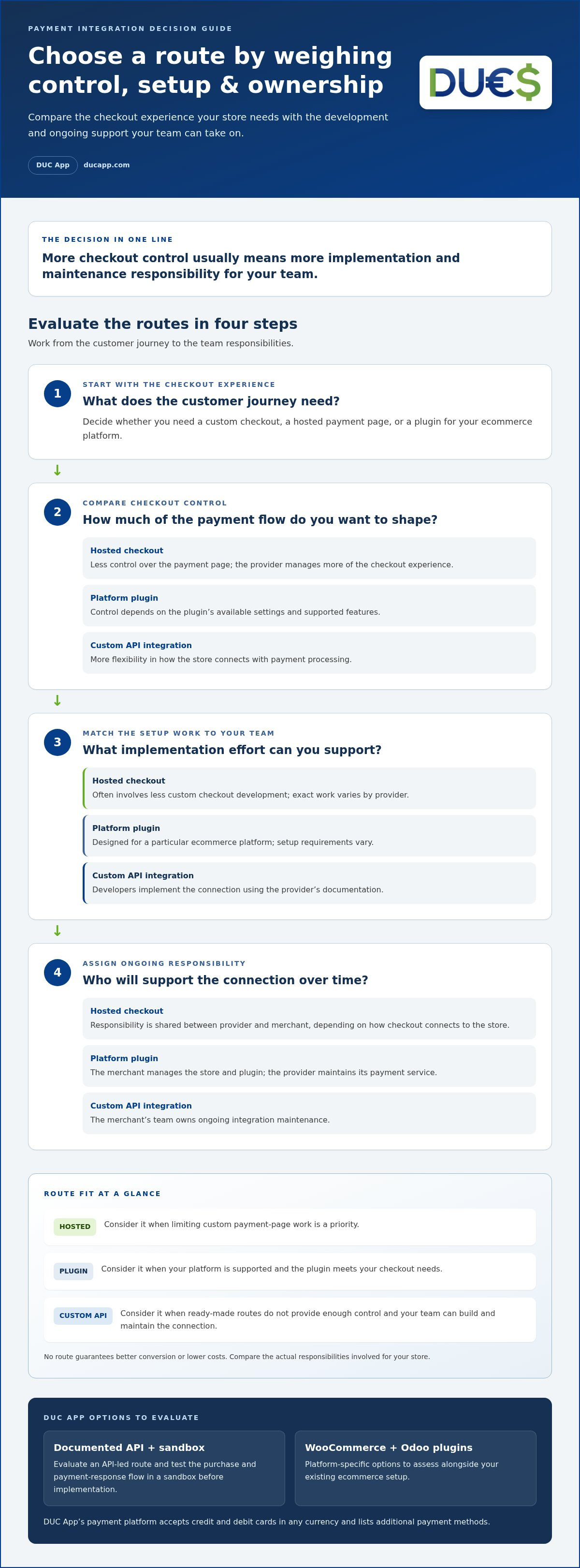
Each integration route balances checkout control with the work your team must handle. Compare who manages the customer-facing flow, how much development is involved, and who owns future updates. No route guarantees better conversion or lower costs. The right fit depends on your store and its requirements.
| Route | Control | Setup involvement | Maintenance responsibility | Potential fit |
|---|---|---|---|---|
| Hosted checkout | Less control over the payment page; the provider manages more of the checkout experience. | Often involves less custom checkout development, though the exact work varies by provider. | Shared between the provider and merchant, depending on how the checkout connects to the store. | Teams aiming to limit custom payment-page work. |
| Platform plugin | Control is shaped by the plugin’s available settings and supported features. | Uses an option designed for a particular ecommerce platform; setup requirements vary. | The merchant manages the store and plugin, while the provider maintains its payment service. | Stores using a platform with a relevant payment plugin. |
| Custom API integration | More flexibility to shape how the store connects with payment processing. | Requires developers to implement the connection using provider documentation. | The merchant’s team owns the integration’s ongoing maintenance. | Teams with specific checkout requirements and capacity to support custom code. |
Hosted checkout, plugin, or custom API: which fits your store?
Choose hosted checkout when limiting custom work on the payment page is a priority. Consider a plugin if your store uses a supported platform and the plugin’s capabilities meet your checkout needs. Custom API work makes sense when ready-made routes don’t provide enough control and your team can build and maintain the connection. For UK merchants exploring streamlined checkout options and card processing, providers such as Dojo offer practical solutions for both online and in-person payments. Compare the actual responsibilities involved, not just the setup label.
How do WooCommerce and Odoo change the integration decision?
Your ecommerce platform helps narrow the options. If you use WooCommerce or Odoo, a platform-specific plugin may fit your existing setup and reduce the need to build a custom connection. DUC offers plugins for both platforms, as well as a documented API for teams evaluating an API-led route. Review the relevant documentation and test how the option supports your store’s requirements before choosing an approach.
Multi-provider orchestration is a separate consideration. It can help coordinate multiple payment providers, but it adds a layer that a store using one payment connection may not need. Start with the checkout and operational requirements you have today. If you’re weighing a direct connection against a platform option, explore DUC ecommerce API integration.
Evaluate Payment API Features, Documentation, and Payment Coverage
A payment API can look capable on a feature page but still miss a requirement your store depends on. Compare documented capabilities with your checkout, platform, markets, and team’s ability to support the integration. Integration fit depends on documented capabilities matching merchant requirements.
Use this checklist to keep the evaluation practical:
- Documentation: Look for setup instructions, code examples, explanations of expected responses, and guidance for handling errors.
- Sandbox access: Use a test environment to exercise the integration. Treat test results as useful checks, not proof of production readiness.
- Platform support: Match the integration route to your ecommerce platform and the way your store handles orders and checkout.
- Payment coverage: Compare the methods and currencies your customers need in your target markets with those described for the integration.
- Maintenance: Decide who will monitor changes, update the connection, and troubleshoot issues after launch.
DUC provides documented API resources and a sandbox environment. Developers can use them to understand the integration and evaluate its flow before implementation.
What should developers look for in API documentation and a sandbox?
Documentation should explain the expected sequence, required information, successful responses, and possible error cases. Check that its instructions match the integration route you plan to use. Each provider documents its own implementation details, so don’t assume one API’s authentication or response structure matches another’s.
Use the sandbox to test a sample purchase from start to finish: begin at checkout, submit a test payment, inspect the response, and confirm the store handles the outcome as intended. Include an unsuccessful test case if the environment supports one. This can reveal gaps in order-status handling or customer messaging. A sandbox helps you assess behavior in a test environment, but it doesn’t establish that the live setup is ready, secure, or correctly configured.
How should merchants assess payment methods and currencies?
Start with the payment options customers expect in the markets you serve. Then distinguish a platform-wide method list from the capabilities documented for a particular API or plugin. A method appearing on a provider’s platform does not establish that it’s available in every integration. Use the documentation for the route you plan to implement to guide your assessment.
DUC’s payment processing platform accepts credit and debit cards in any currency. Its listed payment methods include Visa, Mastercard, Apple Pay, Google Pay, Direct debit SEPA, Interac, Discover, American Express, Bank transfers in USD, iDEAL, Affirm, Afterpay/Clearpay, Diners Club, PayNow, OXXO, Klarna, Cash App Pay, and Link. This is platform-level coverage. Compare your market-by-market requirements with the documentation for the API or plugin you intend to use, then test the relevant checkout flow in the sandbox.
Plan a Practical Ecommerce Payment API Integration Evaluation
Document your evaluation before development begins. This gives business and technical teams a shared view of what the checkout must do, which integration route fits, and what needs to be tested. It also keeps the ecommerce payment api integration grounded in your store’s actual requirements rather than assumptions.
What should the merchant and developer define before implementation?
Record your ecommerce platform, target markets, currencies, expected payment methods, checkout requirements, and the person or team that will own the integration after launch. Then map the customer journey from payment selection to the store’s order response. Use the provider’s documentation to validate technical details such as supported flows, required information, and payment-response formats.
- Define requirements. List the store platform, customer checkout needs, markets, currencies, expected payment methods, and internal technical owner. Separate essential needs from preferences.
- Map the checkout. Trace what customers see and what the store must do at each stage, from choosing a payment option to receiving a response and updating the order. Mark where the store needs to communicate a status to the customer.
- Assess platform fit. Compare hosted checkout, a relevant platform plugin, and custom API work against the checkout map. Review the provider documentation for the route and platform you intend to use. Don’t assume a platform-level capability applies to every integration.
- Test representative flows. Use the documented sandbox process to rehearse successful and unsuccessful scenarios. Inspect the responses and confirm the store reacts as intended, including how it handles an unsuccessful payment.
- Plan maintenance. Assign responsibility for monitoring the integration, handling issues, and reviewing documentation when the store or integration changes. A clear owner helps prevent support tasks from falling between teams.
How can a team test readiness before going live?
Build test scenarios from the provider’s sandbox instructions. Follow a successful purchase through the customer-facing checkout and the store’s order response, then run an unsuccessful scenario supported by the test environment. Compare the system’s response with what the store displays and records. Document unclear handoffs before moving forward. Sandbox testing helps assess behavior, but it doesn’t prove that a live integration is production-ready.
Before implementation, use this decision check: Are your target markets, payment methods, currencies, and platform covered in the documentation? Does the selected route match your checkout map? Can the team interpret expected responses and handle failures? Is someone responsible for ongoing maintenance? Resolve any unclear requirements against the provider’s documentation before committing development work.
A practical evaluation makes the next step easier to scope. Explore DUC’s ecommerce API integration to review its documented API and sandbox, or assess its WooCommerce and Odoo plugins for stores on those platforms.
Evaluate DUC’s Ecommerce Payment API Integration for Your Business
DUC provides merchants with a documented API, a sandbox environment, and plugins for WooCommerce and Odoo. These give teams several integration routes to evaluate. The right option depends on your store platform, checkout needs, and the capabilities described for the specific integration you plan to use.
DUC’s payment processing platform accepts credit and debit cards in any currency. It also lists other payment methods, including Apple Pay, Google Pay, Interac, and iDEAL. Compare your requirements with the documentation for the API or plugin you’re evaluating to determine how they fit that integration.
Which merchants should shortlist DUC’s API and platform integrations?
DUC offers API access for teams evaluating a custom payment connection and plugins for WooCommerce and Odoo. Developers can use the documented API to understand the integration before implementation, and the sandbox provides a test environment for examining its documented workflows. Shortlist the route that aligns with your checkout, platform, and operational requirements.
What is the next step for evaluating DUC?
Bring your requirement checklist to the review. Match your ecommerce platform, target markets, currencies, expected payment methods, and checkout flow against DUC’s API integration information and developer resources. For each required capability, compare what the platform offers with what the documentation describes for the specific API or plugin integration.
Use the sandbox to assess the documented workflow before implementation. Follow the test process, inspect the responses, and decide how your store will handle each outcome. If you use WooCommerce or Odoo, evaluate the relevant plugin against your platform and checkout needs. For a custom connection, use the API documentation to assess the work your team will build and maintain.
- Platform: Does the API or plugin match your ecommerce setup?
- Checkout: Can the documented flow support the customer experience you need?
- Coverage: Are your priority payment methods and currencies described for that integration?
- Testing: Can your team rehearse the relevant workflow in the sandbox?
- Ownership: Is someone responsible for maintaining the connection?
Use these criteria to evaluate DUC’s ecommerce payment api integration against your store’s requirements. Explore DUC’s ecommerce payment API integration and review the route that fits your platform.
Make Your Payment Setup Ready for What Comes Next
Your payment integration should support the store you’re building, not just the checkout you have today. Record why you chose a route and what would prompt a future review, such as a new ecommerce platform, market, or customer checkout need. If your review also includes evaluating payment processing solutions and fee structures, renegadepayments.com provides merchant services designed around transparent pricing. That gives your team a clear reference as operations evolve.
Keep ownership visible, too. Make sure the people responsible for the store, development, and payment operations understand how the setup fits together. A considered ecommerce payment api integration is easier to manage when the decision and responsibilities are clear from the start.
Use your requirements to assess DUC’s integration options and identify the route that matches your store. Explore DUC’s ecommerce payment API integration and take the next step with a clear plan.
Frequently Asked Questions
What is an ecommerce payment API?
An ecommerce payment API gives an online store a software interface for exchanging payment requests and responses with a payment service. Its precise functions vary by provider and integration. Use your store’s requirements to check whether a setup supports the checkout flow you need, then document how the store should respond to the returned payment status before development begins.
Is a payment API the same as a payment gateway?
No. A payment API is the software interface used to exchange information, while a payment gateway generally refers to a component that handles payment information as it moves through a transaction. Providers may use these terms differently or combine functions. To compare options, review what each documented component does, including which system receives a request and how the store gets a transaction response.
Can I integrate a payment API without custom coding?
Sometimes. A hosted checkout or platform plugin may reduce the custom development needed, while a direct API connection generally requires developer involvement. The right route depends on your ecommerce platform and checkout needs. DUC offers plugins for WooCommerce and Odoo, as well as a documented API and sandbox. Merchants using either platform can evaluate the relevant plugin alongside the API route.
How do I test an ecommerce payment API before launch?
Follow the provider’s sandbox documentation and run the test scenarios it supports. For an ecommerce payment api integration, trace a sample checkout from payment selection to the store’s order response, then examine how the store handles documented error cases. Record unexpected results and decide how your team will address them. Sandbox testing helps evaluate the integration flow, but it doesn’t replace a separate review before production use.
Which payment methods does DUC support?
DUC lists Visa, Mastercard, Apple Pay, Google Pay, Direct debit SEPA, Interac, Discover, American Express, Bank transfers in USD, iDEAL, Affirm, Afterpay/Clearpay, Diners Club, PayNow, OXXO, Klarna, Cash App Pay, and Link. Its payment processing platform accepts credit and debit cards in any currency. Compare the documentation for the API or plugin you plan to use with the payment options your checkout requires.
Does DUC offer ecommerce payment API plugins?
Yes. DUC offers plugins for WooCommerce and Odoo, along with a documented API and sandbox environment. If your store runs on WooCommerce or Odoo, compare the corresponding plugin with your checkout requirements and team workflow. For a custom connection, evaluate the API documentation and use the sandbox to examine the documented flow before implementation.


