

Can a credit card fund a transfer to Cuba, and what will your recipient actually receive? If you’re looking to send money to cuba with credit card, the payment method is only half the decision. The recipient’s destination matters just as much.
It’s understandable to want a clear answer before you start. Cash, money sent to a Cuban card, and a mobile phone recharge serve different needs. DUC App accepts credit and debit card payments and uses an AI-powered assistant to guide you through a transaction.
This guide explains how to fund a Cuba transfer by card, choose a service that suits your recipient, and follow the steps in the app. Options include CUP or USD cash delivered to the recipient’s home, euro cash delivery in the City of Havana, funds sent to eligible USD-MLC or CUP cards, and mobile phone recharges. Decide what your recipient can use, then select the matching service and enter the requested details carefully.
Key Takeaways
- To send money to cuba with credit card, choose the recipient’s Cuba service separately from your payment method.
- DUC’s Cuba services include home delivery of CUP or USD cash, euro cash delivery in the City of Havana, transfers to specified Cuban cards, and mobile phone recharges.
- DUC supports credit and debit cards, digital wallets, and other payment methods. Email Money Transfer is available only in Canada.
- Choose the recipient service in DUC App before entering payment details, then review the transaction details before completing it.
- DUC App’s AI-powered assistant guides users through transactions. User reviews give the app a 4.3 rating from 2,116 reviews.
Can you send money to Cuba with a credit card?
Yes. DUC accepts credit and debit card payments for its services, including transfers to Cuba. To send money to cuba with credit card, choose an accepted card payment method in the app to fund your transaction. Your payment method determines how you pay, not how the recipient receives the funds.
A card-funded transfer means you pay through an accepted card option in the app, then select a service for the recipient. This guide focuses on sending money to someone in Cuba through DUC. Keep the two decisions separate: first choose the payment method, then select the Cuba service that matches your recipient’s needs.
Cuba’s monetary and banking systems have changed over time. For historical background, read the Economy of Cuba article. When arranging a transfer, focus on the practical choices in DUC App: your payment method and the recipient’s destination are separate selections.
What does paying by card mean for a Cuba transfer?
It means you use an accepted credit or debit card payment method in DUC App to fund the transaction. Your recipient doesn’t receive “a credit card transfer.” They receive the service you select, such as CUP or USD cash delivered at home, funds sent to a supported Cuban card, or a mobile phone recharge. Keep those choices distinct and review the selected service and transaction details before paying.
Who is this transfer option designed to help?
This option can suit people supporting family or friends in Cuba who want to pay digitally by card. Start with what the recipient needs: cash, funds directed to a card, or phone credit. Their preference helps you choose the service before entering payment details. Rather than assuming one destination works for everyone, select the option that matches how the person plans to use the support.
Keep the payment and the purpose aligned. A card funds the transaction, while the selected recipient service determines how the support is sent. DUC’s AI-powered assistant guides users through the transaction steps. Follow the prompts and review the details shown in the app, including the chosen service and payment method.
Choose how your recipient receives money in Cuba
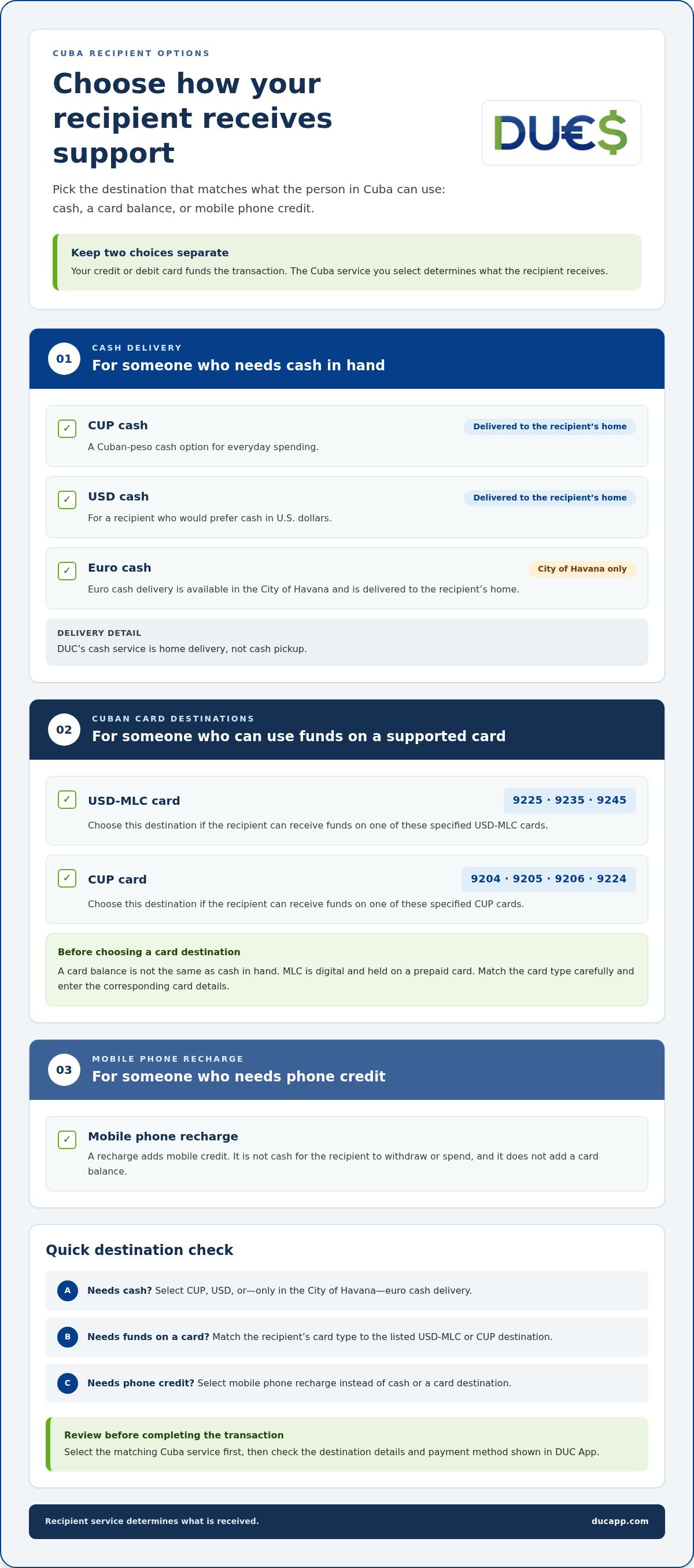
Before you send, match the service to what your recipient can use. DUC offers Cuba options ranging from cash delivered at home to funds sent to specified Cuban cards and mobile phone recharges. These services aren’t interchangeable. Someone who needs cash has a different destination in mind from someone who needs a card balance or phone credit.
| Destination | May fit a recipient who… |
|---|---|
| CUP cash delivered at home | Needs Cuban pesos in cash for everyday spending. |
| USD cash delivered at home | Would prefer to receive cash in U.S. dollars. |
| Euro cash delivered at home in the City of Havana | Is in the City of Havana and needs euros in cash. |
| USD-MLC card destination: 9225, 9235, 9245 | Can receive funds on one of the specified USD-MLC cards. |
| CUP card destination: 9204, 9205, 9206, 9224 | Can receive funds on one of the specified CUP cards. |
| Mobile phone recharge | Needs mobile credit rather than cash or a card balance. |
Cash delivery and Cuban card destinations
CUP and USD are separate cash delivery options, and both are delivered to the recipient’s home. Euro cash delivery is available only in the City of Havana. DUC’s cash service is home delivery, not cash pickup. For a card destination, choose the number that matches the recipient’s card type: USD-MLC cards use 9225, 9235, or 9245; CUP cards use 9204, 9205, 9206, or 9224. Select the right destination and enter the corresponding card details carefully.
A card balance isn’t the same as cash in hand. MLC is digital and held on a prepaid card, so consider whether the recipient needs cash or can use the selected card destination. For wider background on U.S. rules related to Cuba remittances, consult the U.S. Treasury’s OFAC Cuba Sanctions Fact Sheet.
When a mobile top-up may fit better
A mobile phone recharge sends phone credit, not money for the recipient to withdraw or spend as cash. It may fit better when staying connected is the immediate need. Keep the difference clear as you choose: cash delivery provides cash, a card destination sends funds to a specified card, and a recharge adds mobile credit. For details on this separate service, see the guide to Cubacel recharge from the USA.
Once you know what your recipient needs, select the matching Cuba service in DUC App and review the destination details before continuing. Choosing the service first helps you send money to cuba with credit card while keeping the recipient’s needs at the center of the transfer.
Compare credit cards with DUC’s other payment methods
A credit or debit card is one way to fund a transaction in DUC App. DUC also supports digital wallets, bank transfers, and other payment methods. Choose a method that suits your payment setup, and note that Email Money Transfer is available only in Canada.
- Visa and Mastercard
- Apple Pay and Google Pay
- Direct debit SEPA and Interac
- Discover, American Express, and Diners Club
- Bank transfers in USD
- iDEAL, Affirm, Afterpay/Clearpay, PayNow, OXXO, Klarna, Cash App Pay, and Link
- Credit or debit card
- Email Money Transfer, available only in Canada
- Cryptocurrencies, for validated accounts
When a credit or debit card is the practical choice
Paying by an accepted card can be a practical option if you want to fund a transfer through a card payment in the app. DUC’s supported card options include Visa, Mastercard, Discover, American Express, and Diners Club. Apple Pay and Google Pay are also supported payment methods. Select your payment method and review the transaction details before submitting payment.
If you’re comparing ways to send money to cuba with credit card, focus on the payment method you want to use and the recipient service you need. DUC supports card payments, digital wallets, bank transfers in USD, and other methods listed above. Review the transaction details before confirming, rather than assuming a specific fee, limit, or processing time based on the payment method’s name.
Important limits for email and cryptocurrency payments
Email Money Transfer is available only in Canada. Cryptocurrency transactions have important safeguards: only validated accounts may add money for cryptocurrency, and conversion to USD, CAD, or euros is irreversible. No refunds are possible. If you send cryptocurrency, use only the wallet address provided by the platform. Using another address can result in loss of funds. Complete the transaction steps promptly because delayed transactions expire. For general context on digital wallets, see this secure digital wallet app guide.
For a card-funded transfer, select the card or wallet payment method you want to use and keep the recipient’s Cuba service clear as you review the transaction. If you choose another payment method, follow its instructions in the app. A final review helps you distinguish how you pay from how the recipient receives the funds.
How to prepare and complete a card-funded transfer to Cuba
A clear sequence helps you align the recipient’s needs, the payout destination, and your card payment. Start by choosing the service your recipient intends to use. Then follow the information requested in DUC App and review the transaction details before confirming. Use the app’s prompts to enter the details for your selected service.
- Open DUC App. Begin the transfer flow in the app and select Cuba as the destination.
- Choose the recipient’s intended service. Decide whether they should receive CUP or USD cash at home, funds on a supported Cuban card, or a mobile phone recharge. Make this choice before entering payment details.
- Select the precise destination. For a card transfer, match the destination to the recipient’s card type and enter the details requested. Euro cash delivery is available only in the City of Havana.
- Provide the requested information. Follow the prompts in the app for the selected service. Enter the details carefully and provide only the information requested.
- Choose an accepted payment method. Select a credit or debit card option and enter the payment details requested.
- Review before confirming. Check the recipient’s destination, the service selected, and the payment details shown in the app. Confirm only when they match your intentions.
Select the recipient’s service and destination
Keep the payout formats distinct. Cash delivery means CUP or USD cash delivered to the recipient’s home. A card destination sends funds to the selected Cuban card type. A mobile top-up adds phone credit instead of delivering cash or funding a card. Choose the format your recipient plans to use, rather than assuming one service can be converted into another. For card destinations, check the card type and number carefully before moving on.
For example, if your recipient needs money on a card, select a card destination rather than a cash delivery option. The service should reflect how they plan to access or use the funds. If they’re in the City of Havana and need euros, choose euro cash delivery, which is limited to that city.
Review the card payment before confirming
Choose an accepted payment method and compare the recipient service and destination with the payment details presented in the app. Check for selection or entry errors before confirming. The app’s prompts guide the process, while a final review helps ensure your chosen payout and payment method are correct. Don’t rely on assumptions about processing times, transaction limits, or payment terms. Review the details shown for your transaction.
Ready to follow the steps in a guided flow? Start a Cuba transfer in DUC App and review each selection before confirming.
Send money to Cuba through DUC App with guided support
DUC App is an AI-powered money-transfer application that guides you through a digital transaction. Its conversational assistant helps you move through the steps, including choosing a service and entering the requested information. This guidance helps you keep the recipient’s needs in view as you arrange a Cuba transfer.
What the DUC App brings to the transfer journey
DUC supports credit and debit card payments, including Visa and Mastercard, as well as digital payment methods such as Apple Pay and Google Pay. It also supports other payment methods listed in this guide. DUC describes its transfer service as fast and secure, with bank-grade security supporting the digital experience.
The assistant guides you, but you choose the service and payment method. Select the Cuba option that fits your recipient, follow the prompts, and review the information shown before completing the transaction. Someone who needs phone credit has a different need from someone expecting cash at home or funds directed to a Cuban card. Keeping that purpose clear helps you follow the right path through the app.
User feedback offers another reference point. DUC lists a 4.3 rating from 2,116 reviews. Testimonials describe individual experiences with transfers to Cuba, including CUP and USD cash delivery. Reviews report personal experiences, not a promise that every transfer will have the same outcome.
Take the next step with your chosen Cuba option
Keep the sequence simple: choose how your recipient should receive support, then select a payment method. DUC’s Cuba services include CUP or USD cash delivered at home, euro cash delivery in the City of Havana, transfers to specified CUP or USD-MLC cards, and mobile phone recharges. Match the service to what your recipient can use, then review the transaction details before confirming.
If you’re ready to send money to cuba with credit card, let the in-app assistant guide you through the steps. Enter the information requested, check that the selected Cuba destination is correct, and review the payment details before submitting. A careful final review helps ensure the transaction reflects the choices you intended.
Start your Cuba transfer in DUC App and choose the recipient’s service to begin.
Make your next Cuba transfer with confidence
Supporting someone across borders can feel more manageable when you turn the decision into one clear next step. Before you begin, consider what would be most useful to your recipient. That choice gives your transfer a purpose and helps you select the right service.
If you’re ready to send money to cuba with credit card, follow the guided steps in the app, choose the recipient’s service, and review the details before confirming. Keep their needs at the center and make sure your selections match.
Send money quickly and securely with DUC App, and take the next step toward supporting someone in Cuba.
Frequently Asked Questions
Which countries can I send money to with DUC?
DUC’s listed destinations are Bangladesh, Canada, China, Colombia, Cuba, Ecuador, El Salvador, Haiti, India, Ireland, Mexico, Nepal, Pakistan, Philippines, Spain, Switzerland, and the United Kingdom. For destinations outside Cuba, the service is bank deposit. For Cuba, select the service that matches your recipient’s needs in the app.
Can I recharge a Cuban phone instead of sending money?
Yes. DUC offers mobile phone recharging for Cuba as a separate service. A recharge adds phone credit, so it won’t provide cash or put funds on a Cuban card. Choose a top-up if the immediate need is mobile service. If your recipient needs cash or funds sent to a card, choose the corresponding transfer service instead. For a dedicated walkthrough, see the guide to recharging Cubacel from the USA.
Is DUC a bank or a money-transfer app?
DUC App is a financial technology application, not a traditional bank. It supports money transfers and related digital services, including peer-to-peer transfers and international mobile recharges. For a Cuba transfer, choose a recipient service and a payment method. If you want to send money to cuba with credit card, the card funds your payment, while the selected service determines how your recipient receives support.
Can I use Email Money Transfer to pay from outside Canada?
No. DUC’s Email Money Transfer option is available only in Canada. DUC also supports methods such as credit or debit cards and digital payment options. Choose the payment method you intend to use and follow the instructions in the app.
What happens if I do not complete a cryptocurrency transaction promptly?
The cryptocurrency transaction expires if you delay completing its steps. Only validated accounts may add money for cryptocurrency. Use only the wallet address provided by the platform, because using another address can result in loss of funds. Cryptocurrency conversion to USD, CAD, or euros is irreversible and cannot be refunded. Follow the instructions carefully and complete the steps promptly.
Does DUC offer cash pickup in Cuba?
DUC’s Cuba cash option is home delivery, not physical cash pickup. CUP and USD cash can be delivered to the recipient’s home. Euro cash delivery is limited to the City of Havana. Consider the recipient’s location and whether home delivery suits them before selecting a service in the app. Other Cuba options include specified card destinations and mobile phone recharges.


