

The easiest way to send money to Cuba may not be the best fit for the person receiving it. Before you send money to Cuba online, consider what they need: funds delivered to their home, access to an MLC or CUP card, or mobile phone credit. The delivery method matters as much as the transfer itself.
Compare the amount charged with what the recipient is expected to receive, and check which payment methods and delivery options apply to your transaction. A small error in a recipient’s details can also create avoidable problems, so confirm the information carefully before submitting a transfer.
This guide compares online transfer routes and explains what to verify before paying. DUC App offers peer-to-peer transfers and international mobile top-ups, as well as Cuba services including sending CUP to a home, cash delivery of USD to a home, cash delivery of euros in the City of Havana, and transfers to eligible USD-MLC and CUP cards. The right option depends on what your recipient can use and the terms shown for your transaction.
Key Takeaways
- Start with what your recipient needs: funds delivered to a home, access to an eligible MLC or CUP card, or mobile phone credit.
- Compare the delivery format, eligibility, available payment methods, displayed fees, and currency conversion information.
- Before you send money to Cuba online, verify the recipient’s details and review the transaction summary.
- Follow the steps in order: check eligibility, compare terms, enter recipient information, review the details, then confirm.
- DUC App offers peer-to-peer transfers, international mobile top-ups, and Cuba delivery options. Match the service to your recipient’s needs.
Sending money to Cuba online: what the recipient needs determines your options
Start with how your recipient will access the money, not with the app or payment method you already use. Online services can send funds through different delivery routes, and those routes are not interchangeable. DUC App offers several Cuba options: sending Cuban pesos (CUP) to a home, cash delivery of USD to a home, cash delivery of euros in the City of Havana, and transfers to eligible USD-MLC and CUP cards.
A money transfer sends funds through an available delivery route; a mobile top-up adds phone credit or service instead. If your recipient needs general financial support, a top-up will not meet the same need as a transfer. If they mainly need mobile service, a recharge may be the more direct option.
Rules can also affect which transactions are permitted. The Cuban Assets Control Regulations provide background on the US regulatory framework. Check the current requirements that apply to your own situation before sending.
What should you clarify with the recipient first?
Ask how they can receive and use the support before choosing a route. Their answers will help you select a suitable delivery method and gather the right information.
- What do they need the support for: general expenses, phone service, or a specific type of purchase?
- Can they receive funds at home, use an eligible card, or receive a mobile top-up?
- What recipient details does the selected service require, and can they provide them accurately?
Check the required information before you begin. A name, card detail, or phone number entered incorrectly can cause problems. Confirm the details directly with the recipient and match them to the fields shown by the service. Do not request or share sensitive information that the service does not ask for.
Is a money transfer the same as a Cubacel top-up?
No. A top-up adds mobile credit or service to an eligible phone account. It is not general-purpose money the recipient can use for other expenses. A transfer, by contrast, sends funds through a supported delivery method. Choose based on the need: phone service calls for a recharge, while broader support calls for a transfer the recipient can access.
Before purchasing a recharge, verify the recipient’s mobile provider, phone number, and top-up details. DUC App offers peer-to-peer transfers and international mobile top-ups. For phone-credit-specific instructions, use the Cubacel recharge guide. If you plan to send money to Cuba online, first match the transaction type to what your recipient can use.
Online transfers to Cuba: from payment to recipient
Once you know what your recipient needs, map out the transfer before authorizing it. Your payment method funds the transaction, the service processes it under the terms shown, and the delivery method determines how the recipient accesses what you send. Check each step separately because available choices can differ by transaction.
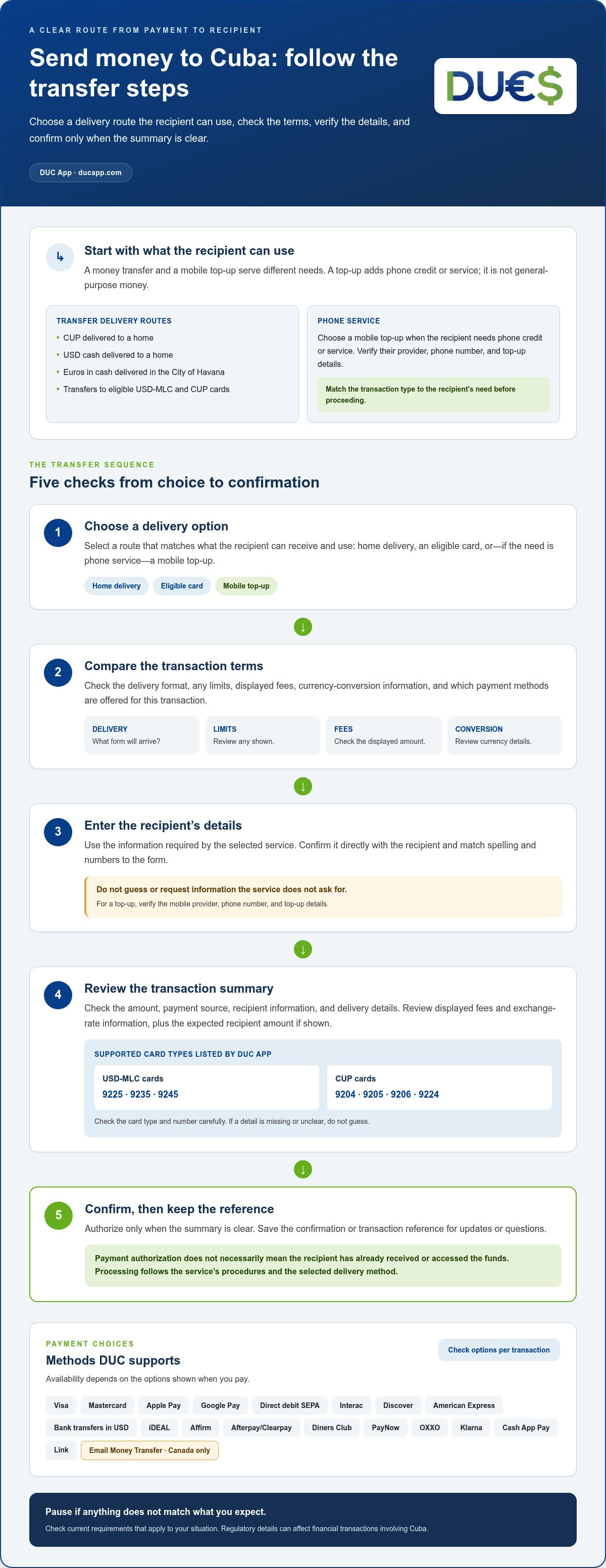
Check the delivery option, compare the displayed terms, enter the recipient’s details, review the transaction, then confirm. Use this sequence whenever you send money to Cuba online, and pause if a detail does not match what you expect.
- Choose a delivery option. Match the available route to what your recipient can use, such as home delivery, an eligible card, or a mobile top-up.
- Compare terms. Review the delivery format, any limits, fees, and currency conversion information shown for the transaction.
- Enter details. Use the recipient information required by the service, checking spelling and numbers against the details they provided.
- Review the summary. Compare the amount, payment source, recipient details, and displayed terms.
- Confirm and save. Authorize only when the summary is clear, then keep the confirmation or transaction reference.
After payment, the service processes the transaction according to its procedures and the selected delivery method. Payment authorization does not necessarily mean the recipient has already received or accessed the funds. Use the transaction information provided by the service for updates or questions.
Which payment methods might an online app support?
DUC supports Visa, Mastercard, Apple Pay, Google Pay, Direct debit SEPA, Interac, Discover, American Express, Bank transfers in USD, iDEAL, Affirm, Afterpay/Clearpay, Diners Club, PayNow, OXXO, Klarna, Cash App Pay, and Link. The payment methods available for your transaction depend on the options shown when you pay. Email Money Transfer is available in Canada only.
What details should you review before confirming?
Check the recipient’s information, transfer amount, payment source, and delivery details. Review any displayed fee and exchange-rate information, then note the amount the recipient is expected to receive if it is shown. Check the card type and number carefully if sending to a card. DUC App supports USD-MLC cards 9225, 9235, 9245 and CUP cards 9204, 9205, 9206, 9224. If a detail is missing or unclear, do not guess; review the transaction information before proceeding.
Rules can change, so check the current requirements that apply to your transaction. The Federal Register published recent amendments to Cuban Assets Control Regulations, a reminder that regulatory details can affect financial transactions involving Cuba. This reference is not a substitute for checking the rules relevant to your own circumstances.
For a digital option to assess, review DUC App’s peer-to-peer transfer options alongside your recipient’s needs and the transaction terms displayed before payment.
Compare online money-transfer options to Cuba without overlooking the details
A useful comparison starts with what the recipient can actually access. A digital transfer, a mobile top-up, and a card transfer serve different purposes. Compare the delivery format alongside the terms, rather than focusing only on the payment method or headline amount.
For Cuba, DUC App offers sending CUP to a home, cash delivery of USD to a home, cash delivery of euros only in the City of Havana, and transfers to eligible MLC and CUP cards. For destinations outside Cuba, the service type is bank deposit. If you’re sending from the United States, consult the U.S. Department of the Treasury’s Cuba Sanctions page for official information on applicable sanctions and authorized transactions.
Which comparison criteria matter most?
Look beyond a headline fee. Compare the total amount charged with the amount the recipient is expected to receive, using the fee and exchange-rate information shown for that transaction. Then check whether your preferred payment method is available. A route only works in practice if the recipient can access and use its delivery format.
Support matters, too. Keep your confirmation or transaction reference available in case you have questions. If a comparison leaves a key detail blank, such as the recipient amount or delivery method, verify it before authorizing payment.
How does DUC App fit into the comparison?
DUC App offers peer-to-peer transfers and international mobile top-ups, which serve different recipient needs. It also provides Cuba delivery options including home delivery of CUP, cash delivery of USD to a home, cash delivery of euros in the City of Havana, and transfers to eligible MLC and CUP cards. Compare the available route and displayed terms with what your recipient can use.
For broader context on peer-to-peer services, the P2P money transfer app guide explains how digital transfers fit into borderless payments. Use that background alongside the details shown for your transaction. To send money to Cuba online with fewer surprises, prioritize clear terms and recipient access over claims that one route is always cheapest, fastest, or best.
Before you send money to Cuba online, follow this verification checklist
A short pause before payment can catch errors that are easy to miss on a small screen. Check the recipient, the delivery option, the payment source, and the transaction summary as separate steps. Review the current details each time you prepare to send.
Recipient details and delivery
- Confirm the recipient information directly. Check names, phone numbers, or card details with the recipient, then compare them with the fields required by the service.
- Review how the recipient will access the transfer. Confirm that the selected method is one they can use and note any requirements displayed in the app.
- Match the transaction to the need. Set up a transfer rather than a mobile top-up if the recipient needs general financial support.
Sender eligibility and payment method
Check that the service supports your location, the destination, and the transaction you intend to make. Eligibility for one route does not automatically establish eligibility for another. Confirm that your chosen payment method appears for this transaction, and use a payment source you are authorized to use.
Displayed transaction terms
Read the final summary before authorizing. Check the amount you’re sending, any displayed fee, exchange-rate information, and the amount expected to reach the recipient if shown. Review applicable limits and any timing information presented. Do not assume these details from a previous transfer. If the amount, currency, or delivery information does not match your understanding, pause and resolve the uncertainty before proceeding.
How can you reduce avoidable mistakes?
Compare each entered detail with the recipient’s instructions, one field at a time. Check every digit and spelling, confirm the payment source and destination, then review the full transaction summary again before approving it. Proceed only when the information is clear and consistent.
After submitting, keep the confirmation and transaction reference in a secure place. Treat these records as private, and share them only through the service’s official support route if you need help. Do not send account credentials or payment details through an unverified message or channel.
If you use DUC’s cryptocurrency services, only validated accounts may add money for cryptocurrency transactions. Cryptocurrency conversion to USD, CAD, or euros is irreversible and cannot be refunded. Use the wallet address provided by the platform, as using another address will result in loss of funds, and complete the steps promptly because transactions expire if delayed.
Use this checklist each time you send money to Cuba online. To compare DUC App’s peer-to-peer transfers or international mobile top-ups with your needs, explore DUC App and review the terms presented for your transaction.
Choose a digital transfer option that fits your Cuba recipient
The right option matches what your recipient can access, the purpose of the support, and the terms you can review before paying. Do not choose by app name or payment convenience alone. Check the delivery format and the amount shown for your recipient before confirming.
Use these questions to make the decision practical:
- What does your recipient need? General financial support and mobile phone credit are different needs, so select a transfer or top-up accordingly.
- Can they use the delivery format? Match the available method to the recipient’s access and the requirements shown in the app.
- Can you use the payment method? Check the options presented for your location and transaction.
- Are the terms clear? Review displayed fees, exchange details, limits, and recipient amount before proceeding.
These checks help separate a convenient setup from a suitable one. A payment option you prefer is not useful if it is unavailable for the transaction, and a delivery method will not help if the recipient cannot access it. If an essential detail is missing or does not fit the recipient’s needs, pause and compare another available route rather than making an assumption.
When might a digital transfer app suit your needs?
An app may suit you if you want to manage supported digital services through one platform. DUC App offers peer-to-peer transfers, international mobile top-ups, and Cuba delivery options. Before proceeding, match the available route to what your recipient needs and review the terms displayed for the transaction.
What is the next step if you are ready to compare?
Review the options presented for your transaction. Check the payment method, recipient amount, delivery details, and any displayed fees, exchange information, limits, or timing. Compare those details with what your recipient can use, not with an assumed rate or a previous transaction. Confirm only when the recipient details and terms make sense together.
To assess DUC App for your needs, explore DUC App’s available services. Review the delivery method and transaction terms before deciding whether to continue. This gives you a clear basis for comparing options without assuming a particular delivery outcome.
Make your next transfer decision with confidence
Before you send money to Cuba online, make your recipient’s needs the starting point. Use what they can access as your guide, then compare the available transfer against its current terms. The recipient amount and delivery format matter more than choosing an app simply because it feels familiar.
DUC App offers peer-to-peer transfers and international mobile top-ups, as well as Cuba delivery options for home delivery of CUP, cash delivery of USD to a home, cash delivery of euros in the City of Havana, and eligible USD-MLC and CUP cards. DUC supports payment methods including Visa, Mastercard, Apple Pay, Google Pay, Direct debit SEPA, and Interac. Review the options and terms presented for your transaction before deciding whether they fit your situation.
Ready to compare your options? Explore DUC App’s available digital services and choose the transfer or top-up that fits your recipient’s needs.
Frequently Asked Questions
Can I send money to Cuba online?
Yes. DUC App offers Cuba services including sending Cuban pesos (CUP) to a home, cash delivery of USD to a home, cash delivery of euros to a home in the City of Havana, and transfers to eligible USD-MLC and CUP cards. DUC supports USD-MLC cards 9225, 9235, 9245 and CUP cards 9204, 9205, 9206, 9224. Review the available route and transaction terms before sending.
How do I send money to someone in Cuba online?
Choose a delivery option that matches what the recipient can access, then follow the app’s instructions. DUC App offers home delivery options and transfers to eligible cards. Enter the recipient information requested, check it against their instructions, and review the transaction summary before authorizing payment. Keep the confirmation details in case you need to refer to the transaction.
What is the difference between sending money and recharging a Cuban phone?
A money transfer sends funds through an available delivery route; a phone recharge adds credit or service to an eligible mobile account. They meet different needs. If the recipient needs mobile service, a top-up may fit. If they need support for other expenses, compare the available transfer options instead. Confirm the recipient’s provider and number before purchasing a recharge.
How much does it cost to send money to Cuba online?
The cost depends on the specific service and transaction. Before paying, review any displayed service fee, currency conversion information, and the amount the recipient is expected to receive. Compare the total charged with the recipient amount, not just a headline fee. If the app does not show a detail you need, use its official support channel before proceeding.
How long does an online money transfer to Cuba take?
Transfer timing depends on the service, route, and transaction. Check whether the app displays an estimate for your transfer, and use it as transaction-specific information rather than a universal promise. After submitting, keep the reference number and use the service’s official status or support tools if you have questions.
Can I pay for an online transfer to Cuba with a card or digital wallet?
DUC supports Visa, Mastercard, Apple Pay, and Google Pay, along with other payment methods including Direct debit SEPA and Interac. The options available for a Cuba transfer are the ones presented for that transaction. Email Money Transfer is available in Canada only. Review the payment choices before entering or authorizing payment details.
What should I check before confirming a transfer to Cuba?
Confirm the recipient details and delivery route, then review the payment method, transfer amount, displayed fee, exchange information, limits, and recipient amount if shown. Check any timing information without treating it as guaranteed. If a name, number, currency, or term looks wrong, pause rather than guessing. Save the confirmation securely after submitting the transaction.


