

Before you pay to recharge cubacel from usa, check the recipient’s number and the checkout details. A mistyped digit could send a top-up to the wrong line. You may also want to know which payment methods are available and whether a promotion applies.
DUC App lets you send an international mobile top-up to Cuba. This guide explains how to select a recharge, verify the recipient’s number, and review the payment details before submitting. DUC accepts credit and debit cards. Email Money Transfer is available only in Canada.
Promotion terms can include specific dates and eligibility rules, so don’t assume every top-up qualifies. Check the offer details before paying, and review the transaction information afterward. The steps below can help you make an informed choice and help the recipient check their balance.
Key Takeaways
- Learn how to recharge cubacel from usa through DUC App, from opening the mobile recharge service to reviewing checkout.
- Understand what a Cubacel mobile top-up does and how it differs from cash delivery or a bank deposit.
- Compare recharge options by their steps, payment choices, transaction details, and promotion terms, not just promotional headlines.
- Use a pre-payment checklist to catch recipient or selection errors before submitting your top-up.
- Know what transaction details to review after submission and where the recipient can check their Cubacel balance.
Recharge Cubacel from the USA: what the top-up does
A Cubacel recharge is a mobile top-up that adds credit to a Cubacel phone line in Cuba. It’s for someone in the USA who wants to add credit to a recipient’s mobile service, rather than send money for general use. With DUC App, select an international mobile recharge and enter the recipient’s Cubacel details.
In short: a mobile top-up adds credit to a designated mobile line. A money transfer sends funds to a person or account. A recharge isn’t cash delivery or a bank deposit. Knowing the difference helps you choose the right transaction before entering payment details. For background on Cuba’s telecom system and the operators behind its mobile services, see Telecommunications in Cuba.
What does a Cubacel top-up provide?
A top-up adds value to the recipient’s Cubacel service. What they can use depends on the selected recharge and the operator’s applicable terms. Don’t assume every recharge includes a particular amount of calling, texting, or mobile data, or qualifies for a promotion. Those benefits depend on the selected recharge and current operator conditions.
Think of the recharge as credit for the recipient’s mobile line, not a guaranteed bundle of services. If you’re sending credit for a specific need, such as staying in touch or using mobile data, read the recharge description and any relevant terms before submitting. This helps set clear expectations and keeps a promotion headline from being the only basis for your choice.
What should you have ready before starting?
A few checks can prevent avoidable mistakes. Have the recipient’s Cubacel number ready, decide which recharge you intend to send, and review the checkout information before paying. Compare the number you enter with the one the recipient provided. A mistyped digit could direct the top-up to a different line.
- Recipient number: Confirm the complete Cubacel number before moving forward.
- Recharge selection: Check that the displayed option matches what you mean to send.
- Checkout details: Review the recipient and transaction information before submitting.
- Payment method: Choose from the methods available for your transaction. Email Money Transfer is available only in Canada.
Check the payment options shown in your transaction rather than assuming every method is available for every payment. DUC supports Visa, Mastercard, Apple Pay, Google Pay, Direct debit SEPA, Interac, Discover, American Express, Bank transfers in USD, iDEAL, Affirm, Afterpay/Clearpay, Diners Club, PayNow, OXXO, Klarna, Cash App Pay, Link, and credit or debit cards. Email Money Transfer is available only in Canada. Review the options and transaction details on screen before authorizing payment.
Once you know what a recharge does and have the correct number ready, choose the mobile recharge flow in DUC App. The goal is simple: add credit to the intended Cubacel line, then review the details before submitting.
How to recharge a Cubacel number with DUC App
DUC App provides a digital way to send an international mobile top-up to Cuba. Follow the steps in order, and pause at checkout to confirm the recipient and transaction details. Use the options presented in the app to complete the transaction.
- Open DUC App. Start in the app and select its international mobile recharge service. Choose Cuba as the destination if prompted, then select Cubacel or the relevant mobile operator option shown.
- Enter the recipient’s number. Type the Cuban mobile number into the recharge flow. Compare the number displayed on screen with the one the recipient gave you, checking each digit before moving on. Follow any number-format guidance shown in the app. Don’t add or remove digits based on a guess.
- Select a recharge. Choose from the options presented in DUC App. Review what the selected recharge includes. Don’t assume it provides a particular quantity of calls, texts, data, or a promotion unless the displayed terms say so.
- Choose an available payment method. Select an option shown for your transaction. DUC supports a range of payment methods, but Email Money Transfer is available only in Canada.
- Review and submit. Before authorizing payment, check the Cubacel number, recharge selection, and transaction details shown at checkout. Submit only when they match your intention. Keep the transaction information provided afterward for reference.
Enter the recipient’s Cubacel details
Accuracy starts with the number. If possible, copy it from a message or verify it directly with the recipient, then compare it with the digits displayed in DUC. Don’t rely on a saved contact name alone. Confirm the actual number. If the app gives formatting instructions, follow them rather than assuming a country code or spacing rule.
This check is especially useful if you’re helping someone else or sending a top-up to a line you don’t recharge often. Taking a moment to compare the digits can catch a typo before you pay.
Choose a recharge and complete checkout
DUC presents recharge choices and payment options in the transaction flow. Read the details attached to your selection, then check the checkout summary before submitting. If a promotion matters to you, look for its eligibility terms and dates rather than assuming it applies automatically. For broader context about staying connected, the FCC guidance on telecommunications in Cuba covers phone connectivity for travelers, a separate topic from sending a Cubacel top-up.
This step-by-step process can help you recharge cubacel from usa without rushing past the recipient check. Open DUC App’s mobile recharge service and follow the transaction details from selection through checkout.
Compare Cubacel recharge options without relying on promotion headlines
A headline can make an offer look simple, but the conditions matter. Compare recharge options by the steps involved, payment methods, information shown before submission, and how clearly the offer explains its terms. For a recharge cubacel from usa, the goal is to choose a mobile top-up that suits the recipient, not just the most eye-catching promotion.
How to assess a recharge offer
Before selecting a promotion, check its valid dates, qualifying recharge, and the benefit intended for the recipient. Confirm that the offer applies to the specific top-up you’re considering and read any stated limits. Promotions can change, so don’t treat an old headline or example as a current offer.
- Validity: Check the start and end dates stated in the offer terms.
- Eligibility: Confirm which recharge options qualify and what conditions apply.
- Recipient benefit: Identify what the recipient receives instead of inferring it from the headline.
- Recharge versus bonus: Keep the amount paid separate from any promotional credit described in the offer.
These checks help you compare offers without relying on outdated promotion amounts or assuming another service’s offer applies through DUC. Review the transaction details and the promotion terms before submitting.
Which payment details matter for a US sender?
DUC supports a range of payment methods, including Visa, Mastercard, Apple Pay, Google Pay, Direct debit SEPA, Interac, Discover, American Express, Bank transfers in USD, iDEAL, Affirm, Afterpay/Clearpay, Diners Club, PayNow, OXXO, Klarna, Cash App Pay, and Link. Choose an available method for your transaction, and review the payment and recharge details before submitting.
Compare the information shown before you pay: the selected recharge, recipient details, payment method, and transaction details. If anything differs from what you intended, pause and review your selections. A promotion headline is not a substitute for checking the offer terms.
Also consider whether your goal is a phone top-up or sending funds for another purpose. A Cubacel recharge adds credit to a mobile line. It isn’t a general money transfer. If you’re exploring a card-based option for another transfer purpose, this credit-card guide for sending money to Cuba explains that separate use case.
For any digital payment, protect your account and payment details. DUC describes its app as secure, but take care with the information you enter. For a broader overview of digital wallet security, see this secure digital wallet guide.
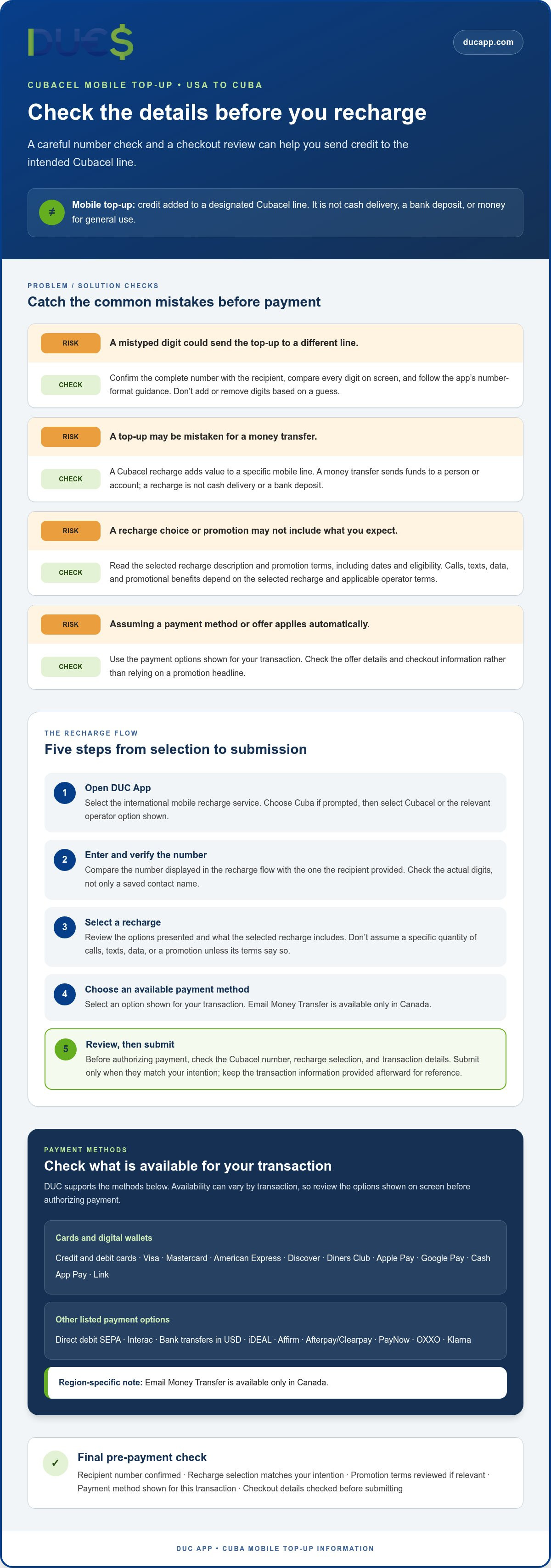
Check these details before and after a Cubacel recharge
Reviewing the details before payment and checking the transaction afterward can help you understand what happened to your top-up. After submitting, refer to the transaction information DUC provides. If the recipient doesn’t see the credit, check those details before taking another step.
Avoid common recipient and checkout mistakes
Before authorizing payment, compare every digit of the Cubacel number with the details the recipient supplied. Confirm that the selected service is a mobile recharge and that the option shown matches your choice. Review the transaction details at checkout, including the recipient and payment information. Pause if anything looks different from what you intended.
- Number: Check each digit, not just the contact name.
- Selection: Confirm the intended Cubacel recharge appears in the transaction.
- Details: Review the checkout information before submitting.
- Record: Keep the transaction information DUC provides after submission.
After submitting, review the transaction information available through DUC. If the recipient hasn’t seen the credit, don’t submit a second recharge right away. First, check the available transaction details and ask the recipient to verify the line and balance. Cubacel users can check their main balance by dialing *222# and bonus balances by dialing *222*266#.
If you still need help after reviewing the details, use the support route provided in the app and keep the transaction information available. This gives you relevant details to refer to without guessing at a separate status page or repeating the transaction prematurely.
Understand what the recharge is, and what it isn’t
A Cubacel recharge adds mobile credit to a Cubacel line. It isn’t cash delivery, a bank deposit, or a deposit to a CUP or USD-MLC card. Those are different transaction purposes, so check that you’ve selected a mobile top-up before proceeding. Keeping the transaction type clear helps you avoid expecting funds through a different channel.
DUC also offers other services for Cuba, including sending Cuban pesos (CUP) to a home, cash delivery of USD to a home, and cash delivery of euros to a home in the City of Havana only. Transfers to USD-MLC cards are for cards 9225, 9235, 9245; transfers to CUP cards are for cards 9204, 9205, 9206, 9224. For destinations outside Cuba, the service type is bank deposit, not cash delivery. DUC lists Bangladesh, Canada, China, Colombia, Cuba, Ecuador, El Salvador, Haiti, India, Ireland, Mexico, Nepal, Pakistan, Philippines, Spain, Switzerland, and United Kingdom as destinations.
A mobile recharge is also separate from cryptocurrency transactions. Cryptocurrency conversion is irreversible and no refunds are possible. Only validated accounts may add money for cryptocurrency transactions. When sending cryptocurrency, use only the wallet address provided by the platform, since using another address will result in loss of funds. Complete the steps promptly because transactions expire if delayed.
Keep the process simple: verify the number and checkout details before paying, then review the transaction information DUC provides. To prepare your next recharge cubacel from usa, open DUC App and start a mobile recharge, checking each detail before you submit.
Start your Cubacel recharge from the USA with DUC
You now have a clear process: open DUC App, choose the international mobile recharge service, enter the recipient’s Cubacel details, select a recharge, and review the checkout information before submitting. Check the number and transaction details rather than rushing through payment.
DUC is an easy-to-use, secure, AI-powered app for digital transactions, including international mobile top-ups. Customer testimonials show a rating of 4.3 from 2,116 reviews. This feedback provides context, not a guarantee of a particular transaction outcome. Review the details shown in your transaction and use them to guide your next step.
What to expect when you begin
Expect an in-app recharge flow with a review before payment. You’ll enter the Cubacel number, select from the recharge options presented, and check the transaction details shown by DUC. Payment methods can vary by transaction, so choose from the options available to you. Review any listed costs or terms at checkout rather than assuming a fee, exchange rate, or delivery timeframe that isn’t shown.
Before submitting, confirm the recipient number digit by digit, make sure you’ve selected the intended mobile recharge, and read the checkout summary. After submission, refer to the transaction information DUC provides. If the recipient hasn’t seen the top-up, review those details before considering another transaction.
Take the next step with DUC
Keep the goal in view: you’re adding credit to a Cubacel line, not sending cash or making a bank deposit. Having the recipient’s number ready can help you move through the steps carefully. If a promotion is part of your decision, read its current terms and dates in the transaction flow instead of relying on an old headline or assuming every recharge qualifies.
Check what’s displayed, make sure it matches your intention, and submit only when the details look right. That simple habit helps you stay in control, whether you’re sending a top-up for the first time or helping the same recipient again.
Ready to recharge cubacel from usa? Use DUC App to start a Cubacel mobile recharge, then follow the in-app options and review the transaction details before payment.
Make Your Next Top-Up a Confident One
A simple routine can make supporting someone’s connection easier. Keep the recipient’s details handy, focus on the transaction, and let them know you’re sending a top-up so they can check their line. If you’re sending credit for a specific occasion or need, a brief note can also help you remember what you intended to send.
If you’re ready to recharge cubacel from usa, take the next step with DUC App. Its digital tools help you manage international transactions, while a careful review keeps the chosen recipient and purpose in focus. Use the information displayed during your transaction, and keep the transaction details for reference.
Start a Cubacel recharge with DUC App when you’re ready. Review the details at your own pace, then submit when they match your intention. A thoughtful process can help you support someone in Cuba and make staying connected across the distance feel more manageable.
Frequently Asked Questions
How can I recharge Cubacel from the USA?
Use DUC App’s international mobile recharge flow to send credit to a Cubacel line. After selecting the recharge, compare the number on screen with the recipient’s details, especially if you copied it from a contact or message. Then follow the payment instructions shown for that transaction. The phrase “recharge cubacel from usa” describes a mobile top-up, so choose the recharge service rather than a different transaction type.
Can I recharge someone else’s Cubacel phone from the USA?
Yes. Use DUC App to recharge another person’s Cubacel line. Ask the recipient to send their number in a message, then enter that information in the app rather than choosing a contact based on its name alone. Before payment, verify that the number shown matches the recipient’s line. This is useful when sending credit to a family member or friend whose phone details aren’t saved on your device.
What payment methods can I use to recharge Cubacel through DUC?
DUC supports Visa, Mastercard, Apple Pay, Google Pay, Direct debit SEPA, Interac, Discover, American Express, Bank transfers in USD, iDEAL, Affirm, Afterpay/Clearpay, Diners Club, PayNow, OXXO, Klarna, Cash App Pay, and Link, as well as credit and debit cards. Review the payment options for your transaction at checkout.
How long does a Cubacel recharge from the USA take?
DUC describes its service as fast, but this does not specify when a particular top-up will appear on the recipient’s phone. After submitting, refer to the transaction information provided by DUC. If the recipient hasn’t noticed the credit, check the transaction details first and avoid sending another top-up until you understand the first transaction’s status.
How do I know if my Cubacel recharge was successful?
Check the transaction information DUC provides after submission, then ask the recipient to check the balance or mobile service on their Cubacel line. These are separate checks: transaction information relates to your submission, while the recipient’s balance shows what they can see on the phone. If the two don’t appear to match, keep the transaction details handy and use the support route available through DUC instead of immediately paying again.
Are Cubacel recharge promotions always available?
Promotion eligibility and availability can change. Before selecting an offer, check its stated dates, which recharge qualifies, and what benefit it describes for the recipient. A headline alone may not show all the conditions. Use the terms presented for the specific offer you’re considering and make your choice based on those details.
Is a Cubacel mobile recharge the same as sending money to Cuba?
No. A Cubacel recharge adds credit to a mobile line; a money transfer serves a different purpose. Start by asking what the recipient needs: credit for their phone service or funds through another transaction type. Then select the matching service in DUC App and review the destination details before submitting. Choosing by purpose helps prevent confusion between a phone top-up and other ways of sending value.


