

What if you could start an international transfer with an email address instead of asking for a long list of payment details? The address can identify the recipient, but the money doesn’t travel through email. A payment platform processes the transaction and may use email to connect the payment with the recipient or provide instructions. To send money using email address globally with confidence, verify who’ll receive it and review the transfer terms before confirming.
DUC App offers email payments and peer-to-peer transfers. Before sending, check the recipient’s details, the payment method shown, any fees and exchange-rate information, and the amount the recipient is expected to receive. These checks help you catch mistakes before authorizing a payment.
This guide explains how email-based transfers work, what to review before confirming, and how DUC App can help you move money across borders. You’ll learn what an email address does, how to reduce the risk of sending to the wrong person, and how to compare transfer details before choosing your next step.
Key Takeaways
- An email address identifies the intended recipient; a payment platform moves the funds through its payment network.
- To send money using email address globally, understand the transfer flow and check recipient details before authorizing payment.
- Compare email, bank-account, and phone-number payment flows to see what recipient information each requires.
- Review the amount, currency, fees, payment method, and destination details before confirming a transfer.
- DUC App supports email payments and peer-to-peer transfers, with payment options that vary by transaction.
What does it mean to send money using an email address globally?
An email-address transfer is a payment started through a platform using an email address to identify the intended recipient. The address connects your payment with a recipient account or payment flow. It doesn’t carry the funds, and an email address alone doesn’t guarantee that its owner can receive money through every service.
That distinction matters. Sending money through a payment app is different from emailing someone their bank details, sending cash, or attaching payment information to a message. The platform processes the transaction using its supported payment and settlement methods. Email is an identifier, not the payment rail.
How an email address connects a payment to its recipient
A payment platform uses the email address you enter to associate the transfer with a recipient account or payment flow. Depending on the service, the recipient may need an account linked to that address or may receive instructions to access the payment. Follow the recipient instructions shown in the payment flow, since notification and claiming processes differ between services. DUC App offers email payments and peer-to-peer transfers, so enter an address that you’ve confirmed belongs to the intended person.
Behind the entry field, a separate process moves the money. The platform may use an eligible card, bank-related method, or account balance, depending on the service and transaction. For example, Canada’s Interac e-Transfer is a distinct service that uses an email address as part of an electronic funds transfer. The email helps direct the payment experience, while the payment network handles the transfer.
What ‘globally’ means for an international email transfer
“Globally” means the sender and recipient are in different countries, not that every route is automatically available. A platform’s supported destinations and transaction rules can depend on where each person is located. Currency conversion may also apply if the recipient is to receive a different currency from the one you send.
Payment methods can vary by transaction, too. A method available to a sender in one country may not be eligible for another sender or recipient route. Local requirements can affect the information needed or the payment flow. DUC App supports multiple payment methods, and the options shown for a specific transfer are the relevant guide.
Before moving on, keep three ideas in view:
- The email address identifies the intended recipient; it isn’t proof of identity by itself.
- The payment platform, not email, processes and routes the funds.
- Cross-border availability, currency, and eligible payment methods depend on the transaction.
So, if you want to send money using email address globally, think of the email as a convenient starting point, not the whole transfer. Follow the platform’s payment flow and review the recipient and transaction details before authorizing anything.
How to send money using an email address: follow these steps
A careful transfer starts before you tap to pay. Keep the recipient’s confirmed email address and intended amount close at hand, then compare them with the details shown in the payment flow. This matters especially for international transfers, where currency, available payment methods, and destination requirements can differ by transaction.
Open the email-payment flow, enter the recipient’s confirmed email, choose the amount and currency, select an available payment method, review the transfer details, and authorize only if everything matches.
Prepare the recipient and payment details
In DUC App, begin with the email-payment flow and follow the prompts shown in the app. Enter the recipient’s email carefully. Compare it character by character with an address they’ve confirmed, paying attention to spelling, punctuation, and the domain.
- Open the email-payment flow and enter the recipient’s email address.
- Set the amount and currency using the values available for the transfer.
- Choose from the payment methods shown for that transaction.
- Review the transfer summary before authorizing the payment.
Don’t rely on an address that merely looks familiar or on a name alone. If the recipient sent the address in a message and anything seems unusual, verify it through a trusted channel. A single mistyped character can direct a payment to a different account or payment flow. DUC App supports multiple payment methods, and the options shown can vary by transaction.
Review the transfer before you authorize it
Pause at the summary. Check that the recipient information is correct, then compare the amount you’re sending with the amount and currency shown for the transfer. Review any displayed fees, exchange-rate information, and total. These details help you understand what the transaction is set to do, not just what you intended to send.
If a recipient detail, currency, amount, or payment method doesn’t match your plan, don’t submit the payment. Go back, correct it, and review the summary again. For practical guidance on the security of e-transfers, Kaspersky also highlights the value of staying alert to suspicious payment requests and protecting your account access.
After authorization, rely on the confirmation or status information the app displays. Don’t assume a transfer is complete based only on an email notification or a message from the recipient. Keep the transaction details available for reference.
Use this review-first approach whenever you send money using email address globally. To explore an email-payment flow, DUC App email payments provide a digital route for sending through an email identifier.
Email transfer vs. other ways to send money internationally
Email, bank-account, and phone-number transfers use different details to connect a payment with its recipient. The right route depends on the information you have, what the payment platform supports, and the transaction terms shown before you authorize it. None is automatically faster, cheaper, or available in every country.
| Transfer route | Recipient information | Sender experience | Visibility and setup |
|---|---|---|---|
| Email identifier | The recipient’s email address, plus any details the platform requires | Can be convenient if you already know the recipient’s address | The payment platform may show recipient and transaction details; account or payment-flow setup may be needed |
| Bank-account details | Account information required by the relevant payment route | Requires entering or selecting the requested account details | Payment details may be tied directly to the recipient’s account; required information varies by route |
| Phone-number identifier | The recipient’s phone number, and any additional details required | Can be straightforward if the number is known and supported | The number may need to be linked to an eligible account or payment flow |
When an email address can make sending simpler
An email identifier can reduce the need to exchange bank-account details directly. If you already have the recipient’s confirmed address, it may be a familiar starting point in a platform’s payment flow. That convenience applies to entering recipient details, not necessarily to the number of steps in the full transfer. The platform may still require account setup, a payment method, or other information before the payment can proceed.
The same principle applies to phone-number transfers: a recognizable identifier can make it easier to select a recipient, but it doesn’t replace the platform’s requirements. Bank-account details may be more suitable when the transfer route asks for them directly. Compare the information requested and the recipient steps, not just the identifier that feels easiest.
What to weigh before choosing a transfer route
Look beyond the email address or phone number. Compare displayed fees, exchange-rate details, the transfer total, eligible payment methods, and any steps the recipient may need to complete. Cross-border availability and delivery timing depend on the specific transaction, including sender and recipient locations and the payment route. DUC App supports multiple payment methods, with options that vary by transaction.
An email address alone doesn’t guarantee a completed payment. It could be entered incorrectly, the recipient may need to complete a platform step, or the transfer may not proceed as expected. Don’t assume an authorized payment can always be reversed. Treat the final review as your decision point: verify the recipient, amount, currency, and terms before confirming, then use the platform’s status information afterward.
When deciding how to send money using email address globally, choose the route whose recipient details and transaction terms you can verify with confidence. A familiar identifier can simplify entry; careful review helps you understand what happens next.
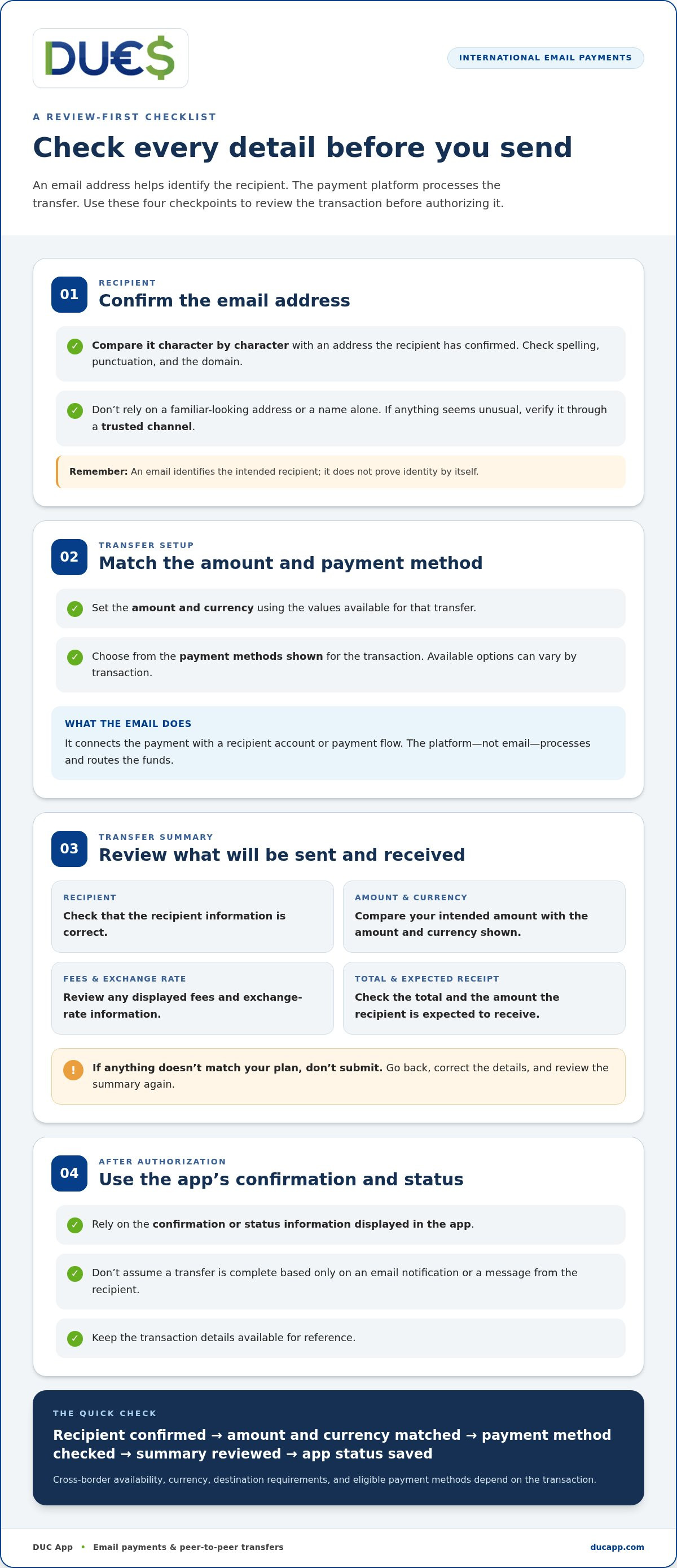
A pre-send checklist for safe, clear global email payments
A short pause before authorization can catch a mistyped address, an unexpected currency, or a payment request that doesn’t feel right. Use this checklist to review the transfer details. Requirements and eligible payment routes can vary based on the sender’s and recipient’s locations, so rely on the information shown for the specific transaction.
- Recipient: Match the email address to one the intended recipient confirmed. Check spelling and punctuation carefully.
- Amount: Confirm the amount you mean to send and the currency selected.
- Cost and conversion: Review any displayed fee and exchange-rate information, along with the amount the recipient is expected to receive.
- Payment method: Make sure the selected method is the one you intend to use and is available for this transaction.
- Destination: Check the sender and recipient locations and any requirements or route options shown for them.
- Status: After authorizing, use the platform’s transaction status information rather than assuming the payment is complete.
Prevent recipient errors and suspicious requests
If a request is unexpected, verify it with the person through a trusted channel before sending. Don’t rely only on a message containing a new email address or urgent payment instructions. Never share your password or one-time verification code to complete a transfer. Treat any request for those credentials as a security warning, and stop before authorizing if the details don’t add up.
A payment sent to the wrong recipient may be difficult or impossible to recover. Don’t assume a transfer can be reversed after authorization. If you spot a mismatch, correct it before proceeding. If anything seems suspicious, pause and verify the request first.
Check transaction terms across borders
Cross-border routes can depend on where the sender and recipient are located. Available payment methods and local requirements may differ, and currency conversion can affect what the recipient gets. Compare the details shown for the route you’re using rather than assuming another country or payment method follows the same process.
On the final review screen, verify the recipient’s email and identity, the amount and currency, any displayed fee and exchange rate, the expected received amount, the selected payment method, and the transaction status before you authorize. If a detail is missing or doesn’t match your intention, stop and resolve the mismatch before submitting the payment.
For a clearer way to send money using email address globally, make the review part of the transfer, not an afterthought. Explore email payments with DUC App for a digital option that supports email payments and peer-to-peer transfers.
Send money by email with DUC App: what to do next
DUC App brings email payments and peer-to-peer transfers into a digital payment experience. If you know the recipient’s email address, it can be a straightforward way to begin a payment without starting with their bank-account details. The address is one part of the process, and the available options and transfer details depend on the transaction.
Start a transfer and review the details in DUC App
Open DUC App and choose its email-payment flow. Follow the prompts shown in the app, enter the recipient’s email address, and provide the requested payment details. Use the in-app instructions to guide you through the steps for your transaction.
Before submitting, compare the recipient information with the address they confirmed. Review the amount, currency, any displayed fees and exchange-rate details, and the selected payment method. DUC App supports options such as Visa, Mastercard, Apple Pay, Google Pay, SEPA, and Interac, but which methods appear can vary by transaction. Choose from the options presented for your transfer.
Take a moment with the summary. If a detail differs from what you intended, stop and correct it before authorizing. After submission, refer to the status information provided in the app. The final review is your opportunity to make sure the payment details match your plans.
Choose the next step that fits your transfer
Email payments may suit you when you already know the recipient’s address and want to start through a digital payment flow. For a transfer involving Cuba, consult the guide to sending money to Cuba with a credit card for information focused on that destination. If you’re looking for broader guidance on digital payment security, the secure digital wallet app guide can help you consider account protection alongside your payment choices.
Whichever route you take, keep the recipient, payment method, currency, and displayed transaction terms in view before you confirm. DUC App also supports peer-to-peer transfers, giving you a digital option for sending money between people. The available route depends on the transaction details shown in the app.
If you’re ready to send money using email address globally, Get started with DUC App. Enter the recipient details carefully, review the transfer information, and confirm only when it all matches.
Make your next transfer with confidence
A good payment routine doesn’t need to be complicated. Treat each transfer as a fresh decision: use recipient details you trust, review the terms shown, and authorize only when they match your intent. That habit gives you a clearer basis for choosing how to send money using email address globally, whether you’re making a one-time payment or sending money again later.
DUC App brings email payments, peer-to-peer transfers, and international remittances into a digital platform, with supported payment methods varying by transaction. When you’re ready to take the next step, open the payment flow and review the details shown before confirming.
Get started with DUC App, review your transfer before confirming, and send with confidence.
Frequently Asked Questions
Can I send money internationally using only an email address?
You can use an email address to identify a recipient if the payment platform supports email payments, but the address alone can’t send funds. You’ll still need to complete the platform’s payment flow and use an accepted payment method. Before sending money to a family member abroad, make sure the email is theirs and review the destination and payment route shown for your transfer.
Does the recipient need an account to receive money sent by email?
It depends on the platform’s process. Some services link an email address to an existing recipient account; others may give the recipient steps to access or claim a payment. Read the recipient instructions presented for the transfer, and check with the person through a separate trusted channel if they’re unsure what to expect. A correct email address doesn’t necessarily mean the recipient has completed any required steps.
Can I cancel or reverse a money transfer sent to the wrong email address?
That depends on the transaction’s status and the platform’s rules. A completed transfer may not be reversible, so don’t count on an email typo being corrected automatically. If you spot an error, open the transaction details promptly and use the help or dispute options available in the app. Keep any confirmation or reference information for your records, and avoid sending a second payment until you understand the first transaction’s status.
How much does it cost to send money using an email address globally?
There isn’t one standard fee for every international email transfer. The total can vary with the payment method, currencies, exchange rate, and route. Before confirming, compare the fee and conversion details displayed for your transaction, then look at the recipient amount as well as your send amount. If the recipient amount changes when you switch currencies or payment methods, review the updated total before proceeding.
How long does an international email money transfer take?
Timing varies by platform, payment method, destination, currency, and any review needed for the transaction. An email alert may only indicate that an action or notification occurred; it isn’t necessarily proof that funds are available to the recipient. Check the transaction status in the payment app and use the timing information shown for that specific payment. If the status is unclear, avoid assuming the transfer has completed or sending it again.
Is it safe to send money using an email address?
It can be a convenient way to identify a recipient, but take care with both the request and the payment details. If someone unexpectedly asks for money, verify the request through a trusted channel, such as a phone number you already know. Never share your password or one-time verification code. Keep the transaction confirmation, and review the recipient and amount before authorizing the payment.


