

What if the app that looks simplest is the wrong choice for the person you’re trying to reach? Choosing an international recharge app for smartphones means checking more than the checkout screen. First, confirm that the recipient’s country, mobile carrier, and phone number are supported. Then review the top-up options, total payable amount, and payment methods before sending a recharge.
A quick, straightforward way to recharge a phone abroad can be useful, but unclear compatibility, currency conversion, or payment steps can make a simple transaction stressful. This guide explains how to compare international phone recharge apps, verify recipient details, and check the transaction before paying.
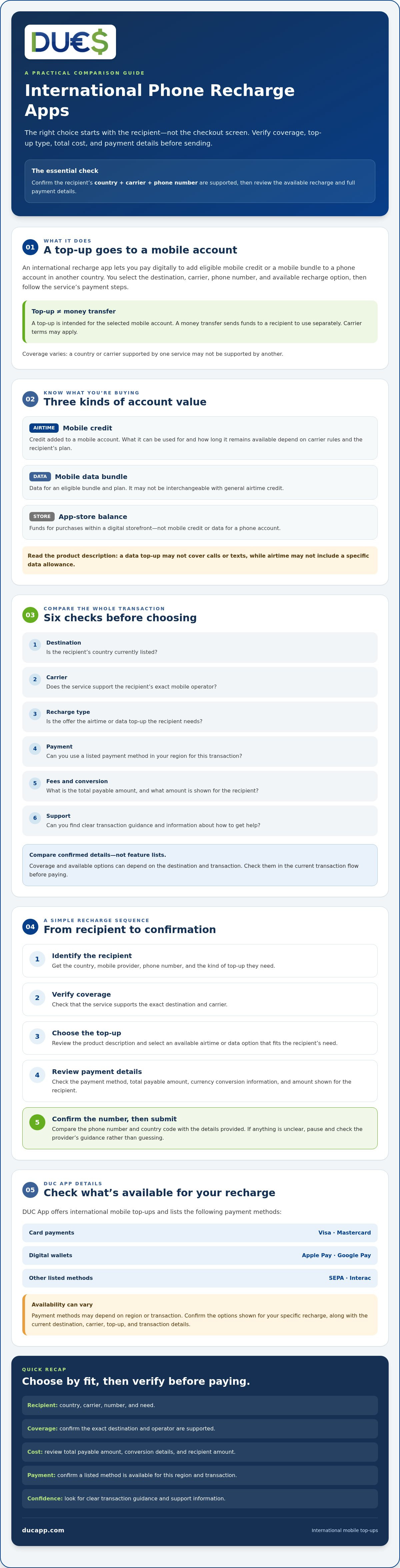
Assess the full process, from choosing a destination and carrier to reviewing payment options and confirming the number. DUC App offers international mobile top-ups and lists methods including Visa, Mastercard, Apple Pay, Google Pay, SEPA, and Interac. Availability can vary by region or transaction, so check the options shown for your specific recharge.
Key Takeaways
- Learn what an international recharge app for smartphones can top up, and how mobile credit differs from data bundles and app-store balance.
- Compare services by destination, carrier, recharge type, payment options, fees, and support before choosing.
- Review the provider’s transaction and support information to make a more informed decision about reliability.
- Follow a simple recharge sequence: identify the recipient, verify coverage, select a top-up, review payment details, and confirm.
- Assess whether DUC App fits your needs by checking the current destination, carrier, payment availability, and transaction details.
What an International Recharge App for Smartphones Actually Does
An international recharge app for smartphones lets you pay digitally to add eligible mobile credit or a mobile bundle to a phone account in another country. You choose the destination, carrier, phone number, and available recharge option, then follow the service’s payment steps. Coverage varies, so a country or carrier listed by one service may not be supported by another.
A phone top-up adds eligible credit or a mobile bundle to a phone account; a money transfer sends funds to a recipient to use separately. With a top-up, the transaction is intended for the selected mobile account. It isn’t the same as sending general-purpose money, and the recipient may be subject to their carrier’s terms. For background on prepaid service and top-ups, see this overview of a prepaid mobile phone.
Mobile airtime, data, and app-store credit: what is the difference?
These options serve different purposes. Check the product description before choosing so you don’t pay for the wrong kind of value.
- Mobile airtime is credit added to a mobile account. What it can be used for, and how long it remains available, depends on the carrier’s rules and the recipient’s plan.
- Data bundles provide mobile data when an eligible bundle is offered for the recipient’s plan. They aren’t necessarily interchangeable with general airtime credit.
- App-store balance funds purchases within a digital storefront. It doesn’t add mobile credit or data to a phone account.
Read the recharge description carefully. A top-up labeled for data may not cover calls or texts, while airtime may not include a specific data allowance.
Who uses an international phone recharge app?
Before starting, identify the recipient’s country and mobile provider. Check that the service supports that combination and the type of top-up they need, then confirm the phone number. An international recharge app isn’t a universal route to every phone, carrier, or plan. These checks help you understand what the service can provide before you select a product or submit payment.
How to Compare International Recharge Apps Before You Choose
Compare the complete transaction, not the number of features an app advertises. For an international recharge app for smartphones, the key questions are whether it supports the recipient’s exact destination and carrier, offers the right top-up, and clearly shows what you’ll pay. A long feature list is less useful than confirmed coverage and a clear total payable amount.
Use this checklist to compare services side by side. Note the details each provider shows, then check them again during checkout because options can depend on the destination and transaction.
| What to compare | What to check |
|---|---|
| Destination | Is the recipient’s country currently listed? |
| Carrier | Does the service support the recipient’s exact mobile operator? |
| Recharge type | Is the available option the airtime or data top-up they need? |
| Payment | Can you use a listed payment method in your region for this transaction? |
| Fees and conversion | What is the total payable amount, and what amount is shown for the recipient? |
| Support | Can you find clear transaction guidance and information about how to get help? |
Does the app support the recipient’s country and carrier?
Start with the exact destination and mobile operator, not a broad claim such as “international coverage.” Search for both in the service before selecting a recharge. Then check that the available offer matches the recipient’s need, such as airtime or a data bundle. Coverage can change, so verify the options in the current transaction flow before paying.
Compare the recipient’s number and country code with the details they provided. If the carrier or top-up type isn’t clearly identified, pause and check the provider’s guidance rather than guessing.
Which payment options and costs should you compare?
Check which payment methods are available to you. Options can vary by location or transaction. For example, DUC App lists Visa, Mastercard, Apple Pay, Google Pay, SEPA, and Interac, but you should confirm availability at your specific checkout. Before paying, review the displayed total, any applicable fees, currency conversion, and the amount the recipient is expected to receive. Use the final checkout details as your reference if they differ from information shown elsewhere.
Clear payment and support information also helps you assess the process. The U.S. Federal Trade Commission offers practical advice on avoiding payment app scams. If DUC App is among your options, you can review its international recharge service and check current eligibility and payment details before proceeding.
Is an International Recharge App Safe and Reliable to Use?
An international recharge app can make topping up a phone across borders more convenient, but no app should be treated as risk-free. Reliability depends on whether the recipient and recharge are eligible, whether the details are accurate, and whether the provider clearly explains the transaction. Before paying, review the provider’s stated payment, support, terms, and privacy information.
A phone top-up is different from sending money, though both can be part of wider cross-border support. For broader context, the Migration Data Portal explains Global remittance flows. For a recharge, focus on the provider’s current information about the service and your specific transaction.
What should you check before entering payment details?
Pause before approving payment. Use the provider’s official app or website, and check that the transaction screen matches what you intend to send. A professional-looking interface alone doesn’t confirm that the selected number, carrier, or top-up is correct.
Before paying, verify the recipient’s country and mobile number, the carrier, the selected recharge type and amount, the payable total and currency, and the confirmation details shown for the transaction.
- Check the number and country code directly against the recipient’s details.
- Confirm the carrier and that the selected recharge applies to the recipient’s plan.
- Review the amount, currency, and any fees or conversion details displayed at checkout.
- Read the provider’s current terms and privacy information, and make sure you understand its stated support process.
These checks can help you catch mismatches before submitting payment. They don’t guarantee an outcome, but they make the transaction easier to review if a question comes up.
What if a recharge is delayed or the number is wrong?
Start by checking the transaction status and confirmation details. If the recharge appears delayed or the details don’t look right, follow the provider’s stated instructions and contact its official support channel. What can be corrected, reviewed, or resolved depends on the provider’s policies and the transaction status. Don’t assume a submitted recharge can be changed or reversed.
Keep the confirmation and any relevant transaction reference so you can describe the issue accurately. Check the recipient’s number and carrier before submitting, since correction options may be limited once a transaction has been processed. Clear instructions and accessible support information are useful comparison points when choosing an international recharge app for smartphones, but they don’t promise that every transaction will go as planned.
How to Choose and Complete a Smartphone Recharge
A clear process helps you avoid preventable mistakes. The screens and steps in an international recharge app for smartphones vary by service, destination, and transaction, so follow the provider’s current instructions rather than assuming every app works the same way.
- Identify the recipient. Gather their country, mobile number, and carrier. Ask which type of credit or data bundle they need if you’re unsure.
- Verify coverage. Check that the service currently supports the destination and operator. Don’t proceed based on a country listing alone.
- Select the top-up. Choose an available option that matches the recipient’s needs and plan.
- Review payment. Check that your intended payment method is available for your region and transaction, then review the total payable amount and currency.
- Confirm. Compare the transaction details with the information you received before authorizing payment. Save the confirmation and check status using the service’s available tools.
What details do you need before starting a recharge?
Have the recipient’s correct phone number, country, and mobile operator ready. Confirm the number and country code directly with them, especially if you’re entering details manually. If you don’t know whether airtime or a data bundle would be more useful, ask before selecting an option. Check which payment methods are available to you, too. A method listed by a provider may not be available for every region or transaction.
What should you review on the confirmation screen?
Take a final pause before approving the payment. Match the number, carrier, recharge type, and amount against the recipient’s information. Check the total payable amount and displayed currency, and review any other transaction details shown by the provider. If something doesn’t match, stop and check the service’s instructions before proceeding.
Pre-submit checklist: correct country and number; supported carrier; intended top-up type and amount; available payment method; total and currency reviewed; confirmation details understood.
After submitting, keep the confirmation and use the app’s available tools to check transaction status. Don’t assume an incorrect recharge can always be changed or reversed. If you’re sending a top-up for a specific destination, consult a current destination-specific guide as well as the provider’s instructions. For example, a guide to recharging Cubacel from the USA can help explain details relevant to that route, but confirm current eligibility and transaction information with the service before paying.
Once you have the recipient’s details, you can check DUC App’s international recharge options and review the current transaction information before proceeding.
Is DUC App the Right International Recharge App for You?
DUC App may be worth evaluating if you’re looking for an international mobile top-up and the recipient’s destination and carrier are supported. It isn’t a universal option for every country, operator, or transaction, so start with the recipient’s details rather than assuming coverage.
When might DUC App fit your recharge needs?
DUC App offers international mobile top-ups and lists Visa, Mastercard, Apple Pay, Google Pay, SEPA, and Interac as payment methods. It may be a candidate if one of those options suits you, but a listed method isn’t necessarily available for every user or recharge. Confirm the payment choices shown for your region and transaction before you begin.
If you need more than a phone top-up, consider whether a broader digital finance service matches your needs. A secure digital wallet guide may help you compare those wider requirements separately from international recharge options.
What should you verify before getting started?
Check the recipient’s country and mobile operator in the service, then confirm that the eligible recharge options match what they need. Before authorizing payment, review the current transaction details, including displayed fees, any currency conversion, the total payable amount, and the recharge information. These details can vary, so rely on the current checkout rather than assumptions or older information.
- Is the recipient’s destination currently supported?
- Does the service list their exact carrier and the intended top-up?
- Is your preferred payment method available for this transaction?
- Are the payable total, currency, and other transaction details clear?
If those checks line up, DUC App could be an option to consider among international recharge apps. If a destination, carrier, payment method, or transaction detail is unclear, pause and confirm it before proceeding. The best international recharge app for smartphones is the one that supports your specific recipient and lets you review the transaction clearly, not simply the one with the longest feature list.
Once you’ve checked eligibility and payment availability, explore DUC App’s international recharge options and review the current transaction details before confirming.
Choose Your Recharge with Confidence
The right international recharge app for smartphones supports the recipient’s specific country and carrier, offers the top-up they need, and makes the payable total clear before you confirm. Double-check the phone number and transaction details, too. These practical checks can help you choose with more confidence.
DUC App offers international mobile top-ups and lists Visa, Mastercard, Apple Pay, Google Pay, SEPA, and Interac as payment methods. Availability may vary by region or transaction, so confirm that your destination, carrier, preferred payment method, and current recharge details are supported before proceeding.
If DUC App matches your needs, check whether DUC App fits your international recharge needs. Review the information for your specific transaction before choosing an option.
Frequently Asked Questions
What is an international recharge app for smartphones?
An international recharge app for smartphones is a digital service for adding eligible mobile credit or a bundle to a phone account across borders. You choose a destination, enter the recipient’s mobile details, select an available top-up, and review the transaction before paying. Coverage and top-up types vary by service. A phone recharge adds value to a mobile account; it isn’t the same as sending money for the recipient to use however they choose.
Can I use an international recharge app to top up someone else’s phone?
Yes, some services let you send an eligible top-up to another person’s phone. Whether it’s possible depends on the service’s current country and carrier coverage. Before paying, confirm the recipient’s country, mobile operator, phone number, and the type of recharge they need. Check the details with the recipient if anything is uncertain. Don’t assume every app supports every destination or that a submitted transaction can always be changed.
How do I know whether an app supports the recipient’s mobile carrier?
Check the recipient’s exact country and mobile operator in the app or service before starting the transaction. Look for an available recharge option for that carrier, then confirm it matches the recipient’s plan and needs. Coverage can change, so verify eligibility in the current transaction flow rather than relying only on a general coverage claim or older information. If the operator isn’t listed clearly, consult the provider’s current instructions before paying.
How much does an international phone recharge app charge?
The cost depends on the service, destination, selected top-up, payment method, and any applicable fees or currency conversion. There isn’t one price that applies across all apps and transactions. Before authorizing payment, review the current checkout details, including the total payable amount, currency, any fees shown, and the amount the recipient is expected to receive. Use the final transaction screen as your reference, not an estimate from another destination or provider.
How long does an international mobile recharge take?
Timing can vary by provider, destination, carrier, and transaction status, so don’t assume a recharge will arrive within a particular timeframe. Check the service’s current delivery information before paying, then use its available tools to review transaction status. Keep the confirmation details in case you need to contact the provider. If the recharge appears delayed, follow the service’s stated support process rather than submitting another payment without checking the first transaction.
Is it safe to pay for a mobile recharge through an app?
Paying through an app involves checks, not a guarantee of risk-free service. Use the provider’s official app or website, review its current payment, privacy, and support information, and make sure you understand the transaction details. Before confirming, verify the recipient’s number and carrier, the selected recharge, the payable total, and currency. Save the confirmation. If anything looks unclear or inconsistent, pause and contact the provider through an official support channel.


