

A fast ETECSA top-up can still go wrong if one digit in the recipient’s number is incorrect. To recharge etecsa mobile lines instantly, first confirm the active Cuban number and follow the provider’s instructions for the +53 country code. Checking the details before paying can help prevent a misdirected transaction. Keep the receipt as well, so you can track what happens next.
You want the credit to arrive quickly, but you also need to know what to do if it doesn’t. Online recharges may be processed within seconds, though delays can happen, especially during busy promotions. This guide explains how to submit a top-up, check payment and delivery details, and confirm the balance. It also covers what to do if the credit hasn’t appeared after an hour.
Before checkout, compare the payment methods available for your transaction, any fees shown, and the provider’s delivery information. DUC App supports international mobile top-ups and several payment methods, though availability can vary by transaction. Check whether ETECSA or Cubacel is currently listed before proceeding. The goal is to send credit with confidence and know how to follow up if it takes longer than expected.
Key Takeaways
- To recharge etecsa mobile lines instantly, choose a provider currently listing ETECSA and confirm that the recipient’s line type is eligible.
- Follow the checkout sequence: select Cuba and the top-up service, enter the recipient’s details, then review the transaction before paying.
- Compare providers by the payment options, displayed total, delivery-status tracking, and support details shown at checkout.
- Check the receipt and transaction status before trying again. Pending, failed, and completed payments call for different next steps.
- DUC App supports international mobile top-ups, but confirm current ETECSA or Cubacel availability and the accepted number format in the app.
What an ETECSA mobile recharge does, and what “instantly” really means
An ETECSA mobile recharge adds prepaid credit to an eligible Cuban mobile line. ETECSA is Cuba's state telecommunications company, ETECSA; Cubacel is the name associated with its mobile service. A recharge adds credit to a line. It doesn’t activate a plan or guarantee that a particular service is available to every number.
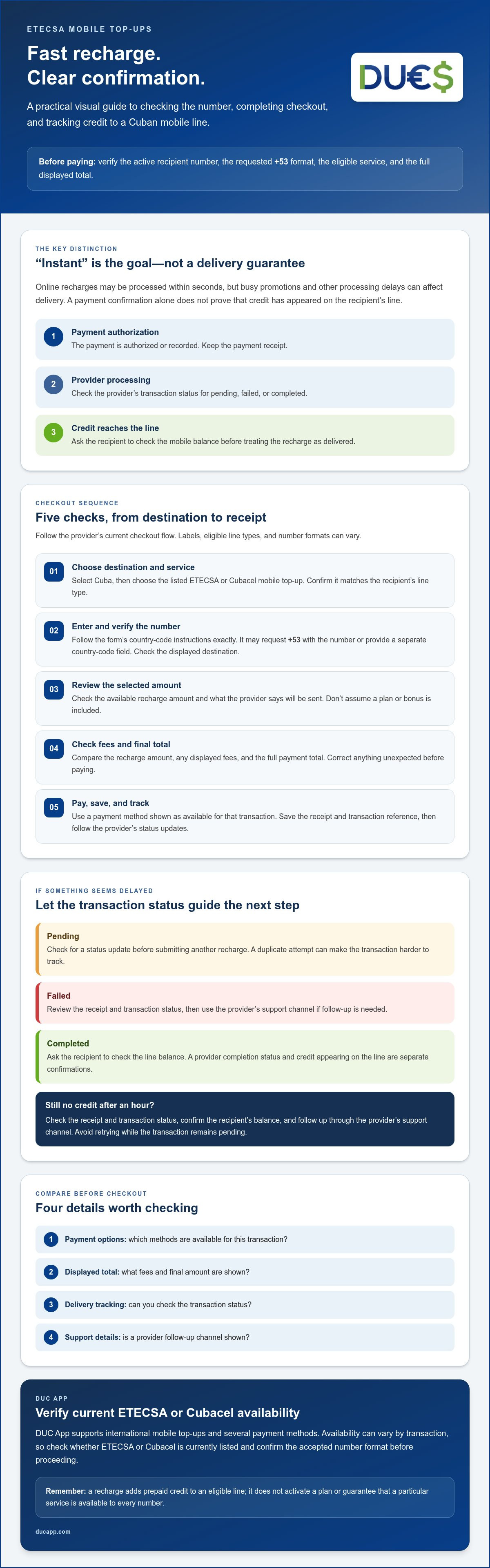
People searching to recharge etecsa mobile lines instantly want a quick, straightforward result. But “instantly” describes the goal, not a guaranteed delivery time. A payment confirmation means the payment was authorized or recorded. It doesn’t, by itself, confirm that credit has appeared on the recipient’s line.
Which Cuban mobile lines can receive an online top-up?
Providers may list Cuba, ETECSA, or Cubacel in their recharge options. Labels and eligible line types can vary, so check the provider’s current checkout flow rather than assuming every Cuban number or plan qualifies. Confirm that the service shown matches the recipient’s line, and enter the number in the requested format, including the +53 country code if required. If the line type or number format is unclear, pause and verify before paying.
What happens after you submit a recharge?
A typical online transaction passes through three stages: payment authorization, processing by the recharge provider, and delivery of credit to the mobile line. Each stage has a different confirmation. A card or wallet receipt confirms the payment step; a provider status can show whether processing is underway or complete; and the recipient’s balance check can help confirm that credit arrived.
Definition: “Instant” ETECSA recharge means a provider aims to deliver mobile credit soon after checkout. Payment confirmation and credit appearing on the line are separate events, so check the transaction status rather than assuming either the timing or delivery.
Some online services describe delivery as taking seconds, but that isn’t a promise for every transaction. Processing can depend on the provider, the receiving network, and whether the transaction is pending, failed, or completed. Keep the receipt and transaction reference. If the status is pending, check for an update before submitting another recharge. A duplicate attempt can make it harder to track what happened. If the provider marks the transaction complete, ask the recipient to check the line balance before treating the top-up as delivered.
How to recharge an ETECSA mobile line online in a few clear steps
Choose a provider that currently lists ETECSA recharges, then work through checkout in order. Before entering payment details, make sure the destination, eligible service, and recipient information all match what you expect. This helps you recharge etecsa mobile lines instantly without mistaking a submitted payment for credit confirmed on the line.
- Choose a provider and destination. Select Cuba, then choose the listed ETECSA or Cubacel mobile top-up service. Check that it fits the recipient’s line type. If ETECSA or Cubacel isn’t shown, don’t assume another service will work for that number.
- Enter the recipient’s number. Follow the checkout’s country-code instructions exactly. Some forms request the number with +53; others separate the country code from the local number. Ask the recipient to verify the digits when possible, then check the destination displayed before continuing.
- Select the recharge amount. Review the available amount and what the provider says will be sent to the line. Don’t assume that a particular plan or bonus is included. The selected service and amount should be clear in the checkout.
- Review the full total. Check the recharge amount, any displayed fees, and the final payment total. If the number, destination, service, or total doesn’t match your expectations, stop and correct it before authorizing payment.
- Pay and track the transaction. Choose a payment method shown as available for that transaction. Wait for the provider’s confirmation or pending status, then save the receipt and transaction reference. Use the provider’s status page or support channel to follow up if needed.
Check the recipient number and recharge details before paying
Compare the number you entered with the one the recipient confirms. Check whether the checkout adds +53 automatically or expects you to enter it; adding it twice or leaving it out can result in an incorrect number. Confirm that the selected service is a mobile top-up, not another product. Pause if the screen shows a different country or line type.
Complete payment and confirm the transaction
A payment alert from your card or wallet may show that authorization occurred, but check the provider’s receipt or transaction status to see what happened next. A pending message means processing may still be underway. Don’t submit a duplicate recharge just because the credit hasn’t appeared yet. Keep the reference number handy in case you need to contact the provider.
Recharging and roaming are different: a top-up adds prepaid credit, while roaming concerns using a phone abroad. The FCC guidance on international roaming agreements with ETECSA can help clarify that distinction for travelers. If you’re considering a digital top-up, check DUC App’s international mobile top-up options and confirm ETECSA availability in the current checkout before paying.
Compare ETECSA top-up options by delivery clarity, payment, and support
The quickest option isn’t necessarily the one making the boldest speed claim. Before paying, compare the details each provider shows: whether the recipient’s line is eligible, which payment methods are available, how you can track the transaction, and whether the full total is visible. Availability and terms can change, so use the checkout details for the specific transaction you’re making.
| What to compare | What’s confirmed | What to verify at checkout |
|---|---|---|
| Eligible line | Eligibility depends on the service offered for the destination. | Confirm ETECSA or Cubacel is listed and the recipient’s line type is accepted. |
| Payment options | DUC App supports Visa, Mastercard, Apple Pay, Google Pay, SEPA, and Interac, subject to transaction availability. | Check which options appear for your country and this specific top-up. |
| Status tracking | Providers may show transaction progress after checkout. | Look for a status display, receipt, and usable transaction reference. |
| Support | Support channels vary by provider. | Check how to contact the provider about a pending or failed transaction. |
| Displayed total | The final amount should be reviewed before authorization. | Check the total and any displayed fees or conversion details; don’t assume them. |
Which checkout details matter most when speed is the priority?
Look for a clear delivery estimate, a visible transaction status, and a reference number you can use to follow up. An estimate helps set expectations, but it doesn’t guarantee that every top-up will arrive within that time. Check that your preferred payment method is available for this transaction, then review the final total before authorizing payment.
A receipt and reference number help if delivery takes longer than expected. They give the provider details to identify the transaction, while a payment alert alone may only confirm that your payment method was charged or authorized. If you’re sending from the United States, review the U.S. Treasury guidance on telecommunications payments for information about the applicable authorization.
When is DUC App worth checking for an ETECSA top-up?
DUC App offers international mobile top-ups, with destinations and payment options varying by transaction. Check the current app flow for ETECSA or Cubacel availability, accepted line details, payment choices, displayed total, and delivery-status information. Don’t assume the destination is available until it appears in the app. For sender-specific context, see the Cubacel recharge guide for senders in the USA.
If an ETECSA recharge is delayed, check these details before trying again
A delay doesn’t always mean the payment failed. Before making another attempt, open the app or website used for the top-up and check the transaction status, receipt, and recipient number. Pending, failed, and completed transactions call for different next steps. Avoid paying again while the first transaction is unresolved, since a second submission could result in a duplicate charge or another top-up.
- Pending: The provider hasn’t confirmed the final outcome. Wait briefly, refresh the transaction status, and keep the reference number. Delays can occur during busy promotions. If the transaction is still unresolved after an hour, contact the provider you used.
- Failed: Check the provider’s message and your payment record before retrying. If the payment appears charged or authorized despite a failed status, contact the provider first rather than submitting a new recharge.
- Completed: Ask the recipient to check the correct line and balance. If credit still isn’t visible, contact the top-up provider with the details so they can investigate the transaction.
What should you do if the recipient has not received the credit?
Start with the transaction details. Confirm the status, reference number, and number entered on the receipt. Then ask the recipient to check the intended line and its main balance by dialing *222#. For promotional bonus balance, the inquiry code is *222*266#. Restarting the phone may also help the recipient refresh the line’s connection. If the provider shows completed but the expected balance hasn’t changed, contact that provider with the receipt and transaction reference.
How can you avoid a duplicate or misdirected top-up?
Before making another payment, compare the full recipient number and destination against the original receipt. Confirm the details with the recipient if possible. Keep the receipt and reference until delivery is verified, and give them to the provider’s support team along with relevant payment evidence. Share only what’s needed to identify the transaction. Never disclose passwords, full payment credentials, or one-time security codes to someone claiming to be support.
If you’re considering another international top-up, review DUC App’s mobile top-up options and confirm ETECSA availability and transaction details in the current app flow before paying. Check the status before trying again, so a delay doesn’t turn into two transactions.
Recharge an ETECSA line with DUC App: verify availability and get started
Once you’ve confirmed the recipient’s number and know what to review at checkout, DUC App is one option to explore for international mobile top-ups. Available destinations and transaction details can vary, so don’t assume an ETECSA or Cubacel recharge is currently offered. Confirm the service and eligible line type in the app before entering payment details.
Before you start a DUC App top-up
Open the current app flow and check whether Cuba and the intended ETECSA or Cubacel service are selectable. Have the recipient’s number ready, but follow the app’s formatting instructions rather than assuming how the country code should be entered. If the destination or line type doesn’t match, stop before checkout and verify the details.
- Review the payment methods displayed for your transaction. DUC App supports Visa, Mastercard, Apple Pay, Google Pay, SEPA, and Interac, but availability may vary.
- Check the selected recharge amount and the complete displayed total, including any fees or conversion details shown.
- Make sure the recipient number and destination are correct before moving to payment.
Submit the recharge and track its status
If the service is available and the details look right, follow the in-app prompts to authorize payment. Review the recipient and transaction information once more before confirming. Save the receipt or reference details, then check the status shown in the app. A payment confirmation alone doesn’t prove that credit has reached the recipient’s line, so use the app’s status to guide your next step.
DUC App offers international mobile top-ups, but it doesn’t operate ETECSA services or guarantee a delivery time. If a status remains pending or the recipient can’t confirm the credit, use the transaction reference to follow up through the provider’s available support channel. Don’t submit another recharge while the first transaction is unresolved.
Ready to check what’s currently available? Explore DUC App’s available services, confirm ETECSA availability, and review the displayed total and transaction status before proceeding. That’s the practical way to recharge etecsa mobile lines instantly without treating speed as a promise.
Make your next ETECSA top-up with confidence
A smooth recharge starts with the right destination and a carefully checked recipient number. Before paying, review the selected service, available payment method, displayed total, and delivery-status information. “Instant” is a goal, not a delivery guarantee, so keep the receipt and use its reference to follow up if the transaction is delayed.
DUC App offers international mobile top-ups and supports multiple payment methods, though options can vary by destination and transaction. Confirm that ETECSA or Cubacel is currently available in the app before proceeding. These checks make it easier to recharge etecsa mobile lines instantly while staying prepared if delivery takes longer than expected.
Check available mobile top-ups with DUC App, review the transaction details, and proceed when everything matches. A careful checkout makes sending credit clearer and easier to follow up on.
Frequently Asked Questions
Can I recharge an ETECSA mobile line instantly from another country?
Yes, you can send an online top-up from another country through a provider that currently offers ETECSA recharges. Choose Cuba and the eligible mobile service, then carefully check the recipient number and payment details. Some transactions may appear on the line within seconds, but “instant” isn’t a guarantee. Processing or network delays can happen, so keep the receipt and check the provider’s transaction status.
How long does an online ETECSA mobile recharge take to arrive?
There’s no delivery time that applies to every online ETECSA recharge. Credit may appear within seconds after processing, but timing can vary with the provider, network, and transaction status. Check the provider’s estimate and status rather than relying only on a payment notification. If the recharge is still missing after an hour, contact the provider you used with your transaction reference.
Is ETECSA the same as Cubacel for mobile top-ups?
Not exactly. ETECSA is Cuba’s telecommunications provider, while Cubacel is the name associated with its mobile service. A recharge provider may use either name when presenting mobile top-up options. Check the selected service and confirm that it accepts the recipient’s line type. Don’t assume that every Cuban number or plan is eligible just because Cuba appears as a destination.
What details do I need to recharge a Cuban mobile line online?
Have the recipient’s mobile number, the intended line type, and your preferred recharge amount ready. Follow the checkout instructions for entering the number: some forms request the +53 country code, while others may handle it separately. Before paying, verify the destination, selected service, displayed fees, and full total. You’ll also need a payment method accepted for that specific transaction.
What should I do if my ETECSA recharge is pending or has not arrived?
Check the provider’s status, receipt, and entered number before taking action. For a pending transaction, wait for an update and don’t submit another payment while the first is unresolved. Ask the recipient to check the correct line’s balance; they can dial *222# to check the main balance. If the status says completed but the credit is missing, contact the top-up provider with the reference number. If it remains unresolved after an hour, follow up with that provider.
Can I use DUC App to recharge an ETECSA or Cubacel line?
DUC App offers international mobile top-ups, but ETECSA or Cubacel availability must be confirmed in the current app flow. Check that the intended destination and line type are selectable before entering payment details. The app supports payment methods including Visa, Mastercard, Apple Pay, Google Pay, SEPA, and Interac, but available options can vary by transaction. Review the displayed total and status information before proceeding.
How can I avoid sending a mobile top-up to the wrong number?
Ask the recipient to confirm the full number, then compare it with the number displayed at checkout before paying. Follow the provider’s instructions for the +53 country code and check that the destination and mobile service are correct. Save the receipt and transaction reference until delivery is confirmed. Recharges sent to the wrong number may not be cancellable or refundable, so pause if anything looks incorrect.


