

What if sending money to a friend through an app is still a bank-to-bank transfer underneath? A peer to peer money transfer using SEPA can feel like a simple person-to-person payment, while SEPA provides the euro payment route moving funds between accounts. The app shapes the experience; the payment scheme handles the transfer.
It’s easy to mix up the purpose of a payment with the route it uses. Standard SEPA Credit Transfers typically settle within one business day, while SEPA Instant transfers are designed to settle in under 10 seconds. Which route you can use depends on the payment options available for your transfer. Before sending, check the recipient’s name and IBAN against details you’ve verified through a trusted channel.
This guide explains how SEPA works for peer-to-peer payments, how P2P apps fit into the process, and what to compare before choosing a route. You’ll learn the differences between standard and instant transfers, which recipient details to review, and how DUC App supports app-based P2P transfers with SEPA. Understand what happens behind the screen, then choose your next euro transfer with more confidence.
Key Takeaways
- Separate the person-to-person purpose of a payment from the SEPA route that moves euros between accounts.
- Compare standard SEPA Credit Transfers with SEPA Instant to see how route availability affects expected timing.
- Before sending a peer to peer money transfer using sepa, review the displayed route, recipient details, and any applicable fees.
- Use a practical checklist to reduce avoidable payment mistakes and make an informed transfer choice.
- DUC App brings peer-to-peer transfers and SEPA-supported payment options into an app-based experience.
What Does Peer-to-Peer Money Transfer Using SEPA Mean?
P2P describes who’s sending money; SEPA describes the euro payment scheme used to move it. A peer-to-peer money transfer using SEPA is a payment from one person to another that uses a SEPA-supported route. An app may provide the interface for starting and tracking the payment, while the payment scheme carries the euros between accounts. The exact steps depend on the app and the route selected.
SEPA stands for the Single Euro Payments Area. It provides a shared framework for euro payments across participating countries. For background on its scope and payment schemes, see this overview of the Single Euro Payments Area.
How Is a SEPA P2P Transfer Different from a Bank Transfer?
A P2P transfer isn’t a separate SEPA scheme. It describes the payment’s purpose: one person sends money to another. You might initiate a bank transfer in your banking app or start a peer-to-peer payment in a P2P app. In either case, a SEPA route may move the euros between accounts.
For example, you enter a friend’s payment details in an app and review the amount and route before authorizing. The app processes your request using an available payment route; your friend receives the funds through that route. The app is the sending experience, not necessarily the payment network itself.
What Are SCT and SCT Inst?
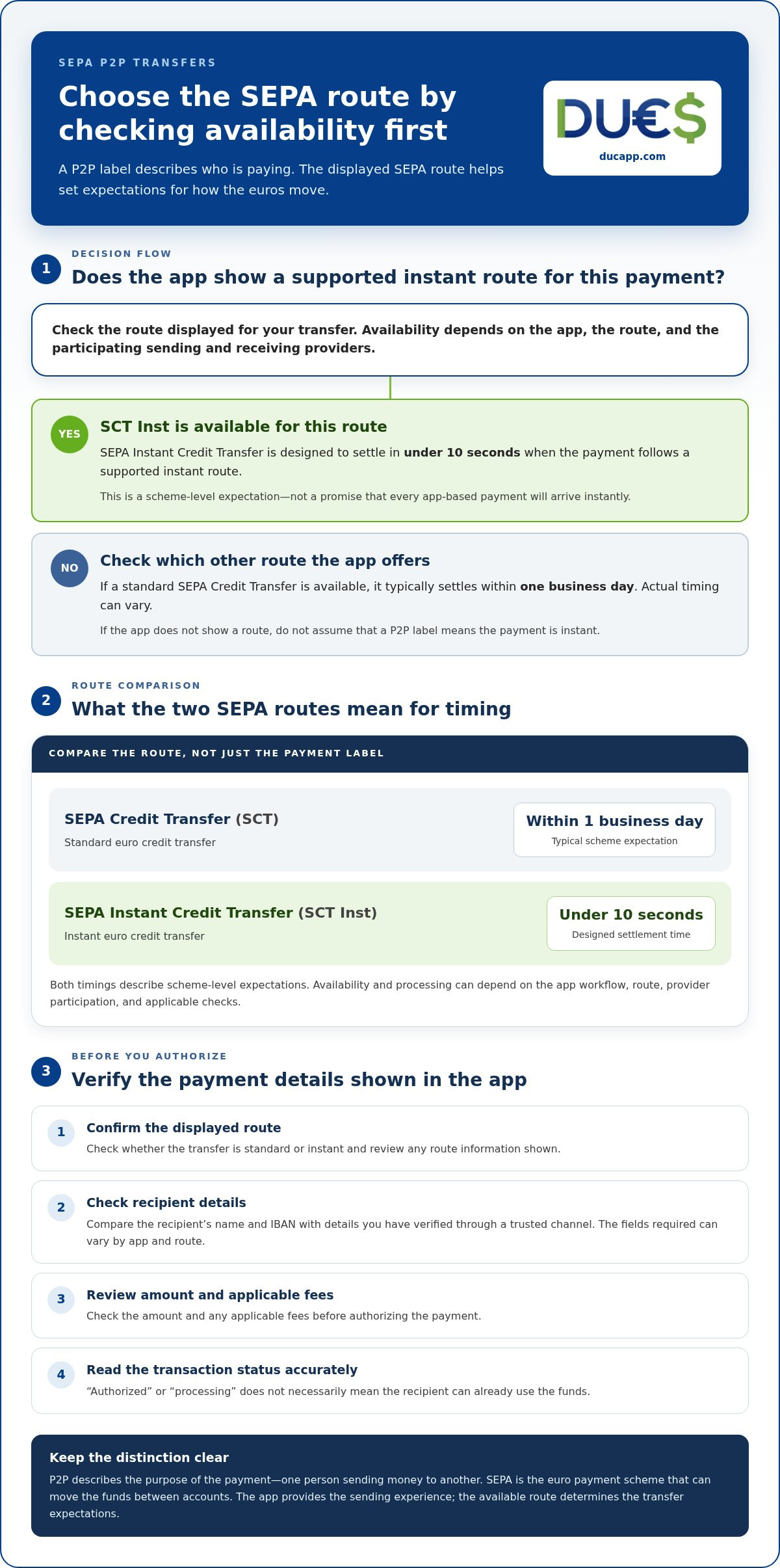
SCT means SEPA Credit Transfer, the standard scheme for sending euros between accounts. SCT Inst means SEPA Instant Credit Transfer, designed to process eligible transfers in near real time. Under scheme operation, SCT Inst payments can settle in under 10 seconds, while standard SCT payments typically settle within one business day. These are scheme-level expectations, not a promise for every app or payment.
Availability depends on the route and participating payment providers. Before choosing, check which scheme the app displays and whether the transfer is standard or instant. A P2P label alone doesn’t tell you when the recipient will receive the money.
How a SEPA P2P Payment Moves from Sender to Recipient
A peer-to-peer payment can look like one quick action on your screen. Behind it, you provide transfer information, authorize the request, and the app processes it through an available payment route. The recipient’s account or payment service then makes the funds available. Knowing these stages helps you understand what a status update does, and doesn’t, tell you.
- Enter recipient information: Add the details requested for the selected route.
- Authorize the payment: Review the recipient and amount, then approve the request.
- Processing begins: The app handles the instruction and sends it through an available payment route.
- Funds become available: The recipient’s institution or payment service updates the incoming payment.
An app may not show these as separate steps. A status such as “authorized” or “processing” doesn’t necessarily mean the recipient can already use the funds.
Which Details Might a Sender Need?
For an account-based euro transfer, the recipient’s IBAN may be required. The app or route may also request the recipient’s name or other information, so there isn’t one universal set of details for every P2P payment. Follow the fields shown for your chosen transfer. Enter each detail carefully, then compare the recipient information and amount with what you intended before authorizing. A typo can send an instruction to the wrong destination or cause a delay or rejection.
What Can Affect Processing and Availability?
The selected route matters. Standard SEPA Credit Transfers typically settle within one business day, while SEPA Instant Credit Transfers are designed to settle in under 10 seconds. These are scheme-level expectations, not guaranteed arrival times for every app-based payment. The European Central Bank’s overview of the SEPA Instant Credit Transfer explains the instant-payment framework.
An instant scheme doesn’t guarantee that every transfer takes an instant route. The sending and receiving institutions’ participation, the app’s workflow, and any applicable checks can affect processing and when funds show as available. Before sending, confirm the route and transfer information displayed. Afterward, use the transaction status to distinguish a submitted request from a completed payment.
DUC App supports peer-to-peer transfers with SEPA among its payment methods. Learn more about DUC App P2P transfers.
SEPA Credit Transfer vs. SEPA Instant: Which P2P Route Fits?
A SEPA payment isn’t automatically instant. Standard and instant transfers use different schemes, and the route selected for your payment affects its expected speed. Use the comparison below as a guide, then check the options shown in your app before sending. The European Central Bank provides an overview of the Single Euro Payments Area (SEPA) and its payment framework.
| Comparison | SEPA Credit Transfer (SCT) | SEPA Instant Credit Transfer (SCT Inst) |
|---|---|---|
| Scheme type | Standard euro credit transfer | Instant euro credit transfer |
| Expected speed | Typically settled within one business day; actual timing can vary. | Designed to settle in under 10 seconds when the payment follows a supported instant route. |
| Availability | Depends on the app, providers, and transfer route. | Depends on the sending and receiving providers and whether the route supports instant processing. |
| Sender consideration | Consider it if the recipient doesn’t need the funds immediately. | Consider it for greater urgency, but confirm that the app displays this route. |
These timings describe scheme expectations, not a guaranteed arrival time for every P2P payment. A peer to peer money transfer using SEPA may begin in an app, but the app’s available route and participating payment providers determine how it is processed. Similar-looking payments may follow different paths, so check the route for each transfer.
When Might Standard SEPA Credit Transfer Be Suitable?
Choose the standard route when immediate receipt isn’t essential, such as when sending someone money they’ll need later. SCT payments typically settle within one business day, but treat that as an expectation, not a fixed delivery promise. Processing can depend on the institutions and service involved. Check the route and timing information displayed in the app before authorizing.
When Might SEPA Instant Be Useful?
SCT Inst is designed for near-real-time euro payments. It may suit a more urgent transfer if the payment is sent through a supported instant route. Availability depends on the providers involved and current scheme conditions. Before approving the payment, compare your timing needs with the route and estimate displayed in the app. If it shows a standard transfer, don’t assume the payment will arrive instantly.
How to Make a P2P Money Transfer Using SEPA: A Practical Checklist
Use this checklist to separate the steps you take in the app from the work handled by the payment route. Screens and labels vary by service, so follow the instructions shown for your transfer instead of assuming every payment works the same way.
- Confirm the recipient and details. Verify the person’s identity and payment information through a trusted channel. If the selected account-based route asks for an IBAN or recipient name, enter them carefully. Don’t rely on new or unexpected payment details sent in a message without checking them independently.
- Select the payment method in the app. Review the available options and note whether the transfer is identified as SEPA Credit Transfer, SEPA Instant, or another route. Check the payment option shown for this transaction rather than assuming all euro payments use the same processing method.
- Check the transfer information. Review the recipient, amount, and currency. Check any displayed fees, exchange information, limits, and delivery estimates. If a detail doesn’t match what you expect, pause before authorizing.
- Authorize only after a final review. Compare the selected route with your timing needs. Scheme-level processing and app-level estimates aren’t necessarily the same, so use the information shown for that payment. Confirm the details before approving the request.
- Save the confirmation and track progress. Keep the confirmation or transaction reference provided by the app. Check the status to see whether the payment is pending or complete. A submitted request doesn’t always mean the recipient can already access the funds.
Before You Start the Transfer
Verify the recipient details, route, and displayed costs before sending. A peer to peer money transfer using sepa depends on the information and payment option selected in the app. Take extra care if you’ve received changed account details, or if the amount or currency differs from what you intended.
After You Authorize the Payment
If something appears incorrect, follow the app’s stated support and dispute process. Keep the transaction reference and confirmation details together so you can identify the payment clearly. Avoid making a second transfer to “fix” the first until you understand its status.
DUC App offers app-based peer-to-peer transfers with SEPA-supported payment options. See DUC App peer-to-peer transfers.
Using DUC App for SEPA-Supported Peer-to-Peer Transfers
SEPA describes a payment method; peer-to-peer describes the purpose of the payment. DUC App brings these together as a digital platform for peer-to-peer transfers that supports SEPA among its payment methods. The app provides the user-facing experience, while the selected route governs how funds move. This distinction sets realistic expectations: choosing an app for a P2P transfer doesn’t mean every payment follows the same route or timeline.
How DUC App Fits into the SEPA P2P Journey
Use DUC App to arrange a peer-to-peer payment and review its details. SEPA is one of the payment methods supported in the app. For a broader look at digital P2P payments, read The 2026 P2P Money Transfer App Revolution: A Guide to Borderless Payments.
For a peer to peer money transfer using sepa, focus on the details shown for the specific transaction. Review the recipient information and payment method rather than assuming that all apps, or all transfers in the same app, use identical processing.
What to Review Before Sending with an App
Before confirming, check the recipient information and make sure the displayed payment method matches the route you intend to use. Review any fees shown, along with the amount and currency. If something doesn’t match your expectations, don’t authorize the payment until you understand the details.
After sending, use the transaction information and status in the app to follow its progress. Keep the confirmation or reference available in case you need to review the payment later. These checks help you make an informed choice without assuming a particular fee, transfer time, or outcome.
Explore DUC App’s digital transfer options.
Make Your Next P2P Transfer with Confidence
A peer to peer money transfer using sepa combines a person-to-person payment with a euro payment route. The app shapes how you set up and review the transfer; the selected SEPA scheme affects how it moves. Standard and instant routes differ, so check the option shown rather than assuming every payment is processed the same way.
Before authorizing, verify the recipient details, amount, currency, selected payment method, and any displayed fees. After sending, save the confirmation and track the transaction status. These checks help you make an informed choice and keep the payment details close at hand.
DUC App offers peer-to-peer transfers and supports SEPA among its payment methods. Explore DUC App’s peer-to-peer transfer options.
With the route and recipient details clear, you can move forward with greater confidence.
Frequently Asked Questions
What is a SEPA peer-to-peer money transfer?
It’s a payment from one person to another that uses a SEPA-supported route to move euros between accounts. “Peer-to-peer” describes who’s sending and receiving the money; SEPA describes the payment framework. An app may provide the interface for setting up the transfer, while the selected payment route moves the funds. Processing options and requirements can vary between apps and providers.
Can I send money to another person using SEPA?
Yes. You can send euros to another person using a SEPA Credit Transfer or, where the route and participating providers support it, a SEPA Instant Credit Transfer. You might start the payment through a banking app or a P2P app. The app’s available options, recipient details, and payment route determine how you can set up that transfer.
How long does a SEPA peer-to-peer transfer take?
Timing depends on the scheme and route used. A standard SEPA Credit Transfer typically settles within one business day, while a SEPA Instant transfer is designed to settle in under 10 seconds when sent through a supported instant route. These are scheme-level expectations, not guaranteed arrival times for every app-based payment. Check the route displayed and the transaction status for your transfer.
Is a SEPA Instant transfer always available?
No. An instant option depends on the transfer route and whether the sending and receiving providers support it for that payment. An app may offer a standard route instead, and a payment labelled as SEPA isn’t automatically instant. Before authorizing, look for the specific route shown and review any timing information displayed for the transaction.
What information do I need for a SEPA transfer?
The information required depends on the app and route. For an account-based euro transfer, you may need the recipient’s name and IBAN. The app will show which fields to complete. Enter the details carefully, then compare them with information you’ve verified through a trusted channel before authorizing. Not every P2P transfer uses the same details or setup.
Are SEPA peer-to-peer money transfers free?
Not necessarily. Fees depend on the payment provider and app, so review the cost shown for your specific transfer before confirming. For providers covered by applicable EU rules, an instant transfer can’t cost more than a comparable standard credit transfer. That doesn’t mean both options must be free. Review any applicable DUC App charges shown for the transaction.
Can I cancel a SEPA transfer after sending it?
Cancellation depends on the payment’s status and the app or provider’s process. If you spot an error, check the transaction status and follow the app’s stated support or dispute process as soon as possible. A payment that has already been processed may not be reversible through a simple cancellation. Keep the confirmation and transaction reference available when seeking help.


