

Interac e-Transfer can move money between people, businesses, and business customers in Canada, with funds sent in near real time. Interac e-Transfer offers a way to send money without sharing the recipient’s personal financial information, though recipients may need to take action to receive it.
That simplicity makes Interac useful for more than paying a friend. It can also support business payments, disbursements, and refunds. To decide whether it fits, understand how personal and business transfers differ, what affects timing, and how availability and security work. This guide explains the process and the practical points to consider before sending a payment.
Key Takeaways
- Interac e-Transfer can support personal and business payments. Recipients may need to take an additional step to access funds after receiving a notification.
- Business transfers typically complete within 30 minutes and use email or SMS verification.
- Availability and access depend on participating Canadian financial institutions; the platform is available 24/7/365.
- Check how your institution’s limits affect the amount and timing of a transfer.
Interac e-Transfer P2P and business transfers
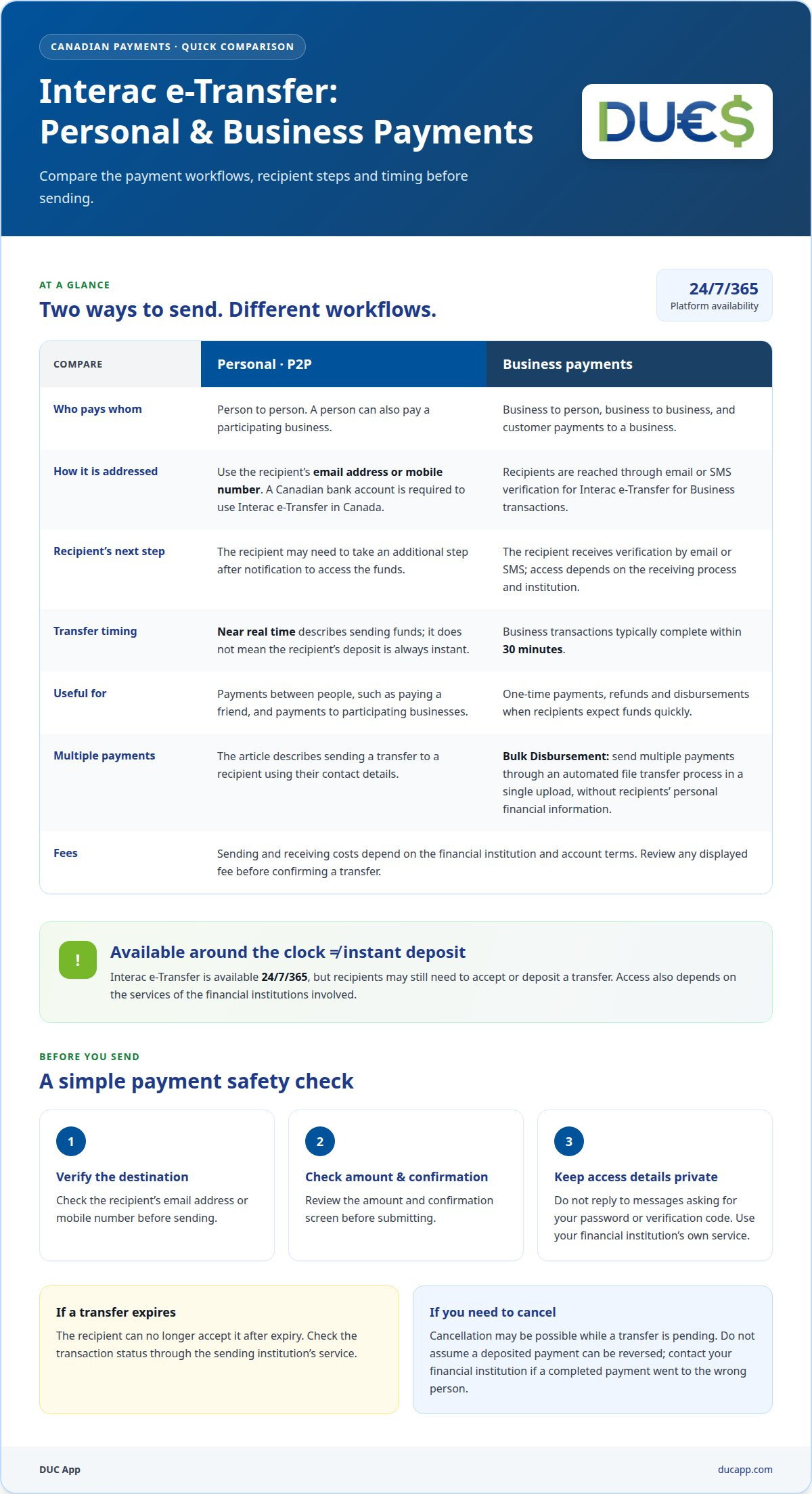
Interac e-Transfer supports person-to-person, person-to-business, business-to-person, and business-to-business payments. A P2P funds transfer with Interac lets a Canadian user send money using the recipient’s email address or mobile number. The recipient doesn’t need to share personal financial information with the sender. Recipients may need to take a step to access the funds after receiving a notification. For example, one person can pay a friend, while a customer can pay a participating business.
When comparing Interac with Zelle, Venmo, or PayPal, first check who can receive payments and what account details are required. Interac e-Transfer in Canada requires a Canadian bank account, and you can address a transfer using an email address or mobile number. These details help you determine whether Interac works for both parties in a particular payment.
Sending and receiving costs depend on the financial institution and account terms. Review any fee displayed by your institution before confirming a transfer. For business payments, include the charge in your payment workflow so the amount and fee are clear before sending.
Business transfers can support one-time payments, refunds, and disbursements when recipients expect funds quickly. Interac e-Transfer® for Business transactions typically complete within 30 minutes and use email or SMS verification. For multiple payments, Bulk Disbursement sends payments through an automated file transfer process in a single upload, without recipients’ personal financial information. Choose the method that matches the payment volume and recipient needs.
For US consumer accounts, Regulation E provides separate protections. According to the Office of the Federal Register, National Archives and Records Administration, a consumer account includes a checking, savings, or other consumer asset account held by a financial institution and established primarily for personal, family, or household purposes, under 12 CFR 1005.2(b)(1). The Office of the Federal Register, National Archives and Records Administration sets financial institutions’ Regulation E error-resolution obligations out in 12 CFR 1005.11.
According to the Office of the Federal Register, National Archives and Records Administration, 12 CFR 1005.6 does not allow a financial institution to use consumer negligence as a basis for imposing greater liability for unauthorized electronic fund transfers than the regulation permits. Keep the payment type and account jurisdiction clear: Interac’s Canadian transfer process and US consumer-account rules address different settings.
Transfer security and availability
Interac e-Transfer is available 24/7/365, so the platform can operate beyond standard banking hours. That doesn’t mean every transfer is deposited instantly. The recipient still needs to act on the notification, and access also depends on the financial institution’s services. Separate platform availability from the time it takes someone to accept and deposit a payment.
Funds remain with financial institutions, which settle with each other through Payments Canada based on advice from Interac. In other words, Interac provides advice, while financial institutions hold the funds and settle between themselves. Before sending, confirm the recipient’s email address or mobile number and review the amount. A typo could send the notification to the wrong contact.
How long do Interac e-Transfers take, and what happens if one expires? Funds are sent in near real time, but recipients must deposit them after receiving a notification. If a transfer expires before it is deposited, the recipient can no longer accept it. Check the transaction status through the sending institution’s service to see what to do next.
Can you cancel or reverse an Interac e-Transfer after sending it? You may be able to cancel a transfer while it is pending, but don’t assume it can be reversed once deposited. Check its status promptly and use the cancellation option if your institution still provides one. If a completed payment went to the wrong person, contact your financial institution about the transaction.
Follow a quick safety routine for each payment: verify the recipient’s contact details, check the amount, and review the confirmation screen before submitting. Keep transfer notifications and account sign-in details private. If a message asks for your password or verification code, don’t reply. Open your financial institution’s own service instead.
For payments outside the Canadian Interac network, consider whether peer-to-peer transfer options better match the people and payment route involved. The key decision is practical: confirm that both sides can use the transfer method, then verify the destination before funds move.
Which Canadian banks and credit unions support Interac e-Transfer?
Interac e-Transfer access is offered through Canadian financial institutions, including banks and credit unions. In 2016, more than 250 financial institutions in Canada offered access to the service. That figure shows broad institutional participation at the time, but it isn’t a current directory or a guarantee that every account has the same features.
Start in your financial institution’s online banking or mobile app. Find Interac e-Transfer in the payments or transfers menu. If the option is available, follow the prompts to set up or send a transfer. Credit union members can use the same process through their credit union’s digital banking service.
Access depends on the institution and account setup. One customer may see an option to send a transfer, while another may need to complete enrollment or add a recipient first. Read the on-screen instructions before proceeding. Your institution’s interface shows which actions are available for your account.
Before sending, confirm that the recipient can receive the transfer through a Canadian financial institution and that their email address or mobile number is correct. This is important when paying someone at a different bank or credit union. The recipient’s institution handles the deposit, so you don’t need to use the same institution.
For a practical check, use this short sequence:
- Open your bank or credit union’s online banking or mobile app.
- Find Interac e-Transfer in the payments menu.
- Review the available send and receive options for your account.
- Confirm the recipient’s contact information before authorizing a payment.
If you can’t find the transfer option, use your institution’s in-app help or account support to find out what to do next. Ask which enrollment step or account setting applies. This gives you guidance for your specific bank or credit union, rather than relying on an old participation count as a current availability list.
What are Interac e-Transfer sending limits per transaction, day, and week?
That is a possible limit per transaction, not an amount every sender can access. Your financial institution sets the limit for your account, so two people may see different maximums.
Daily and weekly limits are separate from the maximum for a single transfer. They cap the combined amount sent across several transactions during the institution’s relevant period. For example, a payment below the per-transfer maximum may still be blocked if earlier transfers have used your daily allowance. The same applies when several payments add up over a week.
Before planning a larger payment, open your bank or credit union’s Interac e-Transfer screen and review the sending limits displayed. Check the maximum for one transaction and any daily or weekly totals. If the payment exceeds a limit, split it only if your institution’s rules allow. Splitting a payment does not increase your overall account allowance.
Limits depend on institutional policies and account settings. They may also vary by sending channel or account type, so another customer’s limit isn’t a reliable guide to yours. For a business paying several people, consider both each transfer and the combined total. A payment may fit the per-transaction cap but still exceed the business account’s remaining daily capacity.
For a p2p funds transfer with Interac, confirm the permitted amount before preparing a payment around a deadline. If the sender’s available limit is too low, adjust the payment timing or use a different permitted payment method.
Need another way to send money between peers? Explore peer-to-peer transfers as an alternative for your payment needs.
DUC App: International recharges
DUC App offers international recharges for topping up a service across borders, rather than sending a Canadian Interac e-Transfer. It also offers peer-to-peer transfers, gift cards, and API integration for e-commerce businesses. Choose the service that matches your task: a recharge to top up, a peer transfer to send money, or API integration for an e-commerce payment flow.
Interac e-Transfer is suited to transfers through participating Canadian financial institutions. DUC App is a separate option for international recharges and other digital services it offers. Be clear about your purpose, then choose the service that fits.
Visit ducapp.com to explore DUC App’s available services.
Choose the transfer route that fits your next move
Let the destination guide your decision. A payment within the Canadian Interac network and a need that crosses borders call for different routes. Before sending, match the method to the recipient, purpose, and payment flow. This makes your next step clearer.
If a p2p funds transfer with Interac fits your situation, use the recipient and account details carefully. For other digital needs, DUC App offers international recharges, transfers between peers, and gift cards. Select the option that aligns with what you need to do, rather than treating every transfer as the same task.
Ready to explore a transfer option with DUC App? Contact DUC App to discuss transfers. Take the next step with a clear purpose and a route that works for you.
Frequently Asked Questions
What is Interac e-Transfer and how does person-to-person money transfer work?
Interac e-Transfer is a Canadian digital payment service for sending money between people and businesses. The sender addresses the payment using the recipient’s email or mobile number, rather than entering bank account details. For example, you could send a roommate money for a shared expense. The recipient gets a notification and deposits the funds through their financial institution.
How do you send money with Interac e-Transfer step by step?
Use your financial institution’s online banking or mobile app, and review every detail before authorizing the payment.
- Sign in and open the Interac e-Transfer payment option.
- Select or enter the recipient’s email address or mobile number.
- Enter the amount and any requested payment details.
- Review the recipient and amount, then submit the transfer.
The recipient can follow the notification to complete the deposit. Save the confirmation so you can refer to the transaction later.
What are the risks of Interac e-Transfer scams, and how can users stay safe?
Scammers may impersonate someone you know or send a fake payment request to pressure you into transferring money. Verify unexpected requests directly with the person using a trusted contact method before paying. Check the recipient’s email or mobile number character by character, and confirm the amount before submitting. Never share account passwords or verification codes in response to a message.
How do you accept and deposit an Interac e-Transfer?
After receiving a notification, deposit the funds through your financial institution’s service. The recipient may need to take action through their financial institution before the funds are available.


