

What if the app that looks simplest leaves the biggest questions unanswered? Choosing a secure p2p remittance application means looking beyond a polished screen or security slogans. You need to understand how your information is protected, how the transfer moves from sender to recipient, and whether the app supports your route and purpose.
That scrutiny matters when considering DUC App. In April 2026, a reported data breach exposed more than 360,000 unencrypted customer files, including personal and transaction information. A clear-eyed decision starts with the facts, not assumptions.
This guide gives you a practical checklist for comparing security and usability, explains the transfer journey from setup to delivery, and shows how payment methods and recipient options can shape the experience. You’ll also learn why country and transfer purpose matter, using Cuba-focused remittances as one example. Use the framework to assess whether DUC App’s peer-to-peer transfers and international remittance services fit your needs.
Key Takeaways
- Assess a secure p2p remittance application across the full transfer journey, from account access and recipient details to final confirmation.
- Compare routes, payment methods, recipient options, and support for the specific transfer you need to make.
- Start with your destination, transfer purpose, and recipient’s needs to narrow down suitable app features.
- Distinguish money transfers from mobile top-ups so you choose the right option for your goal.
- Consider how DUC App’s peer-to-peer transfers, international remittances, and Cuba focus align with your intended use.
What makes a secure P2P remittance application trustworthy?
A secure p2p remittance application lets one person send money to another through a digital service, with safeguards around account access and payment information and clear transaction details. The service may connect sender and recipient, but “secure” isn’t a single feature or a label to take on trust. Consider how the whole transfer works, what information is shown before you send, and how the provider explains its protections.
Peer-to-peer (P2P) transactions describe exchanges between individuals, often supported by an intermediary platform. That differs from paying a merchant, adding credit to a mobile phone, or using traditional banking services. These activities can appear on one digital platform, but they serve different purposes. A remittance moves money to another person; a mobile top-up adds phone credit, while a card purchase pays a seller.
How a P2P remittance transfer moves from sender to recipient
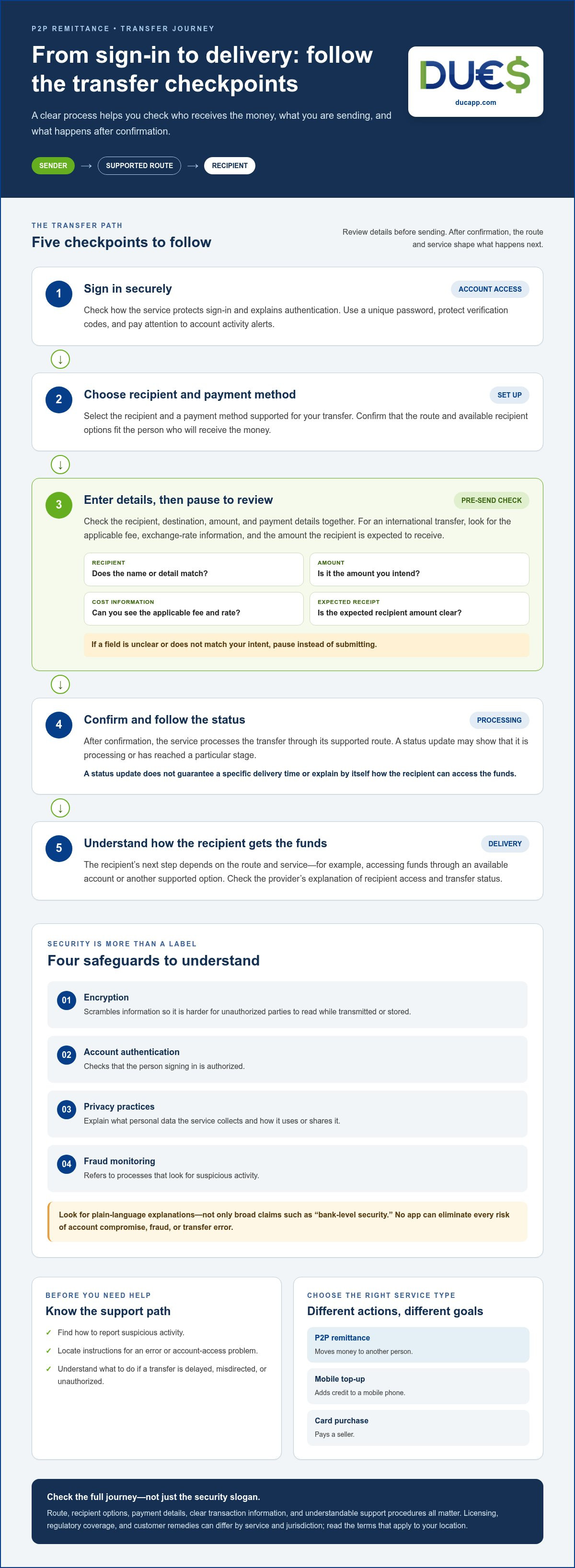
The sender signs in, chooses a recipient and payment method, enters the transfer details, then reviews them before confirming. Check that the app clearly shows who will receive the money, the amount, and the applicable transaction information. This review is your opportunity to catch a mistyped recipient detail or incorrect amount before submitting.
After confirmation, the service processes the transfer through its supported route. The recipient’s next step depends on that route and service, such as accessing funds through an available account or other supported option. A status update can show that a transfer is processing or has reached a particular stage. It does not guarantee a specific delivery time or how the recipient can access the funds.
What security language should a buyer understand?
Translate technical terms into questions you can answer. Encryption scrambles information so it’s harder for unauthorized parties to read while it’s being transmitted or stored. Account authentication checks that the person signing in is authorized. Privacy practices explain what personal data the service collects and how it uses or shares it. Fraud monitoring refers to processes that look for suspicious activity. Look for plain-language explanations of these safeguards, not just broad claims like “bank-level security.”
Consider the provider’s policies and protections in context. Licensing, regulatory coverage, and customer remedies can differ by service and jurisdiction. Read the terms that apply to your location and look for instructions on reporting an issue and what happens if a transfer is delayed, misdirected, or unauthorized. Trust depends on understandable safeguards and transaction information working together, not on a marketing phrase alone.
Which security safeguards should you compare before sending money?
Assess a secure p2p remittance application by looking for protections and procedures you can understand, not absolute promises. No app can eliminate every risk of account compromise, fraud, or transfer error. Clear explanations help you make a more informed choice.
Use this checklist before sending:
- Account access: Does the service explain how sign-in is protected and how to keep credentials safe? Look for practical guidance on securing your account.
- Payment and privacy: Does its privacy information explain what payment and personal details it collects, processes, stores, or shares?
- Recipient review: Can you check the recipient’s details and transfer amount before submitting? A clear confirmation step gives you a chance to catch a typo or incorrect amount.
- Alerts: Can you receive updates about account activity or transfer status? Understand what alerts cover and how to act on ones you don’t recognize.
- Help channels: Can you find instructions for reporting suspicious activity, correcting an error, or addressing account access problems?
How to assess account and payment protection
Read beyond labels such as “encrypted” or “protected.” Look for an explanation of authentication, safeguards for payment information, and your role in keeping account access secure. Privacy information should make data handling understandable. Before confirming, review the recipient, destination, amount, and payment details together. If any field is unclear or doesn’t match your intent, pause instead of submitting.
What transparency and support add to security
Before confirming an international transfer, look for the applicable fee, exchange-rate information, the amount the recipient is expected to receive, and instructions for following the transfer status. These details help you understand the transaction, but they don’t guarantee a particular outcome. Locate the reporting process before you need it. Regulatory statements should identify the relevant service and jurisdiction. Don’t assume a disclosure for one route applies everywhere.
For U.S. context, the Consumer Financial Protection Bureau has published information about federal oversight of popular digital payment apps. A regulatory announcement or disclosure doesn’t replace reading the terms that apply to your transfer.
Keep your own side of the process secure, too: use a unique password, protect verification codes, and never send money based only on an unexpected message. If you’re comparing services for a person-to-person transfer, review DUC App peer-to-peer transfers alongside these safeguards and transparency checks.
How to compare P2P remittance apps for your transfer
Compare services against the transfer you need to make, not the number of features on their home screens. A secure p2p remittance application is useful only if it supports your destination, a payment method you can use, and a way for your recipient to access or use the funds.
Use this matrix to compare options side by side. Record details for your specific route rather than assuming every feature works in every country.
| What to compare | Questions to ask | Why it matters |
|---|---|---|
| Supported route | Can you send from your location to the recipient’s country? | Availability and features can vary by route. |
| Payment methods | Can you pay using a method you can access, such as a card, digital wallet, or bank transfer? | A supported method must work for your specific transfer. |
| Recipient options | How can your recipient access or use the funds? | The option needs to suit their location and circumstances. |
| Transparency | Are applicable fees, exchange-rate information, and transfer details shown before you confirm? | Clear details help you understand the transaction before sending. |
| Support | Can you find instructions for reporting an issue or getting help? | A clear path matters if a transfer or account problem arises. |
Match payment methods and recipient access to the transfer
Start with the recipient’s needs. Someone who needs money for general expenses has a different goal from someone who needs phone credit. For Cuba-related needs, distinguish an international money transfer from a mobile top-up: one sends money to a person, while the other adds credit to a mobile service. DUC App supports peer-to-peer transfers and international remittances, as well as mobile top-ups. Its payment methods include Visa, Mastercard, Apple Pay, Google Pay, SEPA, and Interac, among others. The methods available depend on the route and transaction.
Digital remittance apps and bank-based transfers can involve different workflows. An app may guide you through recipient and payment details in one interface; a bank-based transfer may use the bank’s own process and account information. Compare the steps, information shown, and recipient access for your intended route instead of assuming one method is always faster or cheaper.
Use a decision matrix instead of a feature-count contest
Score each option against your essentials: route, payment preference, recipient access, transparent transaction details, and useful support. Mark a requirement as essential if the transfer can’t work without it. A feature that doesn’t serve your destination or recipient shouldn’t outweigh a missing must-have. Use provider-specific figures only when they’re current and verified for your exact route. For practical guidance on safer app use, see the FTC’s advice on how to avoid a scam. For broader context, read this P2P money transfer app guide.
How to choose an app for your recipient, route, and transfer habits
Start with the real-world need, not an app’s feature list. The right secure p2p remittance application should fit where you’re sending money, why you’re sending it, how you prefer to pay, and how the recipient can use it.
A five-step app selection process
- Define the transfer. Note the destination, purpose, amount, intended recipient, and preferred payment method. Sending money for household expenses is different from adding mobile credit.
- Match the route and recipient options. Check that the service supports your sending location and destination, then identify how the recipient can access or use the transfer. For a Cuba-related need, distinguish a person-to-person remittance from a mobile top-up. Choose based on the recipient’s actual goal.
- Compare safeguards and visibility. Review how the app explains account protection, privacy, transaction updates, and support. Choose a workflow that makes it easy to understand what’s happening and keeps important details visible.
- Review the transfer information. Before authorizing payment, read the applicable fees, conversion details, amount being sent, and amount the recipient is expected to receive. Use the information shown for that specific transfer.
- Test the fit for your habits. For a one-time transfer, prioritize clear setup and an easy-to-follow process. For recurring support, consider whether the payment methods and recipient options remain practical and whether you can review each transfer before confirming.
Questions to answer before making a first transfer
Pause before sending and ask: Can my recipient access the funds through a practical option for this route? Do I understand the amount, applicable fees, conversion details, and how I’ll see the transfer status? Does the app suit my habits while keeping important details visible?
For a digital wallet’s role in payments and account management, explore this secure digital wallet app guide. Whatever service you choose, check the recipient and all transfer details immediately before authorizing payment. A familiar routine can make sending feel simple, but a final review helps catch an incorrect amount or recipient detail.
Sending to Cuba or supporting someone through peer-to-peer remittances? Explore DUC App transfer options and consider how they fit your recipient’s needs.
How DUC App fits a secure P2P remittance decision
DUC App offers peer-to-peer transfers and international remittances, with a particular focus on sending money to Cuba. To assess whether it fits your needs, consider your destination, recipient’s requirements, preferred payment method, and the transaction information available before you authorize payment. A secure p2p remittance application should suit your use case, not just offer a broad set of digital services.
DUC App services relevant to P2P remittance users
DUC App supports transfers between peers and international remittances, particularly for sending money to Cuba. Its other digital services serve different purposes, so identify what the recipient actually needs before choosing:
- Peer-to-peer transfers and remittances are for sending money to another person.
- Mobile top-ups add credit to a mobile service. They aren’t the same as sending money to a recipient.
- Gift cards and email payments are other digital options, each distinct from a person-to-person remittance.
DUC App supports payment methods including Visa, Mastercard, Apple Pay, Google Pay, SEPA, and Interac, among others. Treat the list as a starting point, since the available methods depend on the transfer. Evaluate the options shown for your intended transaction.
A simple next step before choosing
Review the transfer flow for your intended recipient and destination. Check that the payment method suits you, the recipient can use the selected option, and the transaction details are clear enough to support an informed decision. DUC App’s Cuba focus makes it relevant to consider for a Cuba-bound remittance. Don’t assume every route has identical options or steps.
Before authorizing any transfer, pause and check:
- Does the transfer match the recipient’s actual need?
- Is your preferred payment method available for this route?
- Can you understand the amount, applicable fees, conversion information, and status details presented?
- Can you find guidance for getting help if an issue arises?
These checks help you compare DUC App with your own requirements and choose the service that fits the transfer. Explore DUC App for your next transfer.
Choose your next transfer with confidence
A secure p2p remittance application should make the full transfer easier to understand, from payment method and recipient details to transaction information. Start with your destination and recipient’s needs, then compare the safeguards, transparency, and support that matter for that route. A polished interface or long feature list can’t replace a careful review before you send.
DUC App brings peer-to-peer transfers and international remittances together on one platform, with a particular focus on sending money to Cuba. Supported payment methods include Visa, Mastercard, Apple Pay, Google Pay, SEPA, and Interac, among others. Available options can depend on the transfer, so review the details shown for your intended use.
Ready to see whether it fits your next money move? Explore DUC App and make your next money move. Check the recipient, route, and transfer details before you authorize payment.
Frequently Asked Questions
What is a secure P2P remittance application?
A secure p2p remittance application is a digital service for sending money from one person to another, often across borders, with account safeguards and clear transaction information. It should let you understand who receives the funds, what payment method is used, and what details apply before you authorize a transfer. P2P remittances differ from purchases, which pay a merchant, and mobile top-ups, which add credit to a phone.
How can I tell if a money transfer app is secure?
Look for clear explanations of account authentication, how personal and payment information is handled, transaction review steps, activity alerts, and ways to report problems. Check whether you can verify recipient details and review the transfer before submitting it. Read the provider’s terms and privacy information, including disclosures relevant to your location. No app can remove every risk, so be wary of absolute promises such as “completely safe” or “risk-free.”
Is a P2P remittance app safer than a bank transfer?
Neither option is automatically safer for every person or transfer. Security depends on the service’s safeguards, your account habits, the route, and how the recipient accesses the money. Compare each option’s account protections, transfer review process, transaction information, and support for reporting issues. Also consider which workflow you can use accurately. A familiar bank or convenient app doesn’t eliminate the possibility of fraud, account compromise, or mistakes.
Can I use a P2P remittance application to send money to Cuba?
Yes. DUC App supports peer-to-peer transfers and international remittances, with a particular focus on sending money to Cuba. Consider your sending location, the recipient’s needs, payment method, and the transaction information shown for the transfer. A mobile top-up is a separate service that adds phone credit; it isn’t the same as sending money to another person.
What should I compare before choosing a P2P money transfer app?
Start with your destination and confirm that the service supports the route and a recipient option that works for your recipient. Then compare available payment methods, account and privacy explanations, transaction status visibility, and ways to get help. Before authorizing a transfer, review the applicable fees, conversion details, and amount the recipient is expected to receive. Prioritize features that serve this transfer over extras you won’t use.
Are P2P remittance apps free to use?
Not necessarily. A provider may charge fees for peer-to-peer or international transfers, and currency conversion may affect the total the recipient gets. DUC App earns revenue from service fees on international remittances and peer-to-peer transfers, as well as currency conversion spreads on international transactions. The applicable details depend on the transfer. Review the fee and conversion information presented for your transaction before confirming, rather than relying on a “free” headline.
What happens if I send money to the wrong person?
Contact the app’s support channel promptly and share the transaction details they request. Whether a transfer can be stopped, changed, or recovered depends on its status and the provider’s process, so don’t assume it can be reversed. Avoid sending another payment to correct the first until you understand what happened. Before authorizing future transfers, carefully check the recipient’s identifying details and the amount shown on the review screen.
Can I send money and top up a phone with the same app?
Yes, some platforms offer both services, but they’re separate transactions with different purposes. DUC App supports peer-to-peer transfers and international remittances, as well as international mobile top-ups. A transfer sends money to another person; a top-up adds credit to a mobile service. Choose the option that matches the recipient’s actual need, then review the route, payment method, and transaction details before confirming.


