

The checkout button is only the visible part. A payment processing plugin for online shops connects your store’s checkout to a payment gateway, which securely routes transaction details for authorization and returns the result to your shop. The plugin also connects payment options to your store platform, so customers can pay without you managing the transaction flow manually.
Choosing a plugin involves more than adding card payments. The right fit depends on the methods your customers use, the countries and currencies you serve, how the integration works with your shop, and how it handles security and compliance. A mismatch can add friction at checkout or make international sales harder to manage.
This guide explains how payment plugins process transactions and what to compare before choosing one. You’ll learn how cards, digital wallets, bank transfers, and other methods fit into checkout, what international support involves, and why security and compliance matter. The goal is to understand the moving parts and choose an option that suits the way your shop sells.
Key Takeaways
- Compare payment methods against the countries, regions, and currencies your customers use, not just the options available at checkout.
- Understand how the plugin connects your shop to a gateway and routes transactions before choosing an integration.
- Assess security and PCI-DSS compliance as part of protecting cardholder data and your checkout flow.
- Consider transaction fees, international support, and backup processing when evaluating payment gateways for e-commerce.
- Separate checkout processing from adjacent needs, such as integrating payment functionality into an e-commerce site.
Cards, digital wallets, bank transfers, and other payment methods
E-commerce plugins can support cards, digital wallets, bank transfers, and other payment methods, depending on the connected gateway. Supported currencies also vary by gateway and market, so match the available options to the countries and currencies your shop serves.
That choice shapes how customers complete a purchase. Compare payment methods by region, device, and checkout flow rather than treating every option as interchangeable.
Card and Wallet Acceptance
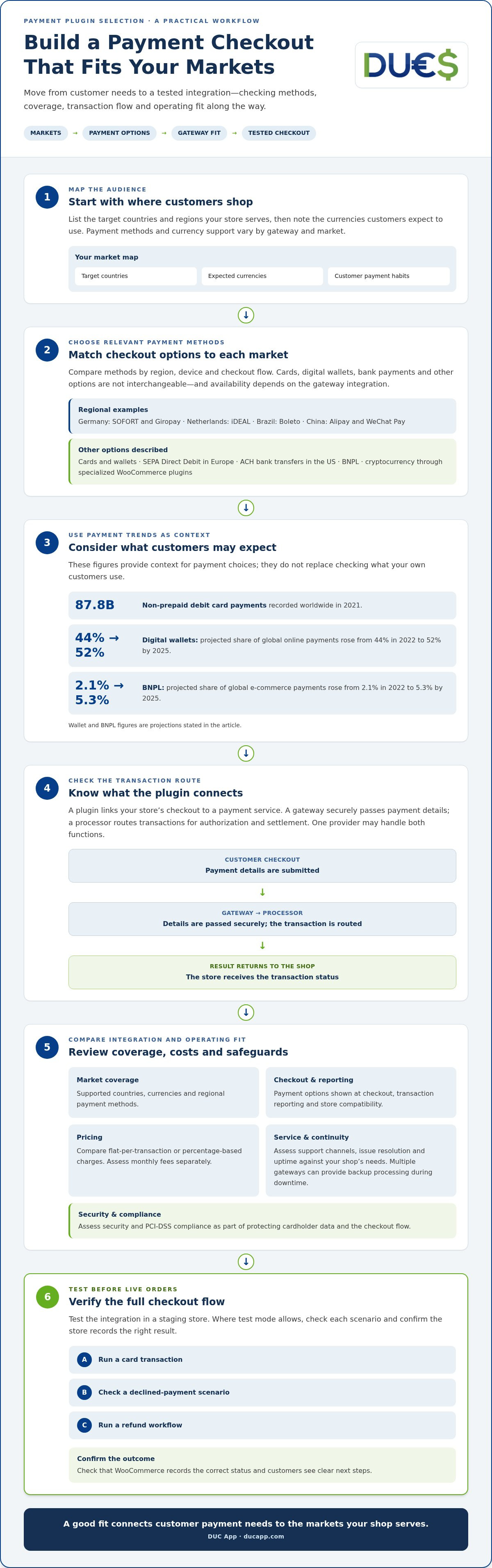
Card and wallet acceptance lets shoppers pay with eligible debit or credit cards, or select a digital wallet at checkout. Wallets can reduce the need to enter card details manually, while card payments remain a familiar option across many online checkouts. Non-prepaid debit cards recorded 87.8 billion payments worldwide in 2021. Digital wallets were projected to account for 52% of global online payments by 2025, up from 44% in 2022.
Regional support matters as much as payment type. WooCommerce gateway integrations can support SOFORT and Giropay in Germany, iDEAL in the Netherlands, Boleto in Brazil, and Alipay and WeChat Pay in China. These examples show why a method popular in one market may not suit shoppers elsewhere. Match checkout options to your audience’s location, then check whether the plugin supports the currencies customers expect to use.
WooCommerce Payment Options
WooCommerce payment options are the methods a store can offer through its gateway integrations and plugins. A WordPress shop may offer cards, wallets, SEPA Direct Debit in Europe, and other regional methods. Specialized plugins can also let WooCommerce accept Bitcoin and other cryptocurrencies. The practical benefit is choice, but every method depends on the integration and the markets it serves.
Bank payments take different forms across regions. SEPA Direct Debit is a European example; ACH is a US bank-transfer method customers may encounter at checkout. A gateway’s regional coverage determines which bank methods it can process, while the plugin connects that capability to the store. Distinguish direct debit from card payments: customers authorize payment from a bank account rather than entering card details.
Other methods can fill specific customer needs. Buy now, pay later (BNPL) was projected to account for 5.3% of global e-commerce payments by 2025, up from 2.1% in 2022. Cryptocurrency acceptance is another option available to WooCommerce through specialized plugins. Neither method suits every purchase or audience, so consider customer expectations and the gateway’s market coverage.
Before choosing a payment processing plugin for online shops, make a short comparison: list your target countries, the currencies you intend to accept, and the payment methods customers can use in each market. Then compare these needs with the integration’s supported options. A shop serving Dutch customers, for example, may prioritize iDEAL, while one targeting Brazil may consider Boleto. Let market coverage guide your choice.
Choosing a payment gateway for international transactions
For international sales, compare gateway coverage, supported currencies, transaction flow, and total pricing. Gateway fees may be flat per transaction or percentage-based. Assess support and uptime against your shop’s service requirements.
Processor and Gateway Roles
A payment gateway securely passes payment details from checkout, while a processor routes transactions for authorization and settlement. The distinction matters because a shop may rely on both functions, even when one provider handles them together. For example, a customer submits card details at checkout, the gateway passes the transaction onward, and the processor returns its status to the shop.
WooCommerce Payment Extensions
WooCommerce payment extensions connect a WordPress shop to a gateway or processor. Their settings determine which payment options appear at checkout and how transaction details reach the payment service. For international businesses, compare each extension’s supported countries, currencies, and regional methods. A gateway that handles wallets in one market may not offer the same option elsewhere, so its coverage should match your sales destinations.
Gateway Evaluation and Testing
When evaluating a gateway, compare geographic coverage, currencies, checkout experience, transaction reporting, and pricing. Test the integration in a staging store before taking live orders. Where test mode allows, run a card transaction, a declined-payment scenario, and a refund workflow. Confirm WooCommerce records the correct status and customers see clear next steps. These checks can reveal configuration gaps before real orders depend on the integration.
For cross-border sales, map your target markets to payment options before choosing a gateway. A Netherlands-focused shop might need iDEAL, while a store serving Germany could prioritize SOFORT or Giropay. These are examples of regional methods supported by WooCommerce gateway integrations. Review currency handling too: the gateway’s supported currencies affect how shoppers pay and how transaction records appear to your business.
Fees, Support, and Uptime
Transaction pricing can be a flat fee or a percentage of each transaction. Compare monthly fees separately from transaction charges. No single plugin leads on customer support and uptime for every shop. Assess service records, support channels, and issue-resolution processes against your operating needs, then test the support process during setup.
Multiple gateways can provide backup processing if one experiences downtime. Assess whether a secondary gateway supports your key markets and payment methods instead of adding one just for variety. Weigh the operational trade-off: extra integrations need configuration and monitoring, while a fallback can provide another route for transactions if the primary gateway is unavailable. Base the decision on your shop’s regions, currencies, and checkout priorities.
Choosing plugins for security and compliance
Security depends on the plugin, the payment solution it connects to, and your store’s configuration. Review safeguards for cardholder data, fraud controls, and the security features customers encounter at checkout.
PCI DSS and SSL Safeguards
PCI DSS compliance is a key criterion for a plugin that processes card payments because it helps safeguard cardholder data. SSL protects the connection between a shopper’s browser and your site. These address different parts of checkout: data handling and the connection carrying information. Before installing a plugin, review its stated PCI DSS compliance and how it handles payment data.
Map the transaction flow before choosing a payment solution. Identify, for example, whether customers enter card details on your site or on a processor-hosted page. This clarifies where information is collected and which systems handle it. Also limit access to payment data and keep the plugin and connected store components maintained.
3D Secure Checks
3D Secure adds an authentication step to some card transactions, allowing the card issuer to verify the shopper during checkout. For a store, this can provide an additional check when a purchase needs cardholder authentication. Consider how the added step appears on mobile and desktop, since a confusing transition can interrupt checkout. Test the customer flow before enabling it.
Fraud prevention also depends on how a payment gateway reviews transactions. Review available controls, such as transaction-review settings and alerts, and decide how your team will handle a flagged order. For example, compare the order details with the payment status before fulfilment. A plugin can connect these processes, but your store still needs a clear review routine.
International sales add another layer. Card authentication flows can differ by market, so test checkout in the countries you serve. Include a successful purchase, a declined transaction, and a return to the shop after authentication. Confirm that the order status updates correctly and customers receive a clear result.
PayPal is one payment option shoppers may see, but the name alone does not explain how a plugin handles security. Compare the specific integration’s data flow, PCI DSS information, and available authentication settings. Check which checkout screens belong to your store and which belong to the payment provider. This helps you understand what customers see before submitting payment.
Before launch, install the selected extension in a test environment and review its settings. Confirm SSL is active, inspect checkout on a phone, and run test transactions for each enabled method. These steps can reveal broken redirects, unclear authentication prompts, or incorrect order updates before real purchases reach your store.
Online payment processors for e-commerce
An online payment processor handles the transaction behind a customer’s purchase, connecting checkout activity with payment authorization and settlement. For an online store, the processor affects how card and debit transactions move from checkout into order records and business accounts. Look beyond the visible plugin: the payment setup includes the store platform, processor, and accounts used to manage funds.
During a credit card purchase, the customer submits payment details and the transaction is routed for authorization. The processor returns a status that the store can use to update the order, such as paid or declined. After authorization, settlement moves the funds through the payment system. A clear transaction flow matters because fulfilment, refunds, and transaction records depend on accurate payment statuses.
For businesses processing more than $100,000 in credit card payments per year, a merchant account is recommended. This threshold can help larger sellers assess whether their payment setup matches their transaction volume. A merchant account supports the handling of card payments, while a processor manages transaction routing. Consider the account and processing arrangement together when planning e-commerce operations.
Evaluate the setup by following the tasks your team handles after a purchase. For example, trace a test credit card transaction from checkout to the order record, then review how a refund appears. Check whether transaction details from the processor can be matched with WooCommerce orders and accounting records. Clear matching reduces manual work when investigating an order or reconciling payments.
Compare payment solutions by how well they fit your store platform, payment methods, target markets, reporting, and operational workflow. A WordPress shop using WooCommerce needs an extension that connects cleanly with its processor. A business selling internationally should also consider the currencies and regions its payment setup supports. Test checkout and order updates in your shop’s actual configuration, not just by reviewing feature lists.
Credit and debit cards are only part of an e-commerce payment mix. Digital wallets and bank-transfer options may suit different customer preferences, while the processor determines which transactions it can handle. Match the payment methods your customers need with the processor’s capabilities, then confirm each option works in your store. A successful test purchase should create the expected order status and transaction record.
Finally, plan for growth and continuity. A growing online store may need different account arrangements as its credit card volume changes. Keep records of transaction statuses, settlements, refunds, and failed payments. These records can help identify whether an issue comes from the store integration, processor connection, or order handling, giving your team a practical way to investigate disruptions.
What are the best payment processing plugins for online shops in 2026?
There isn’t one best plugin for every online store. The right choice depends on your platform, target markets, payment methods, and how transactions fit your order workflow. In 2026, compare integrations by what they enable in your shop, not by feature counts alone.
Start with your store platform. A WordPress shop using WooCommerce needs an extension that connects checkout to a payment gateway and returns transaction results to orders. PrestaShop merchants can install payment plugins from the PrestaShop Addons marketplace or other trusted sources. In either case, confirm the integration fits the platform and checkout process you actually use.
Next, match the plugin to customer payment preferences and locations. A gateway integration may support regional methods such as iDEAL in the Netherlands or Boleto in Brazil, but those options won’t suit every audience. Digital wallets were projected to account for 52% of global online payments by 2025, up from 44% in 2022. Use your target markets to decide which methods matter most.
Evaluate the complete transaction journey, not just the payment button. Test a successful purchase, a declined transaction, and a refund in the store’s test environment. Check that order statuses update correctly and transaction records are easy to match with purchases. If your business sells across borders, include a test for each important country, currency, and payment method.
Security and operational fit also belong in the comparison. Review the plugin’s PCI DSS compliance information, payment-data handling, and connection to the gateway. Then assess pricing structure, reporting, support processes, and uptime information against your shop’s needs. Multiple gateways can provide backup processing if one experiences downtime, but additional integrations also need configuration and monitoring.
- WooCommerce store: prioritize a compatible extension, the methods your customers use, and accurate order updates.
- PrestaShop store: assess available integrations for platform fit, market coverage, and checkout flow.
- International seller: compare country and currency coverage with regional payment options.
- Growing operation: weigh reporting, transaction handling, security, and backup processing together.
Use that shortlist to compare candidates against the same real checkout scenarios. A plugin that supports your platform but misses a key market isn’t the best fit; one that matches your audience and workflow is the stronger choice. For e-commerce payment integration beyond a standard shop extension, explore e-commerce payment integration options.
DUC App: International recharges
DUC App offers international recharges for people who need to top up mobile service across borders. This is separate from choosing a checkout plugin: it serves recharge needs, not card processing for an online shop. DUC App also offers API integration for e-commerce businesses exploring payment integrations. Other options include peer-to-peer transfers and gift cards.
Consider these services when your needs go beyond accepting checkout payments, such as supporting international recharges or integrating payment functionality into an e-commerce site. Keep the distinction clear: a shop’s payment gateway handles checkout transactions, while these offerings serve different needs. Contact DUC App to learn more about international recharges and e-commerce API integration.
Build a Payment Setup That Can Grow With You
Your checkout should support how your business sells today and leave room for new markets, sales channels, and customer needs. Treat plugin selection as part of a broader payment plan, not a permanent, one-time decision. As your store changes, review whether its payment flow still fits the customer journey and the tools your team uses.
A payment processing plugin for online shops connects checkout to a payment service, while other e-commerce integrations can support different digital payment needs. Understanding these roles helps you choose the right next step without expecting one tool to solve every payment challenge.
DUC App’s e-commerce API integration may be relevant if you’re exploring payment functionality beyond a standard plugin. Contact DUC App to discuss your e-commerce payment needs and consider how its integration could fit your plans. Move forward with a setup built around your customers and your business goals.
Frequently Asked Questions
How do payment plugins work?
A payment plugin connects your store’s checkout to the payment service that processes a customer’s transaction. After the shopper submits payment, the integration receives a result and updates the order. For example, the store team should distinguish a confirmed payment from a pending one before fulfilment. If a customer reports an issue, compare the order status with the transaction record to identify where the checkout flow stopped.
What U.S. rules and compliance requirements apply to ecommerce payment plugins, including PCI DSS?
For card payments, use PCI DSS compliance as a key criterion when selecting a plugin to safeguard cardholder data. Start by mapping your data flow: identify where customers enter card details and which systems handle them. Then review the plugin’s security information and settings alongside your store configuration. A plugin’s compliance status is one part of the assessment, not a substitute for understanding how your checkout handles payment data.
How secure are ecommerce payment plugins against fraud and chargebacks?
A plugin can connect your checkout to security and fraud controls, but it cannot eliminate every risk of fraud or chargebacks. Review the gateway’s authentication and transaction-review features, then establish a routine for examining unusual orders. For example, compare an order’s payment status, customer details, and fulfilment record before dispatch. Keep transaction and customer-service records organized so your team can respond clearly if a buyer disputes a charge.
What are the pros and cons of hosted checkout versus an on-site payment plugin?
With hosted checkout, shoppers enter payment details on a payment provider’s page. On-site checkout keeps the payment form within your store’s experience. Hosted checkout can reduce the payment data handled directly by your site, but moving away from your store can feel less seamless. On-site checkout offers more control over the customer journey, while requiring careful attention to the integration and data flow.
How do I install and configure a payment processing plugin for an online store?
Choose an integration that supports your target countries, currencies, and payment methods, then review its payment-data handling and PCI DSS compliance. Test it in a staging store with a card transaction, a declined payment, and a refund workflow where test mode supports them. Confirm the order status and customer instructions.
Which payment processing plugins offer the best customer support and uptime?
No single plugin leads on support and uptime for every shop. Compare service records, support channels, and issue-resolution processes with your needs, and test the support process during setup.


