

A recharge can do more than add talk time. A Cubacel top-up credits the recipient’s line in CUP, which they can use to activate minutes, SMS, or data plans through USSD codes. To send mobile minutes to Cuba with a credit card, select a recharge for the recipient’s Cubacel number and pay by card. Check the number carefully before paying: a recharge sent to the wrong number can’t be corrected or refunded.
It helps to understand the process before sending money across borders. Choose the right recharge for the recipient and make sure you know how they can use the credited balance.
This guide explains how to send a recharge, what to look for in fees and the payment total, and what can affect delivery time. You’ll also learn how airtime, data, and bundle options work, plus which codes the recipient can use to check their balance and plans.
Key Takeaways
- Compare available payment methods, including Visa, Mastercard, Apple Pay, and Google Pay, before choosing how to pay.
- Review the checkout total carefully so you understand any charges shown before completing a recharge.
- Learn what can affect how quickly a recharge reaches the recipient’s line, from payment processing to mobile network crediting.
- Find out how the recipient can check available plans and mobile data validity using Cubacel’s USSD codes.
How can I send a mobile recharge to Cuba?
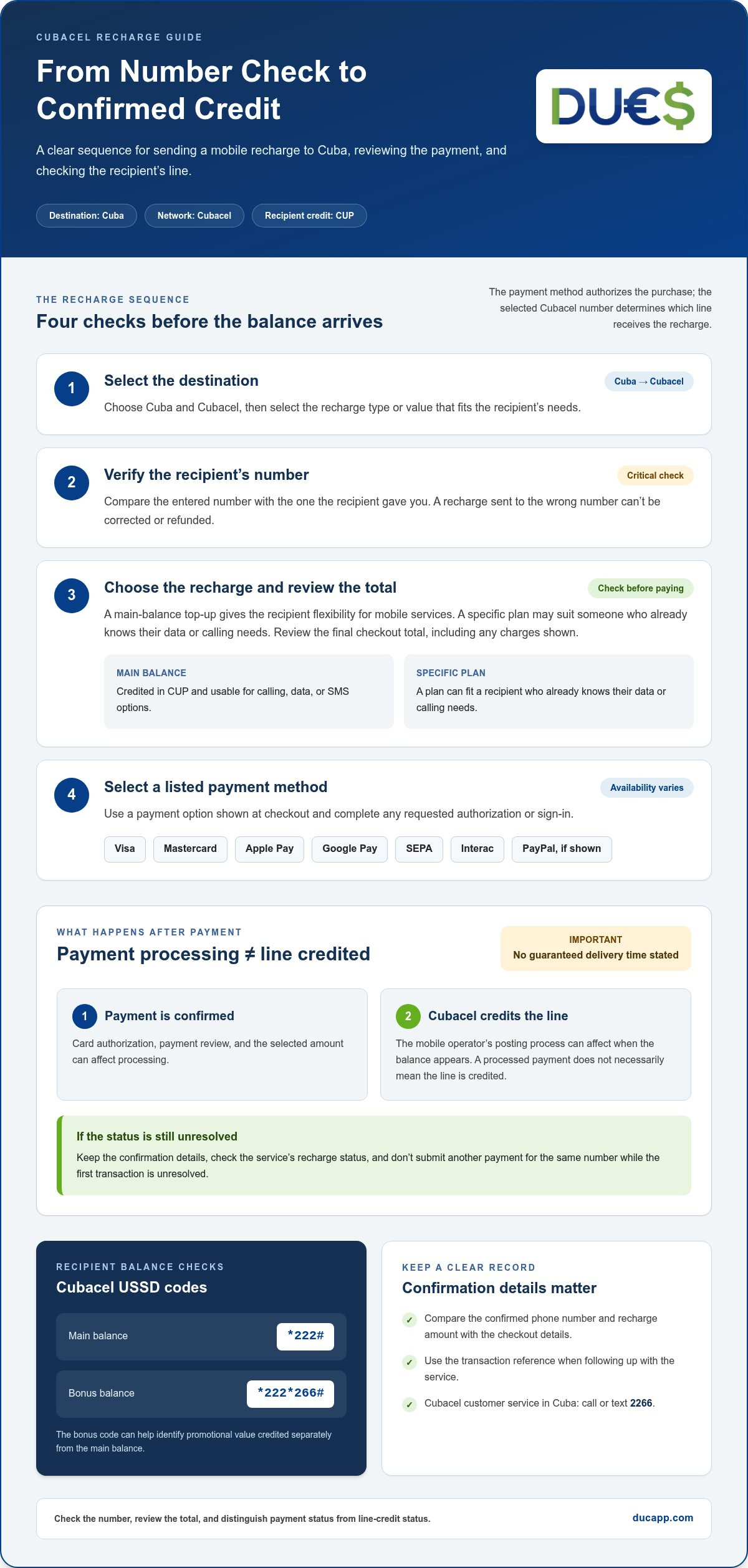
International mobile-recharge services let you top up a Cuban phone with a credit card. Choose Cuba and Cubacel, enter the recipient’s number, select a recharge amount, and complete payment using a method shown at checkout.
Before paying, make sure the number matches the recipient’s Cubacel line. A top-up credits that line in CUP, and the recipient can use the balance for calling, data, or SMS options. Your payment method determines how you authorize the purchase, not which mobile line receives it.
Card and PayPal Payments
Credit and debit cards provide a direct way to pay. Enter the requested card details, review the transaction total, and complete any authorization required by your card issuer. Apple Pay or Google Pay may also appear at checkout. These digital wallets use their linked payment method to authorize the transaction.
If PayPal appears as an option, select it and sign in to approve the transaction. PayPal availability depends on the checkout choices shown for that service. Compare the displayed payment methods and total before confirming, so you know which account or card will be charged.
Services for Cuban Mobile Top-Ups
Choose a service that processes international mobile recharges to Cuba and identifies the destination network as Cubacel. Payment options can include Visa, Mastercard, Apple Pay, Google Pay, SEPA, or Interac, depending on the checkout. PayPal is another option only when the service presents it.
Have the recipient’s number and your payment details ready. Follow the checkout prompts to select Cuba, Cubacel, and a recharge value. Complete any account sign-in shown before payment. Once processed, the recharge is assigned to the selected mobile line.
Use these steps to keep the transaction clear:
- Select Cuba and Cubacel as the destination.
- Enter the recipient’s phone number and compare it with the number they gave you.
- Choose the recharge value and review the final payment total.
- Select a listed card, wallet, or PayPal option, then authorize payment.
After the recharge, the recipient can dial *222# to check the main balance. Customer service for Cubacel customers in Cuba is available by calling or texting 2266.
Recharge costs and fees
The cost of a Cubacel mobile recharge depends on the amount selected and the total shown at checkout. Choose a value based on what the recipient needs, such as main balance for calling or keeping the line ready for later use.
Look at the checkout total before authorizing payment. It should show the recharge value and any applicable charges for the transaction. The payment route can affect what appears in the final total, so compare the displayed amount when choosing a card or PayPal. Don’t assume the recipient receives the same currency amount you pay: Cubacel credits the line in CUP.
A main-balance recharge adds the selected amount to the recipient’s Cubacel balance, which they can use for mobile services such as calling. Decide what the top-up is for before you pay: main balance gives the recipient flexibility, while a specific plan may suit someone who already knows their data or calling needs.
To send mobile minutes to Cuba with a credit card, use this cost-focused sequence:
- Choose Cuba and Cubacel, then select the recipient’s recharge type.
- Pick a CUP amount that fits the intended main-balance use.
- Review the checkout total, including any charges shown for payment.
- Check the final amount and payment method before authorizing.
Mobile operators may offer promotions that change the balance credited for qualifying top-ups. A promotion may set a minimum recharge amount and a defined offer period. Read the offer terms shown during selection and compare the resulting balance with the recipient’s needs before paying. Promotions apply only under their stated conditions.
Keep the receipt or transaction confirmation after paying. It records the selected recharge and payment details if you need to follow up.
Recharge delivery time
A Cubacel recharge involves payment processing and crediting the recipient’s mobile line. The first stage confirms the payment method; the second applies the recharge to the selected number. A payment marked processed does not necessarily mean the line has been credited, so check for a completion or delivery status.
If a checkout page describes a recharge as instant or says processing takes seconds, treat that as the service’s estimate, not a guaranteed delivery time. Card authorization, payment review, the selected amount, and the mobile operator’s posting process can affect when the balance appears. Promotions may have eligibility conditions, so select the offer and read its terms before paying.
To track a recharge, keep the confirmation details and use the status option provided by the service. Check that the destination is Cuba, the network is Cubacel, and the number matches the confirmation. If payment is still processing, distinguish that from a completed recharge. Don’t submit another payment for the same number while the first transaction is unresolved.
After the service marks the top-up complete, the recipient can check whether their Cubacel balance reflects it. They can dial *222# to check the main balance, or *222*266# to check the bonus balance. Those codes help identify whether a promotion credited bonus value separately from the main balance.
If the recipient doesn’t see the expected credit, compare the confirmation’s recharge amount and phone number with the details provided at checkout. Then use the transaction reference when contacting the service’s customer support. For a Cubacel line in Cuba, ETECSA customer service can be reached by calling or texting 2266. This separates a payment-status question from a mobile-line question and gives each team the relevant details.
For a time-sensitive top-up, enter the correct number, review the payment status, and share the confirmation with the recipient. This gives you both a clear reference while the recharge moves from payment processing to the Cubacel line.
Available airtime, data, and bundle options
A Cubacel top-up credits the recipient’s line in CUP. They can use that balance to activate minutes, SMS, or data plans through USSD codes. A qualifying top-up leaves the main balance valid for 330 days from the top-up date. Check plan options with *133#; use *222*328# to check a data plan and its validity.
Limits and expiry depend on the recharge offer and selected plan. The 6x balance promotion applies to recharges of 600 CUP or more from October 29 through 31, 2026, and ends October 31 at 11:59 p.m. Cuba time. It adds balance, not unlimited data. The recipient can use *222# for main balance and *222*266# for bonus balance.
To send mobile data plans, choose a recharge that credits the Cubacel line. The recipient can then activate a suitable plan using available USSD options. Select an amount with their expected use in mind. For airtime, a main-balance top-up gives them the flexibility to choose minutes, data, or SMS later.
Protect your payment details when sending mobile credit. Use the service’s payment page, never share card numbers or account passwords in messages, and avoid saving payment details on a shared device. Be cautious of messages demanding extra payment outside checkout or promising bonus credit without clear terms. Confirm the Cubacel number and promotion details before paying.
Before you send mobile recharge, ask the recipient which plan or balance would help them most. They can check *133# for available plans and *222*328# for data-plan validity. For a straightforward way to send an international mobile recharge, choose the destination and review the recharge details at checkout.
DUC App: International recharges
DUC App offers international recharges, giving you a digital option when you want to top up a mobile line abroad. After choosing the recipient’s Cubacel number and deciding whether they need main balance or a plan, use an international recharge service to complete the next step. The recipient can then use their credited balance for mobile options available through Cubacel.
An international recharge is a practical option when you want to top up a mobile line across borders. Keep the recipient’s number and preferred use in mind as you choose. DUC App also offers peer-to-peer transfers and gift cards, but an international recharge is the relevant service for adding credit to a Cuban mobile line.
Explore DUC App’s international recharge option, or contact DUC App to learn more.
Make your next recharge easier to plan
Before sending a top-up, ask the recipient what would help most: flexible balance for everyday use or support for a specific mobile need. That conversation helps you choose according to their priorities rather than guessing from afar.
If you plan to send mobile minutes to Cuba with a credit card again, keep the recipient’s preferences and correct number handy. A note with their preferred recharge type can make your next choice easier. Revisit it when their mobile needs change, and let them guide your decision.
For help with your next step, contact DUC App about a recharge. You can explore the available options and decide whether they fit the way you want to support someone in Cuba.
Thoughtful planning keeps the focus on helping someone stay connected. Check the details, then choose the recharge that suits their needs.
Frequently Asked Questions
Have a question about sending recharge to Cuba?
Start by deciding whether the recipient needs flexible account balance or a particular mobile plan. A balance top-up gives them credit for mobile services; a plan suits someone who knows which data or calling option they want. Ask which they prefer before paying, so you can match the recharge to their immediate need.
How do I know the recharge is received in Cuba?
Use the transaction confirmation as your first record, then ask the recipient to check their Cubacel account. A completed payment confirmation and credited mobile balance are separate checkpoints. If the confirmation shows completion but the recipient doesn’t see the expected credit, share the transaction reference with the recharge service. The recipient can also contact ETECSA customer service about the mobile line.
Which Cuban mobile networks and phone numbers can receive international top-ups?
Cubacel, ETECSA’s mobile service, is the network identified for Cuban mobile top-ups. The research identifies ETECSA as Cuba’s only mobile operator, so select Cubacel as the destination network. Use the recipient’s active Cubacel number, not a landline or another contact number. Have the recipient send the number in a message, then compare each digit before submitting the recharge.
How much does it cost to send mobile minutes or credit to Cuba, including fees and taxes?
The amount charged depends on the selected recharge value and any transaction charges shown at checkout. Review the final total before authorizing payment, and distinguish the amount paid from the CUP credited to the recipient’s Cubacel line. Don’t assume a tax or fee is included unless checkout shows it. Keep the payment confirmation so you can refer to the transaction.
Are there current promotions or bonus credit offers for Cuban mobile top-ups?
Yes. The Cubacel 6x balance promotion applies to recharges of 600 CUP or more from October 29 through October 31, 2026, ending at 11:59 p.m. Cuba time. The offer can add bonus balance under its qualifying terms. Check that the selected recharge meets the minimum and falls within the promotion period before paying.
How many minutes, data, or SMS does each top-up amount provide in Cuba?
A top-up amount doesn’t translate into one fixed number of minutes, data, or SMS. It credits the Cubacel line in CUP; the recipient then uses balance or activates an available plan. The exact allowance depends on the plan they choose. They can use *133# to check available plans, then select an option that suits their calling, messaging, or data needs.


